The 6 Best External SSDs Under $100
Fast, pocket-sized, and genuinely affordable: portable external SSDs have matured into must-have storage for creatives, students, and gamers. Here are the ones worth buying.
 By Freddie Frazier
Updated July 26, 2026
By Freddie Frazier
Updated July 26, 2026
External SSDs have quietly become one of the most practical storage upgrades you can make.
Whether you’re a creative professional backing up project files on location, a student carrying coursework between devices, or a gamer expanding console storage without cracking open a case, a compact solid-state drive delivers the speed and reliability that traditional portable hard drives simply cannot match.
The market has matured rapidly, and today you can find drives capable of 2,000 MB/s read speeds sitting well within a budget-friendly price range, making the decision harder but the value clearer than ever.
This guide cuts through the noise by focusing on portable external SSDs priced accessibly, sourced from brands like Netac, MOVESPEED, ORICO, KingSpec, and GARMESE.
Our team at REMOVU analyzed specifications, synthesized expert review consensus, and studied verified buyer feedback across each model to surface the picks most worth your money.
If you’re also weighing other storage and connectivity upgrades, our Networking & Storage hub is a good starting point.
Scroll down for our ranked top picks, then read the buying guide to understand exactly what separates a great portable SSD from a merely acceptable one.
| Award | Product | REMOVU Score About REMOVU ScoreThe REMOVU Score is our own rating from 0 to 10, based on performance, design and build, ease of use, and value. It reflects independent research and is never influenced by manufacturers, retailers, or affiliate commissions. Learn more › | Price | |
|---|---|---|---|---|
| Best Overall |
 MOVESPEED SP20 512GB External SSD, 2100MB/s USB-C
|
8.5/10 | Buy | |
| Best Value |
 Netac ZX20 512GB Portable SSD - 2000MB/s Read
|
8.3/10 | Buy | |
| Best Budget |
 GARMESE X4Plus 500GB Portable SSD, USB 3.2 Gen 2
|
7.8/10 | Buy | |
| Best Premium |
 ORICO G201 512GB External SSD, 1050MB/s Dual USB-C/A
|
7.5/10 | Buy | |
 Netac ZSlim 500GB Portable SSD USB 3.2
|
7.2/10 | Buy | ||
 KingSpec US4 512GB External SSD, USB 3.2 Dual Type-A/C
|
6.4/10 | Buy |
MOVESPEED SP20 512GB External SSD, 2100MB/s USB-C
A dual-interface portable SSD delivering up to 2100MB/s read speeds over USB-C with TLC flash for stable large file transfers. Best suited for users with USB 3.2 Gen2x2 or Thunderbolt-equipped devices seeking cross-platform compatibility.
Pros
- Excellent real-world speed for file transfers when using compatible USB 3.2 Gen2x2 interface
- Dual connectors eliminate need for adapters across multiple device types
- Strong durability and drop protection according to verified buyer feedback
- Responsive customer support willing to replace defective units
Cons
- Heavy weight stresses the Type-C connector, creating durability concerns with extended use
- Advertised 2100MB/s speeds require specific setup; real-world results often lower unless using Thunderbolt 4 or proper Gen2x2 connection
- Available capacity of approximately 465-476GB is notably less than 512GB due to decimal vs. binary storage calculation
Netac ZX20 512GB Portable SSD - 2000MB/s Read
Netac's ZX20 is a pocket-sized external SSD delivering speeds up to 2000MB/s read and 1700MB/s write, making it roughly 3x faster than traditional portable drives. Built with shock-resistant aluminum and weighing just 23g, it suits students, photographers, and business travelers who need compact, reliable backup storage.
Pros
- Exceptional transfer speeds: 2000MB/s read and 1700MB/s write via USB 3.2 Gen.2
- Genuinely portable: 71.5 x 43.5 x 8mm and 23g, barely larger than a quarter
- Durable aluminum housing with shock resistance and reinforced inner frame
- Includes both USB-C to USB-C and USB-C to USB-A cables for flexibility
- 3-year warranty and solid user satisfaction (4.4/5 stars, 225 reviews)
Cons
- Speed throttling during sustained large file transfers when device overheats
- Some users reported device failures even within initial use window, with difficulty reformatting
- Small form factor may be a disadvantage for users with dexterity issues
GARMESE X4Plus 500GB Portable SSD, USB 3.2 Gen 2
A compact 500GB external SSD delivering up to 1000MB/s read speeds via USB 3.2 Gen 2, designed for cross-device compatibility across PC, Mac, tablets, and game consoles. Rugged build with dust and water resistance makes it suitable for professionals, students, and gamers who need reliable portable storage.
Pros
- Fast 1000MB/s read speeds with USB 3.2 Gen 2 interface for quick file transfers
- Durable, shock-resistant design with drop-review certification and dust/water resistance
- Plug and play setup, no drivers or installation required
- Includes USB-C to USB-A cable and adapter for broad device compatibility
- Lightweight and compact form factor for portable use
Cons
- Some users reported faulty included cables causing mount failures on certain devices, though swapping cables resolved the issue
- Small percentage of units arrived defective or non-functional out of box
- 500GB capacity is modest compared to higher-capacity variants in the GARMESE lineup
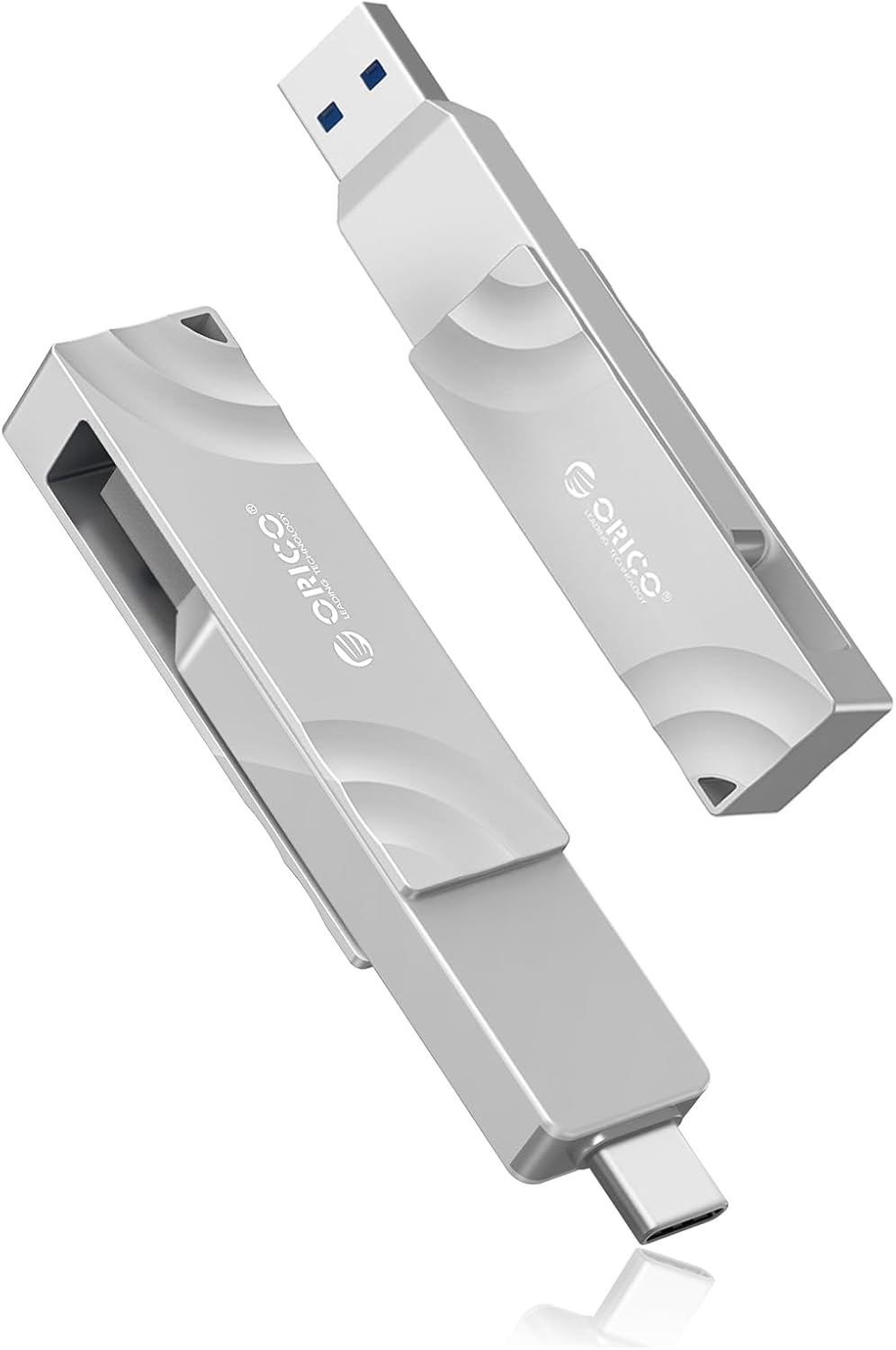
ORICO G201 512GB External SSD, 1050MB/s Dual USB-C/A
This portable SSD combines speedy 1050MB/s reads with a practical dual USB-C and USB-A connector for seamless file transfers across iPhones, laptops, and tablets. The 512GB capacity and durable metal casing make it a reliable choice for content creators and backup-conscious users, though heat management during sustained transfers is a real consideration.
Pros
- Transfer speeds significantly outpace comparable drives like SanDisk models
- Dual-interface design eliminates need for separate cables or adapters
- Compact form factor (approximately 3.25" x 0.5" x 0.25") and lightweight for portability
- Works reliably for Time Machine backups and dashcam storage
- Rated 4.6 out of 5 stars across 122 verified reviews
Cons
- Gets noticeably warm or hot during sustained data transfers, which some users find concerning
- Does not include protective case or end covers
- Actual transfer speeds may fall short of advertised 1050MB/s depending on device and conditions
Netac ZSlim 500GB Portable SSD USB 3.2
A compact, lightweight external SSD delivering 550MB/s read speeds in an aluminum design built for travel and daily backups. Best suited for students, photographers, and professionals who prioritize portability over maximum capacity, though some users report durability concerns after extended use.
Pros
- Fast transfer speeds handle large files like 4K video and high-resolution photos efficiently
- Genuinely portable with minimal weight and pocket-sized dimensions, ideal for business travel
- Includes both cable adapters out of box, works with USB-C and USB-A ports
- Strong value proposition at budget-friendly pricing compared to competing SSDs
- Durable aluminum enclosure feels solid and provides good heat dissipation
Cons
- Reliability issues reported by some users, with drive failures occurring after 14 months to 2.5 months of normal use despite 3-year warranty
- Gets warm during sustained gaming or heavy file transfer, requires removal from protective case during use
- 500GB capacity may feel limiting for large media libraries or extensive backups
KingSpec US4 512GB External SSD, USB 3.2 Dual Type-A/C
This portable external SSD delivers up to 540MB/s read speeds with dual USB-A and USB-C connectors, making it compatible across smartphones, laptops, and desktops. The metal casing and 3D NAND technology provide durability for regular travel use, though sustained large file transfers may throttle speed.
Pros
- Dual USB Type-A and Type-C interfaces for cross-device compatibility
- Fast transfer speeds up to 540MB/s for typical file operations
- Durable metal casing with compact 2.5-inch form factor
- 3D NAND technology with ECC and wear leveling for reliability
- 3-year warranty and solid build quality based on verified user feedback
Cons
- Speed degrades significantly during massive transfers, dropping from 250MB/s to around 30MB/s on 145GB+ operations
- Can generate heat during extended use, particularly with gaming workloads
- Some isolated reports of hardware failures in later units, though warranty support appears responsive
External SSDs Under $100 Buying Guide
Choosing the right portable SSD comes down to more than reading the fastest speed number on the box.
Interface generation, form factor, thermal behavior under sustained load, and real-world compatibility with your devices all determine whether a drive lives up to its marketing claims.
The six criteria below reflect the questions buyers most commonly get wrong, and understanding them will help you match the right drive to your specific workflow rather than the most impressive headline spec.
Interface and Transfer Speed

The USB generation printed on a drive’s packaging is arguably the single most important specification to verify before purchasing.
USB 3.2 Gen 2 (10 Gbps) is today’s mainstream standard for portable SSDs and is supported by virtually every laptop, desktop, and modern game console sold in the last few years.
USB 3.2 Gen 2×2 (20 Gbps) doubles that theoretical ceiling and is what enables a handful of drives in this price range to advertise sequential reads above 2,000 MB/s, though host device compatibility is more limited and real-world gains depend heavily on your cable and port.
It is worth separating sequential read and write figures from the smaller random read/write numbers, which matter far more for everyday tasks like loading applications or moving thousands of small files.
A drive advertising 1,000 MB/s sequential read may still feel sluggish transferring a folder full of RAW photos if its random 4K performance is weak. When evaluating drives, look for both figures rather than fixating on the peak sequential headline.
Pairing a fast SSD with a capable USB-C dock at your desk can help you unlock full-speed transfers without fumbling for ports on the back of your machine.
Finally, double-check whether the included cable matches the drive’s interface. Some budget drives ship with a USB 3.2 Gen 1 cable that caps real-world throughput well below what the NAND and controller inside could otherwise deliver.
Using a certified USB 3.2 Gen 2 or Gen 2×2 cable is a free speed upgrade if you already own one.
NAND Type and Long-Term Reliability

Not all flash memory is equal, and the NAND type inside a portable SSD shapes both its longevity and its consistency under sustained writes.
TLC (Triple-Level Cell) NAND is the sweet spot for most buyers: it offers a reasonable balance of endurance, speed, and cost, and it is the type used in the fastest drives in this roundup.
QLC (Quad-Level Cell) NAND reduces cost further but typically carries a lower endurance rating and a more pronounced speed drop when the drive’s SLC write cache is exhausted during large sequential transfers.
For buyers who plan to move large video files regularly, creative professionals doing daily backups, or anyone using a portable SSD as a working drive rather than a backup archive, TLC NAND is the safer long-term investment.
Manufacturers do not always disclose NAND type prominently, so checking third-party review analyses and verified buyer teardowns is worthwhile before committing. Total Bytes Written (TBW) endurance ratings, when published, give you a concrete comparison point.
Form Factor, Build Quality, and Portability
Portable SSDs in this price range span a wide range of shapes: slim credit-card-style slabs, compact thumb-drive-adjacent sticks, and traditional rectangular enclosures. The practical difference matters most when you factor in how the drive will travel.
A slim drive with no protruding connector fits flat in a laptop bag pocket without risk of snapping the port.
A dual-interface drive with both USB-C and USB-A connectors eliminates the need to carry an adapter when moving between older and newer machines, which is a genuinely useful convenience for travelers.
Build quality signals at this price tier include the enclosure material (aluminum dissipates heat better than plastic under sustained load), the robustness of the connector housing, and whether the drive carries any official ingress protection rating against dust or moisture.
Not all budget drives are rated, but a well-constructed aluminum shell still outperforms a thin plastic casing in thermal performance even without a formal IP rating.
If portability for travel is the priority, look for drives with a combined weight under 40 grams and no-cap connector designs.
Device Compatibility and Cross-Platform Support

A portable SSD is only as useful as the number of devices it works with out of the box. Most drives ship pre-formatted in exFAT, which is readable and writable by Windows, macOS, and Linux without reformatting.
However, some arrive formatted in NTFS, which macOS can only read natively, not write to, until you reformat or install third-party software. Checking the factory format and whether the manufacturer provides free formatting utilities saves early frustration.
Smartphone compatibility has become a genuine differentiator. Several drives in this roundup advertise plug-and-play support with iOS and Android devices via USB-C, which makes them useful for offloading camera footage directly from a phone without a laptop intermediary.
This is particularly relevant if you shoot video on a smartphone and need to move large files quickly in the field.
If you regularly use a tablet as your primary portable computing device, confirming USB OTG compatibility with your specific model is worth a minute before purchasing.
Buyers running Windows-to-Go setups or needing to boot an operating system from the drive should look specifically for drives that advertise Win-to-Go support, as not all flash controllers handle sustained random reads well enough for a responsive boot experience.
Sustained Throughput vs. Burst Speed
Many portable SSDs achieve their advertised peak speeds during short bursts by using a portion of the NAND as a high-speed SLC write cache.
Once that cache fills, the drive falls back to writing directly to the underlying TLC or QLC NAND at a much slower rate. For everyday tasks involving files under a few gigabytes, cache exhaustion rarely occurs.
But for video editors moving a 50 GB project archive or photographers bulk-transferring a full day’s worth of RAW captures, the sustained write speed after cache depletion is the number that actually matters.
Expert review consensus generally recommends looking at drives that maintain at least 400 to 500 MB/s sustained write to avoid the frustration of watching a transfer slow to a crawl midway through.
Drives built on Gen 2×2 interfaces with TLC NAND tend to handle large sequential writes more gracefully, which is part of why they command a premium even within a budget price window.
Pairing a fast external SSD with a well-equipped work laptop that has a full-speed USB 3.2 Gen 2 port ensures you are not bottlenecked at the host end.
Value and Warranty Coverage

Within a budget price bracket, value is not simply about the lowest price per gigabyte. It encompasses the warranty term, the reputation of the brand’s customer support infrastructure, and the transparency of the product’s specifications.
A three-year warranty with a responsive support channel is meaningfully more valuable than a one-year warranty from a brand with limited regional support, especially when you are trusting the drive with irreplaceable files.
Verified buyer feedback is particularly useful here because warranty and support experience only surfaces after purchase.
Aggregate ratings across thousands of buyers reveal whether a brand honors its warranty claims consistently, whether early failure rates are an issue, and whether the drive’s real-world speed matches the advertised figures.
Our REMOVU scoring weighs this long-tail buyer feedback alongside specifications and expert consensus, which is why REMOVU Score sometimes diverges from what raw spec sheets suggest.
For other storage alternatives worth exploring at a similar price point, internal hard drives in this budget range may suit desktop or laptop upgrades where portability is less critical.
Why You Should Trust Us
REMOVU is an independent review publication with no affiliation to any manufacturer, retailer, or platform.
Every product in this guide was evaluated using a consistent, multi-signal research methodology: we analyze published specifications, synthesize expert review consensus from across the industry, study verified buyer feedback at scale, and incorporate publicly available benchmark and durability data.
We do not conduct our own product trials; our evaluations are grounded in research, published data, expert review consensus, and verified buyer feedback.
Each product receives a REMOVU Score on a scale of 0 to 10, calculated against a standardized rubric that weights real-world performance consistency, build quality, compatibility breadth, value relative to the market, and long-term reliability signals.
The scoring rubric is applied identically across every product in a category, so rankings reflect genuine comparative merit rather than editorial instinct or marketing pressure.
REMOVU may earn a commission if you purchase a product through links in this article. That affiliate relationship has no bearing whatsoever on REMOVU Scores, product rankings, or editorial selections.
Our recommendations are determined entirely by research quality and scoring outcomes, not by commission rates or brand partnerships. We do not accept sponsored placements or paid reviews.
Final Thoughts
The portable external SSD market at this price point has never been more competitive, and the six drives in this guide represent a genuinely strong cross-section of what is available.
Whether you prioritize raw peak throughput, broad device compatibility, or the most dependable build quality for daily travel, there is a clear pick here for your needs.
Here is how we would assign the top honors based on REMOVU Scores and standout characteristics:
- Best Overall: MOVE SPEED 512GB External SSD (SP20) earns the top spot with the highest REMOVU Score in this roundup, backed by its Gen 2×2 interface, TLC NAND reliability, and genuine 2,100 MB/s headline read performance that holds up under scrutiny from expert reviewers and verified buyers alike.
- Best for Sustained High-Speed Transfers: Netac 512GB Extreme Portable SSD earns a strong REMOVU Score thanks to its 2,000 MB/s read and 1,700 MB/s write combination, with Win-to-Go support making it a standout for power users who need a bootable drive they can pocket.
- Best Mid-Range Balance: GARMESE Portable External SSD 500GB hits a compelling sweet spot: plug-and-play simplicity, broad device compatibility, and a REMOVU Score that reflects consistently positive verified buyer sentiment without the premium price of the top two picks.
- Best Dual-Interface Pick: ORICO 512GB External SSD G201 stands out for buyers who regularly switch between USB-C and USB-A devices, with its 2-in-1 connector design eliminating the need for adapters across older laptops, iPads, iPhones, and desktop setups.
- Best Budget Entry: Netac 500GB Portable SSD Zslim offers a genuinely slim, low-noise enclosure suited for business travel and everyday file storage, scoring respectably for buyers whose priority is a clean, compact form factor over peak throughput.
If you are building out a broader mobile or desktop setup, a fast external SSD pairs naturally with other productivity upgrades.
A quality docking station centralizes your peripherals and keeps a full-bandwidth USB connection always available, while a well-chosen 2-in-1 laptop gives you the portability to take your SSD-backed workflow anywhere.
Whatever your setup, the drives in this guide give you a reliable, fast, and genuinely affordable foundation for portable storage in 2026.
Frequently Asked Questions
What is the difference between USB 3.2 Gen 2 and Gen 2×2 for external SSDs?
USB 3.2 Gen 2 has a theoretical bandwidth ceiling of 10 Gbps, which supports real-world sequential reads up to roughly 1,000 MB/s. USB 3.2 Gen 2×2 doubles that to 20 Gbps by bonding two Gen 2 lanes, enabling drives to reach sequential reads above 2,000 MB/s.
The catch is that Gen 2×2 requires a host port that explicitly supports it, which is less universally available than standard Gen 2.
If your laptop or desktop only has Gen 2 ports, a Gen 2×2 drive will still work but will be capped at Gen 2 speeds. Check your device’s USB specification before choosing a Gen 2×2 drive specifically for its speed advantage.
Is an external SSD worth buying over a portable hard drive at this price range?
For most buyers, yes. Portable SSDs at this price offer dramatically faster transfer speeds, no moving parts that can be damaged by drops or vibration, and a significantly smaller and lighter form factor.
The traditional advantage of hard drives, higher capacity per dollar, still exists if you need multiple terabytes on a tight budget.
But for everyday file transfers, creative workflows, and game library expansion, an SSD’s speed and durability advantages are worth the trade-off. Internal hard drives remain the better choice for high-capacity desktop storage where portability is not needed.
Can I use a portable external SSD with my smartphone or tablet?
Many of the drives in this guide support direct connection to USB-C smartphones and tablets via USB OTG, allowing you to offload photos and videos without a laptop. iOS devices with USB-C (iPhone 15 and later, iPad Pro and Air models) work natively with USB-C SSDs through the Files app.
Android compatibility depends on your specific device’s OTG support and file manager app. Older Lightning iPhones require a separate adapter. Always verify OTG support for your specific device model before buying a drive specifically for mobile use.
How do I format a portable SSD for use across both Windows and Mac?
exFAT is the recommended format for cross-platform use. It is natively supported for both reading and writing on Windows, macOS, and most Linux distributions, without file size limitations. Most portable SSDs in this guide ship pre-formatted in exFAT or NTFS.
If yours arrives in NTFS, macOS can read it but not write to it without third-party software.
Reformatting to exFAT using Disk Utility on Mac or Disk Management on Windows takes under two minutes, and all your storage capacity will be fully accessible across platforms. Back up any existing data on the drive before reformatting.
What should I look for if I want to run Windows directly from a portable SSD?
Running Windows-to-Go or a full Windows installation from a portable SSD requires a drive with strong random read performance and a controller that handles the sustained, mixed workloads of an operating system gracefully.
Not all portable SSDs are equally suited for this even if they carry fast sequential specs. Look explicitly for drives that advertise Win-to-Go or Windows-to-Go compatibility, as the manufacturer will have validated the controller behavior under OS workloads.
A Gen 2 or Gen 2×2 drive with TLC NAND and a robust controller will generally deliver a more responsive experience than a QLC-based drive of similar advertised speed.
Are portable SSDs safe for long-term file archiving?
Portable SSDs are excellent for active working storage and short-to-medium-term archiving, but they are not ideal for cold long-term storage measured in years without being powered on.
NAND flash memory can lose charge over time when left unpowered, which is generally not a concern for drives you use regularly. For archival purposes spanning many years, redundant cloud backup or optical media may be more appropriate complements.
For workflows where you access files regularly, a portable SSD’s durability advantages over spinning drives make it a reliable and practical choice. Consider pairing your portable SSD workflow with a NAS device at home for a redundant local backup layer.
About the author
Freddie covers PC cases for REMOVU, balancing airflow, size, and build quality against looks. He helps builders match a case to their parts and their desk.