The 12 Best Gaming Monitors
Refresh rate, panel type, and resolution make or break a gaming monitor. We researched the top picks across every price tier so you can find the right display for your setup.
 By Katrina Dean
Updated July 26, 2026
By Katrina Dean
Updated July 26, 2026
A great gaming monitor can be the difference between winning and losing, but the market is crowded with options that vary wildly in panel technology, refresh rate, resolution, and price.
Whether you are building a competitive esports rig or upgrading a casual setup for open-world adventures, choosing the right display matters more than most gamers realize.
Options from brands like Alienware, Samsung, ASUS, and SANSUI cover everything from budget-friendly 1080p curved panels to premium ultrawide displays with serious color credentials, so narrowing the field takes real research.
At REMOVU, we evaluate every monitor on this list through comprehensive research: we analyze manufacturer specifications, synthesize expert review consensus from across the industry, and weigh verified buyer feedback to arrive at a REMOVU Score for each pick.
We do not conduct our own product trials. Our goal is to surface the displays that offer genuine value at every budget so you can buy with confidence.
Scroll down for our ranked top picks, or jump to the buying guide below to learn exactly what to look for before you add anything to your cart.

Alienware AW3425DWM 34-inch Ultrawide Gaming Monitor
This 34-inch ultrawide delivers immersive gaming with a 1500R curve, WQHD resolution, and 180Hz refresh rate for smooth, responsive performance. The 1ms response time and AMD FreeSync Premium support make it solid for competitive play, while DCI-P3 95% color accuracy and DisplayHDR 400 certification handle visuals well. Best suited for gamers prioritizing field of view and visual clarity over pixel density.
Pros
- 180Hz refresh rate with 1ms gray-to-gray response time for fluid gameplay
- 34-inch ultrawide format with aggressive 1500R curve maximizes immersion and peripheral vision
- DCI-P3 95% color coverage and DisplayHDR 400 certification deliver vibrant, detailed visuals
- AMD FreeSync Premium and VESA Adaptive Sync reduce screen tearing across compatible systems
- Thoughtful ergonomic design with adjustable stand, compact footprint, and improved cable management
Cons
- WQHD resolution on ultrawide panel results in lower pixel density compared to standard 16:9 monitors at same screen size
- Ultrawide format limits compatibility with some games and applications that don't support ultrawide aspect ratios
- Premium category pricing reflects specialized form factor rather than mainstream gaming monitor segment

ASUS TUF Gaming VG27AQ3A 27-inch 1440p 180Hz
A 1440p gaming monitor built for competitive play, pairing a 180Hz Fast IPS panel with ELMB Sync and variable overdrive to minimize ghosting and blur. The 1ms response time and adaptive refresh rate support (FreeSync Premium, G-Sync compatible) deliver responsive gameplay across most modern GPUs. Best suited for esports and fast-paced titles where motion clarity matters.
Pros
- High refresh rate (180Hz) with 1ms GTG response time for smooth, lag-free competitive gaming
- ELMB Sync technology eliminates ghosting and tearing simultaneously, sharper visuals at high frame rates
- HDR support with 130% sRGB color gamut provides vibrant colors beyond standard monitors
- Fast IPS panel offers 77% more desktop space than 1080p with wide viewing angles
- Multiple adaptive sync technologies (FreeSync Premium, G-Sync compatible) work across AMD and NVIDIA systems
- Eye comfort features including flicker-free tech and four blue light filter settings for extended sessions
Cons
- 1440p at 27 inches results in moderate pixel density, some users may prefer sharper text at typical desktop distances
- Requires capable GPU to maintain 180Hz at high settings in demanding titles, not ideal for budget builds
- No USB hub or extensive connectivity beyond standard gaming inputs (HDMI, DisplayPort)

Acer Nitro KG271U 27-Inch QHD Gaming Monitor
A 27-inch QHD gaming monitor built for competitive play, the Acer Nitro KG271U pairs a 180Hz refresh rate with AMD FreeSync and a snappy 0.5ms response time to minimize lag and tearing. Beyond gaming, its DCI-P3 95% color accuracy makes it capable for creative work like photo editing and design. The zero-frame design helps maximize screen real estate on a desk.
Pros
- 180Hz refresh rate with 0.5ms response time delivers smooth, responsive gameplay
- AMD FreeSync eliminates screen tearing for fluid motion in fast-paced games
- QHD resolution (2560 x 1440) provides sharp detail at 27 inches
- DCI-P3 95% color accuracy suitable for photographers and designers
- IPS panel with flicker-free, low blue light features for comfortable extended viewing
- 4.5-star rating across over 1,000 verified reviews
Cons
- Limited connectivity: one DisplayPort 1.2 and two HDMI 2.0 ports may restrict multi-source setups
- No NVIDIA G-Sync support, only AMD FreeSync, limiting compatibility with GeForce users
- No mention of height adjustment or extensive ergonomic controls in available specs

Samsung Odyssey G55C 32" QHD Curved Gaming Monitor
Samsung's 32-inch curved gaming monitor delivers sharp QHD visuals with a 165Hz refresh rate and 1ms response time, designed to minimize motion blur during fast-paced gameplay. The aggressive 1000R curve and AMD FreeSync support create an immersive experience, while HDR10 and Eye Saver Mode add visual depth and reduce strain during extended sessions. Best suited for competitive gamers prioritizing smooth performance over ultra-high resolution.
Pros
- 1.7x pixel density over 1080p delivers noticeably sharper detail at QHD resolution
- 165Hz refresh rate with 1ms MPRT response time provides smooth, responsive gameplay
- 1000R curved VA panel fills peripheral vision and enhances immersion
- AMD FreeSync eliminates tearing for fluid motion in compatible games
- Eye Saver Mode with blue light filter reduces fatigue during long gaming sessions
- HDR10 support brings deeper blacks and brighter highlights to supported content
Cons
- VA panel technology has narrower viewing angles compared to IPS alternatives
- No built-in speakers or USB connectivity, unlike pricier models in Samsung's lineup
- 1ms response time requires 'Extreme mode' setting to achieve, results vary by content and monitor calibration
- 165Hz refresh rate trails behind higher-end 180Hz or 240Hz gaming monitors
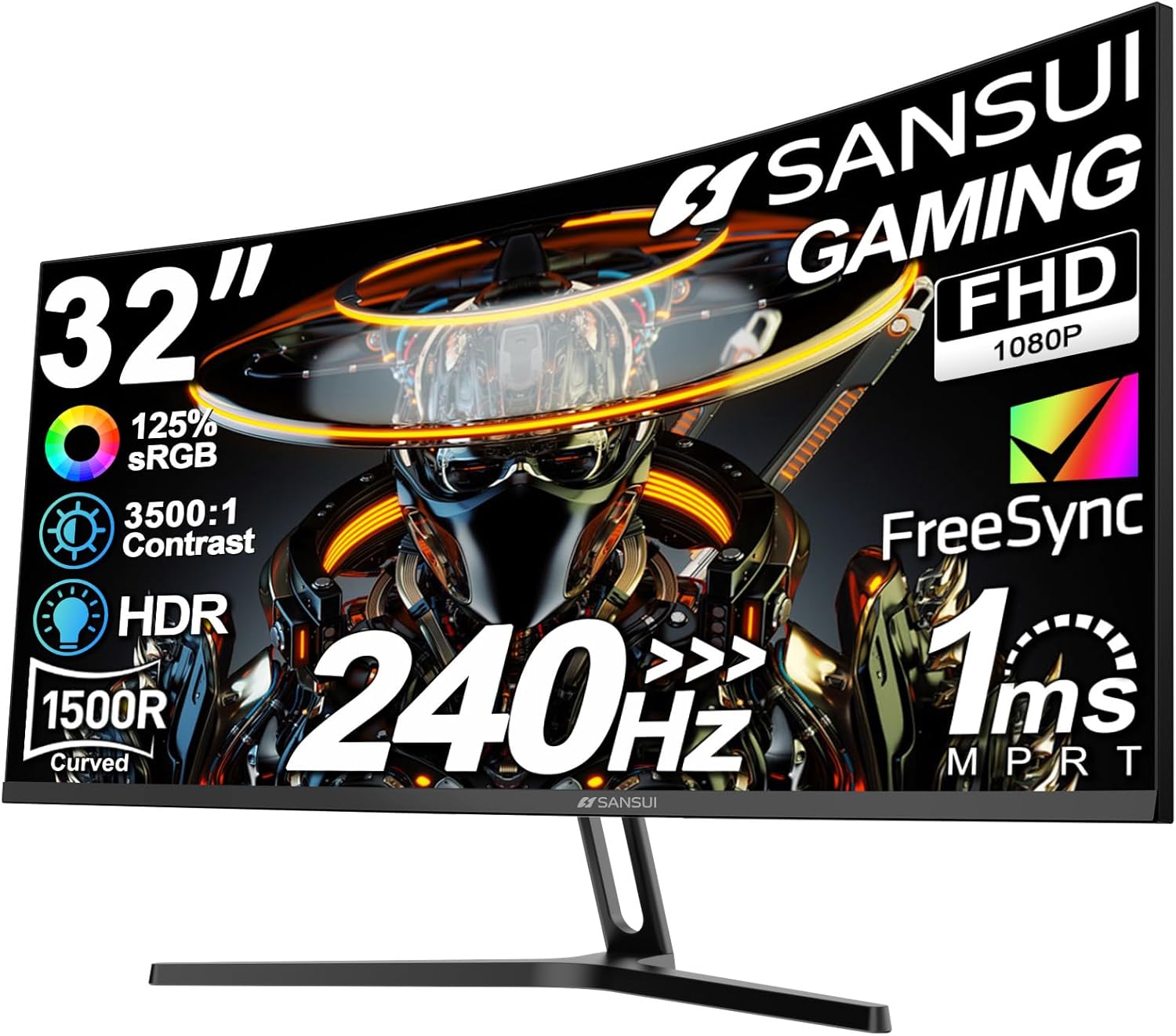
SANSUI 32-Inch 240Hz Curved Gaming Monitor
A 32-inch curved display built for competitive gaming, delivering 240Hz refresh rates and 1ms response time across HDMI and DisplayPort. The 1500R curvature and wide viewing angles create immersion, though the 1080p resolution on a larger screen may feel less sharp for productivity work.
Pros
- 240Hz refresh rate with 1ms MPRT response time for fast-paced gaming
- 1500R curved design with 178-degree viewing angles enhances immersion
- Dual connectivity: HDMI and DP 1.4, both supporting full 240Hz, with DP cable included
- FreeSync technology, anti-flicker, and low blue light for extended gaming sessions
- HDR support and 125% sRGB gamut for enhanced color depth
Cons
- 1920x1080 resolution on a 32-inch panel results in lower pixel density, less ideal for detail work
- No built-in speakers, requiring external audio solution
- 300 Nits brightness is moderate and may struggle in very bright rooms

SANSUI 27" 240Hz 1500R Curved Gaming Monitor
A curved 27-inch gaming display built around speed and immersion, with 240Hz refresh rate and 1ms response time for competitive play. The 1500R curvature and FreeSync support enhance the gaming experience, while 130% sRGB and HDR deliver solid color accuracy for a mid-range monitor. Best suited for gamers prioritizing responsiveness over ultra-high resolution.
Pros
- 240Hz refresh rate and 1ms MPRT response time minimize motion blur in fast-paced games
- 1500R curved panel creates an immersive viewing experience at 27 inches
- 130% sRGB and DCI-P3 95% color gamut provide accurate colors beyond typical gaming monitors
- FreeSync eliminates screen tearing for AMD GPU users
- Comprehensive connectivity with HDMI, DisplayPort 1.4, and VESA mount compatibility
Cons
- 1080p resolution on 27 inches results in lower pixel density, visible at close viewing distances
- No built-in speakers despite audio jack, requiring external speakers or headphones
- Limited stand adjustment range with only -5 to 15 degrees tilt, no height or swivel adjustment

Pixio PX248 Wave 24-inch 200Hz Gaming Monitor
A competitive gaming monitor that combines a rare 200Hz refresh rate with 1ms response time and IPS color accuracy in a 24-inch package. Built-in speakers and dual connectivity (DisplayPort and HDMI) make it versatile for PC and console gaming, though the 1080p resolution may feel limiting on a larger screen.
Pros
- 200Hz refresh rate delivers noticeably smoother motion than standard 144Hz monitors, giving a competitive edge in fast-paced games
- 1ms GTG response time eliminates ghosting and blur effectively
- Fast IPS panel provides vibrant colors and wide 178-degree viewing angles, rare for gaming monitors at this price point
- Dual connectivity with DisplayPort 1.4 and HDMI 2.0, both supporting full 200Hz at 1080p
- Built-in speakers and 75x75mm VESA mount for flexibility
Cons
- 1080p resolution on a 24-inch screen leaves minimal room for desktop workspace and productivity multitasking
- Adaptive Sync support mentioned but specific implementation (FreeSync, G-Sync) not clarified in specs
- 300 nits peak brightness is modest and may struggle in very bright rooms

KTC H27S5C 27-Inch 1440p 144Hz Curved Gaming Monitor
This 27-inch curved monitor pairs a 1440p resolution with a 144Hz refresh rate and 1500R curve to wrap your field of view during gaming or detailed work. The HVA panel delivers strong color accuracy (129% sRGB) and HDR400 support, while eye care features like blue light reduction and flicker-free tech ease strain during long sessions. Best suited for gamers and creative professionals who value immersion and color performance without ultrawide complexity.
Pros
- 1500R curved design reduces eye strain and creates an immersive viewing experience
- Strong 144Hz refresh rate paired with 1440p resolution for smooth, sharp gameplay
- Excellent color gamut coverage (129% sRGB, 110% DCI-P3) and HDR400 support for vibrant visuals
- Built-in eye care technology including blue light reduction and flicker-free mode
- Dual HDMI 2.0 and DisplayPort 1.4 connectivity supports multiple devices
- VESA mount compatible and tilt-adjustable stand for flexible setup
Cons
- Stand offers only tilt adjustment (no height, swivel, or pivot), limiting ergonomic customization
- Adaptive-Sync feature requires compatible GPU; may not benefit users with older graphics cards
- 4000:1 contrast ratio is solid but trails higher-end VA panels, which could impact deep blacks in HDR content

KTC H32S17C 32-Inch Curved Gaming Monitor 165Hz
A budget-friendly 32-inch curved display built for gaming with a 165Hz refresh rate and 1500R curvature that delivers smooth motion and immersive viewing. The VA panel offers strong contrast and decent color accuracy with HDR support, making it solid for both competitive gaming and general use. Best suited for gamers prioritizing screen size and refresh rate over resolution.
Pros
- 165Hz refresh rate with 1ms response time for smooth gaming performance
- Large 32-inch curved screen with 1500R curvature enhances immersion
- Strong 3000:1 contrast ratio and 122% sRGB color gamut for vibrant visuals
- Multiple connectivity options: dual HDMI 2.0 and DisplayPort 1.4
- FreeSync and G-Sync support to minimize screen tearing
- Flicker-free and low blue light features reduce eye strain
Cons
- FHD resolution on a 32-inch panel results in lower pixel density and softer text compared to higher-res alternatives
- Single DisplayPort 1.4 input versus dual on competing models at similar price points
- VA panel may have slower response times in darker scenes despite 1ms spec

Amzfast AMZG27C1 Pro 27-inch 240Hz Curved Gaming Monitor
This 27-inch curved gaming monitor delivers 240Hz refresh rates and 1ms response times in a 1080p FHD panel, paired with a high 4000:1 contrast ratio for sharp visuals. Built-in speakers and adaptive sync make it a self-contained option for competitive gamers, though the FHD resolution on a 27-inch screen means pixel density is modest compared to higher-res alternatives.
Pros
- 240Hz refresh rate with 1ms MPRT response time for fast-paced gaming
- High contrast ratio of 4000:1 and 130% sRGB for vibrant colors and deep blacks
- 1500R curved panel reduces eye strain and enhances immersion
- Built-in dual 2W speakers eliminate need for external audio
- Includes multiple connectivity options (HDMI 2.0 and DP 1.4) with VESA mount support
Cons
- 1080p FHD resolution on 27 inches results in lower pixel density, noticeable in detail-heavy content
- No user reviews available yet to validate real-world performance and durability claims
- Entry-level resolution may feel limiting for design work or productivity despite color specs

Samsung 27" S36GD Curved Monitor 100Hz
This 27-inch curved display brings immersive gaming and everyday computing to a budget-friendly package. The 1800R curve and 100Hz refresh rate work together to reduce motion blur and enhance depth perception, while TÜV-certified eye comfort features help minimize strain during extended sessions. Best suited for casual gamers and office workers who value screen real estate without breaking the bank.
Pros
- 1800R curved panel enhances immersion and reduces peripheral distractions
- 100Hz refresh rate delivers smoother motion for gaming and video playback
- Advanced eye comfort technology with blue light reduction and flicker control certified by TÜV
- Game Mode optimizes color and contrast for better visibility in dark scenes
- Dual connectivity with HDMI and D-Sub for flexible device compatibility
Cons
- FHD resolution on a 27-inch screen results in lower pixel density compared to 1440p alternatives
- Default refresh rate set to 60Hz, requires manual adjustment in settings to unlock 100Hz capability
- VA panel technology may have narrower viewing angles than IPS alternatives in the comparison lineup

SANSUI 27" 1440p 260Hz Gaming Monitor
A high-refresh 1440p gaming display built for competitive play, pairing a 260Hz panel with 1ms response time and FreeSync Premium support. The IPS screen delivers solid color accuracy (DCI-P3 98%, sRGB 130%), making it capable for both esports and content creation. Best suited for gamers prioritizing frame rate over ultra-high resolution.
Pros
- 260Hz refresh rate at 1440p via DisplayPort 1.4, minimizing motion blur in fast-paced games
- 1ms MPRT response time with low motion blur technology for competitive advantage
- Wide color gamut (DCI-P3 98%, sRGB 130%) and HDR10 support beyond typical gaming monitors
- FreeSync Premium eliminates tearing across AMD GPU lineup
- In-game crosshair and game mode presets for FPS, RTS, and racing titles
Cons
- HDMI 2.0 ports limited to 144Hz at 1440p; full 260Hz requires DisplayPort 1.4 cable (not always included)
- 320 nits brightness relatively modest for HDR content compared to high-end gaming displays
- No USB hub or advanced ergonomic features; basic tilt adjustment only (-5° to +20°)
Gaming Monitors Buying Guide
The specifications printed on a monitor box can be misleading if you do not know what each number actually means for real-world gaming.
This guide breaks down the six criteria that matter most, in plain language, so you can match a display to your specific setup and play style.
If you are also building out the rest of your station, pairing your display with capable graphics cards under $300 is the most direct way to keep frame rates high enough to exploit a high-refresh-rate panel.
Panel Type: IPS, VA, or TN

Panel technology is the single biggest driver of image quality. Fast IPS panels deliver the widest viewing angles and the most accurate colors, making them the dominant choice for both competitive and immersive gaming in 2026.
A Fast IPS monitor like the ASUS TUF VG27AQ3A or the Acer Nitro KG271U N3bmiipx maintains color consistency even when you are sitting slightly off-center, which matters for wide ultrawide layouts.
VA panels, used in the Samsung Odyssey G55C and several KTC models on this list, trade some color volume for dramatically deeper blacks and higher native contrast ratios, often reaching 3000:1 or 4000:1 where IPS panels hover around 1000:1.
If you play atmospheric single-player games in a dim room, the shadow detail advantage of VA is real.
TN panels are largely absent from this list because modern Fast IPS has closed the response-time gap that once made TN the default for competitive play.
HVA panels, seen on the KTC H27S5C, sit in a similar space to traditional VA: excellent contrast, acceptable response times, and good color reproduction at a price point that punches above its weight.
Whichever panel technology you choose, look for a quoted native contrast ratio rather than a dynamic contrast figure, which is essentially meaningless for real-world evaluation.
Refresh Rate: How Smooth Is Smooth Enough

Refresh rate, measured in hertz, describes how many unique frames the monitor can display per second.
Moving from a 60 Hz screen to 144 Hz feels like night and day; moving from 144 Hz to 240 Hz is a meaningful but subtler improvement that primarily benefits competitive shooters where reaction time is paramount.
Every monitor on this list runs at 144 Hz or higher, with several SANSUI and Amzfast models pushing to 240 Hz for players who want the absolute smoothest motion.
One important nuance: a monitor that claims 240 Hz via MPRT (Moving Picture Response Time) processing is not the same as a native 240 Hz panel.
MPRT is a backlight strobing technique that creates perceived sharpness but introduces brightness reduction and potential ghosting. Monitors that achieve 240 Hz natively, like the SANSUI WQHD 260/240 Hz panel, offer a cleaner experience for fast-paced competitive titles.
Always check whether the peak refresh rate requires a specific resolution or port to achieve.
For most gamers pairing a mid-range GPU with a 1440p display, 165 Hz to 180 Hz is the sweet spot. It is attainable in the majority of modern titles at high settings and noticeably smoother than 144 Hz without demanding flagship GPU performance.
The Samsung Odyssey G55C at 165 Hz and the ASUS TUF at 180 Hz both sit comfortably in this range.
Resolution and Screen Size: Matching Pixels to Performance
Resolution determines pixel density, which drives sharpness.
At 27 inches, 1440p (QHD, 2560 x 1440) is widely regarded as the ideal balance: sharp enough to read fine text and game detail clearly, demanding enough to require a capable GPU, but not so demanding that you sacrifice frame rates to achieve it.
1080p at 27 inches looks noticeably soft to most eyes, which is why several 1080p picks on this list are 24 to 32 inches where the pixel-per-inch count is more forgiving.
Ultrawide formats, exemplified by the Alienware AW3425DWM at 34 inches and 3440 x 1440 (WQHD), expand the horizontal field of view and are particularly immersive for racing, flight simulation, and open-world RPGs.
They are not universally supported in competitive titles, and their GPU demand is meaningfully higher than standard 16:9 panels.
If you are comparing a gaming monitor setup to a full desktop build, desktop computers for every budget can help you think through the full system picture.
Curved panels appear throughout this list, with 1500R being the most common curvature radius.
A tighter curve, like Samsung’s 1800R on the Essential S3 and the 1000R on the Odyssey G55C, wraps more aggressively around peripheral vision and is most effective on larger panels of 32 inches or more.
On a 27-inch display, the difference between 1500R and a flat panel is subtle; on a 32- or 34-inch panel, it becomes a genuine comfort advantage during long sessions.
Response Time and Motion Clarity

Response time describes how quickly a pixel transitions between colors, with lower numbers indicating less ghosting and trailing behind fast-moving objects.
Marketing materials quote either GTG (gray-to-gray) or MPRT figures, and it is critical to compare like with like: GTG is measured during a natural transition, while MPRT is achieved through backlight strobing and is not directly comparable.
A 1ms GTG figure, as seen on the Acer Nitro and ASUS TUF, represents genuinely fast pixel transitions inherent to Fast IPS technology.
Overdrive settings, typically labeled Response Time or OD in the monitor’s on-screen menu, push pixel transitions faster but can introduce inverse ghosting (a bright halo ahead of moving objects) if set too aggressively.
Most monitors perform best at a medium overdrive setting rather than maximum.
This is a nuance that expert reviewers consistently highlight and that pure spec sheets do not capture, which is why REMOVU synthesizes consensus review data rather than relying on manufacturer claims alone.
Color Coverage and HDR

Color coverage is quoted as a percentage of a reference color space, most commonly sRGB or DCI-P3.
Most monitors on this list quote 130% sRGB, which maps roughly to around 90% DCI-P3 coverage; the SANSUI WQHD model claims 98% DCI-P3, making it the standout for color-accurate work that extends beyond gaming.
For pure gaming, a monitor covering 95% or more of DCI-P3 will render vibrant, saturated game environments that look noticeably richer than sRGB-only displays.
HDR support is listed on nearly every monitor here, but true HDR performance requires both high peak brightness (typically 600 nits or above for HDR600 certification) and local dimming zones to control contrast.
Most monitors in the budget and mid-range tiers support HDR10 signaling but lack the peak brightness hardware to deliver a genuine HDR experience; the effect is more accurately described as “HDR-ready” than “HDR-capable.” The Alienware AW3425DWM and Samsung Odyssey G55C with HDR10 come closest to delivering on the promise at their respective price tiers.
If color quality for creative work is as important as gaming performance to you, it is worth noting that a well-calibrated gaming monitor at this tier can serve double duty.
Pairing it with one of the best laptops for photo editing via a good cable and the right color profile can make the monitor a legitimate creative tool.
Connectivity and Adaptive Sync

For high-refresh-rate gaming, DisplayPort 1.4 is the preferred connection: it supports 1440p at 165 Hz and above without compression, while HDMI 2.0 caps out at 1440p around 144 Hz on most implementations.
If you are connecting a gaming console rather than a PC, HDMI becomes essential since consoles do not have DisplayPort outputs.
Most monitors on this list include at least one DisplayPort 1.4 and two HDMI 2.0 ports, which covers the common combination of a gaming PC plus a console.
Adaptive sync technology, whether AMD FreeSync Premium, NVIDIA G-SYNC Compatible, or VESA AdaptiveSync, synchronizes the monitor’s refresh rate to the GPU’s output frame rate, eliminating screen tearing without the input lag penalty of traditional V-Sync.
FreeSync Premium adds a low-framerate compensation (LFC) requirement that keeps sync active below the monitor’s minimum refresh rate, which is a meaningful real-world benefit during demanding scenes.
Every monitor on this list supports at least FreeSync Premium or AdaptiveSync, and several are also G-SYNC Compatible certified, meaning they work with NVIDIA GPUs as well.
Ergonomics are worth considering alongside ports. A monitor that only tilts is limiting if your desk height is not ideal; height adjustment and swivel expand your options significantly.
VESA mounting compatibility, noted on several models here, lets you use an aftermarket arm for maximum flexibility. If you are browsing the full range of gaming and productivity monitors, ergonomic adjustability is a filter worth applying early in your search.
Why You Should Trust Us
REMOVU is an independent review publication. We do not sell products, manage orders, or handle warranties.
Every monitor on this list was evaluated using our structured research methodology: we analyze published specifications, synthesize expert review consensus from across the enthusiast and professional review community, and incorporate verified buyer feedback gathered from confirmed purchasers.
We do not conduct our own product trials; our evaluations are grounded in research, published data, expert review consensus, and verified buyer feedback.
Each product receives a REMOVU Score on a 0 to 10 scale, applied consistently across every monitor we assess.
The score weighs panel quality, refresh rate and motion performance, color coverage, build quality and ergonomics, connectivity, and value relative to the competition at the same price tier. Products are ranked by REMOVU Score, not by margin or sponsorship.
REMOVU may earn an affiliate commission if you purchase through a link on this page, but that relationship has no influence on scores, rankings, or which products are included or excluded. Our editorial independence is non-negotiable.
We revisit recommendations regularly to account for price changes, new releases, and shifts in the expert consensus. If a monitor that previously scored well develops a pattern of reliability complaints in verified buyer feedback, that informs a re-evaluation.
Our aim is for this list to be genuinely useful to a real person making a real purchase decision, not simply a reflection of which products are currently trending or heavily advertised.
You can explore the full range of display and peripheral coverage in our monitors and peripherals section.
Final Thoughts
The gaming monitor market in 2026 offers genuinely excellent options at every price tier, and the picks on this list cover the full range from capable budget 1080p panels to a premium ultrawide that competes with displays costing far more.
After weighing specifications, expert review consensus, and verified buyer feedback across all twelve models, here are the standout picks by category:
- Best Overall: SANSUI 27 Inch WQHD 260/240Hz Fast IPS earns the top spot with the highest REMOVU Score on the list, combining a 1440p Fast IPS panel, a genuine 240 Hz refresh rate, near-complete DCI-P3 coverage, and a competitive price that few monitors at this tier can match.
- Best Premium Pick: Alienware AW3425DWM is the ultrawide to consider if you want a 34-inch 1500R curved WQHD display with 180 Hz refresh and Alienware’s build quality. It earns one of the highest REMOVU Scores on the list and justifies its premium positioning for immersive single-player and sim gaming.
- Best Mid-Range Value: Samsung Odyssey G55C 32-inch QHD delivers a 165 Hz 1000R curved VA panel with HDR10 and AMD FreeSync Premium in a well-known ecosystem with strong long-term support. Its REMOVU Score reflects a compelling balance of performance and value.
- Best Budget Gaming Monitor: KTC 32-inch 1080P 165Hz Curved offers a large 1500R curved FHD panel with FreeSync Premium and solid build quality at a price point that makes upgrading from an older display an easy decision.
- Best Compact Option: Pixio PX248 Wave 24-inch 200Hz suits gamers who want a smaller footprint without sacrificing a high refresh rate. Its Fast IPS panel, 200 Hz native refresh, and built-in speakers make it a tidy all-in-one choice for a secondary station or a smaller desk setup, and it pairs naturally with a set of mechanical keyboards for a clean, compact battlestation.
Whichever display you choose from this list, you will be getting a monitor that has been vetted against consistent criteria and confirmed by broad expert and buyer consensus.
If you are still deciding on the rest of your setup, laptops for every budget and workflow covers portable options that pair well with an external gaming monitor, and our wireless mice category rounds out the peripheral picture.
Frequently Asked Questions
Is 1440p or 1080p better for gaming?
At 27 inches, 1440p (QHD) is significantly sharper than 1080p and is widely considered the sweet spot for gaming in 2026.
The pixel density is high enough that individual pixels are not visible at a normal viewing distance, and the resolution is demanding enough to genuinely use a mid- to high-range GPU.
If your GPU is older or entry-level, 1080p at 24 to 27 inches is still a solid choice, especially at 165 Hz or above where the high refresh rate more than compensates.
On a 32-inch panel, 1080p begins to look noticeably soft and 1440p becomes strongly preferred.
What is the difference between FreeSync and G-SYNC?
FreeSync is AMD’s adaptive sync implementation, which is royalty-free and therefore appears on the vast majority of gaming monitors. G-SYNC is NVIDIA’s proprietary version, which traditionally required a dedicated hardware module that added cost.
G-SYNC Compatible is NVIDIA’s certification for FreeSync monitors that pass NVIDIA’s validation criteria, meaning they work reliably with NVIDIA GPUs via adaptive sync without the dedicated module.
Most monitors on this list are FreeSync Premium certified and G-SYNC Compatible, making them functional with both AMD and NVIDIA graphics cards.
FreeSync Premium specifically requires low-framerate compensation support, which prevents stuttering when frame rates drop below the monitor’s minimum sync range.
Do I need a 240Hz monitor for competitive gaming?
Only if your GPU can actually deliver 240 frames per second in the titles you play, which requires a high-end graphics card and typically lower graphical settings.
For most players, 165 Hz to 180 Hz is the practical ceiling where returns on additional frame rate become hard to perceive.
Competitive professionals in games like CS2 or Valorant do benefit from 240 Hz, but casual to intermediate players will notice far more improvement upgrading from 60 Hz to 144 Hz than from 144 Hz to 240 Hz.
It is worth prioritizing resolution, panel quality, and adaptive sync over raw refresh rate unless frame rates in your games consistently exceed 165 fps.
Are curved monitors actually better for gaming?
Curved monitors are most beneficial on larger screens of 32 inches and above, where the curve wraps content into the peripheral vision and reduces the eye travel required to scan the full display.
On a 27-inch panel, the practical benefit over a flat screen is modest. The 1000R curvature on the Samsung Odyssey G55C is the most aggressive on this list and is best appreciated at 32 inches.
For ultrawide formats like the 34-inch Alienware AW3425DWM, the 1500R curve is considered essential to prevent the edges of the panel feeling disconnected from the center of your view.
Can I use a gaming monitor as a second screen for work?
Absolutely. High-refresh-rate monitors at 1440p or above make excellent productivity displays, especially for tasks involving video playback, design work, or simply reducing eye strain during long work sessions.
The wide color coverage on several monitors here, particularly those covering 95% DCI-P3 or above, is an asset for creative professionals. Models with built-in speakers, like the Pixio PX248 Wave, reduce desk clutter in a dual-purpose setup.
If you are building a full workstation around a great display, browsing all-in-one computers for students or considering a compact mini PC can give you a powerful yet space-efficient desktop to drive it.
What ports do I need on a gaming monitor?
For PC gaming at high refresh rates, DisplayPort 1.4 is essential: it carries enough bandwidth for 1440p at 165 Hz and above without compression. At least one HDMI 2.0 port is useful for connecting a gaming console or a secondary source.
If you plan to connect both a PC and a console regularly, look for monitors that include at least two HDMI ports alongside DisplayPort, a configuration found on the Acer Nitro, ASUS TUF, and several SANSUI models on this list.
HDMI 2.1 is not yet common on monitors in this price range but becomes relevant if you connect an HDMI 2.1-capable console and want to run at 4K or 1080p 120 Hz with full bandwidth.
Exploring portable monitors is worthwhile if you also need a travel display alongside your main gaming screen.
About the author
Katrina covers graphics cards for REMOVU, tracking gaming performance, features, and value as prices shift with every launch. She helps builders find the right GPU for their resolution and budget.