The 12 Best Laptops
Not sure which laptop fits your needs in 2026? Our research covers processors, RAM, display quality, and battery life across top picks from Apple, ASUS, Dell, Lenovo, and HP.
 By Bobby Chavez
Updated July 26, 2026
By Bobby Chavez
Updated July 26, 2026
Picking the right laptop in 2026 means navigating a crowded field of machines that look similar on paper but perform very differently in real life.
Whether you need a dependable daily driver for school and work, a powerful workhorse for creative projects, or a capable gaming rig, the wrong choice can cost you hundreds of dollars and years of frustration.
Brands like Apple, ASUS, Dell, Lenovo, and HP each bring distinct strengths, and the right fit depends on your workload, portability needs, and budget.
To help you cut through the noise, REMOVU’s editorial team researched and evaluated twelve of the most compelling laptops available right now, drawing on published specifications, expert review consensus, and verified buyer feedback.
Every model in this list has been assessed using our consistent REMOVU Score framework. If you are also comparing 2-in-1 laptops or gaming laptops as separate categories, we have dedicated roundups for those as well.
Read on for our top picks, ranked and ready to compare.
| Award | Product | REMOVU Score About REMOVU ScoreThe REMOVU Score is our own rating from 0 to 10, based on performance, design and build, ease of use, and value. It reflects independent research and is never influenced by manufacturers, retailers, or affiliate commissions. Learn more › | Price | |
|---|---|---|---|---|
| Best Value |
 Apple MacBook Neo 13-inch with A18 Pro
|
8.6/10 | Buy | |
| Best Overall |
 ASUS ROG Strix G16 Gaming Laptop
|
8.9/10 | Buy | |
| Best Premium |
 HP 17-inch Touchscreen AI Laptop
|
8.4/10 | Buy | |
 Dell 15 DC15250 Touch Laptop i7
|
8.1/10 | Buy | ||
 Lenovo Yoga 7i 16 2-in-1 Touchscreen
|
8.1/10 | Buy | ||
 ASUS Vivobook S16 AMD Ryzen AI
|
8.1/10 | Buy | ||
 HP 17.3 Business Laptop i5-1334U 32GB
|
7.7/10 | Buy | ||
 Dell 16 Laptop with Intel Core 7 150U
|
7.5/10 | Buy | ||
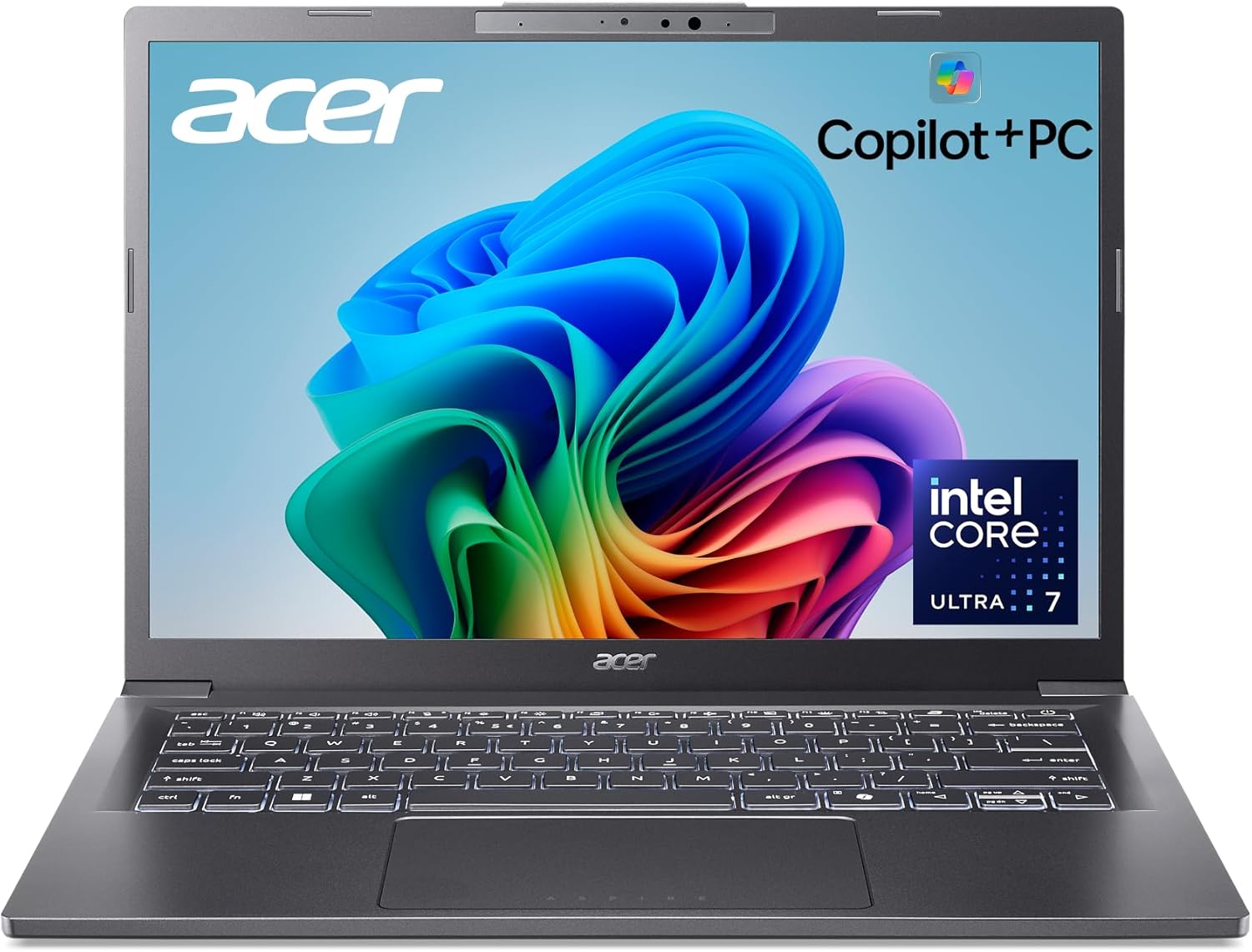 Acer Aspire 14 AI Copilot+ PC
|
7.1/10 | Buy | ||
 Lenovo V15 AMD Ryzen 5 Laptop
|
6.8/10 | Buy | ||
| Best Budget |
 Lenovo IdeaPad Slim 3 16 inch
|
7.9/10 | Buy | |
 Lenovo V15 G6 Business Laptop, 15.6 inch
|
7.5/10 | Buy |
Apple MacBook Neo 13-inch with A18 Pro
The MacBook Neo 13-inch delivers solid everyday performance with the A18 Pro chip, 16-hour battery life, and vibrant Liquid Retina display at an accessible price point. Best suited for students and casual users who need a portable, reliable Mac without premium pricing.
Pros
- Exceptional battery life eliminates daily charging anxiety during school or work days
- Competitive pricing for a MacBook makes Apple laptops accessible to students and budget-conscious buyers
- A18 Pro chip provides snappy performance for productivity apps, creative software, and light gaming
- Vibrant color lineup with coordinated keyboards offers personalization rare in the laptop market
- Privacy and security features including FileVault encryption and Touch ID protect your data
Cons
- Base configuration includes only 256GB storage, which may require external drives for media-heavy users
- 8GB unified memory is adequate but not upgradeable, limiting future-proofing for power users
ASUS ROG Strix G16 Gaming Laptop
A powerful 16-inch gaming laptop built for serious gamers, featuring an Intel Core i7-14650HX, RTX 5060 GPU, and a 165Hz display for smooth competitive play. The advanced cooling system and build quality justify the price for those seeking reliable high-performance gaming.
Pros
- Exceptional refresh rate and response time create competitive advantage in fast-paced games
- Robust cooling system maintains performance stability during long gaming marathons
- Upgradeable memory and storage allow cost-effective future improvements
- Dolby Atmos audio and premium display enhance immersive gaming experience
- Strong build quality and thermal design justify the investment for serious gamers
Cons
- RTX 5060 may require settings adjustments for ultra-high-end AAA titles at maximum graphics
- 16GB DDR5 is adequate now but may feel limiting for heavy multitasking or future demanding applications
- Premium pricing positions it above budget gaming laptops, though feature set justifies the cost
HP 17-inch Touchscreen AI Laptop
A capable 17-inch laptop built around Intel's latest AI-focused processor and 12 TOPS NPU, offering solid performance for professionals, students, and content creators who need large-screen productivity without premium pricing. The 32GB RAM, fast SSD, and touchscreen make it well-suited for multitasking and light creative work, though the HD+ resolution is modest for the screen size.
Pros
- Excellent screen size and touchscreen responsiveness for productivity, design work, and multitasking
- Robust performance with 32GB DDR5 RAM and dedicated NPU handles video editing, complex applications, and heavy workloads smoothly
- Strong security features including biometric fingerprint reader and physical camera privacy shutter for peace of mind
- Competitive price point for a 17-inch AI laptop with premium specs and Windows 11 Pro
- Good portability for its class at under 5 lbs with Fast Charge for quick battery top-ups
Cons
- HD+ (1600x900) resolution is relatively low for a 17-inch display, resulting in larger pixels and less screen real estate for detailed work
- 250 nits brightness may be insufficient for outdoor or bright office environments
- Limited to one HDMI and one USB-C video output, requiring adapters for multi-monitor setups
Dell 15 DC15250 Touch Laptop i7
A capable 15.6-inch touchscreen laptop built for students and professionals, featuring a 10-core Intel i7-1355U processor, 32GB DDR5 RAM, and 1TB SSD for reliable multitasking and productivity work. Windows 11 Pro and Wi-Fi 6 connectivity make it suitable for remote work and online learning.
Pros
- Powerful 10-core processor handles multitasking, video editing, and professional applications with ease
- Ample 32GB DDR5 RAM ensures smooth performance even with multiple applications running simultaneously
- Responsive touchscreen display adds intuitive control for presentations, document signing, and creative work
- Fast charging capability minimizes downtime between classes or meetings
- Comprehensive port selection including USB-C, HDMI, and SD card reader supports external peripherals and displays
Cons
- No dedicated graphics card limits performance for intensive gaming or 3D rendering work
- 3-cell battery capacity may require charging during heavy workloads or extended travel days
Lenovo Yoga 7i 16 2-in-1 Touchscreen
The Lenovo Yoga 7i is a versatile 2-in-1 convertible with a sharp 16-inch 2K touchscreen, modern Core Ultra 7 processor, and flexible form factor for work and entertainment. Best suited for professionals and students who need portability without sacrificing screen real estate.
Pros
- Versatile 2-in-1 design eliminates the need to choose between laptop and tablet functionality
- Large 16-inch display provides ample screen space while remaining portable
- Modern processor and ample RAM enable smooth multitasking and content creation
- Wi-Fi 6E and multiple connectivity options support professional workflows
- Windows 11 Pro and professional customization offer enterprise-grade reliability
Cons
- Premium pricing may be steep for casual users with basic computing needs
- 2-in-1 form factor adds weight and thickness compared to traditional laptops
- Intel Graphics integration limits performance for demanding gaming or 3D applications
ASUS Vivobook S16 AMD Ryzen AI
The ASUS Vivobook S16 pairs AMD's latest Ryzen AI 7 350 processor with a stunning 16-inch 3K OLED display and up to 14 hours of battery life in a lightweight 3.31 lb chassis. Best for content creators and professionals seeking AI-enhanced performance with premium build quality.
Pros
- Exceptional display quality with 2880 x 1800 resolution and 100% DCI-P3 color accuracy
- Lightweight and portable design without sacrificing performance or screen size
- Strong AI acceleration capabilities ideal for creative professionals and multitasking
- Extended battery life minimizes charging interruptions during work or travel
- Comprehensive security features including Windows Hello and Microsoft Pluton encryption
Cons
- No dedicated graphics card beyond AMD Radeon 860M may limit demanding gaming performance
- Premium pricing positions it as a higher-end option compared to mainstream laptops
HP 17.3 Business Laptop i5-1334U 32GB
A capable 17.3-inch workstation built for finance professionals and remote workers who need desktop-level multitasking in a portable form factor. The 10-core i5 processor, 32GB RAM, and full-size keyboard with numeric pad make it well-suited for accounting software and spreadsheet-heavy work, though the display brightness could be stronger for outdoor use.
Pros
- Excellent multitasking performance with 32GB RAM and 10-core processor ideal for accounting and finance work
- Large 17.3-inch display provides comfortable workspace for side-by-side document comparison and video conferencing
- Full-size backlit keyboard with numeric pad is purpose-built for data-heavy roles
- Enterprise security features (Windows 11 Pro, fingerprint reader, BitLocker) protect sensitive corporate information
- Wi-Fi 6 connectivity ensures reliable remote work and virtual meeting performance
Cons
- 250 nits display brightness is adequate indoors but may struggle in bright outdoor or sunlit environments
- At 4.6 lbs, portability is good for a 17-inch laptop but heavier than 15-inch ultrabooks for daily commuting
- Intel UHD Graphics limit gaming and GPU-intensive creative work performance
Dell 16 Laptop with Intel Core 7 150U
A well-rounded 16-inch laptop built for productivity and entertainment, featuring an Intel Core 7-150U processor, 16GB DDR5 RAM, and a bright 1920x1200 anti-glare display. Best suited for professionals and students who need reliable all-day performance without breaking the bank.
Pros
- Spacious 16-inch display with excellent 300-nit brightness and anti-glare coating reduces eye strain during long work sessions
- Fast charging with ExpressCharge reaches 80% battery in 60 minutes, minimizing downtime
- Robust build quality with military-grade durability standards and aluminum chassis provides lasting reliability
- Comprehensive port selection including USB-C with DisplayPort 1.4, HDMI, and multiple USB-A ports
- Integrated privacy features including mechanical camera shutter and dual noise-reducing microphones enhance security and call quality
Cons
- No discrete graphics option limits performance for demanding gaming or 3D rendering tasks
- Non-touchscreen display may feel limiting for users accustomed to touch input on modern laptops
- Intel Core 7-150U is an entry-level processor that may struggle with heavy professional workloads or video editing
Acer Aspire 14 AI Copilot+ PC
The Acer Aspire 14 AI is a capable ultrabook built around Intel's Core Ultra 7 processor and dedicated NPU for AI workloads, delivering strong all-day battery life (up to 22 hours) and a crisp 14-inch WUXGA display. It's best suited for professionals and students who want AI-assisted productivity features without breaking the bank.
Pros
- Outstanding battery endurance supports true mobile productivity without constant charging
- Integrated NPU enables new AI features like Recall and Click to Do for enhanced workflow efficiency
- Bright, high-resolution display provides excellent clarity for both work and entertainment
- Lightweight and durable aluminum build with 180-degree hinge offers genuine versatility
- Strong value proposition at this price point for an AI-focused ultrabook
Cons
- AI Copilot+ features are still rolling out through 2025, so full functionality may not be immediately available
- Intel Arc GPU is entry-level and not suitable for demanding gaming or professional graphics work
- Limited upgrade options due to soldered RAM and storage configuration
Lenovo V15 AMD Ryzen 5 Laptop
The Lenovo V15 pairs a capable AMD Ryzen 5 5500U processor with 16GB RAM and 512GB SSD in a 15.6-inch FHD package, making it a solid choice for professionals and students who need reliable multitasking performance without breaking the bank. Windows 11 Pro and practical ports like HDMI and RJ45 add business-friendly appeal.
Pros
- Excellent CPU performance with 6 cores and 12 threads for demanding tasks
- Generous RAM and storage for seamless multitasking and file management
- Professional-grade operating system with advanced security and management tools
- Well-equipped connectivity including wired Ethernet for stable network access
- Good value proposition for business and educational use cases
Cons
- No discrete GPU limits gaming and graphics-intensive creative work
- Numeric keypad may increase overall size and weight compared to ultraportable competitors
- Limited information on battery life and thermal performance
Lenovo IdeaPad Slim 3 16 inch
The Lenovo IdeaPad Slim 3 16 inch combines a 13th Gen Intel i5 processor with a spacious 16 inch WUXGA display and DDR5 RAM for smooth multitasking and productivity work. Best suited for remote workers, students, and business professionals who need reliable performance and screen real estate without breaking the bank.
Pros
- Large 16 inch screen reduces eye strain and improves productivity for document-heavy work
- Fast DDR5 memory and SSD storage ensure responsive performance even with multiple applications open
- Extensive port selection and WiFi 6 connectivity eliminate the need for additional adapters and hubs
- Privacy-focused features including webcam shutter and TPM 2.0 provide peace of mind for remote workers
- Affordable price point for the specifications and screen size makes it excellent value
Cons
- 8GB RAM may require upgrading for heavy multitasking or content creation workflows beyond typical office use
- Intel UHD Graphics limits performance for demanding gaming or professional video editing tasks
- 60Hz display refresh rate is standard but not ideal for creative professionals who prefer higher refresh rates
Lenovo V15 G6 Business Laptop, 15.6 inch
The Lenovo V15 G6 is a lightweight 15.6-inch business laptop built for professionals, students, and remote workers who need reliable everyday computing without breaking the bank. Its Intel N100 processor, 8GB DDR5 RAM, and 256GB SSD deliver smooth multitasking and fast boot times, while WiFi 6 and comprehensive security features make it practical for business use.
Pros
- Excellent portability at just 3.33 lbs with professional design suitable for business environments
- Strong value at this price point with DDR5 RAM, NVMe SSD, and WiFi 6 connectivity
- Solid security features including privacy shutter and TPM 2.0 protect sensitive business data
- Versatile port selection supports external monitors, peripherals, and multiple network connections
- Reliable performance for everyday business tasks, remote work, and student coursework
Cons
- Intel N100 processor is entry-level and may struggle with intensive creative work or gaming
- 256GB storage fills quickly with large files or multiple applications
- 720p webcam quality is basic for professional video conferencing
Best Laptops Buying Guide
Laptops have never been more capable, but that abundance of choice makes the decision harder, not easier.
The sections below walk through the six criteria that matter most when narrowing your shortlist, so you can match a machine to your actual habits rather than to a spec sheet you may never fully use.
Processor and Performance Tier

The CPU is the single most important determinant of long-term usability. For everyday tasks like browsing, video calls, and document editing, a modern mid-range processor such as an Intel Core 7 series or AMD Ryzen 5 provides more than enough headroom.
If you plan to run creative software, code, or multitask heavily, step up to a Core Ultra 7, Ryzen AI 7, or Apple A-series chip, all of which are represented in this roundup.
Pay attention to thermal design as well. A powerful CPU crammed into a thin chassis with inadequate cooling will throttle under sustained load, erasing the performance advantage you paid for.
Reviews from verified buyers consistently flag sustained performance as a differentiator between laptops that look identical on paper.
For users who need discrete GPU power alongside CPU performance, gaming laptops in our dedicated category roundup are worth exploring alongside this list.
AI-oriented workloads are also reshaping the CPU landscape in 2026. Chips with a dedicated NPU (Neural Processing Unit), including Qualcomm Snapdragon X, Intel Core Ultra, and AMD Ryzen AI series, accelerate AI features in Windows and creative apps.
If Copilot+ capabilities matter to you, confirm the NPU TOPS rating before buying.
RAM and Storage

RAM and storage are the two specs buyers most commonly regret skimping on.
For mainstream productivity, 16 GB of RAM is the comfortable baseline in 2026; 8 GB can feel tight if you keep many browser tabs open or run any virtual machines.
Power users and content creators should target 32 GB, which shows up in several picks in this roundup.
Because most modern thin-and-light laptops solder RAM directly to the motherboard, you generally cannot upgrade later, so buying enough from the start is critical.
On storage, a 512 GB SSD suits light users, but a 1 TB drive is a much more comfortable long-term choice for anyone storing media, large project files, or multiple software installations.
Look for PCIe Gen 4 NVMe drives for the fastest read and write speeds; this distinction matters if you regularly transfer large files or work with high-resolution video.
If local storage proves insufficient, pairing the laptop with a quality desktop PC or external drive for archiving is a practical complement.
Display Quality and Size
Screen size shapes how portable a laptop feels day-to-day. A 13-inch or 14-inch machine slips easily into a bag; a 17-inch model trades portability for screen real estate that rivals a small desktop monitor.
The laptops in this roundup span 13 inches to 17.3 inches, so there is a form factor for every workflow.
Beyond size, resolution and panel technology matter. An FHD (1920×1080) screen is acceptable for most tasks, but a 2K or higher-resolution panel delivers noticeably sharper text, which reduces eye strain during long sessions.
Brightness (measured in nits) determines how usable the screen is in bright environments; anything below 250 nits can wash out in a sunny room.
Touchscreen availability is also worth considering if you lean toward a hybrid workflow, and many of the convertible-style options in our 2-in-1 laptops category offer pen input as well.
Battery Life and Portability

Claimed battery life figures from manufacturers are notoriously optimistic. Real-world figures from expert reviewers and verified buyers typically land 20 to 30 percent below the rated number under mixed workloads.
As a rule of thumb, look for machines rated above 12 hours if you need a full day unplugged; ARM-based and ultra-low-power chips tend to deliver the most reliable real-world battery longevity.
Weight and chassis material also factor into portability. Magnesium alloy and aluminum builds feel more premium and tend to be lighter than polycarbonate, but polycarbonate laptops can be surprisingly durable and are usually more affordable.
If desk-bound use is your primary scenario, battery life and weight matter far less, and you can prioritize performance and display quality instead. In that case, you might also consider an all-in-one PC as a space-saving alternative.
Connectivity and Ports

The port selection on a laptop determines how many dongles you will need to carry.
At minimum, look for at least one USB-C port with data and charging support, a USB-A port for legacy accessories, and an HDMI output for external displays.
Thunderbolt 4 (TB 4) adds high-bandwidth data transfer and the ability to drive multiple 4K monitors from a single port, which is valuable for workstation users.
Wi-Fi standard matters more than many buyers realize. Wi-Fi 6E and Wi-Fi 7 offer lower latency and higher throughput on modern routers, which is meaningful for video calls, large file transfers, and cloud-based workflows.
An RJ45 Ethernet port is a bonus for users who need wired reliability in office or home studio settings. A numeric keypad on 15-inch and larger models is a practical perk for finance and data-entry work.
Operating System and Ecosystem Fit

Windows 11 Pro and Windows 11 Home cover the vast majority of laptops in this roundup, and the choice between them matters primarily for business users who need BitLocker encryption, Remote Desktop, or enterprise policy management.
Pro is worth the premium in a business context; Home is perfectly adequate for personal use.
macOS remains a compelling alternative, particularly for creative professionals who are already invested in the Apple ecosystem. Apple’s unified memory architecture and tight hardware-software integration deliver unusually efficient performance, and the platform’s longevity for software support is a real advantage.
If you are undecided between Windows and macOS, consider which software you depend on daily and whether it runs natively or requires workarounds on each platform.
Users looking for lightweight, web-centric computing at a lower price point may also want to review Chromebooks before committing to a full-featured laptop.
Why You Should Trust Us
REMOVU is an editorially independent review platform.
Every laptop in this roundup was assessed using a consistent, multi-signal framework: we analyze published specifications, weigh expert review consensus from authoritative sources, factor in verified buyer feedback patterns, and cross-reference publicly available benchmark data.
Each model receives a REMOVU Score on a 0 to 10 scale, reflecting overall value within its category and price tier.
We do not conduct our own product trials; our evaluations are grounded in research, published data, expert review consensus, and verified buyer feedback. This methodology lets us cover a far broader range of products with greater consistency than any single in-house reviewer could manage alone.
REMOVU may earn a commission when you purchase through links on this page. That affiliate relationship has no influence on which products appear in our roundups, the REMOVU Scores they receive, or their ranking order.
Products are selected and ranked based on research quality and merit, not on commission rates. We do not accept payment from brands for placement or favorable coverage.
Final Thoughts
This roundup covers a wide spectrum of laptops, from budget-friendly everyday machines to premium AI-powered workhorses and high-performance gaming rigs. Across the 12 models we evaluated, a few stand out clearly within their respective niches.
Below are our editorial awards, each tied to a REMOVU Score that reflects the model’s performance relative to its peers.
- Best Overall: Apple MacBook Neo 13-inch with A18 Pro earns the top spot with the highest REMOVU Score in this roundup, combining Apple Intelligence capabilities, a refined Liquid Retina display, and the efficiency of Apple silicon into a package that excels across productivity, creative, and everyday use cases.
- Best Gaming Laptop: ASUS ROG Strix G16 (2025) delivers the strongest gaming credentials in this group, pairing an NVIDIA GeForce RTX 5060 GPU with a 165 Hz display and Wi-Fi 7, making it the clear choice for serious players. See our full gaming laptops category for even more options at various price tiers.
- Best for Power Users and Creatives: HP 17-inch Touchscreen AI Laptop with Core Ultra 7 255U stands out with 32 GB of DDR5 RAM, a large touch display, and a high-core-count processor that handles demanding creative workloads with ease.
- Best 2-in-1: Lenovo Yoga 7i 16-inch 2-in-1 combines a 2K touchscreen, Thunderbolt 4, and Core Ultra 7 flexibility in a versatile convertible form factor that suits both desk work and tablet-style use. Browse our full range of 2-in-1 laptops for additional convertible picks.
- Best Budget Pick: Lenovo 15.6-inch Business Laptop 2026 Edition offers a sensible entry point for students and light business users who need a dependable Windows 11 machine with DDR5 RAM and Copilot AI at an accessible price.
Whichever model you choose, the laptops in this roundup represent the strongest options available at their respective price tiers based on our research in 2026.
If none of these quite fits your needs, explore our broader computers hub for roundups covering desktop PCs, mini PCs, and more.
Frequently Asked Questions
How Much RAM Do I Really Need in a Laptop?
For most users in 2026, 16 GB is the practical minimum that keeps everyday multitasking smooth.
If you work with video editing software, run virtual machines, or keep dozens of browser tabs open simultaneously, 32 GB provides meaningful headroom and future-proofs your purchase longer.
Budget machines with 8 GB can handle light tasks but may feel sluggish as software demands grow over the laptop’s lifespan.
Is Windows 11 Pro Worth It Over Windows 11 Home?
Windows 11 Pro adds BitLocker full-disk encryption, Remote Desktop hosting, and enterprise management features that matter in business or IT environments. For personal use, students, and most small-business scenarios, Windows 11 Home covers everything you need.
If your employer requires domain-joining or advanced security policies, Pro is worth selecting from the start since upgrading later carries an additional cost.
What Is a Copilot+ PC and Do I Need One?
Copilot+ is Microsoft’s certification for laptops with a dedicated NPU capable of at least 40 TOPS of AI processing. These machines unlock features like real-time AI summarization, image generation, and live captions within Windows.
If you rely on AI-assisted productivity tools or plan to use Windows’ built-in Recall and Creator features, a Copilot+ certified laptop adds genuine value.
For traditional office work and browsing, a non-Copilot+ machine with a strong CPU and ample RAM will serve you just as well for a lower price.
Should I Choose a 15-inch or 17-inch Laptop?
A 15-inch laptop strikes the most common balance between portability and screen size, fitting comfortably in most bags and on café tables.
A 17-inch model is better suited for users who work primarily at a desk and want an immersive display without a separate external monitor. The trade-off is noticeably greater weight and a larger footprint.
If you move between locations daily, a 15-inch or smaller chassis is almost always the more practical long-term choice.
How Do Laptops Compare to All-in-One PCs for Home Office Use?
Laptops offer portability that all-in-one PCs cannot match, making them the default choice if you move between rooms, commute, or travel.
All-in-ones tend to offer larger displays and easier cable management in a fixed workspace, but they cannot easily be taken on the road.
If your home office is truly fixed and you never need to work away from your desk, an all-in-one may deliver better display size and ergonomics per dollar.
Are Gaming Laptops Good for Everyday Work Too?
Yes, with caveats. Gaming laptops like the ASUS ROG Strix G16 in this roundup offer powerful CPUs and ample RAM that handle creative and productivity workloads very well.
The trade-offs are battery life (gaming machines drain quickly under load), weight (typically heavier than business ultrabooks), and fan noise (which can be audible during non-gaming tasks).
If gaming is your primary use and productivity is secondary, the performance headroom is a genuine bonus rather than a waste.
Related Guides
About the author
Bobby writes about gaming keyboards and mice for REMOVU, comparing switch feel, sensor precision, and comfort for competitive play. He helps players tune their setup to their grip and their games.