The 7 Best Gaming Laptops Under $1000
GPU generation, display refresh rate, and thermal design separate a good gaming laptop from a frustrating one. These picks deliver real performance without overspending.
 By Tara Russell
Updated July 26, 2026
By Tara Russell
Updated July 26, 2026

Finding a capable gaming laptop under $1000 has never been more realistic, yet the market is noisier than ever. GPU generations overlap, RAM configurations vary wildly, and refresh rate marketing can obscure real-world performance.
Whether you want to play the latest AAA titles at smooth frame rates or handle competitive multiplayer without breaking the bank, the right machine is out there, but it takes more than a spec sheet glance to identify it.
Shoppers in this price band typically weigh GPU tier, display quality, thermal management, and build durability against a budget that leaves little room for compromise in any single area.
At REMOVU, we researched and compared every model on this list against a consistent set of criteria, drawing on published specifications, expert review consensus, and verified buyer feedback.
Our goal is to cut through marketing noise and point you toward machines that deliver genuine value.
Whether you need a portable everyday driver or a dedicated gaming rig, the picks below represent the strongest options available at this price point right now.
| Award | Product | REMOVU Score About REMOVU ScoreThe REMOVU Score is our own rating from 0 to 10, based on performance, design and build, ease of use, and value. It reflects independent research and is never influenced by manufacturers, retailers, or affiliate commissions. Learn more › | Price | |
|---|---|---|---|---|
| Best Overall |
 Acer Nitro V 15.6" 165Hz Gaming Laptop with RTX 5050
|
8.5/10 | Buy | |
| Best Premium |
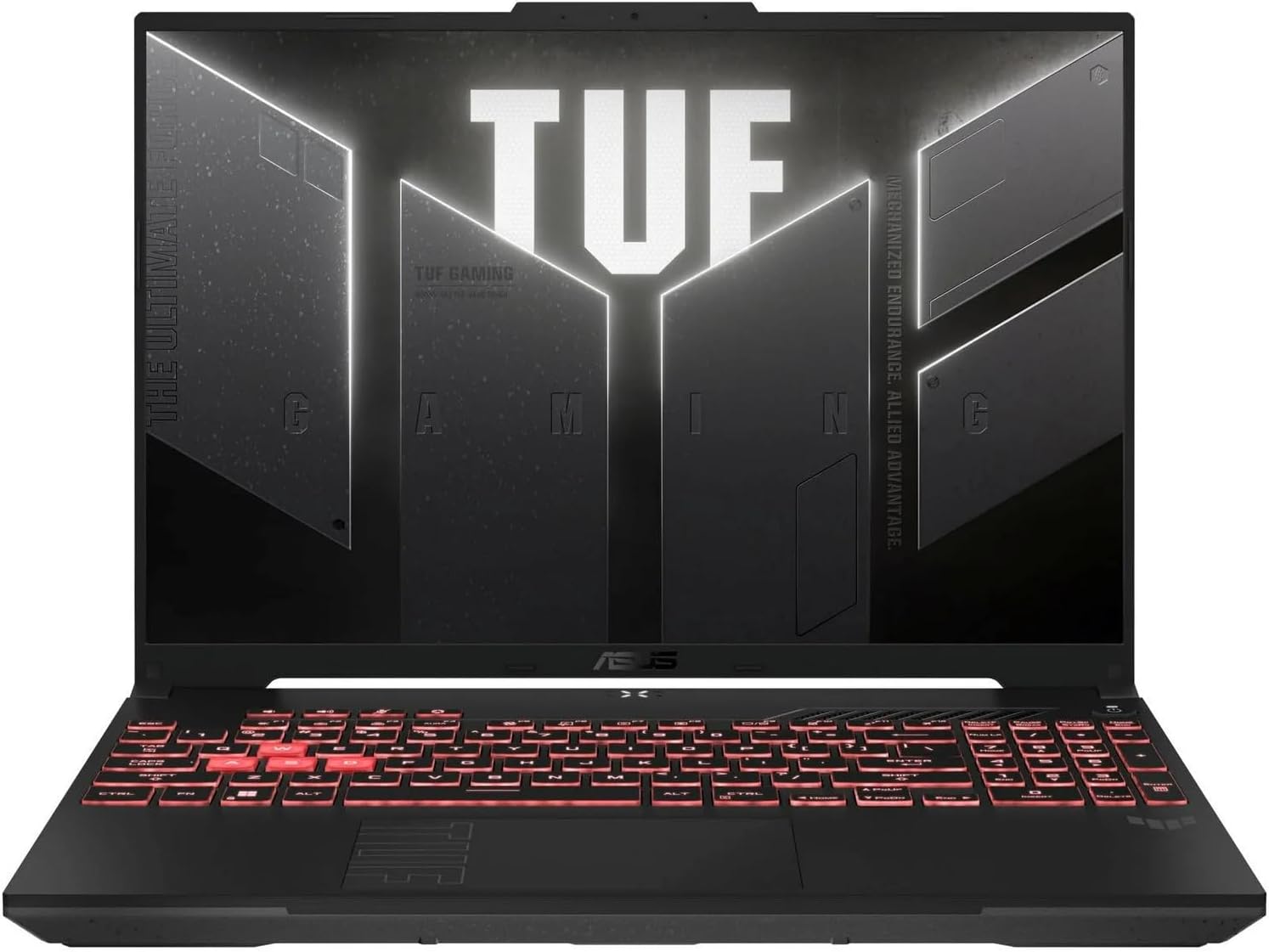 ASUS TUF Gaming A16 Ryzen 7 16" 145Hz
|
8.4/10 | Buy | |
| Best Budget |
 ASUS TUF Gaming A15 (RTX 3050, 144Hz)
|
8.3/10 | Buy | |
 Acer Nitro V 15 (i5-13420H, RTX 4050)
|
8.2/10 | Buy | ||
| Best Value |
 Acer Nitro V15 Gaming Laptop (i5-13420H, RTX 4050)
|
8.1/10 | Buy | |
 ASUS TUF Gaming F16 RTX 4050 16-inch Laptop
|
6.2/10 | Buy | ||
 Nimo 17.3" Ryzen 7 8745HS Laptop with Radeon 780M
|
6.2/10 | Buy |
Acer Nitro V 15.6" 165Hz Gaming Laptop with RTX 5050
A mid-range gaming laptop built for 1080p competitive play and content creation. The 165Hz IPS display pairs well with the RTX 5050 and i5-13420H for smooth gaming performance, while the dual-fan cooling and robust port selection including Thunderbolt 4 make it versatile for both gaming and productivity tasks.
Pros
- Fast 165Hz FHD IPS display minimizes ghosting for competitive gaming
- RTX 5050 with 8GB GDDR7 handles ray tracing and DLSS 4 for modern game optimization
- Solid multitasking with 16GB RAM and PCIe Gen 4 SSD for quick load times
- Comprehensive connectivity including Thunderbolt 4, Wi-Fi 6, and Killer Ethernet
- Dual-fan cooling system keeps thermals in check during extended gaming sessions
Cons
- RTX 5050 is entry-level for GPU performance, limiting ultra-high settings at 1080p in demanding titles
- No mention of battery life specifications, typical concern for gaming laptops in this segment
- i5-13420H is previous-gen processor, newer alternatives available in current market
ASUS TUF Gaming A16 Ryzen 7 16" 145Hz
A mid-range gaming laptop built around AMD's Ryzen 7 7445HS and RTX 4050, offering solid 1080p+ gaming performance with a fast 145Hz display. The 16-inch screen and DDR5 RAM provide modern specs for competitive gamers and content creators on a tighter budget, though storage and GPU performance sit at entry-level for the category.
Pros
- High-refresh 145Hz display ideal for competitive gaming and smoother general use
- AMD Ryzen 7 7445HS delivers strong multi-core CPU performance for gaming and productivity
- DDR5 RAM future-proofs the system compared to older DDR4 machines
- Backlit keyboard standard for gaming-focused workflow
- Solid 4.6-star rating from 153 verified reviews indicates reliable real-world performance
Cons
- RTX 4050 is entry-level for dedicated gaming GPUs, limiting performance in demanding AAA titles at high settings
- 512GB SSD is modest for a gaming machine with large game libraries
- No details on thermal management or battery life in provided specs, limiting full assessment
ASUS TUF Gaming A15 (RTX 3050, 144Hz)
A mid-range gaming laptop built for durability and smooth gameplay. The 144Hz FHD display paired with RTX 3050 handles modern titles at solid frame rates, while the Ryzen 5 7535HS processor and DDR5 memory keep multitasking responsive. Military-grade construction (MIL-STD-810H certified) makes it a reliable choice for gamers who value toughness alongside performance.
Pros
- Fast 144Hz FHD display with Adaptive Sync reduces lag and visual tearing
- Military-grade durability certified by MIL-STD-810H evaluation (drops, vibration, extreme temperatures)
- Efficient cooling with dual 84-blade Arc Flow Fans minimizes noise during gameplay
- DDR5 memory and PCIe 4.0 storage enable quick multitasking and fast load times
- Strong user rating (4.2/5 from 255 reviews) indicates consistent reliability
Cons
- 8GB DDR5 memory is on the lower side for demanding workloads; upgradeability may be limited
- RTX 3050 is entry-level for high-end gaming, limiting performance at ultra settings on newer AAA titles
- 512GB storage fills quickly with modern game libraries, requiring external drives for expansion
Acer Nitro V 15 (i5-13420H, RTX 4050)
A mid-range gaming laptop built for 1080p performance, the Nitro V 15 pairs an Intel Core i5-13420H with RTX 4050 graphics and a 165Hz display to deliver smooth frame rates in competitive titles. The 8GB DDR5 memory and 512GB SSD provide a solid foundation for gaming and light content creation, though base storage and RAM cap multitasking flexibility without upgrades.
Pros
- 165Hz IPS display with 82.64% screen-to-body ratio minimizes ghosting and maximizes visual real estate
- RTX 4050 with DLSS 3.5 and ray tracing handles 1080p gaming at high settings with strong visual fidelity
- Intel Core i5-13420H enables simultaneous gaming, streaming, and recording without significant performance drops
- Thunderbolt 4 port consolidates charging, data transfer, and video output in one interface
- Wi-Fi 6 and Killer Ethernet E2600 provide reliable connectivity across gaming environments
Cons
- 8GB DDR5 base RAM is entry-level for modern multitasking; expansion to 32GB requires aftermarket upgrade
- 512GB SSD fills quickly with modern AAA titles and content creation files; limited upgrade slots (2 DDR5 total)
- RTX 4050 is positioned at the lower end of RTX 40 series, limiting performance in demanding 1440p+ workloads
Acer Nitro V15 Gaming Laptop (i5-13420H, RTX 4050)
A solid mid-range gaming laptop built around Intel's 13th Gen Core i5 and NVIDIA RTX 4050 graphics. The 15.6" 144Hz FHD display and dual-fan cooling system are designed to handle competitive gaming and creative work without thermal throttling. Best for gamers seeking a balance between performance and portability without stepping into premium territory.
Pros
- 144Hz 15.6" FHD IPS display delivers smooth visuals with minimal ghosting for fast-paced gaming
- Dual-fan cooling system with NitroSense customization keeps thermals in check during extended sessions
- Thunderbolt 4 and USB 3.2 Gen 2 ports provide modern connectivity for peripherals and data transfer
- Wi-Fi 6 and Gigabit Ethernet options ensure stable online gaming from multiple locations
- DLSS 3 support on RTX 4050 enhances frame rates in supported titles
Cons
- 8GB DDR5 RAM is entry-level for multitasking and may require upgrades for demanding creative workflows
- 512GB SSD storage fills quickly with modern AAA game titles, limiting game library without external drives
- RTX 4050 is positioned at the lower end of the 40-series lineup, limiting ultra-high settings in demanding 2024+ games
ASUS TUF Gaming F16 RTX 4050 16-inch Laptop
A solid mid-range gaming laptop that balances performance and durability. The 16-inch 144Hz display and RTX 4050 GPU handle modern games well, while military-grade construction and efficient cooling make it reliable for extended use. Best suited for gamers prioritizing build quality over cutting-edge performance.
Pros
- 144Hz FHD display with 100% sRGB and Adaptive-Sync reduces visual tearing and stuttering
- Military-grade durability (MIL-STD-810H) reviewed for harsh conditions
- Efficient cooling system with Arc Flow Fans, 5 heat pipes, and anti-dust filter keeps thermals in check without excessive noise
- 16GB DDR5 RAM and 512GB PCIe Gen4 SSD enable smooth multitasking and fast load times
- Dolby Atmos and Hi-Res audio enhance immersion for gaming and media
Cons
- RTX 4050 is entry-level for demanding AAA titles at high settings
- 16-inch form factor with gaming specs may be bulkier than ultraportable alternatives
- 512GB storage may require expansion for large game libraries
Nimo 17.3" Ryzen 7 8745HS Laptop with Radeon 780M
A 17.3-inch workstation built for creators and multitaskers, pairing AMD's Ryzen 7 8745HS with 32GB DDR5 RAM and 1TB SSD. The Radeon 780M GPU handles 1080p streaming and gaming, while USB4 support adds future-proofing for external GPU expansion. Best suited for video editors, AI researchers, and remote professionals who value screen real estate and expandability.
Pros
- Desktop-grade 54W processor performance for 4K editing and AI workloads without lag
- Expansive 17.3-inch display with 180-degree hinge for flat-lay presentations and collaborative work
- USB4 connectivity plus HDMI 2.1, three USB-A ports, and SD card reader eliminate dongle dependency
- 32GB DDR5 RAM and 1TB PCIe 4.0 SSD upgradeable to 64GB RAM and dual SSDs for future growth
- Compact 100W USB-C fast charger and 58Wh battery rated for all-day use
- 2-year warranty with USA-based final assembly and quality evaluation
Cons
- 17.3-inch form factor and 2.1kg weight make it less portable than 15-inch alternatives despite claims of being ultralight
- Radeon 780M is integrated graphics, not discrete, limiting high-end gaming and 4K rendering without external GPU expansion
- No discrete GPU option at this price point, requiring USB4 docking investment for serious creative workstations
Gaming Laptops Under $1000 Buying Guide
Picking the right gaming laptop at this price requires understanding where manufacturers cut costs and where they do not.
The sections below cover the criteria that matter most, so you can match a machine to your actual needs rather than chasing a spec that sounds impressive on a product page.
GPU Tier and Real-World Gaming Performance

The discrete GPU is the most important determinant of gaming performance in a laptop. In the under-$1000 bracket, you will generally find options from the RTX 4050 and RTX 3050 families, with occasional next-generation entries beginning to appear.
The RTX 4050, for instance, brings meaningful efficiency and ray-tracing improvements over the older RTX 3050, making it a stronger long-term investment even at similar prices.
Beyond raw GPU naming, pay attention to the laptop’s power limit and thermal design.
Manufacturers are permitted to ship the same GPU at different wattages, and a lower-power variant can perform noticeably worse than a higher-power one with the same chip name.
Look for reviewer benchmarks that confirm sustained boost clocks under gaming load, not just peak burst numbers from a manufacturer’s marketing slide.
If your priorities extend to tasks like video production or 3D rendering alongside gaming, check our laptops for video editing guide for context on how GPU compute performance factors into creative workflows, since many gaming GPUs at this tier perform surprisingly well in those tasks too.
Display Quality: Refresh Rate, Resolution, and Panel Type

A high-refresh-rate display is arguably just as important as the GPU that feeds it. At this price, 144Hz panels are essentially the baseline, and some models now offer 165Hz, which provides a perceptibly smoother experience in fast-paced games.
An IPS-level panel is the preferred technology here: it delivers wide viewing angles, accurate colours, and sufficient contrast for both gaming and everyday productivity work.
Resolution is a meaningful trade-off at this tier. FHD (1920×1080) remains the dominant choice because the GPUs on offer can actually sustain high frame rates at that resolution.
Jumping to FHD+ (1920×1200, the 16:10 aspect ratio) on a 16-inch chassis adds useful vertical screen real estate for productivity without demanding a massive GPU uplift, making it an appealing middle ground.
Avoid 4K panels in this segment; the available GPUs are not powerful enough to leverage them in demanding titles.
Screen size also affects portability. A 15.6-inch chassis is the most common footprint and strikes a reasonable balance, while 16-inch or 17-inch models suit users who game mostly at a desk and want more display real estate.
If you also use your laptop for photo work, our guide covering laptops for photo editing explains what colour accuracy and brightness targets actually matter for image work.
CPU Choice: Intel Core vs. AMD Ryzen
Both Intel and AMD offer competitive mobile CPUs in this price range, and the right choice depends on your workload mix.
Intel’s Core i5 H-series processors in recent generations deliver strong single-core performance, which benefits games that are not heavily multi-threaded.
AMD’s Ryzen 5 and Ryzen 7 HX-series parts often edge ahead in multi-threaded tasks and tend to pair well with the machine’s GPU by leaving the power budget more available to the discrete graphics chip.
For pure gaming, the CPU is rarely the bottleneck at this tier, so focus on the processor being a recent enough generation to avoid compatibility issues with future software.
A Ryzen 5 7535HS or an Intel Core i5-13420H will serve the vast majority of gaming and productivity tasks without issue.
Developers and power users who also write code may want to cross-reference with our laptops for programming roundup, where CPU sustained performance under long compile loads becomes a bigger factor.
RAM and Storage Configuration

DDR5 RAM is increasingly standard in this segment. Most configurations ship with 8GB or 16GB.
While 8GB can technically run many current titles, 16GB provides noticeably more headroom for modern open-world games, background tasks, and browser tabs running alongside your session.
If a laptop ships with 8GB but has an upgradeable slot, that can be an acceptable starting point, provided the upgrade path is affordable and accessible.
For storage, a PCIe Gen 4 NVMe SSD of 512GB is the typical entry point. That capacity fills up surprisingly fast once you install a handful of modern games, each of which can consume 50GB to 100GB.
Confirm that the machine has an accessible second M.2 slot or a free 2.5-inch bay if budget expansion later is a priority.
Speedy Gen 4 drives also meaningfully reduce load times and shader compilation stutter compared to older Gen 3 or SATA options.
Thermal Design, Build Quality, and Battery Life

Thermal design determines whether a laptop’s GPU and CPU can sustain their rated boost clocks during long gaming sessions or whether they throttle back to protect the hardware.
Gaming laptops in this segment rely on a mix of copper heat pipes, multiple heat-sink stacks, and dual or triple fan configurations. Thicker chassis designs generally allow better airflow but add weight and reduce portability.
Models from Acer’s Nitro V line and ASUS TUF Gaming series have consistently earned praise in expert reviews for maintaining competitive sustained performance relative to their size and price.
Battery life is where gaming laptops typically concede ground to ultrabooks. Expect two to four hours of light use when running on battery, with gaming sessions demanding the AC adapter regardless.
Build quality varies; look for metal or reinforced plastic lids, MIL-SPEC durability certifications, and hinges that feel solid through repeated open-close cycles. These indicators correlate with longevity in buyer feedback across verified purchases in this category.
Connectivity and Wireless Standards

Wi-Fi 6 is the current baseline for a gaming laptop in this price range, providing lower latency and better throughput in congested wireless environments compared to older Wi-Fi 5 adapters.
If your router supports Wi-Fi 6 or Wi-Fi 6E, the difference in online multiplayer responsiveness is real.
Wired Ethernet via a Gigabit RJ-45 port remains the gold standard for competitive gaming with the lowest possible ping, and most gaming-focused laptops in this segment include one.
Port selection matters for peripherals and external display setups. Look for USB-A ports for mice and external drives, USB-C with DisplayPort Alt Mode for monitors, and HDMI for connecting to a TV or external screen.
A backlit keyboard is essentially universal at this price point, though actuation feel and key travel vary between manufacturers. Pairing your setup with a quality gaming headset with a mic completes the experience for voice chat and in-game audio.
Why You Should Trust Us
REMOVU is an independent review platform. We have no brand partnerships, no sponsored placements, and no manufacturer relationships that influence which products appear in our recommendations.
Every product on this list was evaluated against consistent criteria and scored on our REMOVU Score, which runs from 0 to 10.
Higher scores reflect stronger overall performance across GPU capability, display quality, build, thermal management, RAM and storage configuration, connectivity, and value at the listed price point.
We do not conduct our own product trials; our evaluations are grounded in research, published data, expert review consensus, and verified buyer feedback.
We analyze official specifications, cross-reference findings from established expert reviewers, and weigh real-world buyer experiences from verified purchasers. When reviewers and buyers consistently agree on a strength or a weakness, that consensus carries significant weight in our scoring.
Transparency on affiliate relationships: REMOVU may earn a commission if you purchase through a link on this page. That relationship does not influence our rankings, scores, or product selection.
Products are ordered by REMOVU Score, and no brand can pay to improve its placement. We may also cover adjacent categories such as laptops more broadly or specific sub-categories like gaming desktops, applying the same methodology throughout.
Final Thoughts
The gaming laptop market under $1000 is more competitive than it has been in years. Acer and ASUS dominate this segment with purpose-built lineups, and the models we evaluated from both brands represent well-rounded choices at their respective price points.
Below are the standout picks based on our research and REMOVU Score rankings.
- Best Overall: Acer Nitro V 15.6″ FHD IPS 165Hz with RTX 5050 and GDDR7 VRAM earns the top spot with the highest REMOVU Score in this group, combining a next-generation GPU with a fast 165Hz display and a capable Intel Core i5 processor in a competitive package.
- Best for Large-Screen Gaming: ASUS TUF Gaming A16 with Ryzen 7 7445HS and RTX 4050 brings a 16-inch FHD+ 145Hz display and 16GB DDR5 RAM, making it the strongest all-round performer for users who want more screen real estate and memory without pushing above budget.
- Best Mid-Range Pick: ASUS TUF Gaming A15 with Ryzen 5 7535HS and RTX 3050 offers a well-built, reliable machine that consistently earns strong marks in expert consensus for its thermal management and build quality at an accessible price.
- Best for Everyday Gaming and Productivity: Acer Nitro V 15.6″ FHD IPS 165Hz with RTX 4050 strikes a practical balance between gaming muscle and daily use comfort, with a smooth 165Hz panel and Gen 4 SSD that keeps load times short across both games and productivity tasks.
- Best Budget-Conscious Pick: Acer Nitro V ANV15-51 with RTX 4050 and 144Hz Display gives shoppers the RTX 4050 at the lower end of this price band, making it one of the more accessible entry points to current-generation GPU performance.
Whichever model fits your budget and use case, pairing your laptop with the right peripherals makes a meaningful difference.
A responsive gaming headset for PC sharpens positional audio and voice communication, while a solid desk setup rounds out the experience for longer sessions.
For shoppers still weighing between a laptop and a fixed build, our gaming desktops category covers where a stationary rig pulls ahead on raw performance per dollar.
Frequently Asked Questions
Is an RTX 4050 good enough for gaming at this price?
Yes, the RTX 4050 laptop GPU handles the majority of current titles at FHD resolution with high or ultra settings, particularly in games that are well-optimised.
Performance scales with the power limit the manufacturer assigns, so models that run the chip at higher wattage will see better sustained frame rates.
For competitive multiplayer titles at 144Hz or higher, the RTX 4050 is a genuinely capable match for most 144Hz and 165Hz panels found in this price bracket.
Should I choose AMD Ryzen or Intel Core in a gaming laptop under $1000?
Both platforms are competitive for gaming in this segment.
Intel’s H-series chips tend to offer slightly stronger single-core burst performance, while AMD’s Ryzen HX and HS parts often excel in sustained multi-threaded workloads and can be more efficient under mixed gaming and productivity use.
In practice, the GPU is the larger performance variable for gaming, so prioritise the GPU tier and thermal design over which CPU brand is listed on the spec sheet.
Is 8GB RAM enough, or should I look for 16GB?
Modern game titles are increasingly RAM-hungry, and 16GB DDR5 provides noticeably more stability in open-world games, while also allowing a browser and communication app to run alongside your session without impacting frame rates.
If budget constraints lead you to a strong 8GB configuration, verify that the laptop has an upgradeable slot so you can add a second stick later.
Buying a machine with 8GB soldered and no upgrade path is a long-term limitation worth avoiding.
Do gaming laptops work for creative tasks like video editing or programming?
Many of the models on this list handle creative workloads well alongside gaming. A discrete NVIDIA GPU with CUDA acceleration speeds up video exports in applications like DaVinci Resolve and Premiere Pro.
CPU core count and RAM capacity are the other key factors for these tasks.
If creative work is your primary use case, our guides covering photo editing laptops and laptops more broadly can help you calibrate which specifications matter most for your workflow.
What is a realistic battery life expectation for a gaming laptop?
Expect two to four hours for light productivity tasks on battery, and virtually no usable gaming time without the power adapter plugged in. Gaming workloads push both GPU and CPU simultaneously, which quickly depletes any laptop battery regardless of capacity.
If you need a machine that handles long untethered sessions, a thin-and-light ultrabook is a better fit. Gaming laptops are best treated as portable desktops that happen to be moveable, not as all-day untethered devices.
Complement your setup with quality audio like a streaming-ready gaming headset for content creation or live sessions at your desk.
How does the NIMO 17.3″ compare to the Acer and ASUS options on this list?
The NIMO 17.3″ with Ryzen 7 8745HS offers an unusually large screen, generous RAM, and substantial storage at a competitive price, which makes it appealing on paper.
However, it relies on integrated Radeon 780M graphics rather than a discrete gaming GPU, which places it in a different performance category to the other picks here. It suits AI-adjacent multitasking and productivity-heavy workloads better than demanding 3D gaming.
Buyers specifically seeking a gaming machine should prioritise the discrete GPU options from Acer and ASUS higher on this list.
About the author
Tara writes about monitors for REMOVU, balancing resolution, panel quality, and size for work and creative use. She helps readers match a display to the way they actually work.