The 9 Best Streaming Microphones Under $200
Great audio sets your stream apart. This guide covers USB and hybrid dynamic mics from Blue, HyperX, MAONO, and FIFINE to help you find the right fit for your setup and budget.
 By Adrian Perez
Updated July 26, 2026
By Adrian Perez
Updated July 26, 2026
Finding a great microphone for streaming doesn’t require spending a fortune. Whether you’re going live on Twitch, recording a podcast, or jumping into Discord with your squad, the right mic can transform how your audience experiences your content.
The market has matured dramatically in the past few years, with condenser and dynamic options from brands like Blue, HyperX, MAONO, and FIFINE delivering genuinely impressive audio quality at accessible price points.
Picking the wrong one, however, means dealing with excessive room noise, harsh sibilance, or a connector that doesn’t fit your setup. Pair a great mic with a capable streaming-ready PC and you have the foundation of a professional-sounding broadcast.
To build this guide, our editorial team at REMOVU researched specifications, analyzed expert review consensus across the audio and streaming community, and synthesized verified buyer feedback from thousands of confirmed purchases.
Every product below has been evaluated against a consistent set of criteria and assigned a REMOVU Score on our 0 to 10 scale.
Read on for our top picks at the moment, followed by a practical buying guide that helps you match each microphone to your specific use case.
| Award | Product | REMOVU Score About REMOVU ScoreThe REMOVU Score is our own rating from 0 to 10, based on performance, design and build, ease of use, and value. It reflects independent research and is never influenced by manufacturers, retailers, or affiliate commissions. Learn more › | Price | |
|---|---|---|---|---|
| Best Overall |
 Logitech Blue Yeti USB Microphone with 4 Pickup Patterns
|
8.5/10 | Buy | |
| Best Premium |
 HyperX Quadcast 2 Frost USB Microphone
|
8.4/10 | Buy | |
| Best Value |
 Blue Yeti Nano USB Microphone
|
8.2/10 | Buy | |
 MAONO PD200W Hybrid Wireless Podcast Mic
|
7.6/10 | Buy | ||
| Best Budget |
 FIFINE K688 Dynamic Microphone with Boom Arm
|
7.4/10 | Buy | |
 MAONO PD200XS USB/XLR Dynamic Mic Kit
|
7.3/10 | Buy | ||
 MAONO DGM20S Gaming Microphone with Noise Cancellation
|
7.1/10 | Buy | ||
 DJI Mic Mini Wireless Lavalier, 48-Hour Battery
|
6.8/10 | Buy | ||
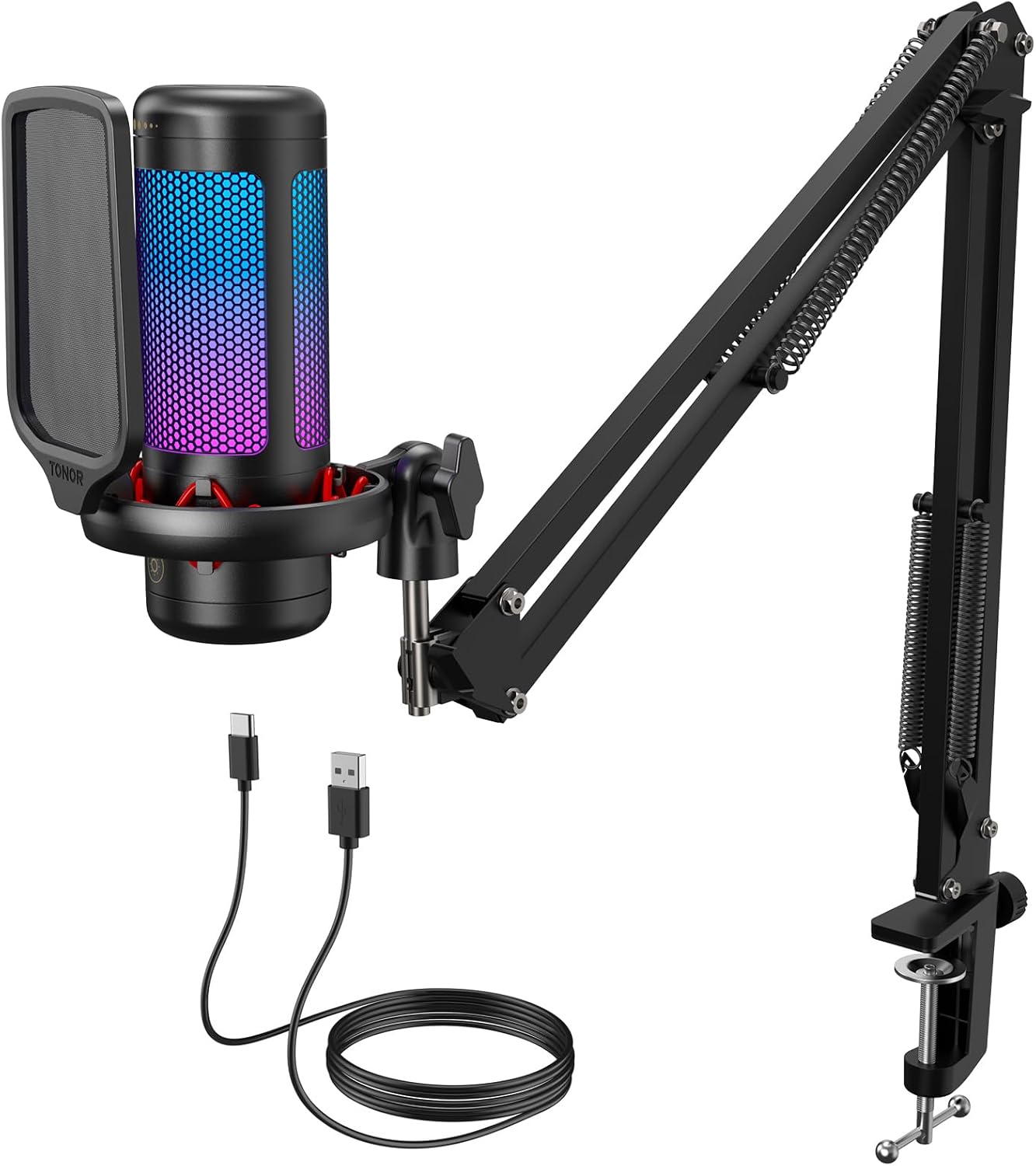 TONOR TC310+ USB Gaming Mic with Boom Arm
|
6.4/10 | Buy |
Logitech Blue Yeti USB Microphone with 4 Pickup Patterns
A broadcast-quality USB condenser mic built for creators across streaming, podcasting, and gaming. The standout feature is its four flexible pickup patterns, letting you handle everything from solo vocals to multi-person setups without swapping gear. Blue VO!CE effects and onboard controls round out a polished, plug-and-play experience on Mac and PC.
Pros
- Four pickup patterns (cardioid, omni, bidirectional, stereo) eliminate the need for multiple microphones
- Three-capsule array delivers clear, broadcast-quality sound across content types
- Blue VO!CE software provides professional vocal effects, modulation, and HD audio samples
- Onboard controls for gain, mute, pattern selection, and headphone volume let you manage audio without software
- No-latency monitoring and instant setup with included desktop stand or boom arm compatibility
Cons
- Requires Logitech G HUB download for full Blue VO!CE functionality, adding setup complexity
- Omnidirectional and stereo modes can pick up unwanted background noise in untreated spaces
- USB-only connection limits flexibility compared to XLR alternatives for advanced studio work
HyperX Quadcast 2 Frost USB Microphone
A solid USB microphone designed for streamers and podcasters, the Quadcast 2 Frost delivers clear audio capture with four selectable polar patterns and convenient tap-to-mute functionality. The removable shock mount and customizable blue LED lighting add flexibility for different streaming setups, though it's positioned at a mid-range price point without significant advantages over competing options at the same cost.
Pros
- Hi-res audio capture with 24-bit depth provides clear sound detail for streaming and podcasting
- Four polar patterns (cardioid, omnidirectional, bi-directional, stereo) adapt to different recording environments
- Tap-to-mute sensor prevents accidental audio leaks during live sessions
- Removable shock mount with spring-loaded pins fits standard 3/8" and 5/8" threading
- On-board multifunction knob and LED status indicators allow quick adjustments without software
- High user satisfaction with 4.7-star rating across 340 reviews
Cons
- Customizable lighting and advanced settings require HyperX NGENUITY software rather than pure hardware control
- Limited to blue LED lighting option, less versatile than RGB alternatives in the same price range
- No significant feature differentiation from the standard Quadcast 2 model at equivalent pricing
Blue Yeti Nano USB Microphone
A compact USB microphone built for creators who need broadcast-quality audio without taking up desk space. The Yeti Nano delivers 24-bit sound with dual pickup patterns and Blue VO!CE effects, making it versatile for streaming, podcasting, and video calls. Best suited for solo streamers and content creators on a tighter budget than the full-size Yeti.
Pros
- Compact design fits any desktop setup and looks professional on camera
- 24-bit audio quality with dual capsules for clear, detailed sound capture
- Two pickup patterns (cardioid and omni) cover most recording scenarios from solo streaming to multi-person calls
- No-latency headphone monitoring with onboard volume and mute controls for instant feedback
- Plug-and-play on Mac and PC with no drivers required, plus Blue VO!CE software for vocal effects
Cons
- Limited to two pickup patterns compared to higher-end models like Yeti X which offer four
- Gain control only available through desktop app, not physical onboard control
- Compass boom arm sold separately, adding extra cost for optimal positioning
MAONO PD200W Hybrid Wireless Podcast Mic
A versatile dynamic microphone built for podcasters and content creators who need flexibility across setups. The PD200W connects three ways, wireless, USB, or XLR, and includes dual-track recording for interviews, plus a 60-hour battery and 60-meter wireless range. Noise cancellation and a companion app let you shape your sound without a treated studio.
Pros
- Three connection modes (wireless, USB, XLR) adapt to different recording scenarios and equipment
- Dual-mic support records each speaker to separate tracks, simplifying podcast editing
- 60-hour battery life and 60-meter wireless range enable flexible, untethered recording
- Three-stage noise cancellation and cardioid design reduce background noise without a soundproof booth
- MaonoLink app provides preset modes and EQ/reverb control for personalized audio shaping
Cons
- No verified user reviews available yet, so real-world reliability and build quality remain unconfirmed
- Camera and Lightning wireless receivers sold separately, adding cost for multi-device setups
- Cardioid design may still pick up ambient noise in untreated spaces despite noise cancellation
FIFINE K688 Dynamic Microphone with Boom Arm
A dual-connectivity podcast mic that bridges USB convenience and XLR studio setups. The cardioid pattern and included boom arm make it solid for streaming, gaming, and voice work, though control features lock down when using XLR mode.
Pros
- Dual USB/XLR connectivity lets you plug into computers, mixers, or audio interfaces without swapping gear
- Sturdy metal boom arm with shock mount reduces desk vibrations and handling noise for cleaner recordings
- Tap-to-mute button, gain knob, and headphone monitoring jack offer in-depth control during USB sessions
- Cardioid pattern effectively isolates your voice from room noise and background interference
- Comes with windscreen and shock mount to minimize wind pops and low-frequency rumble
Cons
- All onboard controls (mute, gain, monitoring) become inactive when connected via XLR, requiring you to manage levels through a separate mixer or audio interface
- Mic functions only fully available within 2-6 inches of the source, limiting flexibility for certain recording setups
- Desktop clamp fits desks under 2 inches thick, which may exclude thicker or unconventional desk edges
MAONO PD200XS USB/XLR Dynamic Mic Kit
A dual-interface dynamic microphone designed for podcasters and streamers who need flexibility between USB and XLR connections. The PD200XS bundles a boom arm, shock mount, and software control for EQ adjustments and RGB customization, making it a complete setup for content creators on a budget.
Pros
- Dual USB/XLR connectivity lets you plug directly into a computer or connect to professional audio interfaces and mixers
- MAONO Link software enables EQ, compressor, and limiter adjustments plus 9 RGB color options in USB mode
- Complete kit includes boom arm, shock mount, and 2.5m USB cable, reducing need for separate purchases
- Cardioid polar pattern effectively isolates vocals and reduces background noise for gaming and streaming
- 40Hz-16kHz frequency response captures warm lows and crisp highs suitable for voice work
Cons
- XLR cable sold separately despite XLR connectivity being a key feature
- Software features only work in USB mode, limiting customization if you use XLR connection exclusively
- No information on noise floor or maximum SPL handling, making it unclear how it performs in loud environments
MAONO DGM20S Gaming Microphone with Noise Cancellation
A cardioid USB microphone designed for gaming and streaming with built-in noise cancellation and customizable RGB lighting. The plug-and-play setup works across Windows, Mac, and PlayStation without driver installation, making it accessible for casual streamers and competitive gamers alike. Comes bundled with a metal boom arm, shock mount, and pop filter for a complete recording solution.
Pros
- One-click noise cancellation effectively reduces background noise during gameplay and streaming
- 9 RGB lighting modes with independent control for custom aesthetic matching
- Complete accessory package includes boom arm, shock mount, pop filter, and dual USB/USB-C cables
- Zero-latency headphone monitoring and adjustable gain control for real-time audio management
- Plug-and-play compatibility with Windows, Mac, PS4, and PS5 without requiring drivers
Cons
- Not compatible with Xbox, limiting use for console-exclusive gamers
- No verified buyer reviews available to assess real-world reliability and longevity
- Cardioid pickup pattern may require careful microphone positioning to avoid capturing unwanted side noise
DJI Mic Mini Wireless Lavalier, 48-Hour Battery
A featherweight wireless lavalier system designed for creators who need reliable audio across extended shoots. The dual-transmitter bundle covers multi-speaker scenarios like interviews and livestreams, while two-level noise cancellation and automatic limiting handle unpredictable sound environments without fuss. Best suited for vloggers, content creators, and mobile videographers prioritizing portability and battery endurance.
Pros
- Ultralight 10g transmitter design minimizes on-camera presence and wearer fatigue
- Extended 48-hour total battery life with charging case eliminates frequent recharging during long production days
- Two-level noise cancellation adapts between quiet indoor and loud outdoor settings
- Automatic limiting prevents audio clipping, ensuring consistent recording quality without manual gain tweaking
- Dual transmitters included enable simultaneous two-speaker capture for interviews and conversations
- Broad 400m transmission range maintains stable connection in outdoor environments
Cons
- Not waterproof, requiring careful handling near moisture and limiting use in wet conditions
- Battery temperature constraints (-10 to 45°C) narrow operational range in extreme climates
- Requires DJI ecosystem integration or separate receiver for non-DJI devices, adding complexity to multi-platform workflows
TONOR TC310+ USB Gaming Mic with Boom Arm
A complete streaming kit that bundles a cardioid condenser mic with a flexible boom arm, metal clamp, and adjustable RGB lighting. Built for content creators who want plug-and-play convenience with tactile controls for muting and gain adjustment. Solid choice for gaming and podcasting on a budget.
Pros
- All-in-one kit includes boom arm and sturdy desk clamp, eliminating need for separate purchases
- Intuitive one-tap mute and rotary gain control for quick adjustments during live sessions
- Effective pop filter and upgraded shock mount reduce background noise and vibration
- Four RGB lighting modes with adjustable brightness to match gaming setup aesthetics
- High rating with 2,124 verified reviews indicates consistent user satisfaction
Cons
- Type-C connector requires full insertion or mute function may fail, adding setup friction
- Desk clamp limited to maximum 2.36 inches thickness and cannot grip curved desk edges
- Mobile compatibility requires separate USB adapters (not included), limiting portability
Streaming Microphones Buying Guide
Choosing a streaming microphone isn’t just about picking the one with the most five-star reviews. Your room acoustics, desk layout, connection preferences, and content type all play a role.
The subsections below walk you through the factors that genuinely matter, so you can match a mic to your workflow rather than the other way around.
Microphone Type: Condenser vs. Dynamic

Condenser microphones are the most common choice for home streamers because they capture a wide frequency range with impressive sensitivity. They pick up the subtle detail and air in a voice, which translates to a natural, professional sound on stream.
The trade-off is that condensers are more sensitive to background noise, including mechanical keyboard clicks, fan hum, and room reflections. If your recording space isn’t acoustically treated, that sensitivity works against you.
Dynamic microphones, by contrast, reject off-axis sound more aggressively.
They’re built to capture what’s directly in front of them while ignoring the rest of the room, which makes them a compelling option for streamers in noisy environments or shared living spaces.
Models like the MAONO PD200XS and the FIFINE K688 bring dynamic capsule performance to a budget-friendly kit, and both offer the hybrid USB/XLR flexibility discussed further below.
If you’re also investing in gaming-specific microphones, understanding condenser versus dynamic is the single most useful frame to carry into any buying decision.
Connection Type: USB vs. XLR

USB microphones are plug-and-play by design. They contain their own analog-to-digital converter, meaning you can connect directly to any PC or Mac without additional hardware. For the vast majority of solo streamers and podcasters, USB is the right starting point.
The Blue Yeti and Blue Yeti Nano are the most established examples in this segment, offering reliable drivers, low-latency headphone monitoring, and consistent performance across Windows and macOS.
XLR microphones require an audio interface or mixer to function, which adds cost and complexity but also unlocks a higher ceiling for audio quality and future upgrades.
Hybrid USB/XLR microphones, like the MAONO PD200XS and the FIFINE K688, bridge the gap: start with USB today and migrate to an XLR interface when you’re ready to level up your studio.
If you’re building out a full creator station, a dedicated studio lighting setup is often the next upgrade after audio, and hybrid mics make the audio side of that expansion seamless.
Polar Patterns and Pickup Behavior
A polar pattern describes which directions a microphone is sensitive to sound. Cardioid is the most practical pattern for streaming: it captures sound from the front and rejects sound from behind, reducing keyboard and ambient noise pickup.
Most microphones in this guide default to cardioid, which suits solo streaming, voiceover work, and podcasting without a guest.
The Blue Yeti stands apart by offering four selectable polar patterns, including bidirectional and omnidirectional modes. Bidirectional is particularly useful for two-person interview setups, while omnidirectional captures a full room for roundtable discussions.
If you anticipate hosting guests in person or want versatility for different recording scenarios, multi-pattern capability is worth seeking out.
For solo streamers who know they’ll always be speaking directly into the mic, a fixed cardioid capsule is simpler and often more focused.
On-Mic Controls and Monitoring
Live streamers benefit enormously from physical controls on the microphone itself. A tap-to-mute button lets you silence yourself instantly without alt-tabbing out of your game or stream software.
Gain control lets you adjust input sensitivity on the fly when ambient conditions change.
Headphone monitoring, where you plug headphones directly into the mic’s 3.5 mm jack, allows you to hear your own voice in real time with zero latency, which is invaluable for catching audio problems before they reach your audience.
Look for a well-spec’d gaming monitor alongside a mic with headphone monitoring for a stream setup where you can hear and see everything clearly.
The HyperX QuadCast 2 includes an illuminated tap-to-mute sensor and onboard gain control in an ergonomic form factor.
The MAONO DGM20S and TONOR TC310+ both offer tap-to-mute with RGB lighting feedback, so you can tell at a glance whether you’re live or muted.
These features may seem cosmetic, but on a busy streaming desk they eliminate costly mistakes.
Desk Mounting and Boom Arm Compatibility
Where and how your microphone is positioned affects both audio quality and ergonomics. A mic sitting on a fixed desktop stand picks up more table vibration and keyboard noise than one suspended from a boom arm.
Boom arms bring the capsule closer to your mouth, allowing you to reduce gain and thus reduce background noise capture.
Several kits in this guide, including the MAONO PD200XS kit, the FIFINE K688 bundle, and the TONOR TC310+ set, include a boom arm in the box, which meaningfully improves value for anyone buying from scratch.
Standard microphone threads are 5/8-inch, and nearly all boom arms on the market accommodate this size with included adapters. If you already own a boom arm or camera tripod, compatibility is rarely an issue.
For those building a mobile or travel-friendly setup, the DJI Mic Mini operates on an entirely different premise as a wireless lavalier system, making it the outlier in this group.
A sturdy mounting solution pairs naturally with other gear on your desk, much like how a reliable gaming chair or desk supports long session comfort.
Wireless vs. Wired: When Each Makes Sense

Wired USB and XLR microphones dominate desktop streaming setups because they offer consistent latency-free audio without battery management or signal dropout concerns. For the overwhelming majority of streamers recording at a fixed desk, a wired connection is the right call.
The cable runs are short, interference is a non-issue, and you never get cut off mid-stream because a battery died.
Wireless microphones earn their place in streaming when the creator is mobile, frequently moves around a room, or wants to use the same mic for outdoor video content and desktop recording.
The DJI Mic Mini, with its compact transmitter/receiver system and up to 48 hours of total use, fits this niche precisely.
It’s also a natural companion for cameras and smartphones, which makes it relevant to creators who shoot short-form content alongside their streams.
If your work extends to video production, pairing it with quality action camera footage or a capable travel camera makes the DJI Mic Mini a surprisingly versatile investment.
Why You Should Trust Us
REMOVU is an independent review publication. We do not accept payment for placement, and no brand can purchase a higher ranking or a better REMOVU Score.
Every product in this guide was evaluated by our editorial team against a consistent set of criteria covering audio quality, build, feature set, value, and user experience in a streaming or content creation context.
Each model receives a REMOVU Score on a 0 to 10 scale, which reflects our composite assessment across all criteria.
We do not conduct our own product trials; our evaluations are grounded in research, published data, expert review consensus, and verified buyer feedback.
Our team analyzes manufacturer specifications, synthesizes consensus from audio and streaming communities, and weighs verified buyer feedback from confirmed purchasers to produce scores that reflect real-world performance rather than spec-sheet marketing.
Sources include publicly available acoustic measurements, community discussions across major streaming platforms, and aggregated purchase-verified reviews.
REMOVU may earn a commission if you purchase through a link in this article. That relationship does not influence our rankings, scores, or product selection. We recommend only products that earn their place on merit, and any affiliate relationship is disclosed transparently here.
Final Thoughts
The streaming microphone market in 2026 offers genuinely excellent options at every tier within the budget range covered here.
Whether you’re a first-time streamer looking for a reliable plug-and-play condenser or an experienced creator ready for a hybrid USB/XLR dynamic with professional-grade noise rejection, there’s a compelling choice in this lineup.
Below are our editorial awards based on REMOVU Score and standout characteristics.
- Best Overall: Logitech Blue Yeti USB Microphone earns the top spot with the highest REMOVU Score in this group. Its four selectable polar patterns, robust Blue VO!CE processing suite, and proven track record across streaming, podcasting, and voiceover work make it the most versatile all-in-one choice for serious creators.
- Best for PC Streamers Who Want Premium Controls: HyperX QuadCast 2 Frost earns recognition for its thoughtfully designed on-board controls, LED mute indicator, and removable shock mount. It’s a natural fit for the gaming and streaming desktop where tactile feedback matters as much as audio quality.
- Best Compact USB Pick: Logitech Blue Yeti Nano delivers a focused, cardioid-optimized experience in a smaller footprint, making it ideal for streamers with limited desk space who still want Blue’s heritage of reliable USB audio.
- Best Hybrid Wireless Option: MAONO PD200W Hybrid Wireless Podcast Microphone stands out for combining dynamic capsule performance with wireless capability and software control, serving creators who need flexibility between desktop recording and on-the-move content.
- Best Budget Dynamic Kit: FIFINE K688 Podcast Microphone Kit provides USB/XLR dual connectivity, a headphone jack, mute button, and a boom arm in a package priced well below the segment average, making it the most accessible entry point for anyone serious about noise rejection on a tighter budget.
Whichever mic you choose, pairing it with the right hardware makes a meaningful difference. A capable gaming desktop ensures low-latency audio processing, and a high-refresh-rate panel from our gaming monitors under budget guide keeps your stream dashboard responsive.
For creators expanding beyond audio, drawing tablets and studio lighting kits are natural next steps in building a complete content creation workspace.
Frequently Asked Questions
Do I need an audio interface to use these microphones?
Most of the microphones in this guide connect via USB and work without any additional hardware. You simply plug them into your PC or Mac and they appear as an audio input immediately.
The hybrid USB/XLR models, including the MAONO PD200XS and FIFINE K688, give you the option to use an audio interface later if you want to upgrade, but USB mode works perfectly out of the box.
If you’re already invested in a high-performance gaming PC, the onboard USB controller is more than sufficient for these microphones.
What’s the difference between a condenser and a dynamic microphone for streaming?
Condenser microphones are more sensitive and capture more detail, making them excellent in quiet, acoustically treated spaces. Dynamic microphones reject off-axis noise more aggressively, which is an advantage in louder or untreated rooms.
For most streamers gaming at home with mechanical keyboards and PC fans nearby, a dynamic like the FIFINE K688 or MAONO PD200XS can actually sound cleaner on stream than a sensitive condenser in the same environment.
Our gaming microphone guide explores this trade-off in depth for players who prioritize voice chat clarity.
Is the Blue Yeti still worth buying in 2026?
Yes.
The Blue Yeti remains the benchmark USB condenser for streaming and podcasting for good reason: four polar patterns, hardware gain control, headphone monitoring, and the Blue VO!CE software suite combine in a package that newer competitors haven’t meaningfully displaced at the same price tier.
It earns the highest REMOVU Score in this group, which reflects both its outright audio performance and its breadth of use cases.
The Blue Yeti Nano is the right choice if you want a smaller form factor and are comfortable with cardioid-only recording.
Can I use one of these microphones for video content, not just live streaming?
Absolutely. Every wired USB microphone in this list works well for pre-recorded video voiceover, YouTube narration, and podcast recording.
The DJI Mic Mini is the most versatile pick for creators who move between desktop recording and on-location video, thanks to its wireless transmitter system and compatibility with cameras and smartphones.
If you’re building a multi-camera video setup, pairing a wireless lavalier with a solid video tripod or compact action camera unlocks a lot of production value at accessible cost.
Does RGB lighting on a microphone affect audio quality?
No. RGB lighting is purely cosmetic and has no effect on the capsule, preamp circuit, or analog-to-digital conversion in any microphone.
Models like the MAONO DGM20S, TONOR TC310+, and HyperX QuadCast 2 include RGB for aesthetic appeal on camera and as a visual mute status indicator.
If lighting doesn’t matter to your setup, it’s a reasonable feature to deprioritize and look more closely at capsule type, polar pattern, and control layout instead.
A clean, well-lit desk matters more to your stream’s look than any LED ring on a microphone, and investing in proper studio lighting will always have more on-camera impact than microphone RGB.
How important is a boom arm for streaming?
More important than most beginners expect.
Placing a microphone on a fixed desk stand puts the capsule at keyboard level, which means it captures more surface vibration and is farther from your mouth, requiring higher gain and thus more background noise.
A boom arm suspends the mic near mouth level, lets you reduce gain, and isolates the capsule from desk vibrations. Several kits in this guide include a boom arm in the box, which is excellent value.
If you’re also optimizing your workspace, pairing your audio gear with an ergonomic setup from our gaming chairs and desks category makes long streaming sessions significantly more comfortable.
About the author
Adrian is REMOVU's home theater speaker writer, matching bookshelf, tower, and surround options to real rooms and receivers. He helps readers build a cohesive system that sounds bigger than its price.