The 8 Best Nas Devices for Home
From two-bay backup hubs to four-bay media servers, these home NAS devices give you private, always-on storage without the recurring cost of cloud subscriptions.
 By Enrique Sullivan
Updated July 26, 2026
By Enrique Sullivan
Updated July 26, 2026

A home NAS (Network Attached Storage) device is one of the smartest investments you can make for your digital life.
Whether you’re a photographer with terabytes of raw files, a family that wants a central place for photos and videos, or a home-office worker who needs reliable backups without a monthly cloud subscription, a NAS gives you private, always-on storage that you fully control.
Unlike external drives that only work when plugged in, a NAS sits on your home network around the clock, accessible from any device in the house or even remotely over the internet.
As cloud storage costs rise and privacy concerns grow, more households are turning to NAS devices to reclaim ownership of their data.
Choosing among the dozens of NAS devices on the market can be daunting, so REMOVU’s editorial team researched the field thoroughly, synthesizing manufacturer specifications, expert review consensus across the industry, and verified buyer feedback to identify the picks most worth your money.
Our coverage spans budget-friendly two-bay enclosures for first-time buyers all the way to high-performance four-bay desktops suited for power users and small home offices.
If you also manage a broader home tech setup, our guides to mesh Wi-Fi systems, Wi-Fi routers, and external drives round out the picture. Read on for our top picks.
| Award | Product | REMOVU Score About REMOVU ScoreThe REMOVU Score is our own rating from 0 to 10, based on performance, design and build, ease of use, and value. It reflects independent research and is never influenced by manufacturers, retailers, or affiliate commissions. Learn more › | Price | |
|---|---|---|---|---|
| Best Overall |
 Synology DS225+ 2-Bay NAS with Intel Celeron J4125
|
9.1/10 | Buy | |
| Best Budget |
 Synology DS223 2-Bay NAS
|
8.2/10 | Buy | |
 Synology DS223j 2-Bay NAS
|
7.8/10 | Buy | ||
| Best Value |
 UGREEN DXP2800 2-Bay NAS with Intel N100
|
7.5/10 | Buy | |
 UGREEN DXP4800 Plus 4-Bay NAS with Intel Pentium Gold CPU
|
6.9/10 | Buy | ||
| Best Premium |
 UGREEN DXP4800 GT 4-Bay NAS with Dual 10GbE
|
7.4/10 | Buy | |
 QNAP TVS-h474 4-Bay NAS with Pentium Gold CPU
|
7.1/10 | Buy | ||
 Buffalo TeraStation 3420RN 4-Bay 8TB Rackmount NAS
|
6.2/10 | Buy |
Synology DS225+ 2-Bay NAS with Intel Celeron J4125
A compact, budget-friendly NAS that consolidates home storage, backups, and media streaming with Synology's polished DSM interface. Best suited for individuals and small households seeking private cloud control without monthly subscription fees.
Pros
- Excellent software experience: DSM is considered the most user-friendly NAS operating system available, with seamless setup and point-and-click management
- Works with standard third-party drives despite past compatibility concerns, verified by multiple reviewers using non-Synology branded HDDs
- Handles home essentials reliably: photo/music/video storage, multi-device backups, Plex media serving, and lightweight Docker applications
- Compact footprint and energy-efficient design suitable for home offices and small deployments
- Strong customer satisfaction: 4.7/5 rating across 178 reviews, with consistent praise for ease of use and dependable performance
Cons
- Limited raw processing power: Intel Celeron J4125 lacks hardware video transcoding, so simultaneous remote streams or transcoding unusual formats may cause performance issues
- Base 2GB RAM is tight for advanced workloads; expansion to 6GB requires additional purchase
- Single 2.5GbE port (plus one 1GbE port) limits networking flexibility compared to higher-tier 25+ series models with dual 2.5GbE ports
Synology DS223 2-Bay NAS
Entry-level 2-bay NAS that consolidates files from multiple devices into a private cloud with license-free backup tools for Windows, Mac, Android, and iOS. Delivers intuitive setup and reliable performance for home and small office use, though limited processor power may constrain advanced features.
Pros
- Smooth out-of-box setup with DSM interface that works across browsers and devices
- License-free backup and sync solutions eliminate subscription costs for cloud alternatives
- Supports mixed drive sizes via SHR without requiring matching capacity
- Silent, reliable operation with 2-year warranty and ongoing software updates
- Verified buyers praise fast LAN access, secure remote QuickConnect access, and stable performance for family backups
Cons
- Weak Realtek processor (1.7GHz quad-core) limits transcoding, heavy concurrent loads, and advanced features like video processing
- QuickConnect remote access and Synology Drive sync reported as slow or unresponsive by some users, reducing usability for remote collaboration
- Requires learning curve and network knowledge to unlock full functionality beyond basic file storage; setup can be time-consuming compared to external USB drives
Synology DS223j 2-Bay NAS
A compact, affordable network storage solution that doubles as a private cloud hub for backup, file sharing, and surveillance. Buyers praise its intuitive interface, reliable performance for family photo backups and local media serving, though it requires some tech comfort for advanced features.
Pros
- Easy initial setup and intuitive web interface compared to competitors like WD MyCloud
- Reliable performance streaming 4K content and handling multiple simultaneous tasks
- Quiet operation suitable for living rooms, with configurable power schedules
- Strong ecosystem of built-in apps (Photos, Surveillance Station, file sharing protocols)
- 2-year warranty backed by ongoing software updates
Cons
- Drives not included; requires separate purchase of compatible NAS-rated drives (WD Red, Seagate IronWolf recommended)
- Software interface has learning curve for non-tech users; advanced configuration requires IT familiarity
- Limited to Synology's approved application catalog; no sideloading of third-party apps
UGREEN DXP2800 2-Bay NAS with Intel N100
A compact 2-bay NAS built for content creators and home users who want local storage without cloud subscriptions. Features Intel N100 quad-core CPU, 8GB DDR5 RAM, dual M.2 NVMe slots, and 2.5GbE connectivity for fast transfers up to 312.5MB/s.
Pros
- Fast setup and intuitive software even for NAS beginners
- Strong CPU performance handles 4K transcoding and AI tasks like Immich effortlessly
- Two M.2 NVMe slots let you cache metadata and databases for responsive app performance
- Metal build feels premium compared to plastic competitors
- One-time purchase model eliminates ongoing cloud subscription fees
Cons
- Single RAM slot means upgrading requires replacing the 8GB module rather than adding another; maximum expandable to 16GB
- Chassis can amplify HDD vibration noise during heavy writes with large drives, though reviewers note silicone pads resolve this
- Setup documentation lacks beginner-friendly network configuration details; requires outside research for non-technical users
UGREEN DXP4800 Plus 4-Bay NAS with Intel Pentium Gold CPU
A powerful 4-bay desktop NAS built for small offices and media enthusiasts, featuring Intel 5-core processing, dual network ports (10GbE and 2.5GbE), and support for Docker and virtual machines. Strong choice for backup, Plex streaming, and centralized storage without breaking the bank.
Pros
- Dual high-speed network ports (10GbE and 2.5GbE) enable rapid file transfers and flexible connectivity
- Upgradeable 8GB DDR5 RAM and two M.2 NVMe slots for caching boost performance significantly
- Supports Docker and virtual machines natively, making it ideal for running Plex servers and custom applications
- User-friendly UGOS interface with straightforward setup, plus AI-powered photo organization and cross-platform access (Windows, macOS, Linux, iOS, Android)
- Up to 144TB capacity potential with broad drive compatibility across Western Digital, Seagate, Toshiba, and others
Cons
- Drives not included; requires separate purchase of compatible HDDs/SSDs, adding to total investment
- Theater and Music apps have documented issues (theater struggles with numbered filenames; music app ignores track numbers), limiting usefulness for some media libraries
- Limited official support for 20TB+ drive capacities, restricting future expansion flexibility
UGREEN DXP4800 GT 4-Bay NAS with Dual 10GbE
A capable 4-bay NAS built around an AMD R2514 processor and dual 10GbE connectivity, designed for creators, small teams, and home labs willing to invest time learning NAS fundamentals. Strong hardware value with an improving software platform, though the OS runs on embedded eMMC rather than a dedicated drive.
Pros
- Exceptional price-to-performance ratio compared to enterprise competitors
- Flexible hardware foundation supports multiple OS options (UGOS Pro, TrueNAS, etc.)
- Quiet operation (35-38 dB typical) with solid aluminum chassis and well-engineered drive trays
- Dual 10GbE networking enables fast multi-user workflows and 4K/8K editing from local storage
- UGOS Pro software adds Docker containers, AI photo indexing, and surveillance features quickly
Cons
- Operating system boots from 64GB eMMC rather than upgradeable SSD, limiting OS flexibility and endurance
- Steep learning curve for first-time NAS users; UGOS Pro lacks detailed diagnostics and could provide clearer guidance on RAID, storage pools, and drive health
- ECC RAM capability advertised but not included by default; non-ECC DDR4 stick shipped, requiring separate purchase for error correction benefits
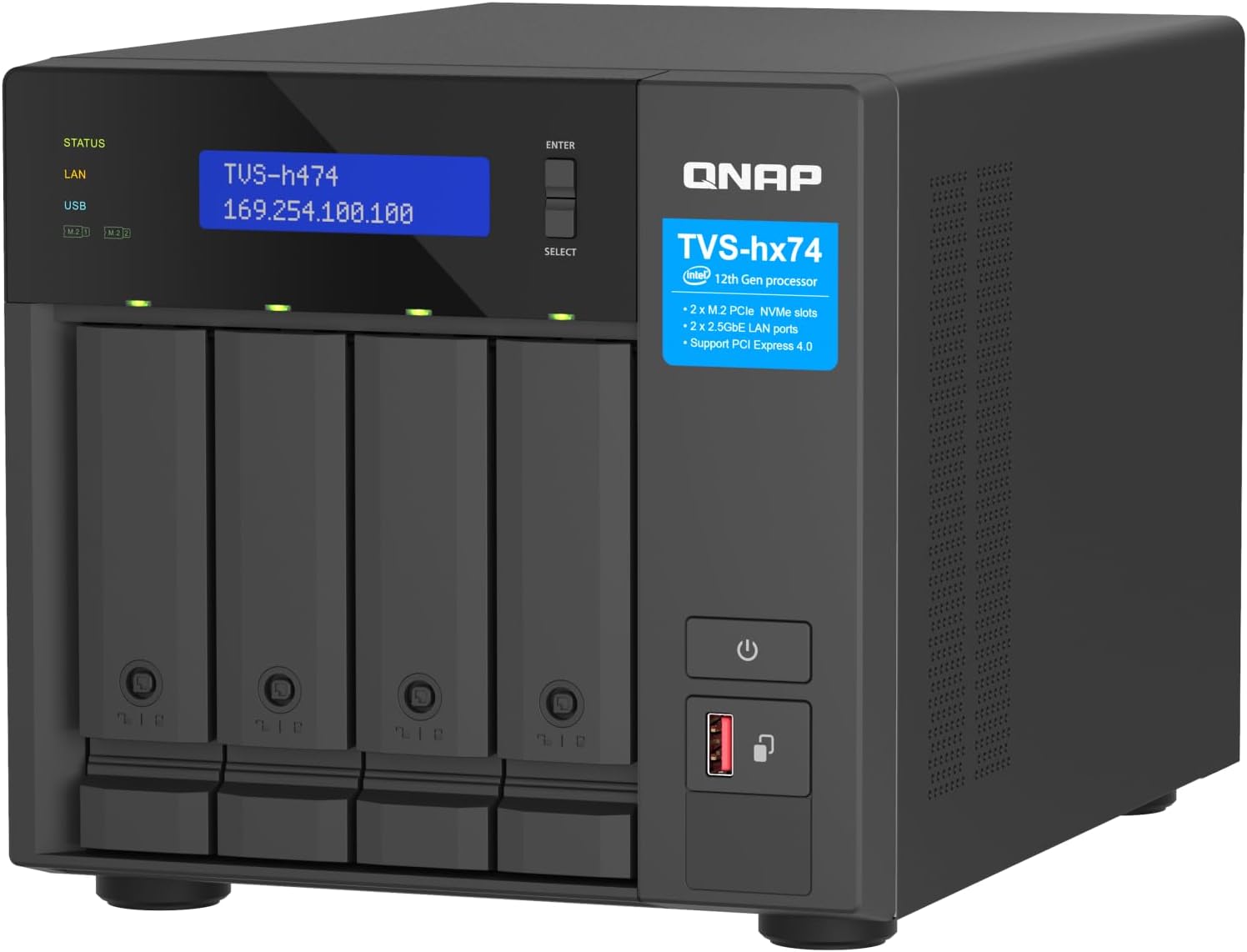
QNAP TVS-h474 4-Bay NAS with Pentium Gold CPU
A compact 4-bay NAS built for small teams and home offices seeking centralized file storage with virtual machine support. The Pentium Gold processor and dual 2.5GbE ports deliver solid performance for file sharing and backup workflows, though the base CPU is modest and requires drive investment.
Pros
- Expandable design allows CPU/RAM upgrades and flexible PCIe connectivity for future growth
- Native ZFS support with advanced data integrity features including block-level deduplication and near-limitless snapshots
- Dual 2.5GbE ports accelerate file transfers without requiring new cabling infrastructure
- Strong security framework with encryption, firewall rules, and hybrid cloud backup integration
- Verified buyer confirms effectiveness for hosting virtual machines with adequate upgrade path
Cons
- Base Pentium Gold processor is entry-level; CPU-heavy workloads benefit from i3/i5 upgrades
- Comes diskless, requiring separate SATA drives to be purchased and installed
- Single review on record limits real-world long-term reliability feedback from diverse use cases
Buffalo TeraStation 3420RN 4-Bay 8TB Rackmount NAS
A fully-populated rackmount NAS built for small business environments needing reliable 24/7 storage with minimal setup. Ships with NAS-grade drives pre-configured in RAID, 256-bit encryption, and cloud sync capabilities across S3, Dropbox, and Azure.
Pros
- Fully populated 4-bay unit with 8TB usable capacity (in RAID 5) eliminates expansion complexity for small teams
- Closed operating system architecture reduces security exposure compared to general-purpose NAS platforms
- NAS-grade drives and RAID pre-configuration provide immediate reliability without technical setup
- Flexible RAID options: RAID 1, 5, 6, or 0 allow users to balance redundancy versus capacity based on needs
- Comprehensive warranty and data recovery service provide peace of mind for business-critical storage
Cons
- Limited to 1GB RAM and 1.4 GHz quad-core processor, which may constrain performance under heavy concurrent access compared to higher-tier models
- Single 2.5 GbE port (plus one 1GbE fallback) limits bandwidth for multi-user environments approaching 30 users
- No built-in anomaly detection or snapshot capabilities, requiring external monitoring tools for advanced threat detection
NAS Devices for Home Buying Guide
Picking the right home NAS comes down to a handful of decisions that compound on each other: how many drives you need, how much processing power you want, which software ecosystem suits you, and how fast your home network actually runs.
The sections below walk through each criterion so you can match a device to your real-world situation rather than overpay for features you will never use.
Number of Bays and Storage Capacity

Bay count is the single most important structural decision. A two-bay NAS is the right starting point for most households.
It lets you run two drives in a RAID 1 mirror for automatic data redundancy, meaning one drive can fail without any data loss.
Models like the Synology DS223 and DS223j are purpose-built for this use case and strike a sensible balance between price and protection for personal or small-office backup needs.
A four-bay unit opens up more sophisticated RAID configurations, higher raw capacity, and better long-term expandability.
If your household streams 4K video, runs a Plex or Jellyfin media server, or you anticipate accumulating large creative project archives, a four-bay device like the UGREEN DXP4800 Plus or QNAP TVS-h474 gives you room to grow without replacing the enclosure.
Bear in mind that more bays generally mean higher upfront cost and increased power draw, so only go larger if you genuinely need the headroom.
Also remember that most home NAS units sold as "diskless" require you to purchase compatible hard drives separately, which is an additional line item in your budget.
As a rule of thumb, plan for twice the storage you think you need today. Raw video files, photo libraries, and system backups grow faster than most people expect.
Buying one extra drive bay now costs far less than replacing an entire enclosure two years from now.
CPU Performance and RAM

The processor inside a NAS determines what tasks it can handle simultaneously. Entry-level ARM or low-power x86 chips are perfectly capable for file backup, photo syncing, and basic media serving.
However, if you want hardware-accelerated 4K video transcoding, multiple simultaneous users streaming different files, or you plan to run Docker containers and virtual machines, you need a more capable processor.
The Synology DS225+, our top-rated pick, ships with an Intel CPU that handles hardware transcoding natively, an important capability that ARM-based alternatives cannot match reliably.
RAM matters alongside CPU. Most NAS devices ship with 2 GB to 8 GB of RAM. Models with 8 GB DDR5, like the UGREEN DXP2800 and DXP4800 Plus, handle multitasking comfortably and future-proof the system if you add more services over time.
Check whether RAM is soldered or user-upgradeable before you buy, especially if your workflow involves memory-intensive applications like surveillance camera recording or database hosting.
NAS devices with a 4K HDMI output, such as the UGREEN lineup, can double as compact media players or low-power home servers when connected directly to a display.
This is a niche but genuinely useful feature for enthusiasts who want a single-box solution for a home theater or creative workstation.
Pairing your NAS setup with capable network switches ensures you get full throughput to every device on your network.
Network Speed: 1 GbE vs. 2.5 GbE vs. 10 GbE
Network throughput is frequently the real bottleneck in a home NAS setup, not the hard drives themselves. Most older home routers top out at 1 Gigabit Ethernet, which delivers roughly 100 MB/s of real-world transfer speed.
That is adequate for streaming HD video or syncing photos in the background, but it can feel slow when copying large archives or backing up multiple computers simultaneously.
2.5 GbE ports, now standard on mid-range models like the UGREEN DXP2800 and QNAP TVS-h474, roughly double throughput if your router or switch supports the same standard.
10 GbE, found on the UGREEN DXP4800 GT and QNAP TVS-h474, is genuinely useful for workstation-level file transfers, editing directly from the NAS, or serving a small team in a home-office environment.
However, 10 GbE requires a compatible switch or direct-attach cable, which adds to total system cost. Evaluate your current network infrastructure before prioritising port speed in your buying decision.
Our roundup of network switches can help you find a compatible switch if you plan to upgrade.
Software Ecosystem and App Support

Hardware specs only tell half the story. The operating system and app ecosystem running on your NAS determines day-to-day usability.
Synology’s DiskStation Manager (DSM) is widely regarded as the most polished NAS operating system available, offering a desktop-like web interface, a curated package centre, robust mobile apps, and excellent documentation.
For families or first-time NAS buyers who want something that works reliably without deep configuration, any Synology device, including the DS223, DS223j, and DS225+, is the lowest-friction choice.
QNAP’s QTS operating system is more powerful and flexible in some respects, supporting virtualisation and advanced networking features, but it has a steeper learning curve and has historically had a more uneven security track record.
UGREEN runs its own UGOS Pro platform, which is newer and improving quickly, and its hardware specs are genuinely competitive at the price.
Buffalo’s TeraStation line targets SMB environments and uses a stripped-down, utility-focused interface that suits IT administrators more than home users.
If you already have a Synology in the house, adding another Synology device lets you centralise management, which is a practical benefit worth factoring in.
If you rely on a mini PC as your main home-office machine, pairing it with a NAS running a capable OS gives you a powerful local server setup without enterprise-level complexity.
Expandability: M.2 NVMe Slots and PCIe
Several modern home NAS devices now include M.2 NVMe slots for SSD caching or all-flash storage.
NVMe cache dramatically accelerates random read and write operations, making the NAS feel snappier when many small files are accessed simultaneously, such as during photo culling or database queries.
The UGREEN DXP2800, DXP4800 Plus, and DXP4800 GT all include two M.2 slots, which is a standout feature at their respective price tiers.
The QNAP TVS-h474 goes further with PCIe Gen 4 expandability, allowing you to add 10 GbE or 25 GbE networking cards, additional USB ports, or even a GPU for specific workloads.
This level of modularity is unusual in a home NAS and is more relevant for power users or home-lab enthusiasts than for the average household.
If you don’t foresee needing to expand connectivity beyond what ships in the box, you can safely deprioritise PCIe expansion and redirect that budget toward better-matched drives or an upgraded router.
Those building a full-featured home media setup may also find value in pairing their NAS with a capable QLED TV for direct playback from their media server.
Use-Case Fit: Backup Hub vs. Media Server vs. Power User
The best home NAS is the one that fits your primary workload.
If your main goal is centralised backup for household computers and phones, a diskless two-bay enclosure running Synology DSM with Hyper Backup is nearly impossible to beat for simplicity.
The DS223 and DS223j both serve this role well, differing mainly in their processor speed and maximum RAM, which matters more for multimedia or multi-user environments.
If you want a private media server for streaming your own movie and photo library to televisions, phones, and tablets around the house, you need hardware transcoding support.
The Synology DS225+ is the clear leader here, with its Intel processor enabling smooth 4K remuxing and on-the-fly transcoding in Synology Photos and Plex.
Content creators who work with large video or photography archives will particularly benefit from faster network ports and NVMe cache, which is why the UGREEN DXP2800 at a mid-range price earns its place in the lineup.
For photographers already investing in full-frame mirrorless cameras or high-resolution optics, a NAS with ample storage and fast network transfer is a natural companion for managing and backing up large RAW archives.
Power users and home-lab enthusiasts who run Docker, virtual machines, or self-hosted services should look at the UGREEN DXP4800 GT or QNAP TVS-h474, which offer the CPU headroom, RAM, and connectivity options those workloads demand.
The Buffalo TeraStation 3420RN is the most niche pick in this lineup, designed for rackmount small-business deployments rather than typical home use, and it includes drives pre-installed, which accounts for its higher price relative to the diskless alternatives.
Why You Should Trust Us
REMOVU is an independent review publication. We have no manufacturer relationships that influence our editorial decisions, and our recommendations are built on structured research rather than sponsorship.
Every product in this guide was evaluated against a consistent set of criteria covering hardware specifications, software ecosystem quality, network performance, expandability, and verified owner satisfaction.
Each model receives a REMOVU Score on a scale of 0 to 10, enabling direct comparison across very different price tiers.
We do not conduct our own product trials; our evaluations are grounded in research, published data, expert review consensus, and verified buyer feedback.
We synthesize information from manufacturer datasheets, industry-standard benchmark publications, and aggregated long-term owner feedback to reach conclusions that reflect real-world performance rather than a single reviewer’s experience on a single day.
Transparency on affiliate relationships: REMOVU may earn a commission if you purchase through links on this page. That relationship does not affect our rankings, scores, or selections in any way. Products are ranked on merit.
A higher-priced product earns a higher REMOVU Score only if the evidence genuinely supports it, regardless of any potential commission difference. Our editorial team and any affiliate arrangements are kept entirely separate.
Final Thoughts
The home NAS market in 2026 offers something genuinely useful at every budget, from simple two-bay backup hubs to feature-rich four-bay workhorses with 10 GbE networking and NVMe caching.
After synthesizing specifications, expert review consensus, and verified buyer feedback across all eight devices in this guide, here are our top designations:
- Best Overall: Synology DS225+ Private Cloud Media Server earns the top REMOVU Score in this group thanks to its Intel CPU with hardware transcoding, polished DSM software, and versatility as both a backup hub and a private media server for families and content creators alike.
- Best Home Backup Hub: Synology DS223 is the most well-rounded two-bay option for households that want reliable, low-maintenance data protection with a mature app ecosystem and strong long-term support.
- Best Budget Pick: Synology DS223j delivers the trusted Synology DSM experience at the most accessible price in the lineup, making it the smartest entry point for first-time NAS buyers on a tighter budget.
- Best for Content Creators and Enthusiasts: UGREEN NAS DXP2800 stands out with its Intel N100 quad-core CPU, DDR5 RAM, dual M.2 NVMe slots, and 4K HDMI output, offering a hardware specification sheet that punches well above its price tier for creative workloads.
- Best for Power Users and Home Labs: UGREEN NAS DXP4800 GT pairs an AMD R2514 CPU with dual 10 GbE ports and dual M.2 slots, making it the strongest choice for home-lab enthusiasts, self-hosted service runners, and anyone who needs maximum throughput in a four-bay desktop chassis.
Whatever your use case, the options above cover the full range from straightforward family backup to high-performance home server.
If you are still deciding on other parts of your home network setup, our guides to cable modems and Wi-Fi routers are worth a read before you finalise your purchase.
For a broader look at everything in the networking and storage category, visit our Networking and Storage hub.
Frequently Asked Questions
Do I need a NAS if I already pay for cloud storage?
Cloud storage and a home NAS serve complementary roles. Cloud services are convenient for access anywhere but come with recurring subscription costs, upload speed limits, and privacy trade-offs.
A NAS gives you a one-time hardware investment for local storage you fully own and control, with no monthly fees and no bandwidth throttling on your home network.
Many users run both: the NAS as the primary fast local copy, and a cloud service as an offsite backup for critical files. This is sometimes called a 3-2-1 backup strategy (three copies, two media types, one offsite).
What is RAID and do I need it for a home NAS?
RAID (Redundant Array of Independent Disks) is a method of combining multiple drives so that the failure of one drive does not result in data loss. In a two-bay NAS running RAID 1, both drives mirror each other continuously.
RAID is strongly recommended for any NAS storing irreplaceable data such as family photos, financial records, or work files.
It is important to understand that RAID is not a backup strategy on its own; it protects against drive failure but not against accidental deletion, ransomware, or physical damage to the device.
Always maintain at least one additional backup copy elsewhere.
Can I use a NAS as a media server for my TV?
Yes, and it is one of the most popular home NAS use cases.
Most NAS devices support media server software such as Plex, Jellyfin, or Emby, which organise your movie and music library and stream it to smart TVs, streaming sticks, phones, and tablets.
The key requirement for smooth 4K streaming is hardware transcoding support, which requires an Intel or compatible CPU. The Synology DS225+ is the standout pick here because its Intel processor handles on-the-fly format conversion without taxing the system.
ARM-based NAS devices can serve files directly (remux) but may struggle with transcoding demanding formats in real time. Pairing a media-focused NAS with a high-quality display elevates the experience further for photo and video review workflows.
How difficult is it to set up a home NAS for the first time?
Setup difficulty varies significantly by brand. Synology has the most beginner-friendly setup experience: plug in drives, power on, navigate to the device’s IP address in a browser, and follow a guided wizard that takes most users under 30 minutes to complete.
QNAP is similarly browser-based but has more configuration options that can overwhelm newcomers. UGREEN’s UGOS Pro is improving rapidly and is reasonably accessible for tech-comfortable users. The Buffalo TeraStation targets IT professionals and assumes familiarity with network storage concepts.
For most households, a Synology two-bay device remains the lowest-friction path to a working home NAS.
If setting up a home-lab environment is something you enjoy, pairing your NAS with a Thunderbolt dock or a capable mini PC can expand what your home network can do considerably.
Are diskless NAS devices worth it compared to bundles with drives included?
Diskless NAS enclosures require you to purchase compatible hard drives separately, which adds a step but gives you full control over drive brand, capacity, and type (CMR vs. SMR, NAS-rated vs. desktop).
NAS-optimised drives from manufacturers like Seagate IronWolf or Western Digital Red are designed for always-on operation and vibration tolerance in multi-drive enclosures, and buying them separately often lets you match the drive to your workload more precisely.
Pre-loaded bundles like the Buffalo TeraStation 3420RN eliminate that decision but limit your choice of drive quality and capacity tier.
For most home users, buying a diskless enclosure and pairing it with NAS-grade drives from a reputable manufacturer delivers better long-term value and reliability than a pre-loaded bundle at a similar price point.
What home network speed do I need to get the most out of a NAS?
A standard gigabit home network is sufficient for streaming HD and 4K media, syncing photos and documents, and running automated backups in the background.
If you plan to edit large video files directly from the NAS, transfer multi-gigabyte archives frequently, or serve multiple simultaneous users, a 2.5 GbE or 10 GbE network switch and matching NAS ports will make a noticeable difference.
Upgrading your network infrastructure does not have to be expensive; affordable 2.5 GbE switches are widely available, and many modern routers include at least one 2.5 GbE port.
Check our mesh Wi-Fi systems guide if your household relies on wireless backhaul rather than wired Ethernet runs.
About the author
Enrique writes about projectors for REMOVU, weighing brightness, resolution, and throw distance for home and portable use. He helps readers get a true big-screen experience that no TV matches.