The 12 Best Home Nas
Private cloud storage at home beats paying forever for subscriptions. We compared two-bay beginner picks to eight-bay powerhouses, weighing software quality, CPU performance, and network speed to find the best home NAS for every type of user.
 By Katherine Perez
Updated July 26, 2026
By Katherine Perez
Updated July 26, 2026

A home NAS (Network Attached Storage) is one of the most practical upgrades a household can make to its digital life.
Whether you are juggling terabytes of RAW photos, running a personal media server, backing up multiple laptops automatically, or simply tired of paying recurring fees to cloud storage services, a NAS gives you private, always-on storage that you fully control.
The category has matured considerably, with options ranging from affordable two-bay enclosures aimed at first-time buyers to powerful eight-bay units with 10GbE networking and hardware transcoding suited to enthusiasts and small home offices.
Picking the wrong device, however, means wasted money on hardware you cannot fully utilise or software that frustrates you from day one.
To help you cut through the noise, REMOVU researched and compared every major home NAS available right now, analysing manufacturer specifications, published benchmark data, expert review consensus from the networking and storage community, and verified buyer feedback from confirmed purchasers.
Our picks span a wide range of budgets and use cases, from the capable budget entry points all the way up to prosumer hardware for power users who want SSD caching, multi-gigabit networking, and HDMI output.
Read on to see which models earned a place on our shortlist, and why one model sat clearly above the rest.
| Award | Product | REMOVU Score About REMOVU ScoreThe REMOVU Score is our own rating from 0 to 10, based on performance, design and build, ease of use, and value. It reflects independent research and is never influenced by manufacturers, retailers, or affiliate commissions. Learn more › | Price | |
|---|---|---|---|---|
| Best Overall |
 Synology DS225+ 2-Bay NAS with Intel Celeron J4125
|
9.1/10 | Buy | |
| Best Premium |
 Synology DS925+ 4-Bay NAS
|
8.6/10 | Buy | |
| Best Budget |
 Synology DS223 2-Bay NAS
|
8.2/10 | Buy | |
 Synology DS223j 2-Bay NAS
|
7.8/10 | Buy | ||
 UGREEN DXP4800 GT 4-Bay NAS with Dual 10GbE
|
7.4/10 | Buy | ||
 TerraMaster F2-425 2-Bay NAS with Intel Quad-Core
|
7.3/10 | Buy | ||
| Best Value |
 Asustor AS5402T 2-Bay NAS with 4x M.2 NVMe Slots
|
7.1/10 | Buy | |
 UGREEN DXP4800 Plus 4-Bay NAS with Intel Pentium Gold CPU
|
6.9/10 | Buy | ||
 Synology DS620slim 6-Bay 2.5" NAS
|
6.8/10 | Buy | ||
 UGREEN DXP8800 Plus 8-Bay NAS, Intel i5 10-Core
|
6.5/10 | Buy | ||
 UGREEN DH2300 2-Bay NAS, 64TB Capacity
|
6.3/10 | Buy | ||
 Buffalo TeraStation 3420RN 4-Bay 8TB Rackmount NAS
|
6.2/10 | Buy |
Synology DS225+ 2-Bay NAS with Intel Celeron J4125
A compact, budget-friendly NAS that consolidates home storage, backups, and media streaming with Synology's polished DSM interface. Best suited for individuals and small households seeking private cloud control without monthly subscription fees.
Pros
- Excellent software experience: DSM is considered the most user-friendly NAS operating system available, with seamless setup and point-and-click management
- Works with standard third-party drives despite past compatibility concerns, verified by multiple reviewers using non-Synology branded HDDs
- Handles home essentials reliably: photo/music/video storage, multi-device backups, Plex media serving, and lightweight Docker applications
- Compact footprint and energy-efficient design suitable for home offices and small deployments
- Strong customer satisfaction: 4.7/5 rating across 178 reviews, with consistent praise for ease of use and dependable performance
Cons
- Limited raw processing power: Intel Celeron J4125 lacks hardware video transcoding, so simultaneous remote streams or transcoding unusual formats may cause performance issues
- Base 2GB RAM is tight for advanced workloads; expansion to 6GB requires additional purchase
- Single 2.5GbE port (plus one 1GbE port) limits networking flexibility compared to higher-tier 25+ series models with dual 2.5GbE ports
Synology DS925+ 4-Bay NAS
A capable mid-range NAS with dual 2.5GbE connectivity and flexible storage expansion, backed by Synology's intuitive DSM software. Best suited for home users, photographers, and small teams needing reliable data storage, backup, and surveillance integration.
Pros
- Intuitive DSM operating system with straightforward setup and automated features
- Strong multi-user performance and responsiveness, especially with network file access
- Supports third-party hard drives and most third-party NVMe SSDs despite early restrictions
- Upgrade path for RAM and storage without replacing the enclosure
- Quiet operation with effective thermal management in standard mode
Cons
- Performance and speed limitations reported by some users for compute-heavy tasks; not suitable for demanding virtualization at scale
- Accessory costs escalate quickly: RAM, Synology NVMe SSDs, and high-capacity drives are premium-priced
- NVMe SSD caching compatibility still weighted toward Synology-branded modules despite openness to third-party drives
Synology DS223 2-Bay NAS
Entry-level 2-bay NAS that consolidates files from multiple devices into a private cloud with license-free backup tools for Windows, Mac, Android, and iOS. Delivers intuitive setup and reliable performance for home and small office use, though limited processor power may constrain advanced features.
Pros
- Smooth out-of-box setup with DSM interface that works across browsers and devices
- License-free backup and sync solutions eliminate subscription costs for cloud alternatives
- Supports mixed drive sizes via SHR without requiring matching capacity
- Silent, reliable operation with 2-year warranty and ongoing software updates
- Verified buyers praise fast LAN access, secure remote QuickConnect access, and stable performance for family backups
Cons
- Weak Realtek processor (1.7GHz quad-core) limits transcoding, heavy concurrent loads, and advanced features like video processing
- QuickConnect remote access and Synology Drive sync reported as slow or unresponsive by some users, reducing usability for remote collaboration
- Requires learning curve and network knowledge to unlock full functionality beyond basic file storage; setup can be time-consuming compared to external USB drives
Synology DS223j 2-Bay NAS
A compact, affordable network storage solution that doubles as a private cloud hub for backup, file sharing, and surveillance. Buyers praise its intuitive interface, reliable performance for family photo backups and local media serving, though it requires some tech comfort for advanced features.
Pros
- Easy initial setup and intuitive web interface compared to competitors like WD MyCloud
- Reliable performance streaming 4K content and handling multiple simultaneous tasks
- Quiet operation suitable for living rooms, with configurable power schedules
- Strong ecosystem of built-in apps (Photos, Surveillance Station, file sharing protocols)
- 2-year warranty backed by ongoing software updates
Cons
- Drives not included; requires separate purchase of compatible NAS-rated drives (WD Red, Seagate IronWolf recommended)
- Software interface has learning curve for non-tech users; advanced configuration requires IT familiarity
- Limited to Synology's approved application catalog; no sideloading of third-party apps
UGREEN DXP4800 GT 4-Bay NAS with Dual 10GbE
A capable 4-bay NAS built around an AMD R2514 processor and dual 10GbE connectivity, designed for creators, small teams, and home labs willing to invest time learning NAS fundamentals. Strong hardware value with an improving software platform, though the OS runs on embedded eMMC rather than a dedicated drive.
Pros
- Exceptional price-to-performance ratio compared to enterprise competitors
- Flexible hardware foundation supports multiple OS options (UGOS Pro, TrueNAS, etc.)
- Quiet operation (35-38 dB typical) with solid aluminum chassis and well-engineered drive trays
- Dual 10GbE networking enables fast multi-user workflows and 4K/8K editing from local storage
- UGOS Pro software adds Docker containers, AI photo indexing, and surveillance features quickly
Cons
- Operating system boots from 64GB eMMC rather than upgradeable SSD, limiting OS flexibility and endurance
- Steep learning curve for first-time NAS users; UGOS Pro lacks detailed diagnostics and could provide clearer guidance on RAID, storage pools, and drive health
- ECC RAM capability advertised but not included by default; non-ECC DDR4 stick shipped, requiring separate purchase for error correction benefits
TerraMaster F2-425 2-Bay NAS with Intel Quad-Core
A budget-friendly 2-bay NAS built around an Intel x86 processor that excels as a home media server with 4K transcoding support and AI photo management. Quiet operation and tool-free drive installation make it accessible to non-technical users, though its dual-bay design and base 4GB RAM limit expansion compared to larger models.
Pros
- Strong media server capability: Intel CPU handles 4K transcoding and runs Plex, Emby, Jellyfin smoothly with multiple concurrent streams
- Ultra-quiet operation at 19dB(A), suitable for bedroom or living room placement
- Tool-free Push-Lock drive bays allow hot-swap installation in under 10 seconds without reformatting via TOS 6 Data Disk Mount
- On-device AI photo management with privacy (no cloud dependency) plus face, pet, and scene recognition
- Practical software suite: TerraSync for PC-to-NAS backups with version history, CloudSync integration (Google Drive, OneDrive, Dropbox), and TNAS Mobile app for remote access
Cons
- Limited to 2 bays and 60TB maximum capacity, constraining long-term scalability versus 4-bay models at higher price tiers
- Base 4GB RAM may throttle performance under heavy concurrent use; user reports indicate RAM upgrades improve stability but require technical knowledge
- One verified buyer reported connectivity issues requiring replacement, suggesting potential QA variability despite majority positive feedback
Asustor AS5402T 2-Bay NAS with 4x M.2 NVMe Slots
A compact 2-bay NAS built around Intel's quad-core N5105 processor, featuring four M.2 NVMe slots, dual 2.5GbE ports, and 4K HDMI output. Well-suited for content creators, Plex server enthusiasts, and users seeking better value than premium competitors.
Pros
- Four M.2 NVMe slots for caching or full SSD storage, significantly boosting performance for content creation and random IO workloads
- Dual 2.5GbE ports with SMB Multichannel support enable faster data transfers than standard gigabit alternatives
- Intel Celeron N5105 CPU delivers 31% better performance than previous generation, handling Plex transcoding and Docker workloads reliably
- 4GB DDR4 RAM expandable to 16GB, allowing flexible upgrades for demanding multitasking scenarios
- Tool-free M.2 installation and HDMI 2.0b with 4K hardware decoding support multifunction use cases beyond traditional NAS roles
Cons
- Only 2 drive bays limits raw storage capacity; users needing extensive array configurations should consider 4-bay alternatives
- Firmware updates reported as problematic by some users, requiring manual intervention or drive removal in certain cases
- ADM software navigation criticized in user feedback for being confusing, though recent reviews suggest improvements; some advanced features assume Linux familiarity
UGREEN DXP4800 Plus 4-Bay NAS with Intel Pentium Gold CPU
A powerful 4-bay desktop NAS built for small offices and media enthusiasts, featuring Intel 5-core processing, dual network ports (10GbE and 2.5GbE), and support for Docker and virtual machines. Strong choice for backup, Plex streaming, and centralized storage without breaking the bank.
Pros
- Dual high-speed network ports (10GbE and 2.5GbE) enable rapid file transfers and flexible connectivity
- Upgradeable 8GB DDR5 RAM and two M.2 NVMe slots for caching boost performance significantly
- Supports Docker and virtual machines natively, making it ideal for running Plex servers and custom applications
- User-friendly UGOS interface with straightforward setup, plus AI-powered photo organization and cross-platform access (Windows, macOS, Linux, iOS, Android)
- Up to 144TB capacity potential with broad drive compatibility across Western Digital, Seagate, Toshiba, and others
Cons
- Drives not included; requires separate purchase of compatible HDDs/SSDs, adding to total investment
- Theater and Music apps have documented issues (theater struggles with numbered filenames; music app ignores track numbers), limiting usefulness for some media libraries
- Limited official support for 20TB+ drive capacities, restricting future expansion flexibility
Synology DS620slim 6-Bay 2.5" NAS
A compact 6-bay NAS designed for small offices and creative professionals who need reliable file synchronization, backup, and 4K video streaming without consuming much desk space. The DS620slim delivers dual-channel 4K transcoding and supports both HDDs and SSDs for flexible storage configurations.
Pros
- Compact design saves deployment space without sacrificing 6-bay capacity
- Native 4K transcoding support via Video Station and DS video apps
- Advanced snapshot technology (65,000 total) for comprehensive data protection
- Supports multiple file protocols (SMB, NFS, AFP, FTP, iSCSI, WebDAV) for cross-platform compatibility
- Expandable memory up to 6GB DDR3L for improved multitasking
Cons
- No user reviews available yet, making real-world reliability assessment difficult
- 2GB base memory may limit performance with heavy concurrent users or large-scale deployments
- Diskless model requires separate purchase of 2.5" drives, increasing total cost
UGREEN DXP8800 Plus 8-Bay NAS, Intel i5 10-Core
Enterprise-class 8-bay NAS with Intel 12th Gen i5 processor, dual 10GbE ports reaching 2500MB/s, and support for up to 272TB storage across SATA and NVMe drives. Built for media streaming, backups, and small business workflows with expandable RAM (up to 96GB verified) and native Docker/VM support.
Pros
- Dual 10GbE network ports with up to 2500MB/s transfer speeds and port aggregation for load balancing
- Powerful 12th Gen Intel Core i5 (10-core, 12-thread) handles 4K Plex transcoding and multiple simultaneous workloads without external GPU
- Expandable to 96GB DDR5 RAM and 272TB storage across 8 SATA bays plus 2 M.2 NVMe slots, flexible RAID configurations (RAID 0/1/5/6/10)
- Mature UGOS Pro operating system with Docker, virtual machines, Time Machine backup, and multi-device compatibility without locking to proprietary ecosystem
- Premium build quality with metal enclosure, included 128GB SSD for OS, magnetic dust filter, and straightforward drive installation
Cons
- Diskless model requires purchasing hard drives separately (WD Red Pro, Seagate, Toshiba compatible), significantly increasing total cost
- UGOS Pro software lacks ZFS support and advanced features found in TrueNAS/UnRaid; some users disabled watchdog timer after OS replacements
- Accessing PCIe expansion slot requires removing all drives and disassembling enclosure (5-10 minute process); only 8GB stock RAM vs competitive systems
- Customer service responsiveness issues reported in reviews; Amazon lacks price protection (UGREEN direct offers 30-day protection)
UGREEN DH2300 2-Bay NAS, 64TB Capacity
A beginner-friendly 2-bay NAS designed for personal photo, video, and file backup without monthly cloud fees. Features AI-powered photo organization, 125MB/s transfer speeds, and strong privacy controls, but requires purchasing drives separately and only supports wired Ethernet.
Pros
- Significant long-term savings compared to cloud subscriptions over 5-10 years
- AI-powered photo library management with facial recognition and location tagging
- Strong privacy and security features with end-to-end encryption and multi-layer protection
- Fast file transfer speeds make backing up media practical and efficient
Cons
- Drives not included, requiring separate purchase of compatible HDDs or SSDs
- Wired Ethernet only, no built-in Wi-Fi support (requires external USB adapter)
- Does not support Docker, virtual machines, or Plex via Docker, limiting advanced features
Buffalo TeraStation 3420RN 4-Bay 8TB Rackmount NAS
A fully-populated rackmount NAS built for small business environments needing reliable 24/7 storage with minimal setup. Ships with NAS-grade drives pre-configured in RAID, 256-bit encryption, and cloud sync capabilities across S3, Dropbox, and Azure.
Pros
- Fully populated 4-bay unit with 8TB usable capacity (in RAID 5) eliminates expansion complexity for small teams
- Closed operating system architecture reduces security exposure compared to general-purpose NAS platforms
- NAS-grade drives and RAID pre-configuration provide immediate reliability without technical setup
- Flexible RAID options: RAID 1, 5, 6, or 0 allow users to balance redundancy versus capacity based on needs
- Comprehensive warranty and data recovery service provide peace of mind for business-critical storage
Cons
- Limited to 1GB RAM and 1.4 GHz quad-core processor, which may constrain performance under heavy concurrent access compared to higher-tier models
- Single 2.5 GbE port (plus one 1GbE fallback) limits bandwidth for multi-user environments approaching 30 users
- No built-in anomaly detection or snapshot capabilities, requiring external monitoring tools for advanced threat detection
Home NAS Buying Guide
Choosing a home NAS involves more variables than most consumer electronics purchases. The hardware enclosure and the operating system software are equally important, and neither spec sheet fully captures the day-to-day experience.
The sections below walk through the criteria that matter most, so you can match a device to the way your household actually works rather than paying a premium for features you will never use.
If you are also thinking about the broader network these devices will live on, our coverage of mesh Wi-Fi systems and Wi-Fi routers can help you build a foundation fast enough to get the most from a NAS.
Number of Bays and Storage Scalability
The number of drive bays determines both your maximum raw capacity today and how much room you have to grow.
A two-bay unit is the sweet spot for most households: you can run two drives in a mirrored RAID 1 array for data redundancy, or in JBOD to maximise capacity.
If you already own or expect to accumulate more than 20 to 30 TB of data, a four-bay unit gives you considerably more headroom without jumping to rack-mount hardware.
Beyond raw drive count, check whether the NAS also offers M.2 NVMe slots.
Several models on our list include two or four NVMe slots alongside traditional 3.5-inch bays, letting you use fast SSDs as a read/write cache to accelerate the slower spinning hard drives behind them.
This hybrid approach delivers dramatically better random I/O for tasks like virtual machine storage or simultaneous 4K video editing without forcing you to buy an all-SSD array at high cost.
Think about your five-year roadmap before buying. It is almost always cheaper to buy a four-bay enclosure now and populate only two bays initially than to replace a two-bay unit entirely when you outgrow it.
Some enclosures also support expansion units, which can multiply available bays for users with especially large media libraries or surveillance footage archives.
Processor and RAM

The CPU matters far more in a NAS than in a simple external hard drive.
Entry-level units ship with ARM-based or low-power x86 processors that handle basic file sharing and backup tasks comfortably, but struggle the moment you ask them to transcode video on the fly or run multiple Docker containers simultaneously.
If your main goal is streaming media via Plex or Jellyfin to devices that cannot natively decode the source format, you need a processor with hardware transcoding capability, ideally an Intel CPU with Quick Sync.
RAM capacity directly influences how many simultaneous services and users a NAS can support. For a single-user home backup hub, 2 GB is technically sufficient, but 4 GB or more makes a noticeable difference once you start adding apps.
Several prosumer models in our shortlist ship with 8 GB of DDR4 or DDR5, and many allow expansion. Always check whether the installed RAM is soldered or socketed before buying if upgradability matters to you.
The gap between a quad-core Intel CPU at 2.0 GHz and an ARM Cortex design is especially apparent during encryption.
If you plan to enable AES-256 encryption on your volumes, an x86 CPU with hardware AES acceleration keeps performance penalty to a minimum. Budget ARM units without AES acceleration can see throughput cut by 30 to 50 percent when encryption is enabled.
Network Connectivity and Speed
The LAN port is the bottleneck most buyers overlook.
A standard 1GbE connection caps sequential file transfers at roughly 110 MB/s in ideal conditions, which is fine for streaming a single 4K video but becomes a chore when you are backing up a large laptop or copying a large video project.
Paying attention to network switches in your home setup is equally important: a 2.5GbE NAS connected to a 1GbE switch will only ever run at 1GbE speeds.
For households with a single power user, 2.5GbE is the practical sweet spot right now. It more than doubles usable bandwidth over 1GbE, is supported by most modern laptops and desktop PCs, and adds minimal cost to a NAS.
More demanding users, including those editing 8K video or running the NAS as a VM host, should consider 10GbE, which several models in our roundup offer as either a built-in port or a PCIe expansion slot option.
Operating System and Software Ecosystem

The software experience is arguably more important than the hardware spec sheet for most home users.
Synology’s DiskStation Manager (DSM) consistently earns the highest praise in the expert community for its polished interface, regular security updates, and a rich library of first-party apps covering backup, surveillance, document management, and more.
If you value a device that just works out of the box and continues to receive updates for years, Synology is the benchmark the rest of the industry chases.
ASUSTOR’s ADM and TerraMaster’s TOS are credible alternatives, particularly for buyers who want more hardware performance per dollar and are comfortable with a less polished app ecosystem.
UGREEN’s UGOS Pro is the newest entrant; it ships on an impressive hardware platform and has a growing community, but it carries more software roughness than DSM at this stage.
Buffalo’s NAS lineup leans toward business reliability and ships with drives included, which simplifies purchasing for buyers who want a ready-to-run appliance.
Before committing, check whether the NAS OS supports the specific apps or protocols you need. Key considerations include SMB/NFS file sharing, Docker container support, Time Machine compatibility for macOS users, and Active Backup or rsync for cross-platform households.
Some platforms charge for advanced packages that competitors include free.
RAID, Redundancy, and Data Integrity
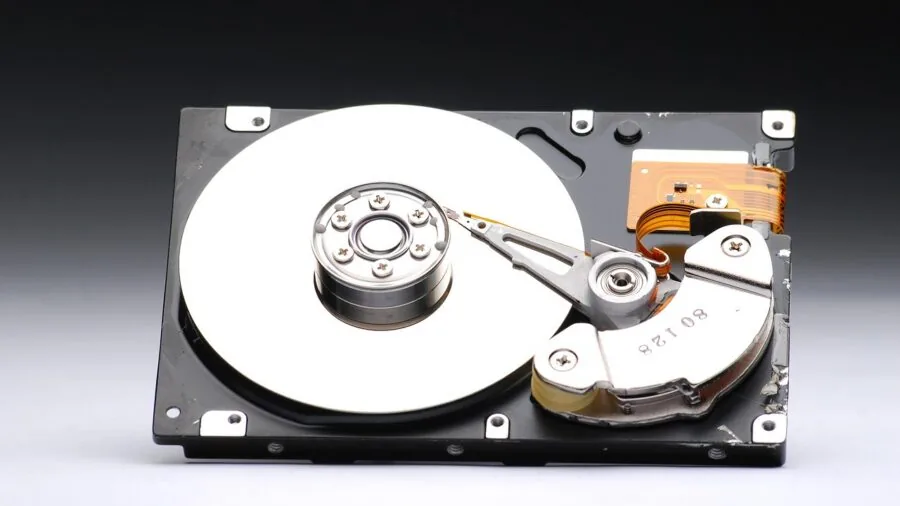
RAID is frequently misunderstood as a backup strategy. It is not: RAID protects against drive failure, not against accidental deletion, ransomware, or device theft.
A RAID 1 or RAID 5 array keeps your data accessible when a drive dies, but you still need a separate off-site or cloud backup to be fully protected.
Treat RAID as an availability measure and plan a proper 3-2-1 backup strategy on top of it.
Synology’s hybrid RAID (SHR) is particularly worth understanding if you plan to mix drives of different capacities, since it manages parity more efficiently than standard RAID 5 across unequal drives. Most other platforms implement standard RAID levels only.
For a single-user home NAS with just two drives, RAID 1 is almost always the right default choice for the balance of performance and protection.
Pairing local NAS storage with external drives for a rotational off-site backup is a practical, low-cost addition to any setup.
Noise, Power Draw, and Physical Footprint

A home NAS typically runs 24 hours a day, so idle power consumption matters. Entry-level two-bay Synology and TerraMaster units are engineered for low idle wattage, and most support drive hibernation when idle, which dramatically reduces both power draw and noise.
Higher-performance units with Intel i5-class CPUs and multiple 10GbE ports draw considerably more at both idle and load, which is worth factoring into total cost of ownership over a three to five year lifespan.
Fan noise is a common complaint in home environments. Smaller desktop units generally use a single 92 mm or 120 mm fan that can be tuned to near-silent at low loads.
The Synology DS620slim uses 2.5-inch drives instead of 3.5-inch, which reduces both the form factor and mechanical noise considerably at the expense of maximum capacity per drive.
If your NAS will live in a living room or bedroom, verified buyer reviews consistently flag fan noise as a deal-breaker for certain models, so read user reports before buying.
Why You Should Trust Us
REMOVU is an independent review publication. We do not manufacture, sell, or distribute the products we cover, and we have no financial relationship with the brands featured in this article beyond standard affiliate arrangements disclosed below.
Every product in this roundup was assessed using a consistent, structured research methodology: we analysed manufacturer-published specifications and datasheets, aggregated expert review consensus from the storage and networking community, incorporated verified buyer feedback from confirmed purchasers, and cross-referenced publicly available benchmark and reliability data.
We do not conduct our own product trials; our evaluations are grounded in research, published data, expert review consensus, and verified buyer feedback.
Each product receives a REMOVU Score on a 0 to 10 scale, derived from our standardised evaluation criteria applied consistently across every model in the category.
The criteria for home NAS devices weight software ecosystem maturity, hardware performance relative to price, network connectivity, build quality and thermal management, and long-term support track record.
A product scoring 8.0 or above represents a genuinely strong recommendation; scores in the 6 to 7 range indicate capable hardware with meaningful trade-offs worth understanding before you buy.
REMOVU may earn an affiliate commission if you purchase through a link in this article. That relationship has no bearing on our scores, rankings, or editorial choices. We would recommend the same products regardless.
Our editorial independence is non-negotiable, and affiliate income never elevates a product’s position on our lists.
Final Thoughts
The home NAS market in 2026 offers genuinely excellent options at almost every price point.
Whether you need a compact two-bay backup hub for a small apartment or an eight-bay powerhouse for a home studio, there is a well-supported device designed for your use case.
Below are our standout picks and the specific reasons each earned its distinction.
- Best Overall: Synology DS225+ Private Cloud Media Server earns the top spot with the highest REMOVU Score in this roundup. Its Intel CPU with hardware transcoding, polished DSM software ecosystem, and strong long-term update track record make it the most balanced home NAS available right now for the widest range of users.
- Best for Power Users Who Want Maximum Throughput: Synology 4-Bay DiskStation DS925+ steps up for households that need four bays, dual-volume flexibility, and Synology’s enterprise-grade software on more scalable hardware. Its REMOVU Score reflects a well-rounded device that handles simultaneous workloads with confidence.
- Best All-Around Two-Bay for Home and Office: Synology DS223 Home and Office Backup Hub is the two-bay recommendation for buyers who prioritise software quality and reliability over raw hardware horsepower. It earns a strong REMOVU Score for dependable performance at a sensible mid-range price.
- Best Budget Entry Point: Synology 2-Bay DiskStation DS223j is the easiest recommendation for first-time NAS buyers. It trades processing muscle for accessibility and simplicity, backed by the same DSM platform that powers Synology’s premium lineup, at one of the lowest prices in the category.
- Best for Gaming and Streaming Enthusiasts: Asustor AS5402T stands out for its four M.2 NVMe SSD slots, dual 2.5GbE ports, and Intel quad-core CPU, making it an appealing choice for home users running Plex, game library storage, or live-stream asset management alongside everyday file sharing.
Whichever model you choose, pair it with a reliable networking and storage foundation and a disciplined backup strategy. A NAS is only as reliable as the plan around it.
If you are building out a full home office or creative workspace, a capable desktop monitor and a fast laptop to connect to your NAS can round out a productive setup.
Frequently Asked Questions
Do I Need a NAS If I Already Use Cloud Storage?
Cloud storage and a NAS serve different purposes. Cloud services like Google Drive or iCloud charge recurring subscription fees that compound significantly over time, especially once you exceed a few terabytes.
A NAS requires a larger upfront investment but has near-zero ongoing costs beyond electricity.
It also gives you full control over your data, local transfer speeds that dwarf cloud sync rates, and no dependency on a third-party provider’s pricing changes or service continuity.
Many users run both: NAS for primary local storage and a cloud destination as an off-site backup layer.
Can I Use Any Hard Drive in a NAS?
Technically yes, but it is strongly advisable to use drives purpose-designed for NAS operation, such as Western Digital Red Plus, Seagate IronWolf, or their respective Pro tiers for heavier workloads.
Desktop drives are engineered for intermittent use; they vibration-compensate poorly in multi-drive enclosures and their firmware does not handle the error-recovery behaviour NAS RAID controllers expect.
Using desktop drives in a RAID array can trigger drive drops and false failures under sustained load. NAS-rated drives carry longer warranties and are rated for continuous operation, which a device that runs around the clock genuinely requires.
How Difficult Is Initial Setup for a Home NAS?
Setup complexity varies significantly by brand and model. Synology’s DSM consistently receives the highest marks from verified buyers for guided, browser-based setup that requires no command-line knowledge.
Most users report having their Synology NAS fully configured, with RAID and a basic backup schedule running, within about 30 to 60 minutes of unboxing. ASUSTOR and TerraMaster have improved their setup wizards considerably and are accessible to confident beginners.
UGREEN’s UGOS Pro is newer and generally rated slightly more technical at this point. If you are new to NAS hardware, Synology is the most forgiving starting point.
What Is the Difference Between a Diskless NAS and One With Drives Included?
A diskless NAS is sold as an enclosure only; you purchase and install your own hard drives or SSDs separately. This gives you full control over drive brand, capacity, and grade. Most prosumer and enthusiast-focused models are sold diskless.
Drive-included bundles, like the Buffalo TeraStation in our roundup, are aimed at buyers who want a fully operational appliance without the added step of sourcing drives.
They typically cost more per terabyte but reduce decision fatigue and are often pre-validated by the manufacturer. For buyers comfortable selecting their own storage media, diskless is almost always the better value.
Can a NAS Replace a Dedicated Streaming Device Like a Plex Pass Server?
Yes, with important caveats.
A NAS running Plex Media Server can act as a complete home media hub, but the experience depends heavily on your CPU and whether your client devices support direct play for the file formats in your library.
If clients can direct play (no transcoding required), even a modest ARM-based NAS handles the job. If transcoding is needed, you need a NAS with a capable x86 processor and hardware transcoding support.
Models like the Synology DS225+ and the Asustor AS5402T are well-regarded for Plex performance. A tablet or e-reader makes a convenient Plex client around the home once your server is running.
How Many Simultaneous Users Can a Home NAS Support?
For standard file sharing and streaming, a two-bay entry-level NAS can typically handle three to five simultaneous users without noticeable degradation, provided the network connection is not the bottleneck.
Performance drops sharply if multiple users are triggering transcoding simultaneously or if you are running several Docker containers alongside file sharing.
Four-bay and higher-spec units with 4 GB or more of RAM and a quad-core CPU handle five to fifteen concurrent users comfortably for mixed workloads.
Households with four or more active users who all stream media concurrently should consider at least a mid-range four-bay model with a capable x86 processor.
About the author
Katherine covers fitness and activity trackers for REMOVU, focusing on sensor accuracy, battery life, and useful daily insights. She helps readers track steps, sleep, and workouts without the bulk of a full smartwatch.