The 12 Best Nas Devices for Photos
Your photo archive deserves better than a single hard drive or a rising cloud subscription. These NAS picks offer private, redundant, and remotely accessible storage for every library size.
 By Rene Coleman
Updated July 26, 2026
By Rene Coleman
Updated July 26, 2026
Photographs are irreplaceable, yet most people store them on a single hard drive or a subscription cloud service that raises prices, changes terms, or disappears entirely.
A network-attached storage device, or NAS, solves both problems at once: it sits on your home or office network, keeps multiple redundant copies of your library, and lets you browse, share, and back up files from any device without paying a monthly fee.
For photographers and families with growing photo collections, a well-chosen NAS is one of the most practical long-term investments in data safety you can make.
Choosing the right NAS for photos is not straightforward.
Processor speed, RAM, drive-bay count, network throughput, and software ecosystem all interact, and the wrong combination means sluggish thumbnail loading, failed mobile sync, or a unit that outgrows your needs within two years.
In this guide, REMOVU’s research team analyzed specifications, synthesized expert review consensus, and studied verified buyer feedback across twelve models, from single-bay entry units to prosumer four-bay powerhouses, so you can find the device that fits your library size, budget, and workflow.
Read on for our top picks below, then dive into the buying guide to understand exactly what to look for. If you plan to pair your NAS with additional storage peripherals, our overview of external drives is a useful companion.

Synology DS225+ 2-Bay NAS with Intel Celeron J4125
A compact, budget-friendly NAS that consolidates home storage, backups, and media streaming with Synology's polished DSM interface. Best suited for individuals and small households seeking private cloud control without monthly subscription fees.
Pros
- Excellent software experience: DSM is considered the most user-friendly NAS operating system available, with seamless setup and point-and-click management
- Works with standard third-party drives despite past compatibility concerns, verified by multiple reviewers using non-Synology branded HDDs
- Handles home essentials reliably: photo/music/video storage, multi-device backups, Plex media serving, and lightweight Docker applications
- Compact footprint and energy-efficient design suitable for home offices and small deployments
- Strong customer satisfaction: 4.7/5 rating across 178 reviews, with consistent praise for ease of use and dependable performance
Cons
- Limited raw processing power: Intel Celeron J4125 lacks hardware video transcoding, so simultaneous remote streams or transcoding unusual formats may cause performance issues
- Base 2GB RAM is tight for advanced workloads; expansion to 6GB requires additional purchase
- Single 2.5GbE port (plus one 1GbE port) limits networking flexibility compared to higher-tier 25+ series models with dual 2.5GbE ports

Synology DS223 2-Bay NAS with 8TB Storage
An entry-level 2-bay NAS designed for home users and small offices seeking centralized data storage and backup. The DS223 bundles pre-installed 4TB Seagate IronWolf drives and offers straightforward setup with Synology's DSM software, though its single 1GbE port and modest 2GB RAM limit performance for larger workloads.
Pros
- Easy setup for users familiar with NAS, with helpful status emails and straightforward Windows drive mapping
- Excellent value for photo and video storage with intuitive Synology apps for file organization and uploading
- Comes with drives pre-installed, reducing assembly complexity
- Comprehensive backup solution covering multiple operating systems and cloud platforms without subscriptions
Cons
- Single 1GbE LAN port and non-upgradeable 2GB RAM restrict performance and networking speed compared to higher-tier models
- Shipping quality concerns reported by reviewers, with loose drive placement during delivery risking bracket damage despite pre-installation
- Limited to 2 bays with no expansion slot option, constraining future storage growth

UGREEN DXP4800 GT 4-Bay NAS with Dual 10GbE
A capable 4-bay NAS built around an AMD R2514 processor and dual 10GbE connectivity, designed for creators, small teams, and home labs willing to invest time learning NAS fundamentals. Strong hardware value with an improving software platform, though the OS runs on embedded eMMC rather than a dedicated drive.
Pros
- Exceptional price-to-performance ratio compared to enterprise competitors
- Flexible hardware foundation supports multiple OS options (UGOS Pro, TrueNAS, etc.)
- Quiet operation (35-38 dB typical) with solid aluminum chassis and well-engineered drive trays
- Dual 10GbE networking enables fast multi-user workflows and 4K/8K editing from local storage
- UGOS Pro software adds Docker containers, AI photo indexing, and surveillance features quickly
Cons
- Operating system boots from 64GB eMMC rather than upgradeable SSD, limiting OS flexibility and endurance
- Steep learning curve for first-time NAS users; UGOS Pro lacks detailed diagnostics and could provide clearer guidance on RAID, storage pools, and drive health
- ECC RAM capability advertised but not included by default; non-ECC DDR4 stick shipped, requiring separate purchase for error correction benefits

Asustor AS6704T v2 4-Bay NAS with Dual 5GbE
A capable 4-bay NAS built around Intel's N5105 processor, dual 5GbE connectivity, and four M.2 slots that appeal to content creators and small teams needing hybrid storage performance. Verified owners praise its reliability and feature set, though the base 4GB RAM and diskless configuration require additional investment.
Pros
- Dual 5GbE ports significantly outpace 2.5GbE competitors for faster team collaboration and file transfers
- Four M.2 slots provide flexible hybrid storage architecture for performance and capacity optimization
- Intel processor and 4GB base RAM (expandable to 16GB) handle multitasking, Docker, and media streaming without strain
- Verified buyers confirm solid reliability and appreciation for extensive feature set compared to Qnap and Synology alternatives
- Supports comprehensive backup solutions, snapshots, and cross-platform access (Windows, macOS, Linux, mobile)
Cons
- Diskless configuration means you must purchase all drives separately, adding significant upfront cost
- Only 4GB RAM installed by default, requiring manual upgrade to 16GB for optimal performance with multiple concurrent users
- Limited USB 3.2 Gen 2 ports (two Type-A) compared to competing 4-bay models, potentially constraining external storage workflow

UGREEN DXP4800 Plus 4-Bay NAS with Intel Pentium Gold CPU
A powerful 4-bay desktop NAS built for small offices and media enthusiasts, featuring Intel 5-core processing, dual network ports (10GbE and 2.5GbE), and support for Docker and virtual machines. Strong choice for backup, Plex streaming, and centralized storage without breaking the bank.
Pros
- Dual high-speed network ports (10GbE and 2.5GbE) enable rapid file transfers and flexible connectivity
- Upgradeable 8GB DDR5 RAM and two M.2 NVMe slots for caching boost performance significantly
- Supports Docker and virtual machines natively, making it ideal for running Plex servers and custom applications
- User-friendly UGOS interface with straightforward setup, plus AI-powered photo organization and cross-platform access (Windows, macOS, Linux, iOS, Android)
- Up to 144TB capacity potential with broad drive compatibility across Western Digital, Seagate, Toshiba, and others
Cons
- Drives not included; requires separate purchase of compatible HDDs/SSDs, adding to total investment
- Theater and Music apps have documented issues (theater struggles with numbered filenames; music app ignores track numbers), limiting usefulness for some media libraries
- Limited official support for 20TB+ drive capacities, restricting future expansion flexibility

Synology DS124 1-Bay NAS - Personal Backup & File Hub
A compact, single-bay network storage device designed for home users to centralize photos, documents, and backups with license-free cloud features and surveillance support. Easy setup and intuitive DSM interface make it accessible to non-technical users, though hardware limitations affect performance under heavy workloads.
Pros
- Extremely compact form factor (6.54" x 8.82") fits easily in any home or office space
- License-free backup and file access across Windows, Mac, iOS, Android, and cloud services without subscriptions
- Intuitive DSM web interface with straightforward setup process documented in quick-start guides
- Silent operation and reliable performance for typical home backup and file-sharing tasks
- Military-grade encryption and private cloud storage keep data under your control
Cons
- Single 1-bay design limits redundancy, storage growth, and data protection compared to multi-bay models
- Weak entry-level hardware (Realtek RTD1619B processor, 2GB DDR4 RAM) struggles with heavy concurrent usage, video transcoding, or large-scale torrenting
- QuickConnect remote access and Synology Drive sync reported as slow and unreliable by users, making external file management cumbersome
- Automatically wipes drives upon first initialization without preserving pre-existing data, despite warning message appearing after formatting occurs

Synology DS223j 2-Bay NAS
A compact, affordable network storage solution that doubles as a private cloud hub for backup, file sharing, and surveillance. Buyers praise its intuitive interface, reliable performance for family photo backups and local media serving, though it requires some tech comfort for advanced features.
Pros
- Easy initial setup and intuitive web interface compared to competitors like WD MyCloud
- Reliable performance streaming 4K content and handling multiple simultaneous tasks
- Quiet operation suitable for living rooms, with configurable power schedules
- Strong ecosystem of built-in apps (Photos, Surveillance Station, file sharing protocols)
- 2-year warranty backed by ongoing software updates
Cons
- Drives not included; requires separate purchase of compatible NAS-rated drives (WD Red, Seagate IronWolf recommended)
- Software interface has learning curve for non-tech users; advanced configuration requires IT familiarity
- Limited to Synology's approved application catalog; no sideloading of third-party apps

TerraMaster F2-425 2-Bay NAS with Intel Quad-Core
A budget-friendly 2-bay NAS built around an Intel x86 processor that excels as a home media server with 4K transcoding support and AI photo management. Quiet operation and tool-free drive installation make it accessible to non-technical users, though its dual-bay design and base 4GB RAM limit expansion compared to larger models.
Pros
- Strong media server capability: Intel CPU handles 4K transcoding and runs Plex, Emby, Jellyfin smoothly with multiple concurrent streams
- Ultra-quiet operation at 19dB(A), suitable for bedroom or living room placement
- Tool-free Push-Lock drive bays allow hot-swap installation in under 10 seconds without reformatting via TOS 6 Data Disk Mount
- On-device AI photo management with privacy (no cloud dependency) plus face, pet, and scene recognition
- Practical software suite: TerraSync for PC-to-NAS backups with version history, CloudSync integration (Google Drive, OneDrive, Dropbox), and TNAS Mobile app for remote access
Cons
- Limited to 2 bays and 60TB maximum capacity, constraining long-term scalability versus 4-bay models at higher price tiers
- Base 4GB RAM may throttle performance under heavy concurrent use; user reports indicate RAM upgrades improve stability but require technical knowledge
- One verified buyer reported connectivity issues requiring replacement, suggesting potential QA variability despite majority positive feedback

UGREEN DH2300 2-Bay NAS, 64TB Capacity
A beginner-friendly 2-bay NAS designed for personal photo, video, and file backup without monthly cloud fees. Features AI-powered photo organization, 125MB/s transfer speeds, and strong privacy controls, but requires purchasing drives separately and only supports wired Ethernet.
Pros
- Significant long-term savings compared to cloud subscriptions over 5-10 years
- AI-powered photo library management with facial recognition and location tagging
- Strong privacy and security features with end-to-end encryption and multi-layer protection
- Fast file transfer speeds make backing up media practical and efficient
Cons
- Drives not included, requiring separate purchase of compatible HDDs or SSDs
- Wired Ethernet only, no built-in Wi-Fi support (requires external USB adapter)
- Does not support Docker, virtual machines, or Plex via Docker, limiting advanced features
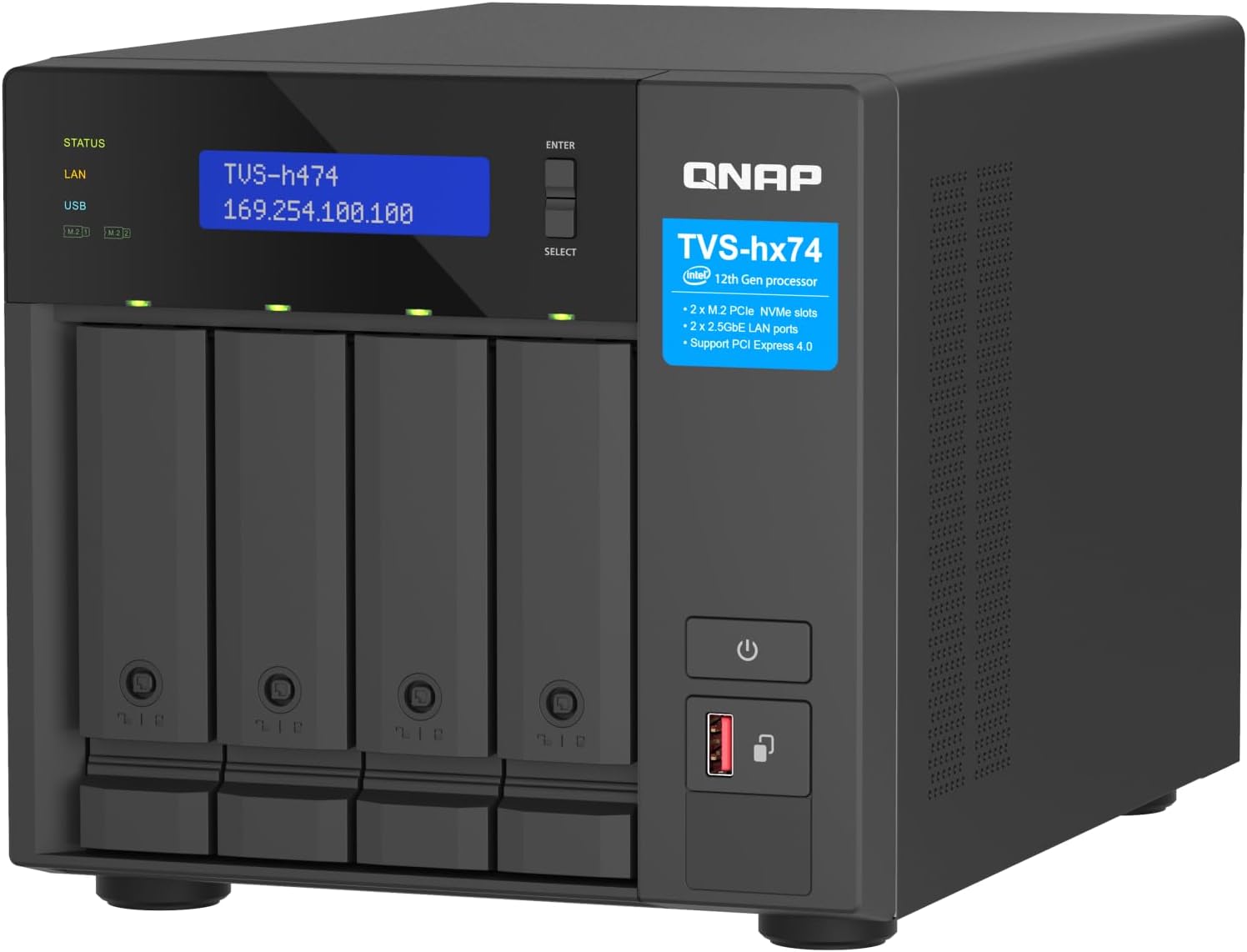
QNAP TVS-h474 4-Bay NAS with Pentium Gold CPU
A compact 4-bay NAS built for small teams and home offices seeking centralized file storage with virtual machine support. The Pentium Gold processor and dual 2.5GbE ports deliver solid performance for file sharing and backup workflows, though the base CPU is modest and requires drive investment.
Pros
- Expandable design allows CPU/RAM upgrades and flexible PCIe connectivity for future growth
- Native ZFS support with advanced data integrity features including block-level deduplication and near-limitless snapshots
- Dual 2.5GbE ports accelerate file transfers without requiring new cabling infrastructure
- Strong security framework with encryption, firewall rules, and hybrid cloud backup integration
- Verified buyer confirms effectiveness for hosting virtual machines with adequate upgrade path
Cons
- Base Pentium Gold processor is entry-level; CPU-heavy workloads benefit from i3/i5 upgrades
- Comes diskless, requiring separate SATA drives to be purchased and installed
- Single review on record limits real-world long-term reliability feedback from diverse use cases

Buffalo TeraStation 3420RN 4-Bay 8TB Rackmount NAS
A fully-populated rackmount NAS built for small business environments needing reliable 24/7 storage with minimal setup. Ships with NAS-grade drives pre-configured in RAID, 256-bit encryption, and cloud sync capabilities across S3, Dropbox, and Azure.
Pros
- Fully populated 4-bay unit with 8TB usable capacity (in RAID 5) eliminates expansion complexity for small teams
- Closed operating system architecture reduces security exposure compared to general-purpose NAS platforms
- NAS-grade drives and RAID pre-configuration provide immediate reliability without technical setup
- Flexible RAID options: RAID 1, 5, 6, or 0 allow users to balance redundancy versus capacity based on needs
- Comprehensive warranty and data recovery service provide peace of mind for business-critical storage
Cons
- Limited to 1GB RAM and 1.4 GHz quad-core processor, which may constrain performance under heavy concurrent access compared to higher-tier models
- Single 2.5 GbE port (plus one 1GbE fallback) limits bandwidth for multi-user environments approaching 30 users
- No built-in anomaly detection or snapshot capabilities, requiring external monitoring tools for advanced threat detection

Buffalo LinkStation 220 8TB 2-Bay NAS
A budget-friendly network storage device with two 4TB drives pre-installed and RAID 1 protection enabled by default. It offers straightforward setup, basic file sharing, and media streaming for home use, backed by 24/7 US support, though transfer speeds and Mac compatibility have limitations.
Pros
- Very easy setup and intuitive web interface for basic users
- Drives included lower total cost compared to drive-less NAS
- RAID 1 configuration ships by default, protecting against drive failure
- Decent reliability with users reporting multi-year operation without unexpected downtime
- Media sharing and DLNA streaming work smoothly
Cons
- Network transfer speeds are modest (17-24 MB/s range), limiting for large file operations
- Intermittent connectivity issues reported by some users, particularly with Mac and Time Machine
- APFS file system not supported on Mac, requiring reformatting external drives
NAS Devices for Photos Buying Guide
Before spending on a NAS, it helps to understand which specs actually matter for a photo-centric workflow.
The sections below walk through each decision point in plain language, from choosing the right number of drive bays to picking a software ecosystem that will not frustrate you years from now.
Number of Drive Bays and Redundancy

Drive-bay count determines both your maximum storage capacity and your ability to protect data through RAID.
A one-bay unit like the Synology DS124 costs less and is perfectly adequate for a personal library that is also backed up to an external drive or cloud service.
However, a single drive has no redundancy: if it fails, data is gone until you restore from backup. Two-bay units running RAID 1 mirror your data across two drives, so one drive can die without any data loss.
That makes two-bay models the practical minimum for anyone serious about photo preservation.
Four-bay units let you run RAID 5 or RAID 6, which allow one or two drives to fail respectively while the array keeps running and preserving data.
They also offer far more raw capacity, which matters as RAW files from modern mirrorless cameras routinely exceed 40 MB each.
If your collection already measures in the tens of thousands of images, or if you shoot video alongside stills, four bays give you room to grow without replacing the enclosure.
Keep in mind that RAID is not a substitute for an off-site backup; the 3-2-1 rule (three copies, two media types, one off-site) remains the gold standard for serious photographers.
Pairing a capable NAS with a solid networking and storage setup ensures every part of your backup chain is reliable.
Rackmount units such as the BUFFALO TeraStation 3420RN are designed for small-business or studio environments where multiple photographers share a single storage pool over a local network. For home users, a compact desktop form factor is almost always the right call.
Processor, RAM, and Transcoding Performance

The CPU inside a NAS determines how quickly it can index your photo library, generate thumbnails, run facial recognition, and transcode video previews.
ARM-based processors, like the Realtek quad-core in the Synology DS223, handle typical photo management tasks well and run cool and quiet.
Intel x86 processors, found in the Synology DS225+ and several UGREEN and QNAP models, are significantly faster and, critically, support hardware transcoding.
Hardware transcoding lets a NAS stream 4K video previews to a phone or TV without taxing the CPU, which keeps the interface snappy even when multiple users are browsing simultaneously.
RAM matters more than many buyers expect. A NAS with 2 GB of RAM is fine for basic file serving, but photo management apps, AI-powered face and scene detection, and Docker containers all consume memory quickly.
Models with 4 GB or more of RAM, such as the UGREEN DXP4800 Plus and the QNAP TVS-h474, handle concurrent tasks without slowdowns. If a unit allows RAM upgrades, that flexibility extends its usable lifespan considerably.
For context, the performance gap between an Intel Pentium Gold NAS and a budget ARM unit is roughly analogous to the gap between a capable laptop and an entry-level Chromebook; see our guide to laptops for a sense of how processor tiers translate to real-world responsiveness.
Dedicated M.2 NVMe SSD slots, available on the UGREEN DXP4800 Plus, UGREEN DXP4800 GT, and Asustor AS6704T v2, let you install fast cache drives.
An SSD cache dramatically reduces the latency of random read operations, meaning your photo thumbnails load almost instantly even when the spinning HDDs are still spinning up.
Network Interface Speed and Connectivity
A NAS is only as fast as the network link connecting it to your devices. Standard 1 Gigabit Ethernet (1GbE) supports theoretical transfer speeds around 125 MB/s, which is adequate for most home photo workflows.
In practice, real-world throughput lands closer to 80 to 110 MB/s over a wired connection, plenty fast enough to import a day’s shoot or stream a slideshow.
If your router and switch support it, upgrading to a 2.5GbE NAS roughly doubles that bandwidth.
Models like the UGREEN DH2300, TerraMaster F2-425, and Synology DS223j bundle 2.5GbE ports, making them a smart choice if you already have a 2.5GbE-capable Wi-Fi router or network switch.
For video editors or studio teams transferring large uncompressed files, 5GbE or 10GbE becomes worthwhile.
The Asustor AS6704T v2 offers dual 5GbE ports, and the UGREEN DXP4800 GT ships with dual 10GbE, giving it a transfer ceiling that easily saturates even fast NVMe SSDs.
HDMI output, included on several UGREEN models and the Asustor, lets you connect a monitor directly without any network hop, which is convenient for on-site editing sessions or local media playback.
Photo Management Software and Ecosystem

Hardware specifications set the ceiling, but software determines your day-to-day experience.
Synology’s DiskStation Manager (DSM) is widely regarded as the most polished NAS operating system available, and its Synology Photos app offers automatic mobile backup, AI-powered face and subject grouping, shared albums, and a clean browser-based gallery that rivals Google Photos in functionality.
The deep integration between DSM, Synology Photos, and the Synology mobile apps is a primary reason Synology products earn consistently high scores in our analysis.
QNAP’s QTS operating system is feature-rich and powerful, but carries a steeper learning curve. Its QuMagie photo app includes AI categorization and geo-tagging, and QNAP’s hardware, such as the TVS-h474, often punches above its weight on raw specs.
TerraMaster’s TOS and UGREEN’s UGOS are newer platforms that have improved rapidly; they cover the essentials and are accessible enough for beginners, though their app ecosystems are less mature than Synology’s or QNAP’s.
BUFFALO’s NAS units run a simpler interface aimed at plug-and-play simplicity, which suits users who want straightforward network storage without complex configuration.
Before committing, confirm that the NAS you are considering has a mobile app compatible with your phone’s operating system, supports your preferred backup protocol (rsync, SMB, or WebDAV), and can run a Docker container if you want to self-host apps like Immich or PhotoPrism in the future.
Ecosystem lock-in is real: migrating a large library from one platform to another is time-consuming.
Diskless vs. Bundled Hard Drives
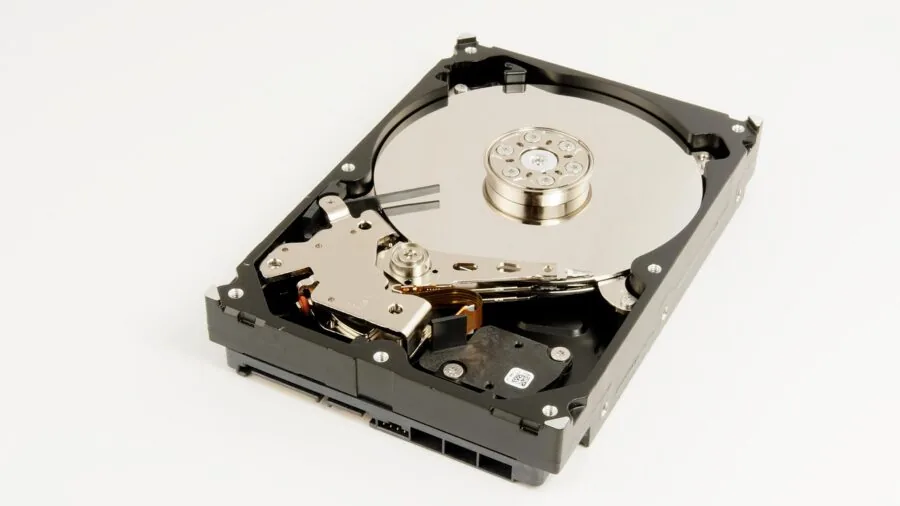
Most NAS enclosures sold today are diskless, meaning you supply your own hard drives. This gives you control over capacity and lets you choose drives that carry a NAS-specific warranty, such as Seagate IronWolf or Western Digital Red Plus.
NAS-grade drives are engineered for continuous operation and handle the vibration of a multi-drive enclosure better than desktop drives.
Buying diskless also means you can upgrade drives incrementally as your library grows, replacing one drive at a time and expanding the array without starting over.
Some products, like the Synology DS223 bundle and the BUFFALO LinkStation 220, come with drives pre-installed. These bundles simplify setup and often represent good value when the included drives match your needed capacity.
Check whether bundled drives are on the manufacturer’s compatibility list before assuming they are identical to separately purchased NAS drives; some bundles use desktop-class drives, which may affect long-term reliability in multi-bay configurations.
If you go the diskless route and plan to store your photo archive entirely on the NAS, pairing it with reliable NVMe SSDs for the cache layer can meaningfully improve library responsiveness.
Remote Access, Mobile Sync, and Privacy

One of the main reasons photographers choose a NAS over a simple external drive is the ability to access photos from anywhere.
All major NAS platforms offer some form of remote access, either through a relay server provided by the manufacturer or via direct connection using a dynamic DNS service.
Synology’s QuickConnect relay is particularly seamless; you log into your NAS from a browser or the Synology Photos app on your phone with no port-forwarding configuration. QNAP, UGREEN, and TerraMaster offer similar relay services with varying degrees of setup complexity.
Privacy-conscious users appreciate that a NAS keeps your photos entirely on hardware you own and control.
Unlike cloud services, there is no third party scanning your images, no possibility of a policy change exposing your library, and no subscription fee that can rise year after year.
The trade-off is that you are responsible for maintaining the hardware and ensuring your backup strategy covers both on-site and off-site copies.
For families accumulating photos across smartphones and tablets, the ability to auto-sync every device to a single private hub is a compelling alternative to paying for expanded iCloud or Google Photos storage indefinitely.
If you also capture photos with a dedicated camera, our roundup of point-and-shoot cameras highlights models whose outputs pair well with a NAS-based workflow for organizing family memories.
Why You Should Trust Us
REMOVU is an independent review publication. We do not manufacture, sell, or have any commercial relationship with the brands whose products appear in our guides.
Every product in this article is assessed using the REMOVU Score, a 0 to 10 rating built on a consistent set of criteria that weighs performance specifications, software ecosystem quality, value relative to competing options, and long-term reliability signals drawn from verified buyer feedback across major retail platforms.
We do not conduct our own product trials; our evaluations are grounded in research, published data, expert review consensus, and verified buyer feedback.
When expert reviewers and verified owners converge on the same strengths or weaknesses for a product, those signals carry significant weight in how we score and rank it.
Products that score well on paper but generate consistent complaints about software bugs, poor thermal management, or misleading marketing are penalized accordingly.
REMOVU may earn an affiliate commission if you purchase through links on this page. That commercial relationship has no influence on which products we include, how we score them, or the order in which they appear.
Our rankings reflect our honest assessment of each product’s merit, nothing else. If a product we previously recommended is superseded by a better option, we update the guide.
Final Thoughts
The NAS market for photographers spans a wide range of price points and capability tiers, and the right choice depends almost entirely on your library size, network infrastructure, and comfort with configuration.
Budget-conscious buyers who want simple setup will find Synology’s single-bay and two-bay enclosures more than capable for personal photo libraries.
Prosumer photographers and small studio teams who need raw processing power and high-speed networking will be better served by the Intel-based four-bay options from UGREEN, QNAP, and Asustor. Our standout picks across the lineup are summarized below.
- Best Overall: Synology DS225+ Private Cloud Media Server. With the highest REMOVU Score in this roundup, the DS225+ earns its top position through a combination of Intel hardware transcoding, Synology’s best-in-class DSM software, and seamless Synology Photos integration that makes it the most complete photo NAS for home and prosumer use.
- Best Two-Bay for Growing Libraries: Synology DS223 Bundle with Seagate IronWolf Drives. Coming ready to run with NAS-grade drives already installed, this bundle removes the guesswork from drive selection and delivers Synology’s polished software experience with genuine RAID 1 redundancy from day one.
- Best Four-Bay for Power Users: Asustor Lockerstor 4 Gen2+ AS6704T v2. Dual 5GbE ports, four M.2 SSD slots, and an Intel quad-core CPU make this a serious performer for photographers who work with large RAW files and want room to expand with NVMe cache and PCIe accessories.
- Best Entry-Level Private Photo Hub: Synology DS124 Personal Backup and File Hub. For anyone taking their first step away from cloud subscriptions, this affordable single-bay unit provides automatic mobile backup, a clean gallery interface, and Synology’s trusted software without a high upfront cost.
- Best Budget Two-Bay Enclosure: Synology DS223j Two-Bay DiskStation. It trades the DS223’s faster ARM chip for a more accessible price while retaining DSM and Synology Photos, making it an honest entry point into two-bay redundancy for photographers on a tighter budget.
Whichever model you choose, remember that the NAS itself is only one layer of a sound backup strategy.
Combine on-device redundancy with at least one off-site copy, whether that is a cloud sync or a drive kept at a separate location, and you will have genuinely robust protection for your photo archive.
For everything else connected to your storage setup, browse our full networking and storage coverage.
Frequently Asked Questions
Do I Need a NAS If I Already Use Cloud Storage for Photos?
Cloud storage is convenient, but it comes with recurring costs, dependency on a third-party provider, and upload speed limitations that make initial migration of a large library painfully slow.
A NAS gives you local network speeds for day-to-day access, complete ownership of your data, and the option to sync selectively to cloud services rather than paying for full-library cloud storage.
Many photographers use both: a NAS as the primary archive and a cloud service as an off-site backup layer.
What Is RAID, and Do I Need It for Photo Storage?
RAID (Redundant Array of Independent Disks) is a method of combining multiple drives so that data is written in a way that survives one or more drive failures without loss.
For photos, RAID 1 in a two-bay NAS is the most practical starting point: one drive mirrors the other, and if either fails you simply replace it and the array rebuilds.
RAID does not replace backups because it offers no protection against accidental deletion, ransomware, or a total enclosure failure. Think of RAID as protection against hardware failure specifically, not a complete data safety strategy.
How Much Storage Do I Need for a Photo NAS?
It depends on your camera and file format. A JPEG from a smartphone averages 3 to 6 MB, while a RAW file from a full-frame mirrorless camera can easily reach 40 to 80 MB.
If you have 50,000 photos averaging 20 MB each, that is roughly 1 TB of storage before accounting for RAID overhead.
A practical rule of thumb for most enthusiast photographers is to start with at least 4 TB of usable capacity and choose an enclosure that supports capacity expansion.
For families accumulating smartphone photos over many years, 2 TB is a reasonable starting point that leaves room to grow. If your setup also includes a document scanner for digitizing prints and paperwork, factor in those files too.
Can a NAS Replace Google Photos or iCloud for Mobile Backup?
Yes, with some caveats. Synology Photos, QNAP’s QuMagie, and similar apps offer automatic background sync from iOS and Android, face recognition, shared albums, and browser-based access that closely mirror what Google Photos provides.
The key difference is that remote access over mobile data depends on your home internet upload speed, which can feel sluggish on slower connections. Within your home Wi-Fi network, browsing and downloading is fast.
If your household is already invested in a mesh Wi-Fi system with solid coverage, the in-home experience is seamless.
Is a NAS Difficult to Set Up for a Non-Technical User?
Modern NAS software has improved dramatically, and a beginner-friendly unit like the Synology DS124 or UGREEN DH2300 can be up and running in under an hour following the guided setup wizard.
Installing drives, connecting to your router via Ethernet, and following the on-screen prompts requires no networking expertise.
The more complex configurations, such as custom RAID levels, VPN access, or Docker containers, are entirely optional and can be set up later once you are comfortable with the basics.
For most home users, initial setup is comparable in complexity to configuring a new router.
What Is the Difference Between a NAS Enclosure and a Bundled NAS?
A diskless enclosure ships without hard drives; you purchase and install compatible drives yourself, giving you full control over brand, capacity, and drive class. A bundled NAS includes drives pre-installed, simplifying the purchase but limiting your choice of storage.
Bundles are often a good value when the included drives match your capacity needs and are NAS-grade. Always verify the bundled drives appear on the manufacturer’s hardware compatibility list before assuming they offer the same reliability as drives chosen independently.
If you plan to expand capacity later, a diskless enclosure with extra bays offers more flexibility over time.
About the author
Rene covers portable power stations for REMOVU, comparing battery capacity, output ports, and value for camping and outages. He helps readers keep devices and appliances running off-grid.