The 11 Best Monitors for Video Editing
Color accuracy, panel type, and connectivity separate a true editing display from a general monitor. Our picks span every budget, from ASUS ProArt to Dell UltraSharp.
 By Dwight Garza
Updated July 26, 2026
By Dwight Garza
Updated July 26, 2026
Choosing the right monitor for video editing is one of the most consequential decisions you can make for your creative workflow.
Unlike general-purpose displays, a monitor intended for color-critical work needs accurate color reproduction, sufficient resolution to spot fine detail, and a panel technology that holds up under long editing sessions.
Whether you are grading footage for a client, cutting a documentary, or producing YouTube content, the display you stare at for hours shapes every color decision you make.
Paired with a capable graphics card, the right monitor becomes the foundation of a reliable creative setup.
For this guide, REMOVU researched and compared monitors across a wide range of budgets and use cases, analyzing manufacturer specifications, expert review consensus, and verified buyer feedback to identify the strongest options available right now.
We assessed color gamut coverage, panel accuracy, connectivity, ergonomics, and value to narrow the field to picks that genuinely serve video editors rather than just look impressive on a spec sheet.
Whether you need a professional-grade display from ASUS ProArt, a wide-format option from Dell, or a budget-friendly entry point, our ranked list below covers every level of commitment.
| Award | Product | REMOVU Score About REMOVU ScoreThe REMOVU Score is our own rating from 0 to 10, based on performance, design and build, ease of use, and value. It reflects independent research and is never influenced by manufacturers, retailers, or affiliate commissions. Learn more › | Price | |
|---|---|---|---|---|
| Best Overall |
 ASUS ProArt PA279CRV 27-inch 4K Professional Monitor
|
8.9/10 | Buy | |
| Best Value |
 ASUS ProArt PA279CV 27-Inch 4K Professional Monitor
|
8.3/10 | Buy | |
| Best Premium |
 Dell UltraSharp U3425WE 34" Ultrawide Monitor
|
8.1/10 | Buy | |
 ViewSonic VP3256A-4K 32-Inch 4K Professional Monitor
|
7.9/10 | Buy | ||
 ViewSonic VP3256-4K 32-Inch 4K Professional Monitor
|
7.8/10 | Buy | ||
 LG 27US500-W 27-Inch 4K UltraFine Monitor
|
7.2/10 | Buy | ||
 ASUS ProArt PA278QV 27-inch 1440p Professional Monitor
|
7.5/10 | Buy | ||
 Dell S3225QS 32-Inch 4K VA Monitor with 120Hz
|
7.4/10 | Buy | ||
 ASUS ProArt PA248QV 24-Inch Professional Monitor
|
6.8/10 | Buy | ||
 Samsung 27" S30GD IPS Monitor, 100Hz
|
6.2/10 | Buy | ||
| Best Budget |
 Samsung Odyssey G55C 32" QHD Curved Gaming Monitor
|
8.6/10 | Buy |
ASUS ProArt PA279CRV 27-inch 4K Professional Monitor
A factory-calibrated 4K display built for color-critical work, offering 99% DCI-P3 and Adobe RGB coverage with Delta E<2 accuracy verified by Calman. The USB-C port consolidates DisplayPort, 96W power delivery, and data transfer into one cable, making it efficient for video editors and designers who demand both precision and clean desk setups.
Pros
- Exceptional color accuracy: Calman Verified, factory pre-calibrated to Delta E<2, and covers 99% DCI-P3 and 99% Adobe RGB
- All-in-one USB-C connectivity with 96W power delivery, DisplayPort, and superfast data transfers via single cable
- 4K UHD resolution (3840x2160) delivers four times pixel density of FHD for detailed editing and design work
- Daisy-chain support via DisplayPort allows expanding workspace with multiple monitors from one cable
- Ergonomic stand with full adjustability (tilt, swivel, pivot, height) for extended work sessions
- 5-year warranty coverage and complimentary 3-month Adobe Creative Cloud access
Cons
- Premium pricing typical of professional-grade displays, making it a significant investment for freelancers or hobbyists
- 27-inch 4K may require scaling adjustments on some workflows, and USB-C hub includes only one downstream USB-C port plus one USB-A
- No user reviews available yet to assess real-world reliability and long-term performance
ASUS ProArt PA279CV 27-Inch 4K Professional Monitor
A 27-inch 4K monitor built for color-critical work, featuring factory-calibrated accuracy (Delta E < 2) and 100% sRGB coverage. The USB-C connection with 65W power delivery and included USB hub streamline desk setup for content creators, while the 5-year warranty and bundled Adobe Creative Cloud subscription add practical value.
Pros
- Calman-verified factory calibration with Delta E < 2 ensures precise color accuracy for professional editing and design
- USB-C with 65W Power Delivery eliminates cable clutter by handling video, data, and device charging through one connection
- Wide color gamut (100% sRGB, 100% Rec. 709) delivers consistent color reproduction across creative workflows
- Integrated USB 3.1 hub and multiple connectivity options (DisplayPort, HDMI) support multi-device workflows
- 5-year warranty coverage and 3-month Adobe Creative Cloud access provide long-term value
Cons
- Premium positioning means higher cost compared to general-purpose 4K monitors without color calibration
- 27-inch 4K resolution may require careful seating distance to avoid eye strain during extended work sessions
- Feature set prioritizes professional color work, making it overkill for casual browsing or gaming
Dell UltraSharp U3425WE 34" Ultrawide Monitor
This 34-inch curved ultrawide delivers expansive screen real estate in a 21:9 aspect ratio, ideal for multitasking and professional workflows. The UW-QHD resolution and anti-glare coating support extended work sessions, while practical features like Picture by Picture and Digital Daisy Chain streamline connectivity for power users.
Pros
- Expansive 34-inch ultrawide format maximizes productivity across multiple applications simultaneously
- Anti-glare surface reduces eye strain during long work hours
- Ambient Light Sensor automatically adjusts brightness to match environment
- Picture by Picture and Digital Daisy Chain enable flexible multi-source setups
- Locking stand provides stable, secure positioning
Cons
- UW-QHD resolution, while adequate for the size, may feel less sharp than higher-res alternatives at close viewing distances
- Ultrawide format requires compatible desk space and may not suit all workspace layouts
- Curved screen design can create reflections in certain lighting conditions despite anti-glare coating
ViewSonic VP3256A-4K 32-Inch 4K Professional Monitor
A spacious 32-inch 4K display built for color-critical work, this ViewSonic monitor combines factory-calibrated accuracy (Delta E <2) with Pantone validation for designers and video editors who need reliable color fidelity. The single USB-C cable handles video, audio, and 100W charging, cutting desk clutter significantly. Ergonomic adjustments and built-in uniformity functions round out a solid professional tool.
Pros
- Factory calibrated to Delta E <2 with 100% sRGB coverage and Pantone validation for pinpoint color accuracy
- Single USB-C connection delivers video, audio, and up to 100W power charging, eliminating multiple cables and adapters
- Large 32-inch 4K panel with integrated uniformity function ensures consistent color and luminance across the entire display
- Comprehensive ergonomic adjustments (swivel, pivot, height, tilt) support extended work sessions with reduced strain
- Includes ColorPro Manager with color sensitivity modes for accessible content previewing and intuitive on-screen controls
Cons
- Premium pricing reflects professional-grade specs and validation, placing it outside budget-conscious workflows
- 32-inch size demands adequate desk space and viewing distance; may overwhelm smaller workstations
- Pantone validation and calibration appeal primarily to color-critical professionals; general users may not justify the investment
ViewSonic VP3256-4K 32-Inch 4K Professional Monitor
A 32-inch 4K IPS display built for color-critical work, featuring factory-calibrated Delta E<2 accuracy and Pantone validation. The single USB-C connection delivers video, audio, and 60W power in one cable, while the frameless design suits multi-monitor setups. Best suited for designers, video editors, and content creators prioritizing color fidelity over gaming performance.
Pros
- Exceptional color accuracy with Delta E<2 factory calibration and 100% sRGB coverage, verified by Pantone validation
- Single USB-C cable handles video, audio, and 60W power delivery, reducing desk clutter
- Large 32-inch 4K resolution (3840x2160) provides ample screen real estate for detailed creative work
- Full ergonomic adjustment (height, tilt, swivel, pivot) and VESA compatibility for flexible mounting
- IPS panel with 178-degree viewing angles ensures consistent color from any position
Cons
- 60Hz refresh rate limits smooth motion for gaming or video playback compared to higher-refresh alternatives
- No built-in webcam, requiring separate peripherals for video conferencing
- Premium positioning means higher cost than general-purpose 4K monitors; calibration kit sold separately
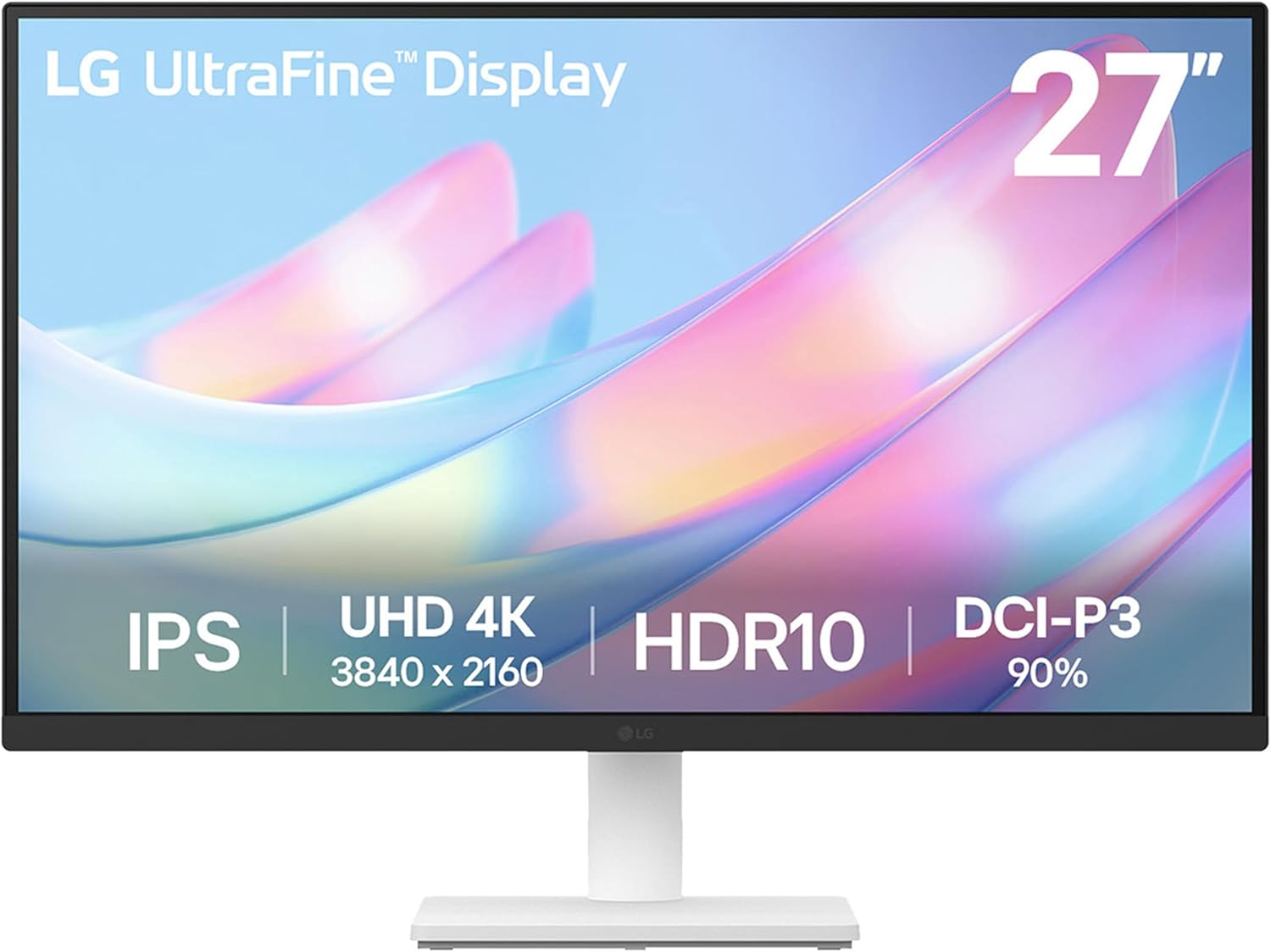
LG 27US500-W 27-Inch 4K UltraFine Monitor
A solid 4K monitor built for creative work, delivering 3840x2160 resolution with HDR10 support and 90% DCI-P3 color coverage on an IPS panel. The ergonomic tilt stand and LG Switch app for workspace customization make it practical for professionals, though the 60Hz refresh rate and basic stand adjustment limit its appeal beyond stationary creative setups.
Pros
- 4K UHD resolution with 1000:1 contrast ratio for detailed imagery and deeper blacks
- HDR10 with up to 90% DCI-P3 color gamut for accurate color reproduction
- IPS panel with wide viewing angles, ideal for collaborative work environments
- LG Switch app enables easy display splitting and monitor settings customization
- Includes HDMI cable and power adapter in the box; budget-friendly entry point for 4K creative work
Cons
- 60Hz refresh rate limits responsiveness for motion-heavy workflows
- Stand offers only tilt adjustment, no height, swivel, or pivot options compared to higher-end UltraFine models
- 5ms response time is slower than gaming or fast-paced editing monitors
ASUS ProArt PA278QV 27-inch 1440p Professional Monitor
A factory-calibrated IPS display built for creative professionals who demand color accuracy. With Calman Verified Delta E <2 precision, 100% sRGB and Rec.709 coverage, and a fully adjustable ergonomic stand, it handles photo editing, video grading, and graphic design without compromise. The integrated USB hub and ProArt Palette software sweeten the workflow, though the premium positioning puts it beyond casual users.
Pros
- Factory-calibrated with Calman Verified Delta E <2 accuracy, ready to use out of the box without additional calibration
- 100% sRGB and 100% Rec.709 color gamut ensures industry-standard color reproduction for photo and video work
- Fully adjustable ergonomic stand with tilt, swivel, pivot, height adjustment, and 90-degree portrait rotation for flexible workspaces
- ASUS Eye Care technology with flicker-free backlighting and multi-level blue light filter reduces fatigue during extended sessions
- Extensive connectivity including DisplayPort, HDMI, DVI-D, Mini DP, and integrated USB hub for streamlined desk setup
Cons
- Premium pricing positions it as an investment rather than an entry-level option for aspiring creatives
- 1440p resolution, while excellent for 27 inches, offers less screen real estate than 4K alternatives for detail-heavy work
- Requires online registration to unlock the 2-year warranty extension, adding an extra step for full coverage
Dell S3225QS 32-Inch 4K VA Monitor with 120Hz
A 32-inch 4K display built for long viewing sessions, combining a VA panel's strong contrast with Dell's ComfortView Plus blue light reduction technology. The 120Hz refresh rate and FreeSync Premium support smooth motion for both productivity and gaming, while the 99% sRGB coverage and HDR readiness deliver accurate, vivid colors. Best suited for creative professionals and content creators who prioritize color accuracy and screen real estate over ultra-fast response times.
Pros
- 4K UHD resolution with 99% sRGB and 95% DCI-P3 coverage ensures accurate color reproduction for design and video work
- TÜV Rheinland 4-star eye comfort certification plus ComfortView Plus reduces blue light to 35% or less for extended viewing comfort
- 120Hz refresh rate with AMD FreeSync Premium delivers smooth, tear-free performance across work and gaming tasks
- 3000:1 contrast ratio and VA panel technology provide excellent depth and detail with strong black levels
- Spacious audio with improved output power and frequency response, plus energy-efficient ENERGY STAR certification
Cons
- 4ms response time may introduce slight motion blur for competitive gaming compared to faster IPS or TN panels at 1ms
- VA panel viewing angles are narrower than IPS alternatives, so colors shift if viewed from the side
- Limited to one DisplayPort 1.4 and two HDMI inputs, which may require adapters for certain legacy or multi-device setups
ASUS ProArt PA248QV 24-Inch Professional Monitor
A 24-inch IPS display built for color-critical work, delivering 100% sRGB coverage with Delta E under 2 and Calman verification for precise color accuracy. The WUXGA resolution (1920 x 1200) and fully adjustable stand suit designers, photographers, and video editors who demand reliable color fidelity without compromise. Includes 3 months of Adobe Creative Cloud and a solid 5-year warranty.
Pros
- Exceptional color accuracy verified by Calman with Delta E < 2, ideal for professional color-dependent workflows
- 100% sRGB and Rec.709 color space coverage ensures consistent, true-to-life color reproduction
- Fully ergonomic stand with tilt, pivot, swivel, and height adjustment for extended comfortable use
- Anti-glare coating reduces eye strain during long work sessions
- Multiple connectivity options (DisplayPort, HDMI, D-Sub) and includes 3-month Adobe Creative Cloud subscription
Cons
- WUXGA resolution (1920 x 1200) is modest by current standards, limiting screen real estate for multitasking
- 24-inch size may feel compact for some professional workflows requiring larger viewing area
- Limited information on brightness levels and contrast ratio in provided specifications
Samsung 27" S30GD IPS Monitor, 100Hz
A 27-inch business-focused display built around Samsung's IPS panel for consistent color accuracy from any viewing angle. The 100Hz refresh rate and Game Mode add versatility beyond office work, while Eye Saver Mode addresses screen fatigue during extended sessions. Best suited for users balancing productivity with occasional gaming or media consumption.
Pros
- IPS panel delivers vibrant, angle-stable colors with minimal color washing across the full display
- 100Hz refresh rate reduces motion blur and lag for smoother gaming and video playback
- Eye Saver Mode combines blue light reduction and flicker control for long-session comfort
- Super-slim design with ultra-thin bezels maximizes screen real estate in compact setups
- Multiple connectivity options (HDMI, D-Sub) support flexible device integration
Cons
- FHD resolution (1920x1080) on a 27-inch panel results in lower pixel density compared to 1440p alternatives
- Tilt-only stand limits ergonomic adjustment versus full articulation (height, pivot, swivel)
- Default 60Hz refresh rate requires manual settings adjustment to enable 100Hz capability
Samsung Odyssey G55C 32" QHD Curved Gaming Monitor
Samsung's 32-inch curved gaming monitor delivers sharp QHD visuals with a 165Hz refresh rate and 1ms response time, designed to minimize motion blur during fast-paced gameplay. The aggressive 1000R curve and AMD FreeSync support create an immersive experience, while HDR10 and Eye Saver Mode add visual depth and reduce strain during extended sessions. Best suited for competitive gamers prioritizing smooth performance over ultra-high resolution.
Pros
- 1.7x pixel density over 1080p delivers noticeably sharper detail at QHD resolution
- 165Hz refresh rate with 1ms MPRT response time provides smooth, responsive gameplay
- 1000R curved VA panel fills peripheral vision and enhances immersion
- AMD FreeSync eliminates tearing for fluid motion in compatible games
- Eye Saver Mode with blue light filter reduces fatigue during long gaming sessions
- HDR10 support brings deeper blacks and brighter highlights to supported content
Cons
- VA panel technology has narrower viewing angles compared to IPS alternatives
- No built-in speakers or USB connectivity, unlike pricier models in Samsung's lineup
- 1ms response time requires 'Extreme mode' setting to achieve, results vary by content and monitor calibration
- 165Hz refresh rate trails behind higher-end 180Hz or 240Hz gaming monitors
Monitors for Video Editing Buying Guide
Video editing monitors live or die by how accurately they represent color and detail.
A display that looks vivid but clips highlights, shifts hues under different viewing angles, or drifts in calibration over time will undermine every grading decision you make.
The buying guide below walks through the six criteria that matter most when choosing a monitor for color-critical creative work, from professional film production to content creation for social platforms.
Panel Type and Viewing Angles

IPS (In-Plane Switching) panels remain the standard choice for video editing, and for good reason.
They deliver consistent color across wide viewing angles, typically up to 178 degrees horizontally and vertically, which means colors do not shift when you lean to the side or when colleagues review your work from an angle.
For a task that demands color fidelity across the entire screen, IPS is nearly always the right starting point.
VA (Vertical Alignment) panels offer deeper native contrast ratios, which can be appealing for monitoring dark scenes and shadow detail in cinematic footage.
However, VA panels tend to exhibit more pronounced color shift at extreme angles and can show smearing in fast motion. If your work involves a lot of color grading and long collaborative review sessions, IPS is typically more dependable.
If you primarily cut and review your own footage and value deep blacks, a high-quality VA panel is worth considering.
OLED panels are increasingly appearing at the prosumer tier, offering exceptional contrast and per-pixel brightness control, but they come with burn-in considerations that make many editors cautious about using them with static interface elements for extended periods.
For most video editing workflows in 2026, IPS remains the pragmatic standard backed by the broadest range of professionally validated options.
Color Gamut and Accuracy
Color gamut coverage is arguably the single most important specification for video editing.
At a minimum, a professional editing monitor should cover 100% of the sRGB color space, which is the standard delivery target for web video, streaming platforms, and most broadcast work.
Monitors that also cover Rec.709 (the HDTV standard) to a high degree of accuracy are suitable for broadcast-destined projects. For cinematic and HDR work, coverage of DCI-P3 and Adobe RGB becomes relevant.
Raw gamut coverage is only part of the story. Accuracy, expressed as Delta E, tells you how closely the monitor reproduces the colors it is supposed to show.
A Delta E below 2 is widely considered imperceptible to the human eye during critical work, and a Delta E below 1 is exceptional.
Look for monitors that are factory calibrated and carry a verification like Calman Verified, which confirms that each unit meets its stated accuracy targets before it leaves the factory rather than relying on batch-level evaluation.
Pantone Validated certification is another meaningful signal for monitors targeting professional creative workflows.
If your work spans multiple deliverable formats, a monitor that supports multiple color space modes (sRGB, DCI-P3, Adobe RGB, Rec.709) with accurate switching between them adds significant practical value.
It allows you to preview how your footage will look across different distribution channels without needing a second display.
For editors who also work in photography or motion graphics, the overlap between video editing monitors and broader creative displays is substantial; our monitors and peripherals category covers related creative display options worth exploring.
Resolution and Screen Size
Resolution affects both the clarity of your footage preview and how much editing interface you can comfortably fit on screen at once.
For a 27-inch display, 1440p (QHD, 2560 x 1440) offers a good balance of sharp pixel density and system performance headroom.
4K UHD (3840 x 2160) on a 27-inch panel is sharper still, making fine detail in footage more visible, though it demands more from your GPU when running at native resolution.
At 32 inches and above, 4K becomes more important to maintain adequate pixel density and avoid a blocky appearance in text and fine image detail.
Ultrawide formats, such as the 34-inch 5K2K panel in the Dell UltraSharp U3425WE, offer additional horizontal real estate that is genuinely useful in timeline-heavy editing workflows, allowing you to see more of your edit without scrolling.
Editors working primarily on web or social media content can be well served by a 24-inch 1080p or WUXGA (1920 x 1200) display, which provides a wider aspect ratio than standard 16:9 and extra vertical space for toolbars.
For those doing 4K production work, a 4K native panel allows one-to-one pixel preview of footage, which helps with focus checking and fine detail work.
If your workstation is also used for gaming on the side, it is worth reviewing gaming monitors separately, as the refresh rate and response time priorities differ significantly from color-critical editing needs.
Connectivity and USB-C Integration

Modern video editing monitors increasingly integrate USB-C with Power Delivery, which allows a single cable to carry video signal, data, and laptop charging simultaneously.
This significantly simplifies desk setups, particularly for editors who move between a desktop workstation and a laptop.
A USB-C port with 65W or higher Power Delivery can charge most creative laptops while you work, eliminating one cable entirely from your setup.
Beyond USB-C, look for monitors that include both HDMI and DisplayPort inputs to ensure compatibility with a broad range of workstations and video interfaces. A built-in USB hub adds further utility by consolidating peripheral connections.
For editors using external drives, audio interfaces, or card readers throughout the day, having USB-A ports on the monitor eliminates a trip to the back of the tower or an external hub.
Daisy chaining capability, where supported, allows connecting a second display off the same cable run and is valuable in multi-monitor setups. A well-equipped docking station can complement monitors that lack built-in hubs.
HDR support varies widely in real-world impact. True HDR grading requires a monitor with local dimming and a peak brightness of at least 600 nits, which few monitors at this price tier deliver credibly.
Many monitors labeled “HDR10” meet the format’s minimum requirements but cannot actually display the HDR experience meaningfully.
Unless HDR grading is a core part of your workflow and you are budgeting accordingly for a monitor genuinely capable of it, HDR labeling at the consumer tier is more a marketing note than a production tool.
Ergonomics and Build Quality

Video editors often spend six to ten hours per session in front of their displays. Ergonomics, therefore, directly affect both comfort and the consistency of your color judgments.
A monitor with a full ergonomic stand (height adjustment, tilt, swivel, and pivot) allows you to find a position that reduces neck and eye strain over long sessions and to share the screen at a comfortable angle with clients or collaborators without repositioning your chair.
Anti-glare coatings are worth prioritizing if your editing space has windows or overhead lighting that can create reflections.
A hard matte coating reduces glare effectively but can introduce a slightly hazy look to the image; semi-gloss or low-haze coatings offer a compromise with less perceptible impact on image sharpness.
VESA mount compatibility matters if you plan to use an arm or wall mount to maximize desk space or adjust positioning beyond what the stock stand allows.
Build quality influences long-term calibration stability as well as day-to-day usability. Professional-tier monitors from ASUS ProArt and ViewSonic ColorPro are generally built to tighter tolerances, with more stable backlights and better long-term uniformity than mass-market consumer panels.
For editors using a compact editing rig, a space-efficient display pairs well with a capable mini PC setup that keeps the footprint small without sacrificing processing headroom.
Budget and Value Tiers

The monitors in this roundup span a meaningful range from budget-accessible to mid-range professional, with options from ASUS ProArt, ViewSonic, Dell, Samsung, and LG.
At the entry level, a monitor covering 100% sRGB with Calman Verified accuracy provides a solid foundation for editors whose primary deliverable is web or streaming video.
These displays are a significant step above general-purpose monitors and deliver accurate color without requiring a large investment.
At the mid range, 4K IPS panels with USB-C Power Delivery, wider color gamut coverage (DCI-P3, Adobe RGB), and factory calibration open up more professional workflows, including broadcast and cinematic production.
These monitors offer the accuracy and connectivity of professional displays without the premium pricing of purpose-built broadcast monitors.
At the higher end of this guide, ultrawide and large-format displays with premium gamut coverage and advanced ergonomics serve editors who want a single display to handle both technical color work and a spacious editing canvas.
For editors building a full workstation, pairing a professional monitor with quality 32GB RAM kits and a reliable storage setup ensures the rest of the system keeps pace with a demanding display.
Those sourcing footage for their projects may also find our guides to waterproof action cameras and mirrorless cameras under $1000 helpful for rounding out a complete production toolkit.
Why You Should Trust Us
REMOVU is an independent review platform with no manufacturer relationships that influence our rankings. Every monitor in this guide was evaluated using a consistent, multi-factor research process.
We do not conduct our own product trials; our evaluations are grounded in research, published data, expert review consensus, and verified buyer feedback.
Each product receives a REMOVU Score on a 0 to 10 scale, reflecting how well it performs across the criteria most relevant to video editing: color accuracy, gamut coverage, resolution, connectivity, ergonomics, and overall value for the intended use case.
Our assessment process draws on published manufacturer specifications, third-party calibration data, professional reviewer consensus, and aggregated verified purchase feedback.
When expert reviewers and verified buyers consistently align on a product’s strengths or limitations, that convergence carries significant weight in our scoring. Products with strong claims but weak real-world feedback from verified buyers are scored accordingly, regardless of marketing.
REMOVU may receive an affiliate commission if you purchase through links in this article. That relationship has no effect on our rankings, scores, or product selection.
Our recommendations are driven entirely by the quality of our evaluation, not by commission rates. We surface this relationship openly because we believe transparency is inseparable from editorial credibility.
Final Thoughts
The monitors for video editing covered in this guide represent the strongest options available across multiple budgets and workflow demands in 2026.
From Calman-verified IPS panels suited to entry-level content creators all the way to wide-gamut professional displays for cinematic production, there is a well-justified pick for every kind of editor here.
Below are our key danh hiệu awards based on REMOVU Score and category performance.
- Best Overall: ASUS ProArt PA279CRV 27 Inch 4K UHD USB-C HDR Professional Monitor. The highest REMOVU Score in this roundup reflects its exceptional combination of 99% DCI-P3 and 99% Adobe RGB coverage, Calman Verified Delta E under 2 accuracy, USB-C Power Delivery at 96W, and daisy chain support. It is the monitor we would recommend to most video editors who want a single display to handle a wide variety of professional deliverables.
- Best 4K Value with USB-C: ASUS ProArt PA279CV 27 Inch 4K UHD USB-C Professional Monitor. A strong REMOVU Score and mid-range pricing make this a standout for editors who want 4K accuracy, 100% sRGB, USB-C 65W Power Delivery, and a built-in USB hub without moving into premium price territory. One of the best-supported picks among verified buyers in its category.
- Best Large-Format Ultrawide: Dell UltraSharp 34 Monitor U3425WE. The 5K QHD ultrawide panel delivers a generous editing canvas that is genuinely useful for timeline work, and Dell’s UltraSharp build quality and color accuracy credentials make it a well-justified premium purchase for editors who want horizontal real estate alongside professional-grade accuracy.
- Best 32-Inch Professional Pick: ViewSonic VP3256A-4K ColorPro Monitor. Pantone Validated, 100% sRGB, 100W USB-C Power Delivery, and a full ergonomic stand combine with a strong REMOVU Score to make this the top 32-inch choice for editors who need expansive screen real estate without sacrificing professional color fidelity.
- Best Budget Entry Point: ASUS ProArt PA278QV 27 Inch 1440p QHD Professional Monitor. Calman Verified accuracy, 100% sRGB, Rec.709 support, and a full ergonomic stand at an accessible price point make this the best entry into professional editing display territory for editors working on a tighter budget. Its REMOVU Score reflects genuine color performance well above general-purpose displays at the same price.
If you are building out a broader editing workstation, pairing your monitor with quality laptops or desktop components and a reliable peripherals setup will ensure the display is not the bottleneck in your creative chain.
Editors who also need high-quality audio monitoring for their projects may find our roundups on AV receivers and USB microphones useful for completing a professional-grade studio environment.
Frequently Asked Questions
Do I really need a 4K monitor for video editing?
Not necessarily, but it depends on the type of content you produce. If you are editing 4K footage, a 4K native panel allows you to preview at full resolution without downscaling, which is helpful for focus checking and detail work.
For editors primarily cutting 1080p content for web or streaming, a high-accuracy 1440p monitor is more than adequate and costs less to drive from your GPU.
The more critical factor for most video editing workflows is color accuracy rather than raw resolution.
What is Delta E and why does it matter for video editing?
Delta E is a numerical measure of how much a displayed color deviates from the target color it is supposed to show. A Delta E of zero would be a perfect match.
In practice, a Delta E below 2 is considered accurate enough that the difference is imperceptible to the human eye during normal viewing.
For video editing, particularly color grading, low Delta E (ideally under 2, preferably under 1) means you can trust that the colors you see on screen will translate faithfully to other calibrated displays and final deliverables.
Monitors that ship with factory calibration reports and carry certifications like Calman Verified provide measurable assurance of this accuracy.
Is USB-C Power Delivery important in a video editing monitor?
It is increasingly valuable, particularly for editors who work from a laptop or switch between a desktop and laptop setup.
A monitor with USB-C Power Delivery at 65W or higher can charge most creative laptops over the same cable that carries the video signal, reducing cable clutter and simplifying the desk.
For stationary desktop-only workflows, it is a convenience rather than a necessity, but for any kind of mobile or hybrid editing setup it quickly becomes one of the most practical features a monitor can offer.
Can I use a gaming monitor for video editing?
You can, but there are trade-offs worth understanding. Gaming monitors prioritize high refresh rates and fast response times, which are largely irrelevant for editing work.
More importantly, many gaming monitors do not carry factory calibration or professional color accuracy certifications, and their color gamut coverage may be tuned for visual pop rather than accuracy.
That said, some gaming displays do offer solid sRGB coverage and reasonable accuracy.
If you need a display that handles both gaming and editing, look specifically for models that combine high refresh rate with validated color accuracy rather than assuming any gaming monitor will serve editing workflows well.
Our separate guide to gaming monitors covers that segment in more depth.
How often should I recalibrate my editing monitor?
Most professional monitors drift over time as the backlight ages, particularly after the first few hundred hours of use.
For critical color work, recalibrating every one to three months is a common practice among professional colorists, though the exact interval depends on how heavily the display is used and how demanding the accuracy requirements of your work are.
Monitors that ship with factory calibration reports give you a documented baseline to compare against when you recalibrate.
Some higher-end displays, including several in this guide, support hardware calibration via software like Calman, which automates and streamlines the recalibration process when paired with a compatible colorimeter.
What screen size is best for a video editing monitor?
27 inches at 1440p or 4K is the most popular choice among professional editors, offering a good balance of pixel density, comfortable viewing distance, and desk footprint.
32-inch 4K panels provide more screen area for timeline work and are easier to view at a distance without scaling the interface.
Ultrawide formats in the 34-inch range add horizontal real estate that is particularly useful when your editing software has a complex multi-panel layout. Smaller 24-inch displays remain practical for budget-conscious setups or secondary reference monitors.
The right size depends on your desk space, typical viewing distance, and whether you prioritize a larger editing canvas or a tighter, more focused display setup.
Editors building a compact mobile workstation may also want to explore portable monitors as a complementary secondary screen option.
About the author
Dwight covers kids tablets for REMOVU, weighing durability, parental controls, and worthwhile content. He helps parents pick a tough, well-managed tablet that earns its price.