The 10 Best Docking Stations for MacBook
Connecting a MacBook to a full desk setup should not require a bag of adapters. These docking stations offer dual 4K displays, fast data ports, and reliable charging through one cable.
 By Jeffrey Kuhn
Updated July 26, 2026
By Jeffrey Kuhn
Updated July 26, 2026

MacBook users know the frustration well: a sleek, powerful laptop reduced to a tangle of dongles the moment you sit down at a desk.
A quality docking station solves that problem by turning a single USB-C or Thunderbolt port into a fully equipped workstation with multiple monitors, fast data transfers, wired networking, and reliable charging, all through one cable.
Whether you are running dual 4K displays for video editing, keeping a software development environment tidy, or just want a cleaner home office setup, the right dock makes a meaningful difference every day.
This guide covers the docking stations for MacBook that earned the highest marks in our research, drawing on published specifications, expert review consensus, and verified buyer feedback to surface options worth your money.
Our lineup spans compact USB-C hubs, standalone vertical docks, and full-featured DisplayLink stations that support up to three monitors on Apple Silicon Macs.
Read on to find the pick that best matches your monitor setup, port needs, and budget, and scroll down to the product list to compare them side by side.
| Award | Product | REMOVU Score About REMOVU ScoreThe REMOVU Score is our own rating from 0 to 10, based on performance, design and build, ease of use, and value. It reflects independent research and is never influenced by manufacturers, retailers, or affiliate commissions. Learn more › | Price | |
|---|---|---|---|---|
| Best Overall |
 Anker Nano A83C3 13-in-1 Docking Station with Detachable Hub
|
8.6/10 | Buy | |
| Best Premium |
 Anker Prime 14-in-1 Docking Station, 160W Dual 4K
|
8.1/10 | Buy | |
| Best Value |
 TobenONE UDS040M 18-in-2 MacBook Dock, Dual 4K@60Hz
|
7.3/10 | Buy | |
 TobenONE 17-in-2 MacBook Docking Station Dual 4K
|
7.2/10 | Buy | ||
| Best Budget |
 Anker 547 7-in-2 USB-C Hub for MacBook
|
7.2/10 | Buy | |
 TobenONE MacBook Docking Station Dual 4K HDMI
|
7.1/10 | Buy | ||
 TobenONE 18-in-2 Docking Station for MacBook M4/M5
|
7.0/10 | Buy | ||
 TobenONE MacBook Docking Station with Dual 4K HDMI
|
6.8/10 | Buy | ||
 PULWTOP MacBook Pro Docking Station Dual 4K HDMI
|
6.3/10 | Buy | ||
 TobenONE DisplayLink 18-Port Docking Station for Triple 4K Displays
|
6.2/10 | Buy |
Anker Nano A83C3 13-in-1 Docking Station with Detachable Hub
A dual-form docking station that splits into a fixed 13-in-1 desktop dock and removable 6-in-1 portable hub, eliminating the need for separate travel gear. Supports triple displays up to 4K single or triple 1080p, delivers 100W laptop charging, and includes 10Gbps data transfer on one USB-C port. Best suited for remote workers and professionals who alternate between home office setups and mobile work.
Pros
- Detachable design covers both stationary and mobile use cases without buying two separate docks
- Triple display support with flexible resolution options (up to 4K single, dual 2K, or triple 1080p)
- 100W Power Delivery charges most USB-C laptops while running all peripherals simultaneously
- Comprehensive port selection including 10Gbps USB-C data, Gigabit Ethernet, SD/TF card readers, and 3.5mm audio
- Plug-and-play setup with no driver installation required on Windows and macOS
Cons
- Hub may block adjacent USB-C ports on some laptop models, requiring dimension verification before purchase
- Dock requires active laptop connection to function; ports and status light only activate when connected
- Ethernet functionality on Windows requires manual Realtek driver installation for full compatibility
- macOS limited to mirrored display mode only on multiple external monitors
Anker Prime 14-in-1 Docking Station, 160W Dual 4K
A space-saving 14-port docking station built for Windows laptops that need serious connectivity and power. It delivers 160W across multiple devices simultaneously, supports dual 4K displays, and offers 10Gbps data transfer, making it ideal for professionals juggling multiple monitors and peripherals. Setup requires checking your laptop's DisplayPort version for optimal dual-monitor performance.
Pros
- Extensive port selection with 4 USB-C and 5 USB-A ports plus dual HDMI, audio, and Ethernet in one compact vertical design
- 160W total power output supports charging up to four devices at once, with individual USB-C ports delivering up to 100W each
- 10Gbps data transfer speeds on supported ports for faster file syncing and external storage access
- Advanced thermal management with temperature controls and heat dissipation to maintain safe operation during heavy use
- Customizable power distribution through Dock Manager app for tailored charging profiles
Cons
- Dual display resolution limited to 2K at 60Hz on DP 1.4 laptops or 1080p on DP 1.2, not true 4K for both monitors simultaneously
- Not compatible with Lenovo Legion series laptops and macOS users see identical displays on both external monitors, limiting flexibility
- Requires checking your specific laptop's DisplayPort version and CPU generation to confirm dual-monitor support, adding setup complexity
TobenONE UDS040M 18-in-2 MacBook Dock, Dual 4K@60Hz
A comprehensive docking station designed specifically for MacBook users who need dual monitor support and extensive connectivity. It delivers 4K@60Hz output through HDMI and DisplayPort, bundled with a 150W power adapter for full-speed charging, and consolidates 18 functions into one vertical stand to minimize desktop clutter.
Pros
- Dual 4K@60Hz monitor support via HDMI and DP, with plug-and-play compatibility for most recent MacBook models
- 100W pass-through charging for MacBook plus 20W quick-charge USB-C for secondary devices, eliminating extra wall adapters
- Extensive port selection: 8 USB ports, 2.5G Ethernet, dual audio jacks, SD/TF card readers, and built-in device holder for organized workspace
- No driver installation required for compatible MacBooks, immediate functionality out of box
- Vertical dock design saves desk space while keeping laptop, tablet, and phone upright and accessible
Cons
- M1, M2, and M3 base-chip MacBooks limited to single external monitor, restricting dual-display capability for entry-level models
- Incompatible with Windows laptops and Mac Studio, narrowing its audience to specific MacBook variants
- Requires manual cable reset troubleshooting if connectivity issues arise, with no built-in diagnostic tools mentioned
TobenONE 17-in-2 MacBook Docking Station Dual 4K
This all-in-one hub consolidates 17 functions into a single dock for MacBook Pro and Max users, handling dual 4K displays, fast charging, and high-speed file transfers without driver setup. Designed for professionals who need a clean desk and seamless workflow, it bundles everything from monitor connectivity to Ethernet and SD card reading in one compact unit.
Pros
- Plug-and-play dual 4K@60Hz display support with no driver installation required
- 150W power adapter delivers up to 100W MacBook charging plus two 30W ports for phones and tablets
- 2.5Gbps Ethernet and SD 4.0 reader with 312MB/s transfer speed accelerate file workflows
- Comprehensive port array (7 USB-C/A ports, HDMI, Ethernet, SD/TF slots) consolidates multiple adapters
- Solid 4.8-star rating reflects strong user satisfaction across verified purchases
Cons
- MacBook-only compatibility limits use to Apple laptops; explicitly incompatible with Windows, Chrome OS, and non-Pro Mac models
- M1/M2/M3 MacBooks support single monitor extension only, not the full dual 4K setup
- Limited information on build durability and long-term heat management under sustained heavy use
Anker 547 7-in-2 USB-C Hub for MacBook
This compact hub transforms your MacBook's two USB-C ports into seven useful connections, including dual display support at 4K and 5K resolutions. It delivers the expansion power users need without blocking MagSafe, though M1 and M2 MacBook owners should note the dual-display limitation.
Pros
- Supports 100W charging and 40 Gb/s data transfer through the main USB-C port
- Dual monitor capability with 4K HDMI and 5K USB-C display outputs
- Includes both USB-A and USB-C data ports plus SD and microSD card slots
- Designed to avoid obstructing MacBook MagSafe functionality
- Strong 4.5-star rating from nearly 3,400 verified reviews
Cons
- Not compatible with MacBook Neo models
- M1 and M2 MacBooks cannot use dual external displays simultaneously
- Requires one USB-C port to connect, reducing available ports despite expansion claims
TobenONE MacBook Docking Station Dual 4K HDMI
This docking station consolidates dual 4K monitor support, fast ethernet, and 100W charging into a single USB-C connection for compatible MacBooks. Built for professionals handling video work, development, and multitasking, it delivers substantial connectivity gains but requires specific MacBook models to unlock its full potential.
Pros
- Dual 4K@60Hz HDMI outputs enable true dual-monitor setups for M1 Pro/Max and newer MacBooks
- 2.5Gbps ethernet connection eliminates Wi-Fi bottlenecks for large file transfers and live streaming
- 100W pass-through charging keeps your MacBook powered without a separate adapter
- Seven USB ports plus dedicated 20W USB-C charging for phones and tablets
- Plug-and-play setup with no driver installation required
Cons
- Requires two Thunderbolt ports on your MacBook, limiting available connectivity
- M1, M2, and M3 MacBooks (non-Pro/Max) support only one external monitor, not dual displays
- Not compatible with Windows laptops or Apple displays
- Needs consistent power delivery to function reliably; insufficient charging causes port malfunctions
TobenONE 18-in-2 Docking Station for MacBook M4/M5
An all-in-one hub designed specifically for MacBook Pro and Max users, this dock consolidates 18 functions into a single connection: dual 4K@60Hz monitors, 150W charging, 2.5Gbps Ethernet, and seven USB ports. Built for professionals juggling video editing, remote work, and content creation who want to eliminate cable clutter without compromise.
Pros
- Dual 4K@60Hz monitor support with plug-and-play setup, ideal for multitasking and video editing workflows
- Powerful 150W power delivery charges MacBook at full speed while simultaneously charging accessories via dual 30W USB-C ports
- 2.5Gbps Ethernet and SD 4.0 card reader with up to 312MB/s speeds benefit remote workers and photographers transferring large files
- Comprehensive port selection (7 USB C/A ports, HDMI, Ethernet, SD/TF slot, audio) consolidates peripherals into one dock
- Solid 4.7-star rating from 48 verified reviews reflects real-world reliability for MacBook users
Cons
- M1/M2/M3 MacBooks limited to single-monitor support only, not dual displays like newer chips
- Ultrawide monitors experience blackouts or flicker due to bandwidth limitations; requires lowering resolution or refresh rate, and USB/Ethernet peripherals cause conflicts when ultrawide is connected
- Not compatible with Windows laptops, Mac Studio, Mac mini, or MacBook Neo, severely limiting its audience
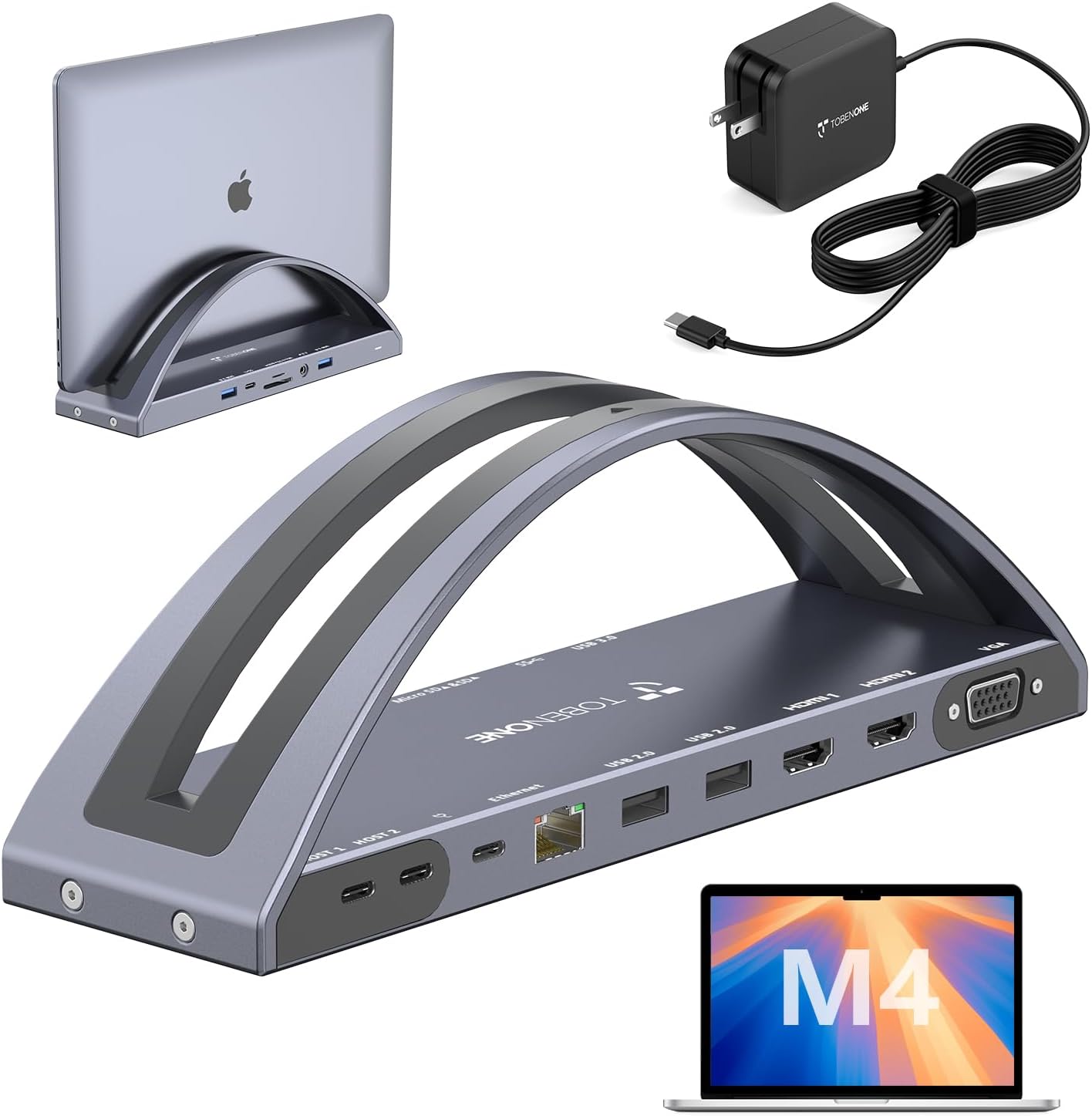
TobenONE MacBook Docking Station with Dual 4K HDMI
A vertical docking stand built for MacBook Pro and Air users who need dual 4K display support and workspace consolidation. Combines charging (100W PD3.0), multiple connectivity ports, and a compact vertical form factor to minimize desk clutter while handling creative workflows.
Pros
- Dual 4K@60Hz HDMI output for M4/M5 Pro/Max models, ideal for video editing and design work
- 100W PD3.0 charging with up to 87W MacBook support included in the box
- Comprehensive port selection: 2 HDMI, VGA, 5 USB ports, SD/Micro SD, Gigabit Ethernet, and 3.5mm audio
- Vertical stand design saves desk space while housing all connectivity
- Strong user satisfaction at 4.5 stars across 89 reviews
Cons
- M1/M2/M3 MacBooks limited to single external display only, not dual display expansion
- HDMI2 and VGA mirror content rather than extend independently, limiting some multi-monitor setups
- Requires macOS 14.6 or later for dual-display functionality on compatible models
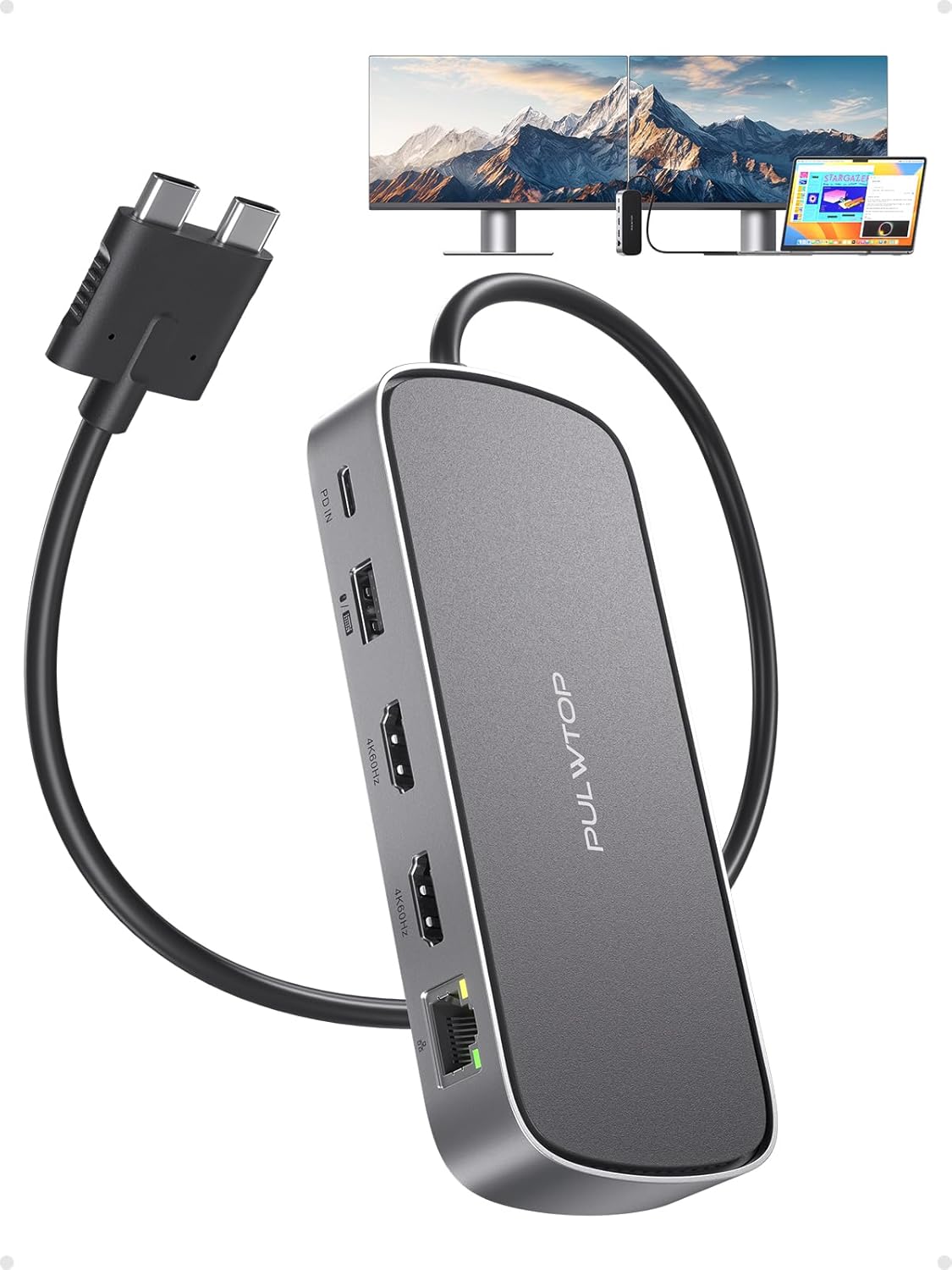
PULWTOP MacBook Pro Docking Station Dual 4K HDMI
A multi-port hub built specifically for MacBook Pro and Air M-series machines, delivering dual 4K@60Hz video output alongside 10Gbps USB-C data transfer, Gigabit Ethernet, and 100W charging support. Best suited for creative professionals and power users managing multiple external displays and peripherals.
Pros
- Dual 4K@60Hz HDMI outputs eliminate the need for separate adapters when connecting two external monitors
- 10Gbps USB-C and USB-A ports enable fast file transfers for photographers and video editors
- 100W PD input with 95W output supports fast MacBook charging without a separate power brick
- Compact aluminum design (135×58×19mm) reduces desk clutter while maintaining robust port selection
- 4.6-star rating from 43 verified reviews reflects consistent user satisfaction
Cons
- Power adapter not included; requires external 65W or higher adapter for full functionality
- Incompatible with M1, M2, and M3 base-model MacBooks, limiting compatibility to Pro/Max variants and 2025 M4 Air models
- USB-C ports are data-only and cannot support video or charging simultaneously, requiring careful port allocation
TobenONE DisplayLink 18-Port Docking Station for Triple 4K Displays
This USB-C docking station consolidates 18 ports into one connection, enabling up to three 4K@60Hz monitors on Mac or four on Windows while delivering 100W laptop charging. Built for professionals juggling multiple displays and peripherals, it excels at stock trading, content creation, and remote workstations, though macOS users should know streaming services won't play through extended displays due to DisplayLink's screen recording requirement.
Pros
- Supports triple 4K@60Hz display extension (quad on Windows) with flexible HDMI and DisplayPort combinations
- Robust 120W power adapter charges laptop at up to 100W, eliminating need for separate charger
- 18 total ports including 4x USB 3.2 10Gbps and 2x USB-C for fast data transfer and peripheral connectivity
- Wide compatibility across Thunderbolt 3/4/5, USB4, macOS 11+, Windows 10+, and Chrome OS
- Lifetime expert support with direct engineer access for troubleshooting
Cons
- macOS users cannot stream Netflix, Prime Video, or other HDCP-protected content on extended displays due to DisplayLink's screen recording functionality
- Requires driver downloads for Displays 1 and 2 on Mac/Windows; connection stability depends on proper cable seating and adequate laptop power
- Does not support Linux/Unix systems
Docking Stations for MacBook Buying Guide
Choosing a MacBook dock is more nuanced than it looks. Apple Silicon Macs have hardware-level restrictions on how many external displays they can drive natively, which affects which dock technologies actually work for your setup.
Below are the six criteria that matter most when narrowing down your options.
Display Output: Native Thunderbolt vs. DisplayLink

The most important question to answer before buying any dock is how many external monitors you need and whether your Mac supports them natively.
MacBook Air models (M1 through M4) support only one external display out of the box through native Thunderbolt, while MacBook Pro models with M-series Pro or Max chips support two or more.
If you need dual monitors on a MacBook Air or want three monitors on any MacBook Pro, you will need a dock that uses DisplayLink or Apple’s own Multi-Stream Transport technology, which requires a driver install but effectively bypasses the hardware limit.
Thunderbolt-native docks deliver the cleanest experience with no software dependency, lower latency, and full HDR support where applicable.
DisplayLink docks, such as the TobenONE triple-monitor station in this lineup, are the only practical path to three or more screens on most Macs.
Understand which camp your workflow falls into before committing to a purchase, because a dock marketed for MacBook may still be limited by your specific chip generation.
If your desk setup also includes a dedicated display, our coverage of monitors and portable monitors can help you find a screen that pairs well with whichever dock you choose.
Power Delivery: How Much Charging Wattage You Actually Need

Most docks in this category offer Power Delivery (PD) to charge your MacBook over the same USB-C cable that carries data and video.
The wattage matters: a MacBook Air charges comfortably at 65 to 70 W, while a MacBook Pro 16-inch with an M-series Max chip ideally wants 100 W or more to charge at full speed under load.
Docks that cap out at 60 W or 85 W will still charge a Pro, just more slowly when the CPU and GPU are busy.
Several picks in our list supply 100 W to 160 W of total output, with a dedicated MacBook charging allocation separate from the wattage shared among downstream USB ports. Pay attention to how the manufacturer breaks down power distribution.
A dock rated at 150 W total might allocate only 90 W to the laptop and spread the rest across USB-A ports and phone charging pads. If you frequently run demanding workloads, prioritize docks that clearly document their laptop PD budget.
Data Transfer Speed: USB 3.2, 10 Gbps, and Thunderbolt Bandwidth
Not every USB port on a dock is equal.
Many budget hubs ship with USB-A ports that top out at 5 Gbps (USB 3.2 Gen 1), which is adequate for keyboards, mice, and flash drives but noticeably slow when transferring large video files or connecting fast external SSDs.
Docks that advertise 10 Gbps (USB 3.2 Gen 2) on both USB-A and USB-C ports keep transfer times short and future-proof your peripheral setup for at least a few years.
If you work with fast NVMe enclosures or high-resolution cameras, look specifically for a dedicated 10 Gbps USB-C data port in addition to the one handling video output. Several TobenONE and Anker models in this roundup include exactly that combination.
Thunderbolt 4 docks offer 40 Gbps total bandwidth, but that headroom is partially consumed by display and charging traffic, so real-world throughput to storage still varies.
Ethernet: Speed and Reliability for Remote and Studio Work

Wi-Fi 6E on newer MacBooks is fast, but a wired connection remains the benchmark for video calls, large file uploads, and latency-sensitive work. Standard Gigabit Ethernet (1 GbE) handles most home and office scenarios without issue.
However, several docks in this guide include 2.5 Gigabit Ethernet (2.5 GbE), which is increasingly relevant if your router or NAS supports multi-gig speeds and you regularly move large media files across a local network.
If your building’s infrastructure only offers Gigabit, a 2.5 GbE port costs nothing extra in practice and simply negotiates down to 1 GbE.
So when two otherwise comparable docks sit at similar price points, the one with 2.5 GbE is the better long-term investment.
All of the full-size docking stations in this lineup include at least Gigabit Ethernet; the compact Anker hub is the only entry that omits a wired port entirely.
Form Factor: Horizontal Station, Vertical Stand, or Compact Hub

Docking stations for MacBook come in three practical shapes. A horizontal desktop station sits beside your display and is the most common form factor, offering the greatest port density but occupying meaningful desk real estate.
A vertical stand doubles as a laptop mount, raising your MacBook to eye level to save space and improve thermal performance since hot air can escape more freely.
A compact hub, like the Anker 7-in-2 option in this list, plugs directly into the MacBook’s port and travels well but sacrifices Ethernet and limits total port count.
For a permanent desk setup with multiple monitors, a full-size station or vertical stand is almost always the better choice.
If portability matters and you only need 4K output plus a few fast USB ports, a compact hub covers most bases.
The Anker Nano dock bridges these worlds with a modular design: a 13-in-1 desktop unit that includes a detachable 6-in-1 hub you can carry in a bag.
Pair any of these with a good wireless mouse and a quality mechanical keyboard to complete a clean desk setup.
Build Quality, Thermal Management, and Long-Term Reliability

A dock that runs hot under sustained load risks throttling USB performance or shortening the lifespan of connected devices. Verified buyer feedback consistently flags heat as a differentiator between budget and mid-range options.
Metal or aluminum housings dissipate heat better than all-plastic shells, and vertical form factors help by allowing passive airflow along the chassis.
Some full-size docks in this lineup include active or passive heatsink designs that keep surface temperatures reasonable even during 4K streaming and simultaneous charging.
Build quality also shows up in port robustness. Wobble-prone HDMI sockets and loose USB-A ports are common complaints in lower-scoring models.
When evaluating verified buyer feedback, our team specifically looked for patterns in long-term reliability reports beyond the first few weeks of use, because initial impressions rarely reveal connector durability issues.
Paying a modest premium for a dock from a brand with consistent quality control pays off over a two to three year ownership horizon.
Why You Should Trust Us
REMOVU is an independent review site with no affiliation to any manufacturer or retailer.
Every product in this roundup was assessed using the REMOVU Score, a consistent 0 to 10 rating framework applied across specifications, expert review consensus drawn from multiple credible sources, and verified buyer feedback from confirmed purchasers.
We do not conduct our own product trials; our evaluations are grounded in research, published data, expert review consensus, and verified buyer feedback.
Our scoring criteria for docking stations weight display output capability, Power Delivery performance, data transfer speed, port variety, build quality and thermal management, and overall value.
Docks are compared against others in their price tier so that a compact budget hub is not penalized for lacking features only relevant to a full-size station, and vice versa.
The result is a ranking that reflects real-world utility for MacBook users rather than raw spec sheet numbers.
REMOVU may earn a commission if you purchase through a link on this page. That affiliate relationship has no influence on which products are included, how they are ranked, or what REMOVU Score they receive.
Our editorial decisions are made independently, and products are ranked on merit alone.
Final Thoughts
The docking station market for MacBook has matured quickly, and the options in this lineup reflect genuine improvements in power delivery, display compatibility, and port density compared to what was available just a few years ago.
Whether you need a single-cable desk transformation or a three-monitor workstation for creative production, there is a dock here that fits. Below are our editorial awards based on REMOVU Score and standout use cases.
- Best Overall: Anker Nano Laptop Docking Station 13-in-1 earns the top REMOVU Score in this roundup thanks to its modular design, broad display output (two HDMI plus one DisplayPort), 10 Gbps USB-C data, and the rare convenience of a detachable hub for travel. It is the most versatile all-in-one solution for MacBook users who want a permanent desk dock and portable accessory in one package.
- Best for Power Users: Anker Prime Docking Station 14-in-1 scores second highest and stands out for its 160 W maximum output and Smart Interface, making it an excellent fit for MacBook Pro users who run resource-heavy workflows and need fast charging alongside dual 4K displays.
- Best Space-Saving Vertical Dock: TobenONE 18-in-2 MacBook Docking Station earns this distinction for combining a compact vertical stand with dual 4K monitor support, seven USB ports, and 2.5 GbE Ethernet, freeing up desk space without sacrificing connectivity.
- Best Budget Pick: Anker USB-C Hub 7-in-2 for MacBook is the most affordable entry in the roundup and a strong choice for users who need 4K HDMI output and fast USB ports in a bus-powered hub that travels easily. It is not a full dock replacement, but for lighter setups it delivers solid value at an accessible price.
- Best for Multi-Monitor Creative Setups: TobenONE DisplayLink Docking Station 3 Monitors is the only pick in this roundup capable of driving triple or quad 4K displays simultaneously, making it the go-to recommendation for video editors and designers who need the widest screen real estate possible from a single MacBook.
If you are also building out a broader workspace, a capable lightweight laptop or a 2-in-1 laptop for drawing can complement a MacBook-centric desk when you need a second machine.
For desktop setups, compact mini PCs and all-in-one computers are also worth considering if your workflow would benefit from a dedicated stationary machine alongside your MacBook.
Frequently Asked Questions
Do I need a special dock to run dual monitors on a MacBook Air?
Yes. MacBook Air models with M1, M2, M3, and M4 chips support only one external display natively through Thunderbolt or USB-C.
To drive two monitors simultaneously, you need a dock that uses DisplayLink technology paired with its driver software, or Apple’s own Multi-Stream Transport approach where supported.
Native dual-display support on MacBook Air requires Apple’s M3 or later with the right cable and display combination, but even then a DisplayLink dock is often the more practical solution for standard HDMI setups.
What is DisplayLink and do I need to install software for it to work?
DisplayLink is a chip technology that compresses and transmits video data over a USB connection rather than relying on the Mac’s native GPU output.
It effectively bypasses Apple Silicon’s hardware display limit, enabling two, three, or even four monitors on a MacBook that would otherwise only support one. It does require a free driver download from the DisplayLink website and a one-time setup.
Once installed, it runs quietly in the background. Most users report a smooth experience, though the driver adds a small CPU overhead that is negligible for typical productivity tasks but worth noting for intensive GPU-compute workflows.
Will a USB-C dock work with both Thunderbolt and standard USB-C ports on my MacBook?
Generally yes, with some caveats. Thunderbolt 4 and USB4 ports on MacBook Pro and MacBook Air support the full feature set of compatible docks including high-power delivery, 10 Gbps or faster data, and video output.
Most docks in this roundup are designed primarily around Thunderbolt or USB-C Alt Mode.
If you connect a Thunderbolt dock to a USB-C port that does not support Thunderbolt, some features like high-wattage charging or certain display resolutions may be limited. Always verify your specific MacBook’s port specification before assuming full compatibility.
How many USB ports does a good MacBook docking station typically include?
Full-size docking stations in this roundup offer between seven and eighteen ports in total, typically including a mix of USB-A (at 5 Gbps or 10 Gbps), USB-C data, HDMI, DisplayPort, Ethernet, SD card slots, and audio.
The sweet spot for a standard desk setup is around eight to fourteen ports, which covers dual monitors, wired networking, an external SSD, keyboard and mouse, and a headset without needing any additional hubs.
Compact travel hubs like the Anker 7-in-2 offer fewer ports by design but are optimized for portability rather than maximum connectivity.
Can a docking station charge my MacBook and a phone simultaneously?
Several docks in this guide include a dedicated USB-C or USB-A port specifically for charging downstream devices such as phones and tablets, alongside the main Power Delivery port for the MacBook.
The wattage allocated to phone charging varies: some docks provide up to 20 W on a secondary USB-C port, which is enough for fast charging most smartphones.
Check the manufacturer’s power distribution breakdown to confirm that the dock’s total wattage budget covers both the MacBook PD allocation and any additional device charging you need simultaneously.
Are these docking stations compatible with MacBook Pro models featuring M4 Pro or M5 Pro chips?
Yes, all of the docks in this roundup are USB-C or Thunderbolt 4 compliant, which means they are forward compatible with current and upcoming MacBook Pro and MacBook Air generations.
Several products in the lineup explicitly list M4 and M5 Pro and Max compatibility in their specifications.
For multi-monitor configurations on newer chips, always confirm whether the dock uses native Alt Mode output or DisplayLink, as the correct choice depends on how many displays your specific chip supports natively.
Pairing these docks with the right monitors and peripherals completes a future-ready desk setup.
About the author
Jeffrey covers smart displays and home hubs for REMOVU, weighing control, features, and value as the center of a connected home. He helps readers build routines that actually simplify daily life.