The 10 Best Wireless Mice for Small Hands
Small hands deserve a mouse that actually fits. We researched compact wireless options across price tiers to help you find comfortable, precise control without the stretch.
 By Catherine Shaw
Updated July 26, 2026
By Catherine Shaw
Updated July 26, 2026

Finding a comfortable wireless mouse when you have small hands is harder than it sounds.
Most mainstream mice are engineered for medium-to-large palms, leaving people with smaller hands stretching uncomfortably or gripping too loosely, which leads to wrist fatigue and imprecise cursor control over long sessions.
Whether you work from a laptop on the go, use a desktop for creative work, or just want a more natural feel day-to-day, the right compact wireless mouse can make a genuine difference in how you feel at the end of a workday.
Pairing your setup with a well-matched peripheral, like a solid mechanical keyboard or a well-positioned monitor, matters more than most people realize.
At REMOVU, we research wireless mice through a synthesis of published specifications, expert review consensus from across the industry, and verified buyer feedback from real purchasers.
Every product in this list carries a REMOVU Score on a 0-to-10 scale reflecting that multi-source analysis.
The picks below focus on models sized for smaller hands, spanning budget-friendly options all the way to polished everyday drivers from well-known brands like Logitech, TECKNET, VssoPlor, SABLUTE, wegear, and Acer.
Read on for our top picks, followed by a buying guide covering everything you need to know before choosing.
| Award | Product | REMOVU Score About REMOVU ScoreThe REMOVU Score is our own rating from 0 to 10, based on performance, design and build, ease of use, and value. It reflects independent research and is never influenced by manufacturers, retailers, or affiliate commissions. Learn more › | Price | |
|---|---|---|---|---|
| Best Overall |
 Logitech Signature M550 Wireless Mouse
|
8.6/10 | Buy | |
| Best Budget |
 Logitech M196 Bluetooth Travel Mouse
|
8.3/10 | Buy | |
 Tecknet 2.4G Wireless Mouse, 2600 DPI Ergonomic
|
6.2/10 | Buy | ||
 Tecknet Compact Ambidextrous Wireless Mouse
|
7.8/10 | Buy | ||
| Best Value |
 Wegear WL300 Bluetooth Mouse, Silent 6-Button
|
7.3/10 | Buy | |
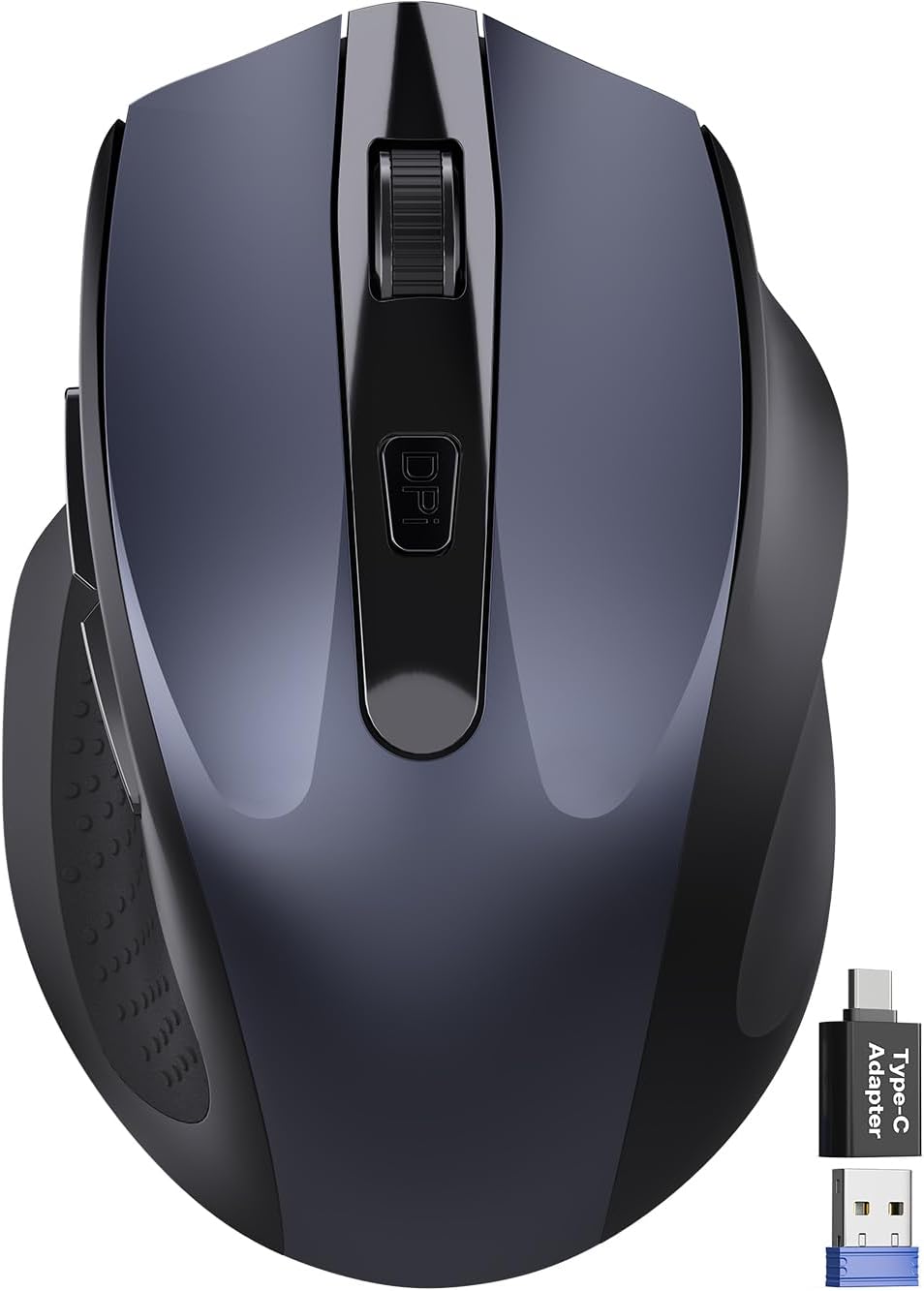 SABLUTE M21 Wireless Mouse for Small Hands
|
6.4/10 | Buy | ||
 Acer 2.4GHz Wireless Mouse, 5 DPI Levels
|
6.7/10 | Buy | ||
| Best Premium |
 Logitech Signature M550 L Wireless Mouse for Large Hands
|
6.2/10 | Buy | |
 Logitech Signature M550 L Wireless Mouse
|
6.2/10 | Buy | ||
 VssoPolor 2.4G Wireless Mouse with Quiet Click
|
6.2/10 | Buy |
Logitech Signature M550 Wireless Mouse
A compact wireless mouse built for small-to-medium hands, featuring Logitech's SmartWheel for dual-mode scrolling and SilentTouch technology that cuts click noise by 90 percent. The contoured design with soft thumb grips and rubber side panels delivers comfort for extended work sessions, while a single AA battery lasts up to 2 years. Connects via Bluetooth or USB receiver across Windows, macOS, Linux, Chrome OS, iPadOS, and Android.
Pros
- Exceptional battery life: single AA battery lasts up to 24 months
- Quiet operation with SilentTouch technology reduces click noise by 90 percent
- Ergonomic design with contoured shape and soft thumb area optimized for small-to-medium hands
- Flexible connectivity via Bluetooth Low Energy or Logi Bolt USB receiver
- Broad platform compatibility including Windows 11, macOS, Linux, Chrome OS, iPadOS, and Android
- Contains 26-65 percent certified post-consumer recycled plastic depending on color
Cons
- Sized specifically for small-to-medium hands, limiting fit for users with larger hands
- Requires AA battery replacement every 2 years rather than built-in rechargeable battery
- Single SmartWheel mode switching may feel less intuitive than dedicated scroll buttons for some users
Logitech M196 Bluetooth Travel Mouse
A lightweight, ambidextrous Bluetooth mouse designed for laptop and tablet users who travel frequently. It pairs instantly without a dongle and delivers a full year of battery life on a single AA battery, making it practical for remote workers and students on the move.
Pros
- Bluetooth connectivity eliminates the need for USB receiver or extra ports
- Comfortable ambidextrous design works equally well for left and right-handed users
- Impressive 12-month battery life with auto-sleep feature reduces charging frequency
- Compact, portable form factor fits easily into bags and travel gear
- Made with 66-67% post-consumer recycled plastic, supporting sustainable manufacturing
Cons
- Only three non-customizable buttons limit functionality for power users
- Battery life varies significantly depending on usage patterns and conditions
- Optical tracking may not perform consistently on all surface types
Tecknet 2.4G Wireless Mouse, 2600 DPI Ergonomic
A compact, battery-powered wireless mouse designed for medium to small hands with ergonomic side grips and adjustable DPI up to 2600. Delivers long battery life and reliable connectivity across multiple operating systems, though it's not rechargeable and won't work with glass surfaces.
Pros
- Extended 24-month battery life with power-saving mode and on/off switch
- Ergonomic contoured design with rubber side grips tailored for medium to small hands
- 5-level adjustable DPI (800-2600) for flexible cursor control
- Wide OS compatibility including Windows, Mac, Chrome OS, and Linux
- Compact and travel-friendly at 4.09 x 2.68 x 1.49 inches
Cons
- Not rechargeable; requires AAA batteries (not included)
- Does not work on glass surfaces; optical tracking limited to standard surfaces
- Side button incompatible with Mac systems despite Mac connectivity support
- Not completely silent; produces soft clicks rather than silent operation
Tecknet Compact Ambidextrous Wireless Mouse
A budget-friendly wireless mouse in eye-catching mint green, designed for portability and quiet operation. Its compact form factor suits small to medium hands and frequent travelers, while the soft-click mechanism keeps noise levels low. Rated 4.6 stars across thousands of reviews, though it requires AA batteries and offers modest DPI customization.
Pros
- Compact, portable design (3.94 x 2.28 x 1.52 inches) ideal for travel and small hands
- Quiet, soft-click buttons reduce noise in shared spaces
- Extended battery life up to 15 months on a single AA battery
- Reliable 2.4GHz wireless connectivity with 49-foot range
- Universal compatibility across Windows and Mac systems
- 36-month warranty with registered products
Cons
- Requires AA battery (not included) for operation
- Limited DPI adjustment options (three levels only: 800, 1200, 1600)
- USB receiver stored inside back compartment requires manual access
Wegear WL300 Bluetooth Mouse, Silent 6-Button
A sculpted wireless mouse designed for quiet office work and travel, featuring Bluetooth 5.0 connectivity and three adjustable DPI levels. The silent click mechanism and side navigation buttons make it practical for multitaskers, though forward/backward button support on Mac is limited.
Pros
- Silent buttons across all inputs, ideal for shared workspaces and quiet environments
- Ergonomic sculpted grip designed for extended daily use without hand fatigue
- Excellent battery life with up to 24 months on a single AA battery and auto sleep mode
- Three DPI settings (800/1200/1600) for flexible control across different tasks
- Durable construction rated for 3 million clicks on primary buttons and 300,000 scroll cycles
Cons
- Forward and backward buttons do not function on Mac devices, limiting utility for Apple users
- No battery included in the box despite being AA-powered
- Product has zero verified reviews on the platform, making real-world durability claims difficult to validate
SABLUTE M21 Wireless Mouse for Small Hands
Compact right-handed mouse designed for travel and shared workspaces, with quiet clicks and multi-device compatibility via USB-A and USB-C. Best suited for users with small to medium hands who prioritize portability and noise reduction over advanced features.
Pros
- Ultra-compact design fits easily into laptop bags and works on most surfaces without a mouse pad
- Up to 90% noise reduction maintains click feedback, ideal for offices and libraries
- Dual USB-A and USB-C adapters enable broad compatibility across Windows, Mac, Linux, Chrome OS, Android, and iOS devices
- 3-level DPI switching (800/1200/1600) provides straightforward cursor control options
- Extended 18-month battery life with intelligent auto-sleep modes reduces charging interruptions
Cons
- Right-hand asymmetrical design excludes left-handed users
- No user reviews available yet to validate real-world performance and durability claims
- Battery not included (requires 1x AA), adding an extra purchase for initial setup
Acer 2.4GHz Wireless Mouse, 5 DPI Levels
A no-fuss wireless mouse built for office work, offering stable 2.4GHz connectivity up to 33 feet and five adjustable DPI settings from 800 to 4000. The ergonomic design suits medium to large hands, while forward/backward buttons streamline navigation. Best for desk workers who value reliability over gaming performance.
Pros
- Plug-and-play setup with USB-A receiver, no driver installation needed
- Five adjustable DPI levels with visual indicator light for quick settings confirmation
- Forward and backward navigation buttons improve workflow efficiency
- Auto-sleep after 10 minutes of inactivity extends battery life, wakes instantly with 2-3 clicks
- Rated for 10 million clicks, indicating solid durability for daily use
Cons
- AA batteries not included, requiring separate purchase before first use
- Designed specifically for medium to large hands, limiting comfort for smaller hand sizes
- No mention of ergonomic features like wrist support or contoured grip for extended use
Logitech Signature M550 L Wireless Mouse for Large Hands
A full-size wireless mouse engineered for larger hands, featuring Logitech's SmartWheel for adaptive scrolling and SilentTouch technology that cuts click noise by 90%. The contoured design with soft thumb grip and rubber side grips delivers comfort through extended work sessions, while 24-month battery life and multi-platform compatibility minimize maintenance and device switching hassles.
Pros
- Excellent ergonomic fit specifically designed for large hands with contoured shape and soft-touch thumb area
- SmartWheel delivers both line-by-line precision and rapid free-spin scrolling with a single gesture
- Extended 24-month battery life on a single AA battery reduces replacement frequency
- SilentTouch technology provides 90% noise reduction for shared workspaces
- Dual connectivity options via Bluetooth Low Energy or Logi Bolt USB receiver with broad OS support
Cons
- Limited to large-hand users; those with smaller hands must purchase the separate M550 standard size
- USB-C adapter sold separately, adding extra cost for certain connectivity setups
- No reviews available yet to assess real-world durability and long-term user satisfaction
Logitech Signature M550 L Wireless Mouse
A full-size wireless mouse built for people with larger hands, combining practical comfort features with productivity-focused design. The adaptive SmartWheel switches between precise scrolling and fast-spin mode, while SilentTouch technology cuts click noise by 90 percent. Multi-platform compatibility and a 24-month battery life make it a low-maintenance option for office or remote work.
Pros
- Adaptive SmartWheel delivers both line-by-line precision and fast scrolling without mode switching hassle
- SilentTouch technology reduces click noise by 90 percent, ideal for shared spaces
- Excellent battery life at 24 months on a single AA battery
- Ergonomic design with contoured shape, soft thumb area, and rubber grip grips for extended comfort
- Broad OS compatibility across Windows, macOS, Linux, Chrome OS, iPadOS, and Android
Cons
- Sized specifically for large hands; smaller-handed users need the M550 standard model instead
- Logi Bolt USB receiver connectivity requires separate USB-C adapter purchase
- Battery life varies based on user behavior and computing conditions, so actual performance may differ from 24-month estimate
VssoPolor 2.4G Wireless Mouse with Quiet Click
A slim, portable wireless mouse designed for quiet operation in shared spaces. The 2.4 GHz connection reaches up to 10 meters, while auto-sleep mode extends battery life during inactive periods. Best suited for office workers and travelers who prioritize discretion and portability over advanced features.
Pros
- Whisper-quiet clicking mechanism reduces distraction in shared work environments
- Plug-and-play USB nano receiver requires no driver installation
- Ambidextrous design accommodates both left and right-handed users
- Auto-sleep mode conserves battery after 5 minutes of inactivity
- Compact, lightweight build with USB receiver that stores inside the mouse for travel
Cons
- Uses disposable batteries rather than rechargeable, adding ongoing replacement costs
- No reviews available to verify real-world performance or reliability claims
- Limited to 10-meter range, which may be restrictive in larger office spaces
- Lacks advanced features like programmable buttons or adjustable DPI settings
Wireless Mice for Small Hands Buying Guide
Choosing a wireless mouse sized for smaller hands involves more nuance than simply picking the most compact option on the shelf. Shell dimensions, sensor performance, connectivity type, and battery life all interact in ways that affect real-world comfort.
The sections below walk through the criteria that matter most, so you can match the right mouse to your hand size and daily workflow.
Size and Shell Dimensions

The most important factor for small-handed users is the physical footprint of the mouse itself. A shell that is too long forces your fingers to extend beyond the rear buttons, which strains tendons over time.
Look for mice explicitly listed as compact or sized for small to medium hands, typically measuring roughly 100 to 115 mm in length.
Mice marketed toward medium to large hands, even excellent ones, can cause fatigue if your palm does not reach the rear arch naturally.
Width matters too. A narrow body, usually under 65 mm at its widest, lets smaller fingers wrap around the sides without awkward splaying.
Pay attention to how a manufacturer describes the intended hand size, since some brands are transparent about this in the product listing while others are not.
When in doubt, verified buyer reviews from people who mention small or petite hands are among the most reliable signals you can find.
Weight is a secondary but real consideration. Lighter shells, generally under 90 grams, reduce the effort needed for rapid repositioning and reduce wrist strain during extended use.
For most productivity and casual-use scenarios in this category, weight savings matter more than feature-rich scroll wheels that add grams.
Grip Style: Palm, Claw, or Fingertip

Your grip style determines which shell profile fits you best, and this is especially consequential for small-handed users.
Palm grip users rest the entire hand on the mouse and need a lower-profile shell that does not force the wrist upward at an uncomfortable angle.
Claw and fingertip grippers need a shorter body so fingertips reach the click buttons without overextending.
Most compact mice in this roundup are best suited to palm or claw grip; they are not deep enough for aggressive fingertip grip at high-speed gaming use cases.
Symmetrical, ambidextrous designs are a practical choice for small hands because they keep the body narrow and centered, which tends to fit petite palms better than pronounced right-handed ergonomic arches.
That said, some right-handed ergonomic mice at the compact end of the spectrum also work well if the arch height is modest.
If you are considering ergonomic wireless mice more broadly, we have a dedicated roundup worth reading before you decide.
Connectivity: Bluetooth vs. USB Receiver
Compact wireless mice generally ship with either a 2.4 GHz USB nano receiver or Bluetooth connectivity, and each has meaningful trade-offs.
USB receiver mice offer a plug-and-play experience that works on virtually any device regardless of OS support, and they tend to have lower perceived latency for everyday productivity tasks.
The downside is occupying a USB-A port, which can be a real constraint on thin laptops with limited ports. If you regularly use a docking station, this becomes less of an issue since you’ll have ports to spare.
Bluetooth mice pair directly to your device without any dongle, keeping all USB ports free. They also tend to support multi-device pairing, so you can switch between a laptop, tablet, and desktop with a button press.
The trade-off is that Bluetooth can experience occasional lag or dropout on crowded wireless channels, though modern Bluetooth 5.0 and later implementations have largely addressed this for productivity users.
If you move between a laptop and Chromebook or between devices frequently, Bluetooth is worth prioritizing. Our Chromebook guide covers compatible peripherals if you are building out that ecosystem.
DPI Range and Sensor Quality

DPI (dots per inch) describes how far the cursor moves for each inch of physical mouse movement. For productivity and everyday computing, a range of roughly 800 to 1600 DPI covers the vast majority of use cases across common screen sizes.
Adjustable DPI settings, typically toggled with a button on the bottom or top of the mouse, let you tune sensitivity to match your monitor resolution and personal preference without going into software.
Most mice in the budget and mid-range tiers use optical sensors that perform well on standard desks and mouse pads.
Higher DPI ceilings, such as 2600 DPI or 4000 DPI, are useful if you work on a high-resolution display or need fine cursor control for graphic design.
For small-handed users doing general office work, three DPI steps covering a low, medium, and high sensitivity are typically more than sufficient, and simpler controls mean less accidental mode-switching mid-task.
Battery Life and Power Management

Wireless mice in this category are almost universally powered by AA or AAA batteries rather than a built-in rechargeable cell, which is actually an advantage for users who dislike managing charge cycles.
Battery life claims vary widely, from around 12 months at the lower end to 18 months or more for models with aggressive power-saving modes. Manufacturers typically achieve longer runtimes by using efficient optical sensors and implementing auto-sleep after a short idle period.
Longer battery life is a genuine quality-of-life benefit for users who travel or work away from a desk, where swapping a battery is far simpler than hunting for a charging cable.
Pay attention to whether a manufacturer backs their battery claims with a warranty or guarantee, as that transparency often signals genuine confidence in the power management implementation.
Battery-powered mice also tend to be lighter than rechargeable counterparts, which suits small-handed users looking to minimize fatigue.
Button Layout and Quiet Clicks

A mouse with too many buttons can become cluttered and uncomfortable for smaller hands where the thumb rests closer to the scroll wheel. For most productivity users, three to six buttons is a practical ceiling.
Standard left click, right click, and scroll wheel click are universals; side buttons for forward and back navigation add convenience without overwhelming the layout.
Avoid mice where side buttons are so large or close-set that accidental clicks become common with a narrower grip.
Quiet or silent click switches have become increasingly common across all price tiers and are worth seeking out if you work in shared or open-plan spaces, libraries, or coffee shops.
The click mechanism is dampened internally so the activation feel remains crisp while the audible sound is reduced significantly. Several picks in this roundup feature silent switches, which pairs well with the quieter overall computing environment many remote workers prefer.
If you are also thinking about audio peripherals for a quiet setup, a quality USB microphone is a natural companion for home-office productivity.
Why You Should Trust Us
REMOVU is an independent review publication. We do not accept paid placements, sponsored rankings, or manufacturer-provided review samples that could compromise our editorial independence.
Every product in this guide is assessed using a consistent research framework: we analyze published specifications, draw on expert review consensus from across the industry, incorporate verified buyer feedback from real purchasers, and reference published data from credible sources.
We do not conduct our own product trials; our evaluations are grounded in research, published data, expert review consensus, and verified buyer feedback.
Each product receives a REMOVU Score on a scale of 0 to 10. That score reflects our multi-source evaluation across criteria relevant to the category, including comfort, connectivity, sensor performance, battery life, build quality, and value.
Higher scores indicate stronger overall performance against those criteria relative to the competitive set. The ranking order in this article corresponds directly to REMOVU Score, with the highest-scoring pick listed first.
We are transparent about how we earn revenue. REMOVU may receive an affiliate commission when you purchase through links in this article. That relationship does not influence which products we include, how we rank them, or what scores they receive.
Our recommendations are driven by research quality and user benefit, not commission rates.
Final Thoughts
After synthesizing specifications, expert review consensus, and verified buyer feedback across every model in this roundup, a few standout picks emerge for different types of small-handed users.
Whether you prioritize a trusted brand, budget friendliness, or silent performance, there is a strong option here. Below are our top awards from this group.
- Best Overall: Logitech Signature M550 Wireless Mouse (Rose) earns the top position thanks to its explicit sizing for small to medium hands, multi-device Bluetooth and USB flexibility, and strong two-year battery life, combining thoughtful ergonomics with Logitech’s reliable build quality for an excellent everyday driver.
- Best Bluetooth Pick: Logitech M196 Compact Ambidextrous Bluetooth Wireless Mouse (Rose) stands out for dongle-free Bluetooth convenience in a compact ambidextrous shell, making it ideal for small-handed users who want to keep their USB ports free across multiple devices.
- Best Budget Compact: TECKNET Compact Ambidextrous Wireless Mouse (Mint Green) delivers a quiet ambidextrous design with three adjustable DPI levels and broad OS compatibility at an accessible price point, making it a smart first choice for anyone looking to upgrade without spending much.
- Best for All-Day Work: WL300 Bluetooth Mouse by wegear (Grey) pairs a sculpted grip with quiet clicks, six-button versatility, and an impressive 18-month battery life claim, making it a strong daily-driver for small-handed remote workers who dislike frequent battery swaps.
- Best for Dual USB Compatibility: SABLUTE M21 Wireless Mouse covers both USB-A and USB-C connections with an included adapter, making it one of the more versatile compact options in the group for users who move between older and newer laptops or portable monitors.
For small-handed users building out a complete desk setup, the right mouse is just one piece of the puzzle. A well-matched monitors and peripherals ecosystem can make your workstation genuinely more comfortable and productive.
If you are shopping for a wireless mouse on a stricter budget, our broader wireless mice under budget roundup includes additional options worth considering.
And if workspace ergonomics are a priority, our guide to ergonomic wireless mice covers a wider range of shaped designs with richer detail.
Frequently Asked Questions
What size mouse is best for small hands?
Most ergonomists suggest looking for mice in the 100 to 115 mm length range for small hands. Width under 65 mm at the widest point also helps prevent lateral stretching.
Some brands now explicitly label products as sized for small or small-to-medium hands, which is a reliable starting point when filtering options.
Is Bluetooth or a USB receiver better for a compact wireless mouse?
It depends on your workflow. USB receiver mice tend to offer more reliable out-of-the-box compatibility and slightly lower latency for everyday tasks.
Bluetooth mice are ideal if you frequently switch between devices or need to preserve USB ports on a slim laptop or tablet. Both technologies perform well for productivity use; the choice is mostly about convenience and port availability.
Do I need a high DPI mouse for small hands?
Not necessarily. DPI is about cursor sensitivity, not hand size. For everyday productivity on a standard 1080p or 1440p display, 800 to 1600 DPI covers most users comfortably.
Higher DPI ceilings become more useful on large 4K displays or in design workflows requiring very fine cursor control. Adjustable DPI with two or three steps is generally more useful than a very high maximum figure.
Are ambidextrous mice better for small hands?
Ambidextrous mice often work well for small-handed users because their symmetrical, narrow profiles tend to suit petite palms without forcing the hand into an awkward grip. They are also versatile for left-handed users.
That said, a compact right-handed ergonomic mouse with a modest arch can be equally comfortable if the shell dimensions are appropriate for your hand size.
Can I use one of these mice with a Chromebook or Mac?
Yes. Most wireless mice in this roundup advertise compatibility with Windows, macOS, Chrome OS, and Linux either via plug-and-play USB receiver or Bluetooth pairing.
Always check the product listing for the specific OS compatibility list, particularly if you use a Chromebook as your primary machine.
Our guide to Chromebooks for work includes additional peripheral compatibility context if you are setting up a full Chrome OS workspace.
How long should a wireless mouse battery last?
Budget and mid-range wireless mice typically claim between 12 and 18 months of battery life under average usage conditions. Premium models with efficient sensors and aggressive auto-sleep modes can push beyond 18 months.
Real-world figures depend on how many hours per day you use the mouse, your surface type, and whether auto-sleep activates reliably.
Replacing a standard AA battery takes seconds and costs little, which is one reason battery-powered designs remain popular despite the rise of rechargeable mice.
If you want a full peripheral refresh for your desk, a capable home office desktop paired with well-chosen accessories makes the investment worthwhile.
About the author
Catherine is REMOVU's camera drone writer, comparing image quality, flight time, and obstacle avoidance across beginner and pro models. She focuses on which drones capture keeper footage without risking a crash.