The 11 Best Network Switches Managed
Choosing a managed switch means balancing port count, PoE budget, VLAN depth, and software ecosystems. Our research across top TP-Link and NETGEAR models cuts through the specs to find the right fit.
 By Lisa Nelson
Updated July 26, 2026
By Lisa Nelson
Updated July 26, 2026
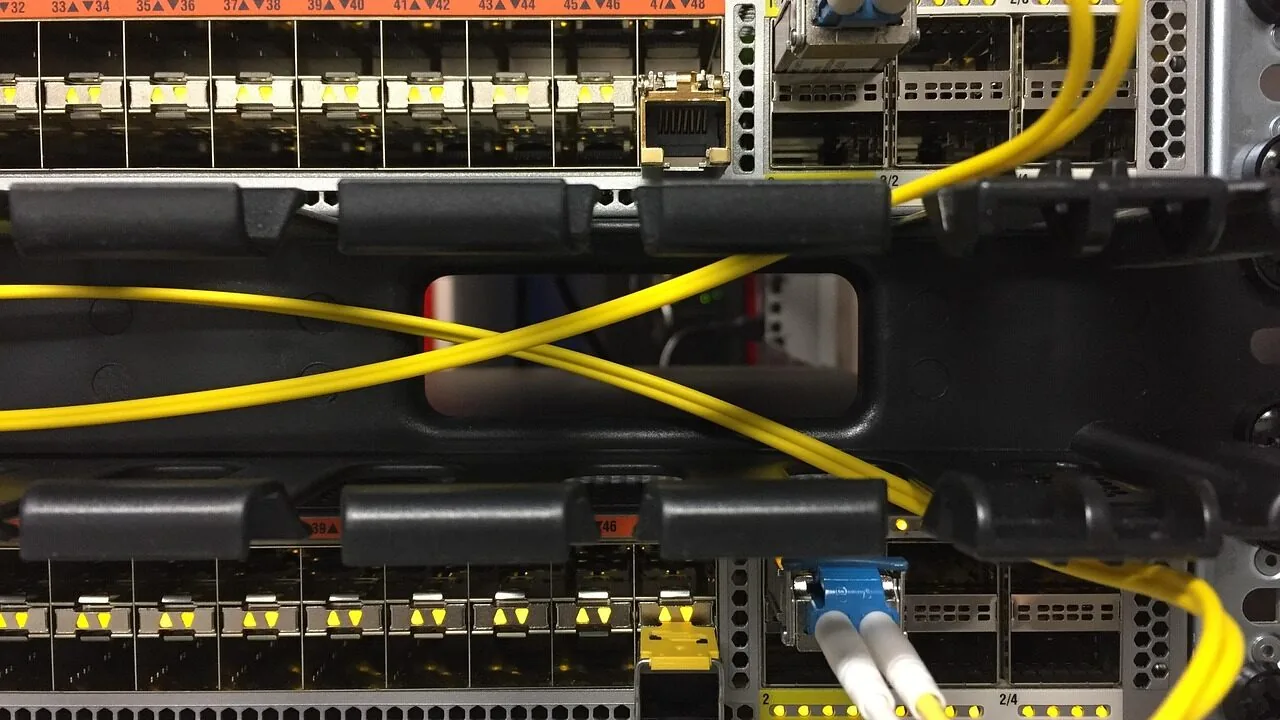
Managed network switches sit at the heart of any serious network infrastructure, giving IT administrators granular control over traffic, VLANs, QoS, and link aggregation that unmanaged switches simply cannot offer.
Whether you are setting up a small office, wiring a multi-floor building, or building out a home lab, the right managed switch determines how reliably and efficiently your devices communicate.
The market spans everything from entry-level “easy smart” models aimed at small businesses to fully enterprise-grade L3 switches with multi-gig uplinks, and sorting through the options takes real research.
Our team at REMOVU analyzed specifications, synthesized expert review consensus from networking publications, and weighed verified buyer feedback across all price tiers to surface the picks below.
If you also rely on NAS devices or are evaluating mesh Wi-Fi systems to complement your wired backbone, getting the switch right first pays dividends across every connected device on your network. Scroll down for our ranked top picks.
The eleven switches we recommend range from compact five-port desktop units ideal for a home office up to rackmount 2.5G multi-uplink AV-grade switches engineered for demanding professional deployments.
Every pick was assessed against a consistent set of criteria covering port count and speed, management depth, PoE capability, build quality, and long-term value.
Prices span a wide budget range, so there is a genuinely useful option for nearly every network size and use case. Our ranked list follows immediately below.

Netgear M4250 12-Port 2.5G Managed Switch
Purpose-built for AV over IP installations, this managed switch combines 12 ports of 2.5G Ethernet with 2 SFP+ uplinks and comes pre-configured for zero-setup audio and video deployment. The fanless operation option and AV-specific web GUI make it a solid choice for professional AV integrators, though the specialized focus limits broader networking use cases.
Pros
- Hardware and software designed specifically for AV over IP with input from industry professionals
- Flexible mounting options including reversed rack orientation, VESA, and recessed installation
- PoE power scaling from 15.4W to 90W covers diverse endpoint requirements
- Quiet operation possible with switchable fan control based on thermal and load conditions
Cons
- Specialized AV focus means limited value for general-purpose network switching
- Only two user reviews available, limiting independent performance validation
- No information on management features, VLAN support, or advanced networking capabilities in product data

TP-Link TL-SG2218 16-Port Gigabit Smart Managed Switch
A fanless 16-port managed switch with Omada SDN integration, designed for small businesses and home networks needing centralized cloud management. Delivers enterprise-grade security and traffic control features at an accessible price point.
Pros
- Omada ecosystem integration simplifies multi-device network management across switches, APs, and gateways
- Robust L2/L3/L4 security and QoS capabilities justify the managed switch tier without premium pricing
- Fanless, low-power operation (10W max) suits always-on home and small office deployments
- Verified users report reliable performance and straightforward Omada adoption after proper DHCP configuration
- CLI interface follows Cisco IOS conventions, familiar to network admins
Cons
- Web UI navigation is dense with many configuration options scattered across menus; learning curve for complex setups like VLAN and PVID configuration
- Some settings may not persist when switching between standalone web interface and Omada controller management
- Initial adoption into Omada environment requires DHCP availability on target VLAN; static IP assignment only works post-adoption

NETGEAR GS324T 24-Port Gigabit Smart Managed Switch
A mid-range managed switch with 24 Gigabit ports plus 2 SFP fiber connections, designed for small to medium network deployments. Combines flexible mounting options, low power consumption, and quiet operation with practical L2 management features like VLAN and QoS support.
Pros
- Strong port density for its class with dual SFP expansion capability
- Fanless design eliminates noise, suitable for office or noise-sensitive environments
- Flexible deployment with included rackmount kit and desktop option
- Advanced VLAN, QoS, and IGMP features support professional network management
- Industry standard 5-year warranty provides extended protection
Cons
- No PoE support limits use cases for IP cameras or wireless access points
- L2 management layer lacks L3 routing capabilities compared to higher-tier models
- No product reviews available to validate real-world performance claims

TP-Link TL-SG1016PE 16-Port Gigabit PoE Switch
A 16-port managed switch with 8 PoE+ ports (150W total budget) designed for small offices and camera/access point deployments. Setup is straightforward with web-based management, VLAN support, and QoS features, though power budget limits simultaneous high-draw devices.
Pros
- All 16 ports deliver Gigabit speeds (10/100/1000 Mbps), not just PoE ports
- 8 PoE+ ports handle multiple cameras and access points with auto-detection and per-port power monitoring
- Easy Smart web interface allows VLAN, QoS, and LAG configuration without deep networking knowledge
- Sturdy metal rack-mount chassis with internal power supply and low fan noise in typical office environments
- Plug-and-play setup with automatic IP assignment, plus 3-year warranty and free tech support (6am-6pm PST weekdays)
Cons
- 150W PoE power budget limits you to roughly 4-5 high-power devices simultaneously; heavy IR camera workloads require planning
- Operating temperature spec maxes at 40°C, which can be exceeded in attics or unclimated spaces despite robust cooling
- Fan is audible in quiet environments (not silent/fanless); one reviewer confirmed fanless models exist elsewhere for absolute silence

TP-Link TL-SG1016DE 16-Port Gigabit Smart Managed Switch
This 16-port managed switch brings enterprise-grade features like VLAN, QoS, and IGMP snooping to small networks and homelabs at a budget-friendly price. Its fanless metal design runs silent and handles constant use reliably, though VLAN configuration requires some study beyond the included documentation.
Pros
- 16 gigabit ports provide ample connectivity for growing networks without performance bottlenecks
- Web-based management interface with monitoring dashboard and free utility software for easy traffic control
- Fanless operation stays silent with minimal heat generation, suitable for always-on deployments
- Advanced features like VLAN segmentation, QoS traffic prioritization, and port mirroring at an accessible price point
- Durable metal construction with shielded RJ45 ports, rackmount capability, and 3-year warranty backed by TP-Link support
Cons
- VLAN configuration documentation lacks clarity and explanation of tag/untag/PVID settings, requiring external resources to properly implement custom network designs
- Rackmount bracket design may strain under weight if your rack depth is limited, and standard power adapter requires approximately 8 inches of clearance
- No console port for CLI-based management, limiting configuration options for advanced users

TP-Link TL-SG1024DE 24-Port Gigabit Managed Switch
A budget-friendly managed switch with 24 gigabit ports, VLAN support, QoS, and useful diagnostic tools that strikes a balance between simplicity and functionality. Best suited for small offices, homelabs, and users upgrading from unmanaged switches without needing enterprise-grade features.
Pros
- 24 gigabit ports with 1000 Mbps data transfer for simultaneous connectivity
- Easy management interface with web dashboard and traffic monitoring via port mirroring and cable diagnostics
- VLAN, QoS, LAG, and IGMP snooping for network segmentation and traffic control
- Plug-and-play setup with minimal configuration overhead for basic use
- Durable metal chassis with fanless design, rackmount-ready, and includes shielded RJ45 ports
- Strong user feedback on reliability and build quality over extended periods
Cons
- Included network cable feels cheap and flimsy, limiting practical immediate use
- Limited device identification capability and no automatic port labeling in management software
- Learning curve for VLAN configuration, and requires careful IP address setup to avoid conflicts with modem default ranges

NETGEAR GS108PEv3 8-Port PoE Gigabit Switch
A compact, fanless managed switch designed for small PoE deployments like security cameras and access points. Combines basic Layer 2 management features (VLANs, QoS) with reliable 53W PoE budget across 4 ports, backed by proven long-term durability in real-world home and small office setups.
Pros
- Exceptional reliability, with verified user reports of 9+ years continuous operation without port failures
- 4 PoE ports with 53W total budget sufficient for 4-5 standard security cameras or IoT devices
- Basic managed features (VLANs, QoS, IGMP snooping) at a budget price point rare for this class
- Silent fanless operation and compact desktop/wall-mount design
- Lifetime limited hardware warranty with next-business-day replacement
Cons
- NETGEAR Switch Discovery Tool (NSDT) configuration software is unreliable and difficult to use, requiring manual static IP setup on first connection
- Lower PoE budget (53W) compared to similar models like GS108LP (60W) or GS108PP (123W), limits simultaneous powered device count
- Management interface does not function properly on tagged VLANs, requiring workarounds for advanced network configurations

NETGEAR GS308E 8-Port Gigabit Smart Managed Switch
A straightforward managed switch that works immediately out of the box while offering VLAN, QoS, and traffic management when you need them. Fanless metal design runs silent, making it reliable for home offices, small businesses, and expanding home networks without complexity.
Pros
- Plug-and-play setup with full gigabit performance right away
- Silent fanless operation with metal housing that runs cool
- Web-based management interface accessible on Windows, Mac, and Linux without proprietary apps
- VLAN support, QoS, IGMP snooping, and DoS prevention for network control without overwhelming complexity
- Compact desktop or wall-mount form factor, rated #4 in networking switches
Cons
- Firmware updates are manual and require extracting a ZIP file to access the .bin file
- Web interface has a slight learning curve and some users note it feels clunky
- Warranty is actually 3 years according to specifications, despite marketing references to 5 years

TP-Link Omada ES206X-M2 5-Port 2.5G Managed Switch
A compact, fanless managed switch with five 2.5 Gbps ports and a 10G SFP+ slot, designed for small businesses and home offices that need Layer 2 features without complexity. Cloud management via Omada app keeps configuration straightforward, and the metal chassis with surge protection delivers solid build quality at a competitive price point.
Pros
- Solid build quality with metal casing and shielded ports, noticeably heavy construction per owner feedback
- Fast setup and stable connections out of the box, with consistent performance across verified purchases
- Good value for a managed switch with Layer 2 features and 10G uplink capability
- Centralized Omada ecosystem integrates well for network visibility across multiple devices
- Flexible configuration with customizable VLAN management (32-entry table)
Cons
- Only 5 ports limits scalability for growing networks without additional switches
- No built-in PoE on the RJ45 ports, requiring external injectors if power delivery is needed
- VLAN table capped at 32 entries, which may constrain complex network segmentation
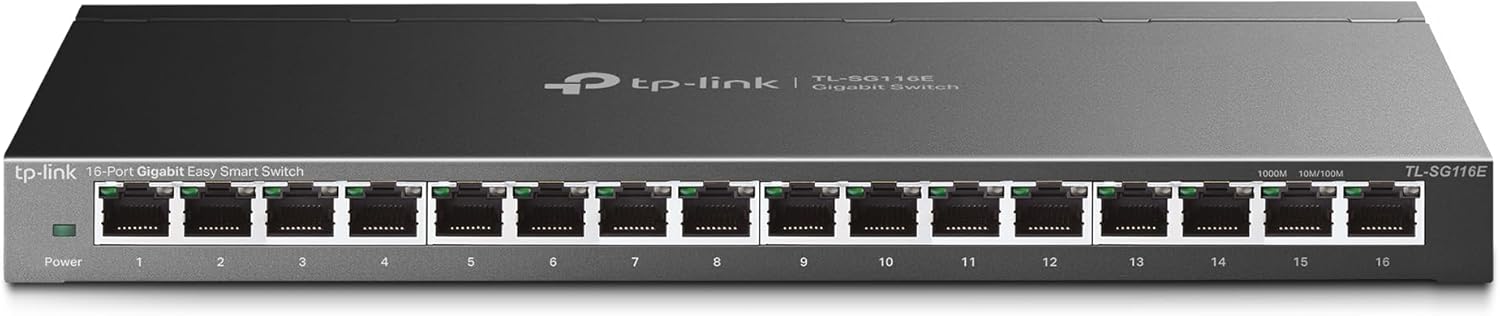
TP-Link TL-SG116E 16-Port Gigabit Smart Switch
A plug-and-play managed switch with 16 gigabit ports designed for home and small business networks. It combines ease of setup with intelligent features like QoS, VLAN, and IGMP snooping, wrapped in a durable metal casing that runs fanless and quiet.
Pros
- Easy deployment with auto-negotiating ports and minimal configuration
- Robust metal casing provides better component protection than plastic alternatives
- Management dashboard and web interface enable network monitoring and traffic prioritization without requiring expert knowledge
- Quiet, fanless operation suitable for home and office environments
- Strong user satisfaction with 4.7 stars across 7,297 reviews
Cons
- Login persistence issues reported by some users requiring periodic resets to access management interface
- VLAN configuration can create non-rebooting setups if management VLAN #1 is improperly removed, requiring careful configuration awareness
- Requires gigabit-capable router or upstream equipment to realize full performance potential

NETGEAR GS105Ev2 5-Port Gigabit Smart Managed Switch
A compact, fanless managed switch designed for small networks and VLAN setups, offering full gigabit speeds across all 5 ports with intuitive web-based configuration. Highly rated by users for reliability and straightforward deployment in both home and small office environments.
Pros
- Solid VLAN and 802.1Q support suitable for multi-network environments despite entry-level price point
- Consistently achieves full gigabit speeds with verified buyer reports of reliable long-term performance
- Compact footprint (3.7" x 3.9") fits easily behind monitors or in confined spaces
- Fanless design eliminates noise, making it suitable for offices and quiet environments
Cons
- Initial setup requires manual IP configuration or ProSAFE utility to access web interface, creating friction for non-technical users
- Limited to 5 ports, constraining scalability compared to 8 or 16-port alternatives in the same brand lineup
- US and Canada regional compatibility only, restricting availability in other markets
Best Network Switches Managed Buying Guide
Picking the right managed switch requires balancing several factors that vary considerably depending on your environment. A small retail shop has very different requirements than a university IT closet or a home lab running virtualization.
The sections below walk through the criteria that matter most, giving you a framework to evaluate any managed switch, not just the ones we picked.
Port Count, Speed, and Uplink Options

The most foundational question is how many devices you need to connect today, and how many you realistically expect within the next three to five years.
Standard gigabit ports (1G) remain the sensible baseline for most office and home-lab environments, but multi-gig ports (2.5G, 5G, 10G) are increasingly relevant if you are connecting NAS units, wireless access points supporting Wi-Fi 6E, or workstations handling large file transfers.
Buying one tier above your current need is usually the smarter play over replacing a switch in two years.
Uplink ports deserve special attention. SFP slots let you run fiber between switches or to a router over longer distances without signal degradation, which matters in larger buildings.
Switches like the NETGEAR GS324T include dual 1G SFP uplinks, and the NETGEAR AV Line MSM4214X goes further with SFP+ slots for 10G fiber connectivity.
If your network is currently all-copper and confined to a single room, SFP may not be a priority, but plan ahead.
For networks that also rely on fast local storage, external drives connected over a 2.5G or 10G link benefit enormously from a switch that does not bottleneck throughput.
Also consider whether you will need stacking or cascading across multiple switches. In larger deployments, buying a consistent platform (for example, staying within the TP-Link Omada ecosystem or the NETGEAR S-Series family) simplifies management significantly and future-proofs your investment in controller software licenses.
Management Depth: Easy Smart vs. Smart vs. Fully Managed
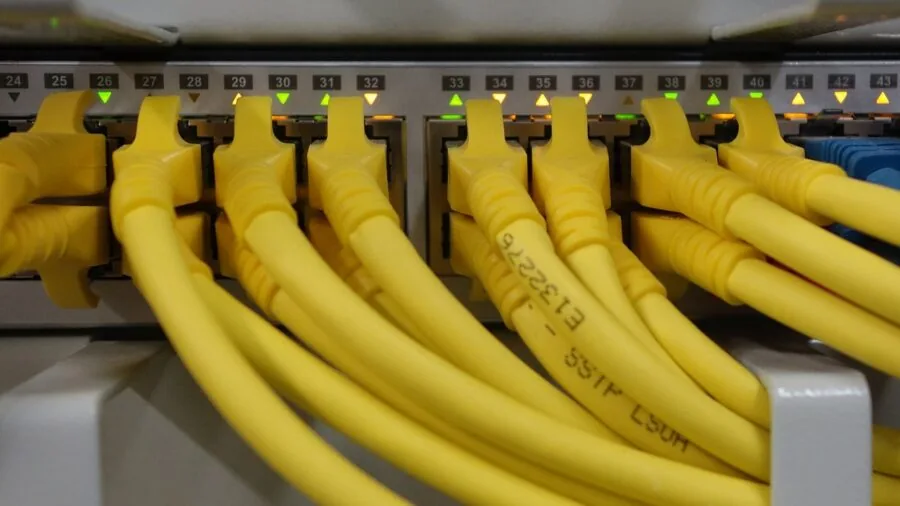
“Managed switch” is a broad label that actually covers three distinct tiers. Easy Smart switches, such as the TP-Link TL-SG1016DE and the NETGEAR GS308E, offer a browser-based GUI with basic VLAN, QoS, and IGMP snooping controls.
They are designed for users who want more control than an unmanaged switch provides but do not need a full CLI or SNMP integration. These are excellent for small businesses and power home users.
Smart Managed Pro switches, like the NETGEAR GS324T, add richer VLAN functionality, ACLs, RMON, and SNMP support while still relying primarily on a GUI.
Fully managed switches sit at the top, offering CLI access (usually SSH or Telnet), full Layer 2 and sometimes Layer 3 routing, dynamic routing protocols, and robust SNMP/NMS integration.
The TP-Link Omada SG2218 and the NETGEAR AV Line MSM4214X represent this tier with cloud-managed and on-premise SDN controller options respectively.
Choosing the wrong tier is one of the most common buying mistakes. Overbuy management depth and you pay for complexity you will never use.
Underbuy and you hit a ceiling when you need to segment VoIP from data traffic or isolate IoT devices onto a separate VLAN. Map your actual network administration tasks before deciding.
If your team also manages Wi-Fi routers through a centralized controller, selecting a switch that integrates with the same platform (such as Omada SDN) dramatically reduces day-to-day overhead.
PoE and PoE+ Power Budget
Power over Ethernet (PoE) turns your switch into a power source for IP cameras, VoIP phones, wireless access points, and even small displays, eliminating the need for separate power adapters at each endpoint.
The critical specification is not whether a switch has PoE but what the total power budget is across all PoE ports.
A switch with eight PoE ports but a modest total wattage budget will struggle if you connect several high-draw devices simultaneously.
PoE (802.3af) delivers up to 15.4W per port, while PoE+ (802.3at) goes to 30W, which is enough for most access points and PTZ cameras.
Budget accordingly: the NETGEAR GS108PEv3 offers a combined PoE budget across its four PoE ports, whereas the TP-Link TL-SG1016PE provides 150W total across eight PoE+ ports, making it far more capable for multi-AP deployments.
Verify the aggregate wattage, not just the per-port spec, before committing.
Also check whether the switch supports PoE scheduling and port prioritization. Higher-tier managed switches allow you to cut power to cameras overnight or prioritize PoE delivery to critical devices when the budget ceiling is approached, features that matter in always-on commercial environments.
VLAN, QoS, and Traffic Control Features

VLANs (Virtual Local Area Networks) let you logically segment your network without adding physical switches. A typical small-business deployment uses VLANs to separate staff workstations from guest Wi-Fi, IoT devices, and VoIP, providing security isolation and reducing broadcast domain size.
Every managed switch in our list supports IEEE 802.1Q tagged VLANs, but the depth of VLAN configuration varies.
Easy Smart switches typically support a limited number of static VLANs, while Smart Managed Pro and fully managed switches support hundreds or thousands along with dynamic GVRP-based VLAN registration.
QoS (Quality of Service) is essential whenever latency-sensitive traffic like VoIP or video conferencing shares a network with bulk transfers. Look for 802.1p priority queuing and DSCP remarking support.
The TP-Link Omada SG2218 supports L2/L3/L4 QoS classification, giving it fine-grained control that simpler easy-smart units cannot match. For standard office use with VoIP and a few cameras, basic 802.1p support on an easy-smart switch is usually sufficient.
IGMP snooping is worth verifying if you run multicast streams, such as IPTV or video surveillance using multicast protocols. Without it, multicast packets flood every port, wasting bandwidth.
Link Aggregation (LACP / 802.3ad) allows you to bond two or more ports for higher throughput or redundancy between switches or to a server, another feature present across all our picks to varying degrees.
Build Quality, Form Factor, and Fanless Operation

Switches come in desktop, wall-mount, and 1U rackmount form factors. Desktop units are convenient for small offices and home labs but offer no cable management.
Rackmount units keep larger deployments organized and are the default choice for any dedicated server room or wiring closet.
Several picks in our list, including the TP-Link TL-SG1024DE and the NETGEAR GS324T, support both desktop and rackmount installation, which gives flexibility without forcing an early commitment.
Metal construction with shielded ports is a meaningful durability differentiator over plastic chassis units, particularly in environments with RFI concerns or physical handling. The TP-Link Easy Smart lineup emphasizes a sturdy metal chassis with shielded ports across its range.
For office environments near workstations or meeting rooms, fanless operation (passive cooling) is a genuine quality-of-life feature. The TP-Link Omada ES206X-M2, for example, is fully fanless, making it appropriate for quiet environments.
Higher-throughput switches often require active cooling fans, which produce audible noise and represent an additional failure point over years of operation.
If you are also evaluating workstation accessories alongside your network upgrade, pairing a good managed switch with a capable docking station for work from home creates a clean, centralized wired connection point for remote employees.
The combination of a reliable gigabit switch and a multi-port dock eliminates most wireless reliability complaints in home-office setups.
Software Ecosystem and Long-Term Support

A managed switch is only as good as its management software.
TP-Link’s Omada SDN ecosystem is a standout at the prosumer and SMB level, offering a free controller (software, hardware, or cloud-based) that centralizes configuration of switches, routers, and access points in a single dashboard.
The Omada SG2218 and Omada ES206X-M2 integrate natively with this platform. NETGEAR provides its ProSAFE Plus Utility and, for higher-end switches, NETGEAR Insight for cloud management, though cloud access on some tiers carries a subscription cost.
Firmware update cadence matters too. Security vulnerabilities in network equipment are real, and vendors that push consistent firmware updates reduce exposure.
Check vendor track records before committing: TP-Link’s Omada line and NETGEAR’s S-Series both have documented histories of multi-year firmware support. NETGEAR also backs several models with a Limited Lifetime Hardware Warranty, which is a meaningful long-term value signal.
Verify warranty terms at the time of purchase, as they can change between model generations.
Finally, consider whether the switch supports IPv6 natively. The TP-Link Omada SG2218 explicitly lists IPv6 and static routing support, which future-proofs deployments as ISPs continue their gradual IPv6 rollout.
If your infrastructure includes cable modems already provisioned for dual-stack IPv4/IPv6, a switch that handles IPv6 management avoids a painful compatibility gap down the road.
For a broader overview of everything that fits into a complete wired and wireless network, our Networking and Storage section covers routers, modems, storage, and more.
Why You Should Trust Us
REMOVU is an independent review publication with no manufacturer affiliations and no ownership stake in any product we recommend. Every managed switch in this guide was evaluated using a consistent, multi-source research framework.
Our analysts examine published technical specifications, synthesize expert review consensus from networking-focused publications and community forums, and weigh patterns in verified buyer feedback across major retail channels.
Each product then receives a REMOVU Score on a scale of 0 to 10, reflecting overall value, performance consistency, feature depth relative to price, and long-term reliability signals drawn from owner data.
We do not conduct our own product trials; our evaluations are grounded in research, published data, expert review consensus, and verified buyer feedback.
This methodology lets us assess a broader range of products and configurations than any single reviewer could physically evaluate, while remaining transparent about the basis for each recommendation. When expert sources disagree, we note the tension rather than obscuring it.
REMOVU may earn an affiliate commission if you purchase a product through a link on this page. That relationship does not influence our rankings, REMOVU Scores, or which products are included.
Our picks are determined entirely by the quality of the research-backed evaluation, not by commission rates. We update our rankings as new models launch, prices shift, and long-term owner feedback matures.
Final Thoughts
The managed switch category rewards careful specification matching more than almost any other networking product.
An easy-smart switch at a budget price point can genuinely outperform a poorly chosen enterprise model if it is sized and configured correctly for its environment.
With that in mind, here are our top danh hiệu picks from this guide, each earning its recognition based on the REMOVU Score and the specific strengths that make it the right tool for a particular use case.
- Best Overall: NETGEAR AV Line M4250-12M2XF Managed Switch (MSM4214X) earns the top REMOVU Score in this roundup thanks to its 2.5G multi-speed ports, dual SFP+ 10G uplinks, and purpose-built AV networking architecture, making it the most capable and future-ready pick across every metric we assessed.
- Best Mid-Range Managed Switch: TP-Link Omada SG2218 stands out as the most well-rounded choice for SMB and prosumer deployments, combining L3 QoS, IPv6, static routing, SFP uplinks, and native Omada SDN integration at a competitive mid-range price, all of which earned it one of the highest REMOVU Scores in the group.
- Best Smart Managed Pro Switch: NETGEAR GS324T 26-Port Smart Managed Pro Switch delivers the deepest feature set among the non-enterprise picks, with dual SFP uplinks, extensive VLAN and QoS controls, and S350 Series firmware backing, earning a strong REMOVU Score for its price tier.
- Best PoE Switch for Small Business: TP-Link TL-SG1016PE 16-Port PoE Switch offers the most generous PoE+ power budget among the PoE-capable picks in this guide, making it the clear choice for deployments with multiple access points, IP cameras, or VoIP endpoints that need reliable power delivery across many ports simultaneously.
- Best Budget Managed Switch: NETGEAR GS308E 8-Port Easy Smart Managed Switch provides genuine VLAN and QoS capability in a fanless, compact form factor at the lowest price of any pick in this roundup, making it the smartest entry point for home labs and very small offices that want more control than an unmanaged switch without the added cost.
Whatever your network size or budget, the right managed switch gives you control, segmentation, and reliability that unmanaged hardware simply cannot provide.
If you are also building out the rest of your workspace, a capable monitor setup and a high-performance laptop for programming pair well with a well-structured wired network backbone.
Frequently Asked Questions
What is the difference between a managed switch and an unmanaged switch?
An unmanaged switch operates entirely automatically with no configuration interface. Plug in cables and it forwards traffic based on MAC addresses, full stop.
A managed switch adds a configuration interface (web GUI, CLI, or cloud dashboard) that lets you define VLANs, prioritize traffic with QoS, monitor port statistics, configure link aggregation, and control access with ACLs.
For any network that needs security segmentation, VoIP quality assurance, or remote administration, a managed switch is the appropriate tool. Unmanaged switches are fine for simple home setups where every device can trust every other device on the same segment.
Do I need a PoE managed switch?
Only if you plan to power devices over the Ethernet cable rather than via separate power adapters. Common PoE-powered devices include wireless access points, IP cameras, VoIP desk phones, and some smart door locks.
If all of your endpoints have their own power supplies, a standard non-PoE managed switch saves money and thermal load.
If you are deploying any IP cameras or access points, a PoE managed switch consolidates power and data into a single cable run, which meaningfully reduces installation complexity and cost, especially in ceiling or wall-mount locations where running AC power is difficult.
How many VLANs do I actually need for a small business?
Most small businesses operate comfortably with three to five VLANs: one for staff workstations and servers, one for guest or customer Wi-Fi, one for IoT or building automation devices, one for VoIP, and optionally one for management traffic.
Easy Smart switches typically support enough static VLANs for this use case without requiring a fully managed unit.
As your network grows or compliance requirements tighten, upgrading to a Smart Managed Pro or fully managed switch with dynamic VLAN support and ACL capabilities gives you the headroom to expand without rearchitecting your core switching layer.
Is the TP-Link Omada ecosystem worth committing to?
For SMBs and home lab users who want centralized management without subscription fees, Omada SDN is one of the strongest value propositions in the prosumer networking space.
The controller software is free and can run on a local machine, a dedicated Omada hardware controller, or in the cloud with an optional cloud management tier.
The SG2218 and ES206X-M2 both integrate natively with Omada, and pairing them with Omada access points and routers creates a unified dashboard for your entire network.
The main risk of any ecosystem commitment is vendor lock-in; if TP-Link discontinues Omada support, migration requires replacing your entire managed layer.
That said, verified buyer feedback and expert consensus consistently rate Omada’s stability and update cadence as strong for its price tier in 2026.
Can I use a managed switch at home?
Absolutely. Home users with large smart-home deployments, home labs running virtualization, NAS-based media servers, or remote work setups with multiple connected workstations benefit from VLAN segmentation that keeps IoT devices isolated from personal computers.
Easy Smart switches make this accessible without requiring CLI expertise.
The NETGEAR GS308E and the TP-Link TL-SG116E are popular picks for home use precisely because they deliver meaningful management capability through a clean browser interface, at a price that makes sense even for personal networks.
Pairing a managed switch with a solid Wi-Fi router that supports VLAN tagging on its WAN or LAN port completes the segmentation picture without requiring enterprise hardware.
What does SFP mean on a managed switch, and do I need it?
SFP (Small Form-factor Pluggable) is a modular port that accepts transceiver modules for fiber or copper connectivity.
On managed switches, SFP ports are most commonly used as high-speed uplinks between switches, between a switch and a router, or over long distances where copper Ethernet (limited to roughly 100 meters) falls short.
For a single-room home office or a small office on one floor, SFP uplinks are rarely necessary.
For multi-floor buildings, campus networks, or deployments where you need 10G uplinks to a NAS or core router, SFP or SFP+ slots are essential.
The NETGEAR GS324T includes dual 1G SFP ports at a mid-range price, while the NETGEAR MSM4214X offers SFP+ for 10G fiber, reflecting its position at the professional end of the market.
About the author
Lisa is REMOVU's smart thermostat writer, weighing energy savings, features, and system compatibility. She helps readers add comfort and remote control while trimming their bills.