The 11 Best 4K Gaming Monitors
4K gaming monitors vary wildly in panel quality, HDR performance, and refresh rate headroom. Here are the picks that actually deliver on their specs, from budget IPS to flagship QD-OLED.
 By Melissa Lambert
Updated July 26, 2026
By Melissa Lambert
Updated July 26, 2026

Upgrading to a 4K gaming monitor is one of the most impactful changes you can make to your setup. At 3840×2160 resolution, detail is dramatically sharper, textures feel tangible, and cinematic titles look closer to film than ever before.
The challenge is that not every panel marketed as a “4K gaming monitor” is built equal: refresh rates, panel technology, color accuracy, and HDR implementation vary enormously across price tiers, and making the wrong call can leave you with a beautiful display that bottlenecks your GPU or stutters at the worst moment.
If you are pairing your new monitor with a high-end rig, you will want to make sure your gaming PC can actually push 4K frame rates before committing to the highest refresh rate panels.
At REMOVU, we cut through the spec-sheet noise by synthesizing manufacturer specifications, expert review consensus from the display community, and verified buyer feedback to identify the monitors that genuinely deliver on their promises.
Our picks span everything from affordable IPS panels for budget-conscious players to flagship QD-OLED displays aimed at enthusiasts who demand the absolute best.
Read on for our top picks across every budget, followed by a detailed buying guide to help you find the right match for your needs.
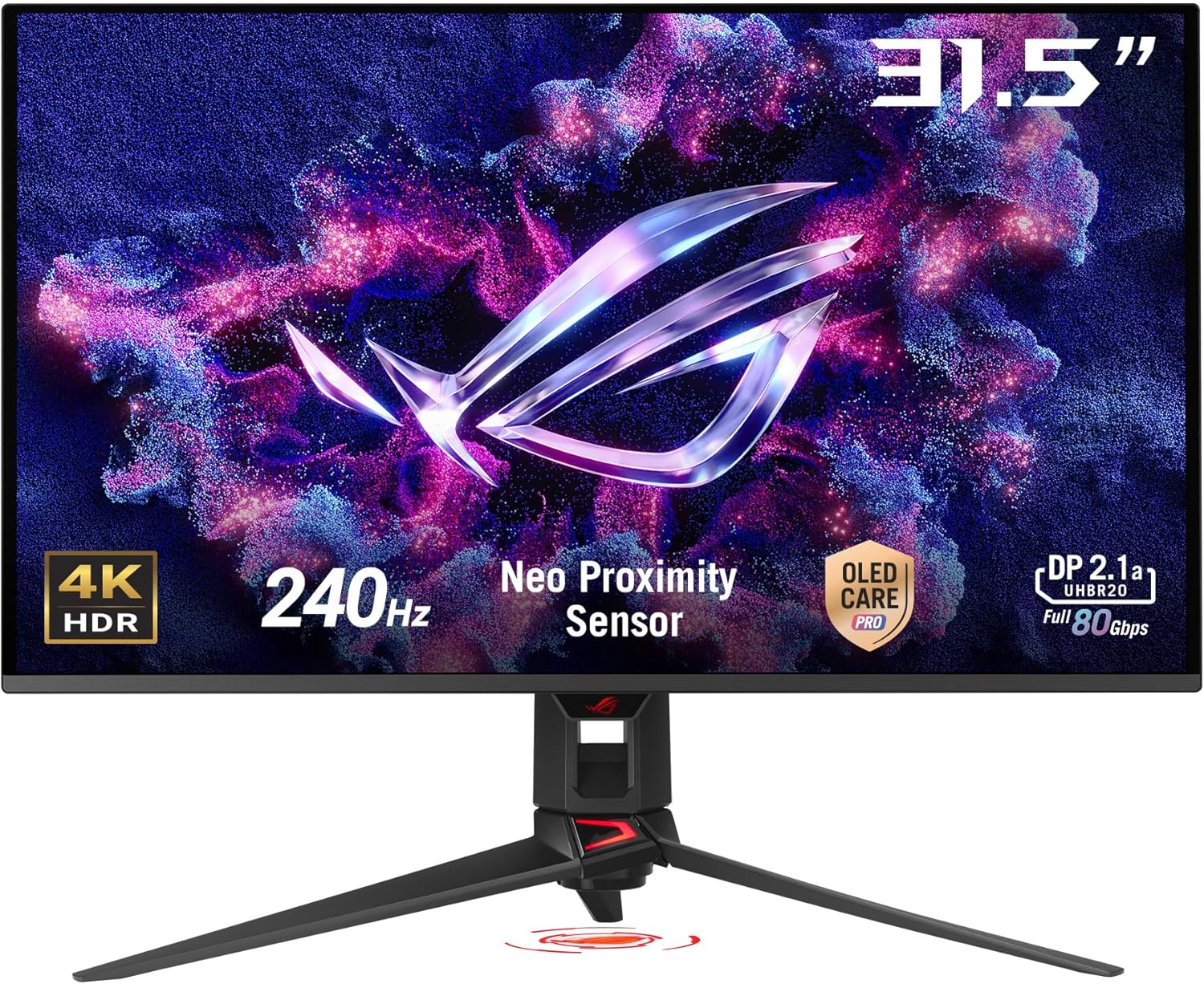
ASUS ROG PG32UCDMR 32-Inch 4K 240Hz QD-OLED Gaming Monitor
A premium 32-inch 4K QD-OLED gaming monitor built for competitive players and creative professionals who demand both speed and image quality. The 240 Hz refresh rate and 0.03 ms response time deliver blur-free gameplay, while the third-generation QD-OLED panel offers exceptional color accuracy (99% DCI-P3) and infinite contrast. OLED Care Pro's burn-in prevention suite, including proximity sensor and pixel cleaning, addresses a key concern for OLED longevity.
Pros
- Exceptional motion performance with 0.03 ms response time and 240 Hz refresh rate for competitive gaming
- Outstanding image quality with 1.5M:1 contrast ratio, true 10-bit color, and 99% DCI-P3 gamut coverage
- Comprehensive OLED Care Pro burn-in protection including Neo Proximity Sensor, pixel cleaning, and multiple safeguard modes
- DisplayPort 2.1 with 80 Gbps bandwidth supports 4K 240 Hz without compression
- USB-C with 90W Power Delivery and extensive connectivity (HDMI 2.1, DisplayPort 2.1)
- 3-year warranty with burn-in coverage and advance replacement
- AI-assisted gaming features (Shadow Boost, Crosshair, Visual adjustment) and flexible aspect ratio control
Cons
- Premium pricing positions this as a high-end investment rather than a mainstream gaming monitor
- OLED technology still carries inherent burn-in risk despite protective features, requiring ongoing user awareness
- Large 32-inch 4K resolution may demand higher GPU power to achieve full 240 Hz performance in demanding games

ASUS ROG PG32UCDM 32-inch 4K 240Hz OLED Gaming Monitor
A premium 32-inch 4K QD-OLED display built for high-end gaming and creative work, delivering exceptional color accuracy with 99% DCI-P3 coverage and true 10-bit depth. The 240Hz refresh rate paired with 0.03ms response time targets competitive gamers, while advanced thermal management and burn-in mitigation features address traditional OLED concerns. Best suited for those who prioritize visual fidelity and can justify the premium positioning.
Pros
- Exceptional color performance: true 10-bit, 99% DCI-P3 gamut, and Delta E < 2 accuracy for professional-grade content creation
- Fast gaming response: 0.03ms GTG response time and 240Hz refresh rate eliminate motion blur and ghosting
- Robust burn-in protection: custom heatsink, graphene film, and uniform brightness setting reduce OLED longevity risks
- Versatile connectivity: 90W USB-C power delivery enables single-cable setup for compatible devices
- Comprehensive warranty: 3-year coverage includes burn-in protection, rare for OLED displays
Cons
- Premium pricing limits accessibility for budget-conscious buyers
- 32-inch 4K resolution may require larger viewing distance; not ideal for compact desk setups
- OLED technology inherently susceptible to burn-in despite mitigation features; requires user discipline with static content

ASUS ROG Strix XG27UCDMG 27" 4K 240Hz QD-OLED
A premium 27-inch 4K gaming monitor built on fourth-generation QD-OLED technology, delivering 240Hz refresh rates, 0.03ms response times, and exceptional color accuracy with 99% DCI-P3 gamut. The OLED Care Pro suite with Neo Proximity Sensor actively guards against burn-in. Best suited for competitive gamers and content creators who prioritize motion clarity and visual fidelity.
Pros
- Exceptional motion clarity with 0.03ms response time and ELMB technology for minimal ghosting
- Advanced burn-in protection through Neo Proximity Sensor, pixel cleaning, and multiple safeguard features
- Outstanding color performance: 1.5M:1 contrast ratio, true 10-bit color, Delta E < 2, and VESA DisplayHDR 400 True Black compliance
- Latest QD-OLED panel offers improved longevity and 20% flicker reduction versus previous-generation OLED monitors
- Comprehensive connectivity including DisplayPort 1.4 DSC, HDMI 2.1, and USB-C with 90W Power Delivery
Cons
- OLED burn-in remains a concern despite mitigation features, requiring active user engagement with Care Pro settings
- Premium pricing reflects the advanced technology, making it a significant investment for gaming-only use cases
- 27-inch 4K resolution may require scaling adjustments for some users accustomed to 1440p at this screen size

LG 32GX850A-B 32" 4K OLED Gaming Monitor 165Hz
A premium 32-inch 4K OLED gaming monitor built for players who want both visual fidelity and competitive speed. The dual-mode design lets you run 4K at 165Hz for story-driven games or switch to Full HD at 330Hz for fast-paced shooters, all backed by a lightning-quick 0.03ms response time and NVIDIA G-SYNC plus AMD FreeSync support.
Pros
- Exceptional 0.03ms response time with OLED technology eliminates ghosting and lag for sharp, responsive gameplay
- Dual-mode flexibility: 4K 165Hz or Full HD 330Hz via hotkey to match game demands
- Bright OLED panel (275 nits typical) with Micro Lens Array+ technology and 1.5M:1 contrast ratio delivers vivid detail in dark scenes
- VESA DisplayHDR True Black 400 certified with 98.5% DCI-P3 color gamut meets professional color standards
- Fully adjustable stand (height, tilt, swivel, pivot) plus gaming-focused features like Black Stabilizer and Crosshair overlay
Cons
- Requires DisplayPort 1.4 or HDMI 2.1 graphics card to achieve 165Hz at 4K; achieving 330Hz Full HD requires DisplayPort 2.1
- Glossy OLED panel may show reflections in bright rooms despite three UL eye-comfort certifications
- Premium pricing reflects the OLED technology and dual-mode capability, placing it at the high end of gaming monitors

ASUS ROG Strix XG27UCG 27-inch 4K Gaming Monitor
A premium 27-inch 4K gaming monitor that flips between 4K at 160Hz and FHD at 320Hz with a single hotkey, catering to players who want visual fidelity or competitive speed. The Fast IPS panel delivers sharp 1ms response times, vibrant colors at 95% DCI-P3, and AI-assisted features like dynamic shadow boost and auto-detecting crosshair adjustment. Best suited for competitive gamers and content creators who value both high refresh rates and color accuracy.
Pros
- Dual-mode flexibility: seamlessly switch between 4K 160Hz for visual quality and FHD 320Hz for esports performance
- Fast IPS panel with 1ms response time, ELMB SYNC, and G-SYNC compatibility eliminate ghosting and tearing at high frame rates
- 95% DCI-P3 color gamut with DisplayHDR400 support and advanced gray-scale tracking for professional-grade color accuracy
- AI-powered gaming features (GamePlus crosshair detection, Dynamic Shadow Boost) enhance competitive visibility and visual clarity
- Versatile connectivity including USB-C with DP Alt mode, DisplayPort 1.4, and HDMI; ergonomic stand with full adjustment range
Cons
- Premium pricing reflects the dual-mode capability and feature set, positioning it at the high end of the gaming monitor market
- Switching between 4K and FHD modes requires manual hotkey input rather than automatic detection based on content or application
- 27-inch 4K resolution may result in smaller on-screen text and UI elements for users who prefer larger scaling without external adjustments

LG 27G810A-B 27-inch 4K Gaming Monitor with Dual Mode
This LG UltraGear delivers a rare combination: 4K clarity at 180Hz for story-driven games, or Full HD at 360Hz for competitive shooters via a single hotkey switch. The 27-inch IPS panel covers 95% DCI-P3 color with DisplayHDR 400 support, paired with 1ms response time and both G-Sync and FreeSync compatibility. Best for gamers who want visual fidelity without sacrificing speed.
Pros
- Dual Mode flexibility lets you toggle between 4K 180Hz and FHD 360Hz without hardware changes
- Strong color accuracy with 95% DCI-P3 coverage and DisplayHDR 400 for vibrant visuals
- 1ms GtG response time and gaming-focused features (Black Stabilizer, Dynamic Action Sync, Crosshair) reduce competitive disadvantages
- Comprehensive connectivity with dual HDMI 2.1, DisplayPort 1.4, and USB 3.0 ports
- Fully adjustable stand with height, tilt, swivel, and pivot for ergonomic setup
- Solid 4.6-star rating across 72 verified reviews
Cons
- Requires graphics card with DisplayPort 1.4 or HDMI 2.1 to achieve full 144Hz+ refresh rates
- Dual Mode switching still involves a tradeoff: you cannot run native 4K at 360Hz simultaneously
- Premium pricing reflects the dual-mode feature; gamers wanting pure 4K or pure high-refresh may find better value elsewhere

Dell S2725QS 27-inch 4K 120Hz Monitor
A 4K IPS display built for both work and entertainment, delivering sharp visuals with 99% sRGB coverage and smooth 120Hz performance via AMD FreeSync Premium. The ComfortView Plus technology reduces blue light for extended viewing sessions, while height-adjustable stand and multiple connectivity options make it flexible for various setups.
Pros
- Excellent color accuracy with 99% sRGB and 95% DCI-P3 coverage for creative work
- Smooth 120Hz refresh rate with AMD FreeSync Premium for gaming and video playback
- ComfortView Plus reduces blue light emissions to 35% or less, supporting all-day comfort
- Versatile connectivity with dual HDMI, DisplayPort 1.4, and USB-C
- Height adjustable stand with swivel and pivot for ergonomic positioning
- Energy Star certified with sustainable packaging using 100% renewable materials
Cons
- Response time specs show conflicting data (1ms vs 0.03ms mentioned), creating uncertainty about actual performance
- VA panel contrast ratio listed as both 1,500:1 and 3,000:1 in product description, indicating inconsistent specifications
- Premium pricing may limit appeal for budget-conscious buyers seeking basic 4K monitors

Amzfast AMZG32C3U 32-inch 4K 120Hz Curved Gaming Monitor
A 32-inch curved 4K display built for console gaming, pairing 120Hz refresh rates with 1ms response time and Adaptive Sync to minimize lag. The 3000:1 contrast ratio and HDR support make it suitable for both gaming and content creation, though the modest brightness and basic speaker system limit its versatility for professional workflows.
Pros
- 4K 120Hz with HDMI 2.1 and DP 1.4 connectivity optimized for PS5 and Xbox Series X
- 1ms OD/MPRT response time and Adaptive Sync reduce motion blur and input lag
- 130% sRGB with 3000:1 contrast and HDR for strong color accuracy and visual depth
- PIP/PBP split-screen functionality balances multitasking with gaming
- Eye care features (flicker-free, low blue light) and VESA mounting support
Cons
- 300nits brightness is modest for bright rooms or professional color-critical work
- Built-in 3W speakers are basic; most users will prefer external audio
- No HDMI 2.1 on second port limits flexibility for dual high-bandwidth device setup

Samsung Odyssey G55C 32" QHD Curved Gaming Monitor
Samsung's 32-inch curved gaming monitor delivers sharp QHD visuals with a 165Hz refresh rate and 1ms response time, designed to minimize motion blur during fast-paced gameplay. The aggressive 1000R curve and AMD FreeSync support create an immersive experience, while HDR10 and Eye Saver Mode add visual depth and reduce strain during extended sessions. Best suited for competitive gamers prioritizing smooth performance over ultra-high resolution.
Pros
- 1.7x pixel density over 1080p delivers noticeably sharper detail at QHD resolution
- 165Hz refresh rate with 1ms MPRT response time provides smooth, responsive gameplay
- 1000R curved VA panel fills peripheral vision and enhances immersion
- AMD FreeSync eliminates tearing for fluid motion in compatible games
- Eye Saver Mode with blue light filter reduces fatigue during long gaming sessions
- HDR10 support brings deeper blacks and brighter highlights to supported content
Cons
- VA panel technology has narrower viewing angles compared to IPS alternatives
- No built-in speakers or USB connectivity, unlike pricier models in Samsung's lineup
- 1ms response time requires 'Extreme mode' setting to achieve, results vary by content and monitor calibration
- 165Hz refresh rate trails behind higher-end 180Hz or 240Hz gaming monitors

Samsung Odyssey G7 27" Dual-Mode 4K/360Hz Gaming Monitor
Samsung's Odyssey G7 is a premium gaming monitor that bridges high-resolution visuals and extreme refresh rates through its dual-mode design. Switch between 4K at 180Hz for cinematic detail or Full HD at 360Hz for competitive precision, backed by Fast IPS clarity, 1ms response time, and both G-Sync and FreeSync support. Best suited for gamers who want flexibility across different genres without compromising on either fidelity or speed.
Pros
- Dual-mode flexibility: toggle between 4K UHD (180Hz) and Full HD (360Hz) depending on your game and priorities
- Fast IPS panel delivers consistent color accuracy and clarity across the entire screen
- 1ms response time (GtG) minimizes input lag for competitive gaming
- Compatible with both NVIDIA G-Sync and AMD FreeSync Premium for tear-free gameplay
- Ergonomic stand with tilt, height, and pivot adjustments for extended gaming sessions
Cons
- Dual-mode switching may require manual toggling in monitor settings rather than automatic game detection
- Premium pricing reflects the dual-mode capability, which not all gamers may prioritize
- Fast IPS panels typically have slightly slower response times compared to TN panels, though 1ms is competitive

Acer Nitro VG270K 27" 4K Gaming Monitor
A 4K IPS gaming monitor that trades traditional high refresh rates for sharp visuals and color accuracy, with dynamic refresh rate switching to hit 144Hz at lower resolution when needed. AMD FreeSync and 0.5ms response time keep gameplay smooth, while the zero-frame design works well for multi-monitor setups. Best suited for gamers who prioritize image quality over competitive frame rates.
Pros
- Sharp 4K UHD resolution with 95% DCI-P3 color gamut and HDR 10 support for vibrant visuals
- AMD FreeSync eliminates screen tearing for smooth gameplay without stuttering
- Dynamic Frame Rate lets you switch to 1080p at 144Hz for faster-paced games if needed
- Ultra-responsive 0.5ms GTG response time minimizes ghosting and smearing
- Zero-frame bezel design maximizes screen real estate and enables seamless multi-monitor configurations
Cons
- Base refresh rate capped at 72Hz in 4K mode, limiting appeal for competitive shooters and fast-action titles
- Limited connectivity with only one DisplayPort 1.4 and two HDMI 2.0 ports
- No verified buyer reviews available to assess real-world reliability and user experience
4K Gaming Monitors Buying Guide
Choosing among the best 4K gaming monitors requires more than comparing pixel counts. Panel type, refresh rate headroom, HDR tier, connectivity, and ergonomics all interact in ways that affect whether a display feels worth its asking price in daily use.
The sections below walk through every factor you should weigh before purchasing.
Panel Technology: IPS, VA, and OLED

Panel type is arguably the single most important spec on a gaming monitor because it determines color accuracy, viewing angles, contrast, and response time simultaneously.
Fast IPS panels deliver wide viewing angles and accurate color from the factory, making them a reliable all-rounder for both gaming and creative work.
They fall short on native contrast compared to VA or OLED, but modern implementations have closed much of the gap.
VA panels like the curved Samsung Odyssey G55C offer dramatically higher native contrast ratios, which translates to richer blacks in dark game environments without paying a premium for OLED.
The trade-off is slower pixel response and potential smearing in fast-motion scenes. For strategy games, RPGs, and cinematic titles, a VA panel can look stunning; for competitive shooters where every millisecond counts, IPS or OLED is the stronger call.
QD-OLED panels, featured in the ASUS ROG PG32UCDMR, PG32UCDM, and the LG 32GX850A, represent the current pinnacle of gaming display technology.
They combine self-emissive pixels for true infinite contrast with quantum dot color enhancement for near-100% DCI-P3 coverage. Response times of 0.03ms are essentially instantaneous, and motion clarity is unmatched.
The trade-off is price and the need for careful brightness management to avoid long-term burn-in, though modern OLED care features have made this less of a concern for typical gaming use.
Refresh Rate and Motion Clarity

Refresh rate at 4K is a more nuanced conversation than it is at 1080p or 1440p, because driving high frame rates at 3840×2160 demands serious GPU horsepower.
A 240Hz 4K OLED panel is a future-proof investment, but only if your graphics card can sustain the frame rates to take advantage of it.
For most players running current mid-range hardware, a 120Hz to 165Hz 4K panel represents the practical sweet spot.
Several monitors in this guide, including the ASUS ROG Strix XG27UCG and the LG 27G810A, feature a “Dual Mode” that lets you switch between 4K at a lower refresh rate and Full HD at double or more the refresh rate.
This is a genuinely useful feature for competitive gaming sessions where you want 360Hz-class smoothness, then switch back to 4K for immersive single-player titles without changing cables or displays.
Motion blur reduction technologies such as Extreme Low Motion Blur Sync and NVIDIA G-SYNC Compatible certification work in tandem with variable refresh rate to eliminate both tearing and stutter.
Look for these certifications, particularly AMD FreeSync Premium Pro or G-SYNC Compatible, rather than relying on rated refresh rate alone as a proxy for in-game smoothness.
HDR Tier and Real-World Brightness
HDR on monitors is marketed inconsistently. VESA DisplayHDR 400 is an entry-level certification that requires only 400 nits peak brightness with no local dimming, resulting in HDR that looks marginally different from SDR.
True HDR impact requires at minimum DisplayHDR 600 with full-array local dimming, or a self-emissive technology like OLED that achieves infinite contrast per pixel regardless of peak brightness.
The LG 32GX850A carries a TrueBlack 400 certification, which is OLED-specific and indicates genuine per-pixel black levels rather than backlight dimming.
The QD-OLED panels in the ASUS ROG PG32UCDMR and PG32UCDM similarly deliver HDR that is visibly transformative rather than just checked on a spec sheet.
If HDR performance matters to you, prioritize OLED panels or displays with full-array local dimming over generic HDR10 claims.
Color volume is equally important alongside brightness. A panel covering 99% DCI-P3 will render game environments with richer, more lifelike color saturation than a standard sRGB panel, even at comparable peak brightness figures.
For creative work alongside gaming, look for displays that ship with accurate factory calibration rather than requiring manual adjustment out of the box.
If you are building a complete A/V workspace, pairing a reference-grade monitor with quality AV receivers rounds out the audio side of the equation.
Connectivity and Port Selection

At 4K with high refresh rates, bandwidth requirements climb steeply.
HDMI 2.1 is the current standard for connecting to consoles like the PS5 and Xbox Series X at 4K 120Hz, and many monitors in this guide include at least one HDMI 2.1 port.
DisplayPort 1.4 remains the go-to connection for PC gaming at 4K 144Hz and above.
USB-C with power delivery is increasingly common on premium panels and adds meaningful versatility, particularly for users who also connect laptops.
The ASUS ROG PG32UCDMR and PG32UCDM both support USB-C at 90W, meaning you can drive the display and charge a laptop from a single cable. This makes them compelling choices for hybrid work-and-game setups.
A docking station can further expand connectivity if your workflow requires multiple peripherals connected simultaneously.
Also check the KVM or multi-source capabilities if you switch between a PC and console.
Some monitors in this guide support Picture-in-Picture and Picture-by-Picture modes, letting you monitor two sources on a single display simultaneously, which is useful for streamers or anyone who alternates between desktop work and console gaming.
Ergonomics, Stand, and Build Quality

A monitor you use for hours at a time needs a stand that adjusts to your posture, not the other way around.
Height adjustment, tilt, swivel, and pivot capability are not luxury features; they directly affect neck and back comfort over long sessions.
The Dell S2725QS and LG 32GX850A both include comprehensive ergonomic stands with height, swivel, and pivot, which is especially useful for portrait mode productivity work.
VESA mounting compatibility matters if you prefer an aftermarket arm for more precise positioning. Most monitors in this guide support standard 100x100mm VESA patterns, but verify before purchasing if arm mounting is a priority.
Pairing a good monitor with a proper mechanical keyboard and a well-organized desk setup further improves the overall experience during extended sessions.
Build quality and finish choices also affect in-use experience. Glossy screens like the LG 32GX850A’s glossy OLED surface maximize perceived contrast and color vibrancy but introduce reflections in brightly lit rooms.
Matte anti-glare coatings on IPS panels like the Dell S2725QS and Acer Nitro VG270K are more practical in variable lighting environments. Factor your room setup into this decision alongside panel specs.
Size, Curvature, and Viewing Distance
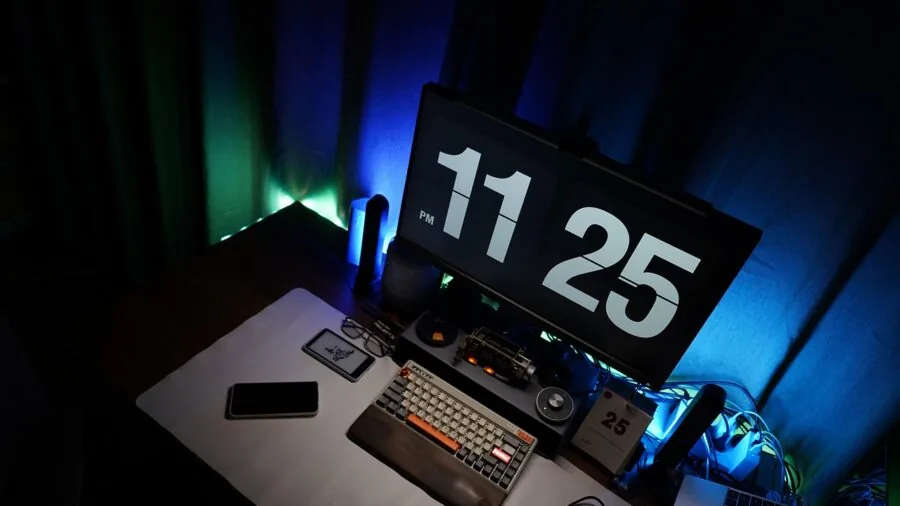
27-inch and 32-inch displays represent the dominant form factors for 4K gaming monitors. At 27 inches, 4K yields a pixel density of approximately 163 PPI, which is sharp enough that individual pixels are invisible at typical desktop viewing distances.
At 32 inches, pixel density drops slightly but screen real estate increases, making it a better choice for productivity multitasking and immersive single-player titles. Sitting closer than about 70cm to a 32-inch panel will make individual pixels discernible to keen eyes.
Curved monitors, notably the Samsung Odyssey G55C at 1000R curvature, wrap the edges of the screen toward your peripheral vision, which can enhance immersion for racing games and cinematic titles.
However, curvature introduces slight geometric distortion at the edges when used for productivity tasks like spreadsheets or code editing. Flat panels are generally more versatile if the monitor doubles as a work display.
If you want a larger immersive display for both gaming and media consumption, it is worth exploring OLED TVs as an alternative for living-room setups.
Why You Should Trust Us
REMOVU is an independent review publication.
Every monitor in this guide was assessed using our standardized evaluation framework, which synthesizes manufacturer specifications, expert review consensus from the display and gaming press, verified buyer feedback from confirmed purchasers, and published benchmark data from reputable sources.
We do not conduct our own product trials; our evaluations are grounded in research, published data, expert review consensus, and verified buyer feedback.
Each product receives a REMOVU Score on a scale of 0 to 10, calculated against a consistent set of criteria that includes panel quality, motion performance, HDR implementation, connectivity, ergonomics, and value relative to category.
This scoring system allows direct comparison across very different price points, from the budget-friendly Acer Nitro VG270K to the flagship ASUS ROG PG32UCDMR, without conflating “good for the price” with “best in class.”
REMOVU may earn a commission when you purchase through links on this page. That affiliate relationship has no influence on which products are included, how they are ranked, or what scores they receive.
Our recommendations are based entirely on evaluated merit. Products are selected because they perform well for real users across a range of needs, not because of commercial relationships.
Final Thoughts
The 4K gaming monitor market in 2026 spans a wider performance and price range than ever before, which makes it easier to find the right panel for your budget but harder to know whether you are overspending for features you will not use.
After evaluating the full field, a few standout performers emerged clearly across different use cases.
- Best Overall: ASUS ROG PG32UCDMR earns the top spot for combining a 32-inch QD-OLED panel, 240Hz refresh rate, OLED Care Pro, and USB-C 90W charging into the most complete enthusiast package in this roundup, backed by our highest REMOVU Score in the group.
- Best for Competitive Multiplayer: ASUS ROG PG32UCDM shares the second-highest REMOVU Score and delivers the same 240Hz QD-OLED core performance at a slightly more accessible premium price point, making it the first choice for players who prioritize competitive frame-rate headroom without sacrificing image quality.
- Best Mid-Range OLED Pick: ASUS ROG Strix XG27UCDMG brings 27-inch QD-OLED with 240Hz, Anti-Flicker 2.0, and a three-year warranty to a more accessible price tier, making OLED performance available to buyers who do not need the full 32-inch size.
- Best OLED Under a Grand: LG 32GX850A offers a glossy 32-inch OLED panel with Dual-Mode 165Hz/330Hz flexibility, TrueBlack 400 certification, and a fully adjustable stand at a price that undercuts most competing OLED panels, scoring well above its tier.
- Best Budget 4K Pick: Samsung Odyssey G55C stands out as the value leader. Its 1000R curved VA panel, 165Hz refresh rate, and HDR10 support deliver an engaging gaming experience at a budget-friendly price, earning the strongest REMOVU Score among the sub-budget IPS and VA competitors.
Whatever your budget or play style, every monitor in this guide represents a meaningful step up from 1080p or 1440p. Browse the full monitors category on REMOVU for additional comparisons across screen size, resolution, and panel type.
Frequently Asked Questions
Do I need a powerful GPU to run a 4K gaming monitor?
Yes, 4K is significantly more demanding than 1440p or 1080p. To drive a 4K 120Hz panel smoothly in modern AAA titles, you generally need a current high-end discrete GPU.
If your graphics card is mid-range, a 4K 60Hz panel is still viable for visually rich single-player games, and Dual-Mode monitors let you drop to Full HD at higher refresh rates for competitive titles.
Checking your GPU’s HDMI 2.1 or DisplayPort 1.4 output capability before buying is equally important.
Is OLED worth the premium over IPS for gaming?
For players who prioritize image quality, dark scene performance, and motion clarity, OLED is a meaningful upgrade.
The infinite contrast and near-instantaneous response times of QD-OLED panels produce visibly different results in dark environments and fast-motion sequences compared to even premium IPS displays.
The trade-off is a higher initial cost and the need to use built-in OLED care features to minimize pixel aging. For competitive multiplayer gaming alone, a high-refresh IPS panel remains a strong alternative at lower cost.
What is the difference between G-SYNC Compatible and full G-SYNC certification?
G-SYNC Compatible means NVIDIA has validated the monitor’s variable refresh rate implementation and confirmed it works reliably with NVIDIA GPUs without major visual artifacts.
Full G-SYNC certification involves a dedicated hardware module inside the monitor that enables additional features like ultra-low latency mode and a wider VRR range, but also adds cost.
For most gamers, G-SYNC Compatible or AMD FreeSync Premium Pro certification provides the core benefit of tear-free, low-latency gaming without the price premium of full G-SYNC hardware.
Can I use a 4K gaming monitor with a PS5 or Xbox Series X?
Yes, provided the monitor has at least one HDMI 2.1 port, which supports 4K at up to 120Hz from current consoles. Most monitors in this guide include HDMI 2.1.
Note that consoles do not support DisplayPort, so the HDMI port count and version matter more for console users than the DisplayPort specification.
Variable refresh rate from consoles also requires FreeSync or G-SYNC Compatible certification, which all top picks in this guide carry.
How does screen size affect the 4K gaming experience?
At 27 inches, 4K provides excellent pixel density for crisp, detailed imagery at typical desktop viewing distances.
At 32 inches, the larger screen creates a more immersive field of view and makes text and UI elements slightly larger, which many users prefer for extended sessions. The right choice depends on your desk depth and seating distance.
If you sit roughly 60 to 80 centimeters from your screen, both sizes work well. Beyond 32 inches, many buyers find that a large-screen OLED TV in a living-room setup offers better value than an oversized desktop monitor.
What should I look for if I also use my gaming monitor for work?
For dual work-and-game use, prioritize color accuracy (at least 99% sRGB with factory calibration), a matte anti-glare coating to reduce reflections in office lighting, a fully adjustable ergonomic stand, and USB-C connectivity for laptop users.
The Dell S2725QS is a strong example of a 4K panel that balances gaming specs with professional-grade color and ergonomics. If your desk setup also involves peripheral management, a docking station alongside your monitor can simplify cable management considerably.
Completing your workspace with a quality wireless mouse reduces cable clutter further.
About the author
Melissa is REMOVU's portable monitor writer, weighing image quality, weight, and connectivity for a second screen on the go. She helps mobile workers add display space without the bulk.