The 8 Best PC Controllers
Hall Effect sticks, high polling rates, and wireless freedom define the top PC controllers right now. Here are the picks that hold up across genres and budgets.
 By Beverly Morrison
Updated July 26, 2026
By Beverly Morrison
Updated July 26, 2026
Choosing a PC controller in 2026 is genuinely harder than it looks.
The market has exploded with options spanning budget wireless pads, esports-grade gamepads with 8,000 Hz polling rates, and hybrid controllers with built-in LCD screens, all competing for a spot on your desk.
Whether you are pairing a controller with a gaming PC for action-adventure titles, fighting games, or couch-friendly platformers, the wrong pick can mean stick drift, input lag, or uncomfortable grip after an hour of play.
Getting this decision right matters, and the differences between models are real.
This guide cuts through the noise. REMOVU researchers analyzed publicly available specifications, synthesized consensus from expert reviewers across the industry, and cross-referenced verified buyer feedback to surface the controllers that genuinely perform on Windows PCs, Steam, and beyond.
Our picks span every budget tier, from affordable entry-level options to premium esports controllers, so you can find the right fit without overspending. The top picks are ranked below, starting with the model we recommend most.
| Award | Product | REMOVU Score About REMOVU ScoreThe REMOVU Score is our own rating from 0 to 10, based on performance, design and build, ease of use, and value. It reflects independent research and is never influenced by manufacturers, retailers, or affiliate commissions. Learn more › | Price | |
|---|---|---|---|---|
| Best Overall |
 PlayStation DualSense Wireless Controller Cosmic Red
|
8.6/10 | Buy | |
| Best Value |
 8BitDo Ultimate 2 Wireless Controller with TMR Joysticks
|
8.2/10 | Buy | |
| Best Budget |
 EasySMX D10 Wireless Controller with TMR Joysticks
|
8.1/10 | Buy | |
| Best Premium |
 GameSir G7 Pro 8K Aimlabs PC Controller
|
7.9/10 | Buy | |
 8BitDo Ultimate 2C Wireless Controller, Hall Effect Joysticks
|
7.8/10 | Buy | ||
 GameSir G7 Pro Wireless Xbox Controller with TMR Sticks
|
7.3/10 | Buy | ||
 GameSir Nova Lite 2 Wireless Controller Hall Effect
|
6.5/10 | Buy | ||
 AOC GC310 Multi-Platform Controller with Interactive Screen
|
6.2/10 | Buy |
PlayStation DualSense Wireless Controller Cosmic Red
Sony's DualSense controller brings haptic feedback and adaptive triggers to PS5, PC, Mac, and mobile gaming. Verified buyers praise its build quality, responsive buttons, and immersive feedback, though some note the charging cable doesn't come included.
Pros
- Haptic feedback and adaptive triggers deliver genuine immersion in supported games
- Premium build quality feels durable during extended play sessions
- Seamless multiplatform connectivity across PS5, PC, Mac, and mobile
- Responsive buttons and triggers with no reported input lag
- Built-in microphone eliminates need for separate headset when chatting
Cons
- USB charging cable not included in the box
- Glossy finish may show fingerprints despite good grip during gameplay
- Battery life requires recharging after a couple of play sessions
8BitDo Ultimate 2 Wireless Controller with TMR Joysticks
A premium multi-platform gamepad built for competitive gaming, featuring 8BitDo's proprietary 8Speed wireless technology with sub-1ms latency and switchable trigger modes. Best suited for players who value low-lag performance across Windows, Steam, Apple, and Android.
Pros
- Sub-1ms latency and strong anti-interference on 2.4G connection make it reliable for competitive gaming
- Trigger mode switch lets you adapt between linear Hall Effect and tactile feedback for different game types
- TMR Joysticks deliver higher sensitivity and precision with extended durability compared to standard sticks
- Back paddle buttons and extra bumpers provide ergonomic options for faster response times
- High 4.5-star rating from nearly 5,000 verified reviews indicates consistent user satisfaction
Cons
- Switchable trigger modes add complexity that casual players may not need
- Premium positioning means higher cost compared to standard controller options
- Customization features require 8BitDo's software, creating a learning curve for setup
EasySMX D10 Wireless Controller with TMR Joysticks
A multi-platform wireless gamepad with TMR anti-drift joysticks, mechanical buttons, and dual-mode triggers that works across PC, Switch, and mobile. Reviewers praise its responsive inputs and included charging dock, though the D-pad and bumpers require some adjustment and it lacks gyro support in 2.4G mode.
Pros
- Exceptional value for features offered, comparable to controllers costing more according to verified owners
- Mechanical buttons deliver satisfying tactile feedback and responsive inputs for all game genres
- Included charging dock is genuinely convenient and syncs LED lighting with the controller
- TMR joysticks show zero drift even after 1000+ hours of use according to long-term user reports
- Flush USB-C charging port and improved button layout eliminate frustrations from earlier EasySMX models
Cons
- D-pad has left input bias (SOCD issue) that disqualifies it for tournament fighting game play, and requires slightly heavier presses for rapid inputs
- Bumpers sit too high and require deliberate, committed presses rather than easy roll-over activation
- Lacks gyro support when using 2.4G wireless dongle mode, available only on Switch via Bluetooth
- Not compatible with Xbox, PlayStation, Amazon Luna, or GeForce Now platforms
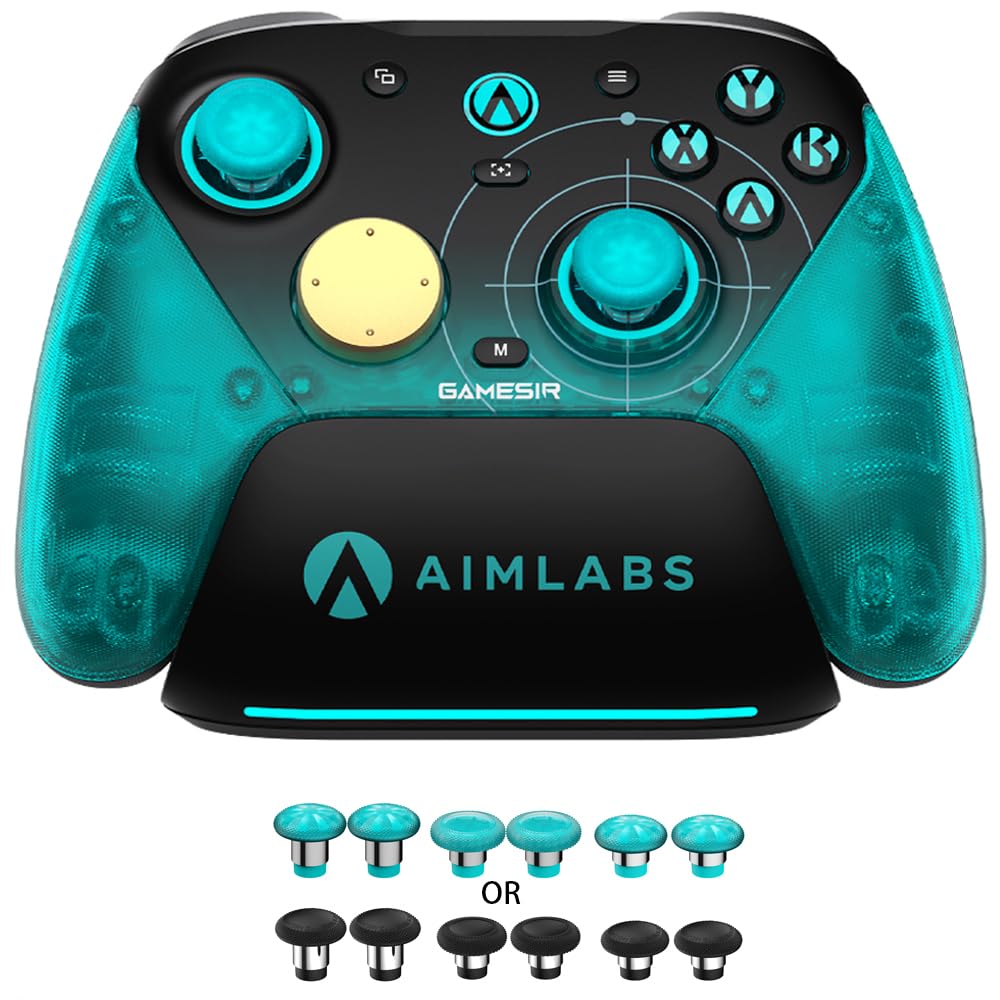
GameSir G7 Pro 8K Aimlabs PC Controller
A competitive PC gamepad built for low-latency gaming with 8000Hz polling, magnetic TMR joysticks that resist drift, and dual-mode triggers supporting both analog and digital input. Reviewers praise the refined D-pad and gyro performance over the standard G7 Pro, making it solid for FPS, fighting, and racing games.
Pros
- 8000Hz polling rate over USB and 2.4G wireless delivers measurable latency reduction in competitive play
- Magnetic TMR joysticks Gen-2 eliminate physical contact, providing durable anti-stick drift with smooth linear response
- Dual-mode Hall Effect plus mechanical triggers let you switch between analog precision and instant digital actuation
- Mechanical D-pad and optical ABXY buttons are significantly tighter than the standard G7 Pro, reducing input bleed
- Gyro aiming implementation works smoothly as mouse input on PC, a major step above the original G7 Pro
Cons
- Battery life is moderate at roughly 8 hours per gaming session at 1K polling, worse at 8K mode
- Macro button customization limited to R, L, and the back buttons; practical macro count is lower than feature count suggests
- Options button placement is awkward for larger hands without remapping to another button
8BitDo Ultimate 2C Wireless Controller, Hall Effect Joysticks
A budget wireless gamepad for Windows and Android that delivers Hall Effect joysticks, Hall triggers, and a 1000 Hz polling rate over 2.4G without the price tag of premium controllers. Reviewers consistently praise its build quality, responsiveness, and long battery life despite its lightweight plastic construction.
Pros
- Hall Effect joysticks and triggers provide durability and precision without stick drift
- 1000 Hz polling rate on 2.4G wireless eliminates noticeable input lag
- Excellent build quality and ergonomic grip despite budget pricing
- Long battery life on wireless mode, reported to last a month between charges
- Works instantly on Windows without drivers; supports Bluetooth and 2.4G dongle
Cons
- Bluetooth connection shows noticeable delay compared to 2.4G dongle or wired mode
- Power button occasionally requires multiple presses to turn on, per some users
- Included USB-C charging cable is short, not suitable for wired gameplay from a couch
GameSir G7 Pro Wireless Xbox Controller with TMR Sticks
An officially licensed Xbox controller featuring Hall Effect triggers, TMR joysticks with anti-drift technology, and four remappable buttons including top-mounted mini bumpers. Delivers responsive 1000Hz polling on PC and includes a smart charging dock, making it a strong alternative to the Xbox Elite Series 2 at a lower price point.
Pros
- Exceptional build quality and premium feel compared to standard Xbox controllers, with micro switch ABXY buttons delivering tactile, mouse-like clicks
- TMR stick technology and adjustable triggers significantly reduce the stick drift and durability issues common in Xbox Elite Series 2 controllers
- Well-placed remappable buttons (especially top-mounted mini bumpers) offer competitive advantage without the accidental activation issues of back paddles
- Comprehensive customization via GameSir Nexus app including gyro settings, stick curves, and button mapping
- Generous accessories included: charging dock, carrying case, USB cable, wireless dongle, and six stick variants
Cons
- Slightly smaller form factor than Xbox Elite controllers may feel cramped for larger hands, requiring adjustment to bumper and trigger reach
- Battery life around 8-10 hours requires regular charging after extended play sessions, shorter than some competing premium controllers
- Firmware updates require direct wired connection to PC rather than wireless or console-based updates, adding friction to maintenance
GameSir Nova Lite 2 Wireless Controller Hall Effect
Budget-friendly gamepad with Hall Effect joysticks, programmable back buttons, and 1000Hz polling rate across PC, Switch, and Android. Strong value for casual to mid-core players, though battery life and wireless stability have trade-offs.
Pros
- Hall Effect joysticks deliver smooth, drift-resistant performance with anti-friction rings
- 1000Hz wired and 2.4G polling rate ensures minimal input lag for competitive games
- Two programmable back buttons support macro recording and custom button mapping
- Comfortable ergonomic design with solid build quality at budget price point
- 2-way trigger system toggles between short and long pull positions
Cons
- 600mAh battery delivers roughly 6 hours of actual use, not the claimed 10 hours
- Back buttons cannot be remapped in Steam or as standalone inputs; only duplicate existing buttons due to hardware limitation
- Wireless connectivity occasionally drops and requires manual reconnection; wired connection more stable
AOC GC310 Multi-Platform Controller with Interactive Screen
A versatile gamepad built for PC, Switch, Steam Deck, and mobile with Hall Effect joysticks, a built-in 1.5-inch display for on-controller settings, and triple-mode connectivity. Best suited for players who value cross-platform compatibility and drift-free precision without software overhead.
Pros
- Hall Effect sticks and triggers eliminate drift at hardware level, critical for competitive play
- On-controller screen removes the driver/app setup cycle common with gaming controllers
- Genuine multi-platform support across PC, Nintendo Switch family, PS4, and mobile without repurchasing
- Programmable back paddles with macro recording suit both casual and hardcore gamers
- Strong battery endurance handles extended sessions across tethered and portable setups
Cons
- Not compatible with Xbox Series or PS5, limiting its appeal for those ecosystems
- No independent user reviews available yet to validate real-world reliability and build quality
- Battery life variance depends on RGB and vibration settings, so actual runtime may fall short of 18-hour claim during heavy use
PC Controllers Buying Guide
Not all gamepads are created equal, and the spec sheet alone rarely tells the full story. Here is what actually matters when shopping for a PC controller, broken down by the criteria that separate good picks from great ones.
Connection Type and Wireless Reliability
PC controllers typically connect via USB wired, 2.4 GHz wireless dongle, or Bluetooth. Wired connections are the most latency-stable and require no pairing, making them the default choice for competitive play.
A 2.4 GHz dongle sits in a sweet spot: near-zero wireless latency without the occasional dropout risk of Bluetooth, which is more dependent on your PC and environment.
Bluetooth is the most flexible for multi-device use, especially if you want one controller to cover a phone, tablet, or Mac as well, but verify your PC has a reliable Bluetooth adapter before relying on it.
Several controllers in our picks support multiple connection modes simultaneously or let you switch between them, which adds significant long-term flexibility. If you game on both a PC and a handheld console, a controller with broad multi-platform support is worth the slight premium.
Polling Rate and Input Latency

Polling rate describes how many times per second the controller reports its position to the PC. Standard controllers poll at 125 Hz or 250 Hz, which is perfectly adequate for casual and single-player gaming.
Controllers advertising 1,000 Hz reduce that reporting interval to one millisecond, a measurable improvement for fast-paced genres. At the extreme end, some models now push 8,000 Hz, which is designed specifically for competitive esports where every fraction of a millisecond counts.
For most players, the real-world difference between 1,000 Hz and 8,000 Hz is marginal outside of top-tier competitive scenarios. What matters more is pairing your controller with a display that can keep up.
Naturally, 240 Hz gaming monitors maximize the benefit of low-latency input, so both ends of the chain matter. If you are playing at 60 fps on a standard display, spending extra purely for the highest polling rate is unlikely to be perceptible.
Joystick Technology: Hall Effect vs. Potentiometer
Stick drift has been one of the most common and frustrating failure modes for modern controllers. Traditional potentiometer-based joysticks use physical contact between components that wear over time, leading to drift as the resistance changes.
Hall Effect joysticks use magnetic sensors with no physical contact, which means they are inherently more resistant to drift and longer-lasting under heavy use.
TMR (Tunnel Magnetoresistance) joysticks are a newer variant that offer similar anti-drift benefits with claimed improvements in precision at the center point.
If longevity and competitive accuracy matter to you, prioritizing a controller with Hall Effect or TMR sticks is one of the most impactful decisions you can make.
Nearly all of the controllers we recommend here feature one of these technologies, reflecting a clear market shift away from traditional potentiometer designs. It is one area where the extra cost pays real dividends over the life of the product.
Trigger Design and Customization
Triggers fall into two broad categories: analog triggers that register a full range of motion (useful for racing games and shooters with variable pressure inputs) and digital or switchable triggers that actuate like a button, giving a short, tactile click ideal for rapid-fire shooting games.
Some controllers offer dual-mode triggers that let you switch between analog and digital modes on the fly, which is the most versatile setup for players who move between game genres.
Trigger stops, which physically limit how far the trigger travels in digital mode, further reduce actuation time and can feel noticeably faster in games like first-person shooters.
Haptic or tactile trigger feedback, as found on Sony’s DualSense, adds a layer of in-game immersion that is increasingly supported by PC titles and the Steam platform.
Think of trigger choice as a direct extension of how you intend to use the controller most.
Ergonomics, Build Quality, and Grip

Ergonomics are deeply personal, but certain design patterns recur in high-quality controllers. Asymmetric thumbstick layouts, popularized by Xbox-style pads, tend to feel more natural for players who use sticks frequently during long sessions.
Symmetric layouts, as seen on PlayStation-style controllers, suit players who shift frequently between sticks and the D-pad.
Weight distribution, button travel, and grip texture all contribute to comfort over extended play, factors that specifications rarely capture well but that verified buyer feedback surfaces clearly.
Build materials matter too. A controller used daily at a well-set-up gaming desk will experience significant physical wear. Look for rubberized or textured grips, a sturdy shell without excessive flex, and buttons with consistent, satisfying actuation.
Remappable rear paddles or extra bumpers are a meaningful ergonomic upgrade for players who want to keep thumbs on sticks during complex inputs.
Software, Remapping, and Platform Compatibility
A controller is only as good as its integration with your platform. XInput compatibility is the broadest standard for Windows games, meaning a controller that registers natively as an Xbox pad will work in virtually every PC title without configuration.
Controllers using DirectInput or proprietary protocols may require additional setup or third-party software for some games. Steam’s controller support layer has improved third-party compatibility significantly, but XInput native support remains the safest baseline.
On-board or companion app remapping unlocks real customization: reassigning buttons, tuning stick curves, adjusting trigger sensitivity, and saving profiles for different games. Some controllers store profiles directly on the hardware so settings carry over between devices.
If you play on multiple platforms, such as PC and Switch, or PC and mobile, verify the controller’s compatibility list carefully. Mobile gaming support has become a genuine selling point for several picks in our list, particularly for players who move between PC and phone sessions.
Why You Should Trust Us
REMOVU is an independent review publication.
Every product in this guide was assessed using the REMOVU Score, a consistent 0 to 10 rating system that evaluates each controller across the same criteria: joystick technology, polling rate, trigger design, build quality, ergonomics, platform compatibility, and overall value.
We do not conduct our own product trials; our evaluations are grounded in research, published data, expert review consensus, and verified buyer feedback.
Our research process pulls from publicly available manufacturer specifications, synthesizes patterns across expert reviewers in the gaming hardware space, and weighs the volume and consistency of verified purchase reviews on major retail platforms.
Where data points conflict, we note uncertainty rather than paper over it. Controllers with unresolved concerns about long-term durability or software stability are scored accordingly.
REMOVU may earn an affiliate commission if you purchase through links in this article. That relationship has no influence on our rankings, scores, or product selections. Our recommendations are based solely on the quality of the evidence behind each product.
We have no financial incentive to favor any brand, and we do not accept payment for placement.
Final Thoughts
The PC controller market in 2026 is healthier and more competitive than it has been in years.
Brands like 8BitDo, GameSir, EasySMX, and AOC have pushed meaningful innovation into every price tier, and the result is a strong lineup of picks across different needs and budgets. Here is how our top recommendations break down by use case.
- Best Overall: PlayStation DualSense Wireless Controller in Cosmic Red earns the top spot with the highest REMOVU Score in this lineup. Its adaptive trigger technology, haptic feedback, broad PC and Steam support, and premium build quality make it the most well-rounded option for the widest range of players.
- Best Dedicated PC Gamepad: 8BitDo Ultimate 2 Wireless Controller is the strongest purpose-built PC and Steam option among dedicated third-party gamepads. TMR joysticks, Hall Effect triggers, 1,000 Hz polling, and a standout RGB fire ring make it the go-to for players who want the full feature set without a PlayStation or Xbox ecosystem attached.
- Best Mid-Range Value: EasySMX D10 Wireless Game Controller delivers a compelling feature set at a mid-range price point. Dual-mode triggers, mechanical buttons, TMR joysticks, 1,000 Hz polling, and cross-platform support covering PC, Switch, Switch 2, iOS, and Android give it exceptional versatility for the price.
- Best for Esports: GameSir G7 Pro 8K PC Wireless Controller is the pick for competitive players who demand the lowest possible input latency. Its 8,000 Hz polling rate, TMR joysticks, Hall Effect triggers, and 3.5 mm audio passthrough make it the most technically capable option on this list for pure PC esports play.
- Best Budget Pick: 8BitDo Ultimate 2C Wireless Controller is the most affordable route to Hall Effect joysticks and 1,000 Hz polling in a reliable wireless package. It strips away extras to hit a budget-friendly price while keeping the performance fundamentals that matter most.
Whichever direction you go, pairing your controller with the right display makes a real difference. Our picks for gaming monitors under a moderate budget and 4K gaming monitors are good next stops if you are building out your full setup.
And if you are assembling a broader gaming rig, RAM for gaming builds and internal hard drives for gaming are worth reviewing alongside your controller choice.
Frequently Asked Questions
Do PC controllers work on Steam without extra setup?
Most modern controllers work with Steam out of the box. Steam has built-in support for Xbox, PlayStation DualSense, and many third-party controllers, and its controller configuration layer can remap inputs for games that do not natively support your device.
Controllers that register as XInput devices (Xbox-compatible) have the broadest plug-and-play compatibility across the Windows game library. Some controllers, like those from 8BitDo and GameSir, also include companion apps that let you fine-tune behavior before you even launch a game.
What is polling rate and does it matter for casual gaming?
Polling rate is how frequently your controller sends input data to your PC per second, measured in Hz. A 1,000 Hz controller reports inputs every one millisecond.
For casual and single-player gaming, the difference between 125 Hz and 1,000 Hz is unlikely to be perceptible. The higher figures, particularly 8,000 Hz, are aimed at competitive esports players where marginal latency reductions can matter.
Unless you are competing at a high level, prioritize joystick quality and ergonomics over raw polling rate.
Are Hall Effect joysticks really worth the premium?
For most players, yes. Hall Effect and TMR joysticks use magnetic sensors instead of physical contact points, which means they are significantly more resistant to the stick drift that commonly develops in traditional controllers over months of use.
If you play daily or keep controllers for multiple years, the durability difference is real and has been consistently confirmed in long-term verified buyer feedback.
The price gap between Hall Effect and potentiometer controllers has narrowed considerably, making it easier to justify the upgrade at nearly every budget tier.
Can I use a PlayStation DualSense on PC?
Yes. The DualSense connects to PC via USB-C or Bluetooth and works in most modern games. Steam has native DualSense support, including haptic feedback and adaptive trigger effects for supported titles, which is an increasingly large list.
Some games that only support XInput may require additional software like DS4Windows to recognize the controller as an Xbox pad, but for Steam-based gaming the DualSense experience on PC is excellent.
It is a strong choice for players who want the most immersive feedback available on a PC gamepad.
Is it worth buying a controller with a built-in screen?
A built-in screen, as featured on the AOC PC Controller in this list, offers a novel setup and configuration experience without requiring a companion app on a second device.
It can be genuinely useful for players who switch between multiple platforms and want quick on-device profile management. However, the added complexity and cost are not necessary for most players.
If you primarily game on a single PC, a controller without a screen at a lower price point will cover your needs more efficiently. The screen feature is best appreciated by enthusiasts who manage multiple gaming environments.
How do wired and wireless controllers compare for PC gaming?
Wired controllers offer zero wireless latency and no battery to manage, making them reliable for competitive play and long sessions.
Wireless controllers with a 2.4 GHz dongle come close to wired performance in practice, and the cable-free experience is a genuine quality-of-life improvement for couch gaming or shared setups.
Bluetooth wireless is the most flexible but can introduce occasional instability depending on your PC’s Bluetooth adapter quality. For most players, a 2.4 GHz wireless controller strikes the best balance.
If you also game on a handheld gaming device, Bluetooth compatibility may tip the scales toward that connection type for the added convenience.
About the author
Beverly covers robot vacuums and mops for REMOVU, weighing cleaning power, smart mapping, and low-fuss maintenance. She helps readers find a model that earns its keep.