The 12 Best Mechanical Keyboards
Switch type, layout, and build quality all shape how a mechanical keyboard feels day to day. Our research across specs, expert consensus, and verified buyers surfaces the top picks for gaming, typing, and everything between.
 By Levi Carlson
Updated July 26, 2026
By Levi Carlson
Updated July 26, 2026

Mechanical keyboards have seen a surge in popularity among gamers, programmers, writers, and productivity enthusiasts alike, and for good reason.
The tactile feedback, durability, and customizability of a well-built mechanical keyboard can genuinely transform how you interact with your computer every day.
With hundreds of options spanning everything from compact 75% layouts to full-size boards with number pads, finding the right one requires cutting through a lot of marketing noise.
At REMOVU, we researched the current market by analyzing published specifications, synthesizing expert review consensus, and combing through verified buyer feedback to surface the models that consistently earn strong marks across typing feel, build quality, wireless reliability, and value.
Whether you are shopping for a gasket-mounted enthusiast board or a straightforward budget pick, the ranked list below covers the best mechanical keyboards you can buy right now across every major layout and price tier.
Read on for our top picks, then scroll to the buying guide to know exactly what to look for before you order.

EPOMAKER F75 75% Gasket Mechanical Keyboard
A compact 75% gaming keyboard that combines gasket mounting with acoustic engineering through five-layer padding for a quieter, more comfortable typing experience. The tri-mode connectivity, hot-swappable switches, and multimedia knob make it versatile for both work and gaming, though Mac users should note the driver limitation.
Pros
- Five-layer sound-dampening design significantly reduces typing noise without sacrificing feel
- Gasket structure provides flexible yet stable typing with reduced fatigue during extended use
- Tri-mode connectivity (Bluetooth, 2.4GHz, USB-C) adapts to different setups and workflows
- Full hot-swappable support with pre-lubricated switches for smooth linear experience out of the box
- 4.6-star rating from nearly 4,000 verified reviews demonstrates consistent user satisfaction
- Programmable multimedia knob and 16.8M RGB customization for personalized setup
Cons
- Programmable driver only supports Windows; Mac users cannot reprogram keys despite Mac/iOS compatibility
- 4000mAh battery falls short compared to competing models in the same price tier (competitors offer 8000-10000mAh)
- Single switch type option (LEOBOG Reaper linear) limits choice at purchase; customization requires buying additional switches separately

AULA F99 96% Tri-Mode Mechanical Keyboard
A compact mechanical keyboard built for gamers and office workers who value flexibility. The F99 connects across three modes (Bluetooth 5.0, 2.4GHz, USB-C) and supports up to five devices, making it practical for multi-device setups. Hot-swappable switches, pre-lubed linear keys, and customizable macros deliver solid gaming performance, though the compact layout may require adjustment for users accustomed to full-size boards.
Pros
- Tri-mode connectivity with seamless device switching simplifies work-to-gaming transitions
- Hot-swappable design with included puller tools lets you swap switches and keycaps without soldering
- Pre-lubed linear switches provide smooth, responsive typing with reduced noise from gasket structure and five-layer silencing pads
- 8000mAh battery offers extended wireless use, and double-shot PBT keycaps resist fading
- Macro customization and 16 RGB effects with music rhythm lighting add personalization
Cons
- 96% compact layout omits some keys full-size users may expect, potentially slowing workflow adjustments
- Limited RGB lighting options compared to premium gaming keyboards, with only 16 preset effects
- No mention of wireless range specifications or battery life duration in hours, making real-world endurance unclear

AULA F75 75% Hot-Swap Mechanical Keyboard
A compact 75% gaming keyboard with tri-mode connectivity (Bluetooth, 2.4GHz, wired) and hot-swappable switches for easy customization. Pre-lubed Reaper switches deliver smooth, creamy keystrokes, while the multifunctional knob lets you toggle between gaming and office modes. The RGB lighting supports 16 effects plus music rhythm sync, though the keycaps aren't backlit-through.
Pros
- Full hot-swap support with 3/5-pin compatibility makes switch swaps straightforward for beginners and enthusiasts
- Tri-mode connectivity with multi-device pairing (up to 5 devices) and strong 4000mAh battery life
- Pre-lubricated stabilizers and linear Reaper switches provide consistent, pleasant tactile feedback with minimal noise
- Multifunctional knob simplifies mode switching and media/brightness control without cluttering the layout
- Advanced dampening structure with five-layer silicone pads reduces cavity noise effectively
Cons
- RGB backlighting doesn't shine through keycaps, limiting visual impact compared to side-lit alternatives
- No LCD screen for quick status checks, unlike some competing tri-mode boards at similar price points
- Compact 75% layout sacrifices dedicated function row and some navigation keys, requiring layer switching for less frequent tasks

Aula F98 Pro V3 96% Wireless Mechanical Keyboard
A feature-rich 96% layout gaming keyboard with tri-mode connectivity, 10000mAh battery, and a standout 1.14-inch TFT color display that shows battery status and custom GIFs. The gasket-mounted design with five-layer dampening appeals to mechanical enthusiasts seeking both performance and personalization, though software features are limited on macOS.
Pros
- Exceptional battery capacity (10000mAh) enables months of wireless use in low-power Bluetooth mode
- Smart TFT display with knob control for quick access to connection status, battery level, and custom visuals without software
- Hot-swappable 3-pin and 5-pin switch compatibility lets you customize the typing experience without soldering
- Gasket mount with five-layer sound dampening delivers a refined, cushioned keystroke suitable for both gaming and quiet shared spaces
- Seamless tri-mode switching between Bluetooth 5.1, 2.4GHz wireless, and USB-C wired across Mac, Windows, and Android
Cons
- Sound-reactive RGB and custom GIF uploads work only on Windows and Android, limiting macOS users to standard lighting modes
- Limited verified buyer feedback (only 2 reviews) makes it difficult to assess real-world durability and long-term reliability
- Macro customization and advanced RGB control require driver software installation, adding setup complexity despite the hardware's plug-and-play design

YUNZII C98 96% Wireless Mechanical Keyboard with Numpad
A cute cake-themed 99-key mechanical keyboard that combines aesthetic charm with practical features like tri-mode connectivity (Bluetooth 5.0, 2.4GHz, USB-C), hot-swappable switches, and a hefty 10000mAh battery. The gasket mount structure with factory-lubed linear switches delivers a creamy, quiet typing experience. Best for users who want a compact layout with numpad access plus customizable RGB lighting without breaking their workflow.
Pros
- Tri-mode connectivity with 5-device pairing and wide OS compatibility (Win, Mac, iOS, Android)
- Large 10000mAh battery provides extended wireless use between charges
- Hot-swappable design supports 3-pin and 5-pin switches for easy customization
- Gasket mount with silicone padding and factory-lubed switches creates smooth, quiet typing
- Complete accessory bundle includes keycap puller, dust cover, stickers, and extra keycaps
Cons
- No physical reviews available yet to validate real-world durability and user satisfaction
- Web-based customization software may lack the advanced programmability of QMK/VIA found in higher-end models
- 96% layout with numpad is less compact than 75% alternatives, reducing portability

ASUS ROG Strix Scope II X Full-Size Mechanical Keyboard
A premium wired gaming keyboard built for customization, featuring hot-swappable pre-lubed ROG NX Snow V2 switches and durable PBT doubleshot keycaps. The aluminum construction, sound-dampening foam, and included wrist rest make it comfortable for extended gaming and work sessions. Best suited for enthusiasts who want to fine-tune their setup without breaking the bank on connectivity options.
Pros
- Hot-swappable switches let you swap between ROG NX Snow linear or Storm clicky types to match your preference
- Pre-lubed V2 switches with dust-proof design deliver smooth, consistent keystrokes out of the box
- PBT doubleshot keycaps resist shine and wear better than standard ABS alternatives
- Integrated sound-dampening foam and stabilizer tuning reduce pinging and echo for cleaner acoustics
- Detachable wrist rest and three-angle adjustment accommodate different hand positions for comfort
- Pre-programmed hotkeys for Xbox Game Bar and recording, plus fully programmable macros via Armoury Crate
Cons
- Wired USB-C only, no wireless or Bluetooth option for desk flexibility
- Full-size layout takes up significant desk real estate compared to compact alternatives
- Premium pricing reflects the customization features, which may not justify the cost for casual users

GEODMAER G87 Wireless Mechanical Keyboard
A tri-mode mechanical keyboard that switches seamlessly between 2.4GHz wireless, USB-C, and Bluetooth 5.0. The pre-lubed linear switches and PBT keycaps deliver a smooth typing experience, while hot-swappable design lets you customize switches later. Solid choice for gamers and typists seeking wireless flexibility without breaking the bank.
Pros
- Pre-lubed linear switches reduce friction for smooth keystrokes out of the box
- Hot-swappable design allows easy switch replacement and customization
- Tri-mode connectivity (2.4GHz, USB-C, Bluetooth 5.0) covers most gaming and work setups
- PBT side-printed keycaps resist shine and wear better than standard ABS
- RGB backlighting with strong user ratings (4.6 stars from 24 reviews)
Cons
- Limited specification details provided, making it hard to assess build quality or battery life
- No information on switch type options or customization depth beyond hot-swappable capability
- RGB software compatibility and programming features not clearly documented

Logitech G413 SE Full-Size Mechanical Gaming Keyboard
A full-size mechanical gaming keyboard built around durability and competitive performance. The G413 SE combines tactile mechanical switches with PBT keycaps and a brushed aluminum frame, making it a solid choice for players seeking a no-frills, reliable input device that won't flex under intense sessions.
Pros
- PBT keycaps deliver superior heat and wear resistance compared to standard ABS plastic
- 6-key rollover anti-ghosting ensures reliable simultaneous key registration during gameplay
- Aluminum-magnesium alloy top case provides structural rigidity with minimal flex
- Twelve programmable FN media controls for volume, playback, and lighting adjustment
- Full-size layout plus compact tenkeyless option available for different desk setups
Cons
- Wired USB connection only, no wireless option for cable-free setup
- White LED lighting is fixed and non-customizable compared to RGB alternatives
- No information provided on switch type specifications or actuation force details

LEOBOG A98 Wireless Mechanical Keyboard, 96% Layout
A versatile wireless mechanical keyboard with tri-mode connectivity (Bluetooth 5.0, 2.4GHz, USB-C) and hot-swappable switches that appeal to both gamers and office workers. The gasket-mounted design delivers a creamy, quiet typing experience, while the 96% compact layout preserves a number pad for productivity. Its 4.6-star rating reflects solid build quality, though Windows-only driver support limits macOS users.
Pros
- Tri-mode connectivity with support for up to 5 paired devices enables seamless switching between gaming and work setups
- Hot-swappable MX-compatible design allows full customization without soldering, appealing to keyboard enthusiasts
- Gasket-mounted structure with five-layer sound damping produces a refined, quiet acoustic profile suitable for shared spaces
- Double-shot PBT keycaps resist shine and fading for long-term durability and consistent appearance
- 8000mAh battery provides weeks of use per charge, making it practical for travel and flexible workspace setups
Cons
- Driver software is Windows-only, limiting functionality and macro programming for macOS users
- RGB lighting and knob controls require Windows drivers to fully customize, reducing appeal for Mac-based workflows
- 96% layout with number pad may feel cramped compared to full-size boards for users with larger desks

SOLAKAKA A75 PRO 75% Wireless Mechanical Keyboard
A compact 75% gaming keyboard that combines wireless versatility with a built-in LCD screen and rotary knob for media control. The gasket-mounted design with factory pre-lubed switches delivers a smooth, thocky typing experience, while hot-swap sockets and programmable RGB make it customizable for both gaming and productivity workflows.
Pros
- Tri-mode connectivity (2.4GHz, Bluetooth 5.0, USB-C) with 4,000mAh battery for extended wireless use
- Integrated LCD screen displays custom GIFs, system status, and RGB controls without software dependency
- Gasket-mounted structure with pre-lubed switches delivers cushioned, deep acoustics out of the box
- Hot-swappable 3/5-pin sockets enable full switch customization and experimentation
- Durable PBT double-shot keycaps resist shine and wear while maintaining texture
Cons
- No verified buyer reviews yet, so real-world durability and reliability remain unconfirmed
- LCD screen and rotary knob add complexity that may not appeal to users seeking simplicity
- Limited information on software stability and driver updates for long-term support

RK Royal Kludge R98 Pro 98-Key Mechanical Keyboard
A compact mechanical keyboard that retains the numpad and arrow keys in a 96% layout, featuring hot-swappable pre-lubed cream switches and gasket mounting for a smooth, creamy typing feel. The MDA profile PBT keycaps and programmable RGB lighting appeal to both gamers and productivity users, backed by a 4.6-star rating from over 680 verified buyers.
Pros
- Gasket mount structure with five-layer sound-absorbing foam reduces noise by 50% while delivering a satisfying thocky keystroke
- Hot-swappable design supports 3/5-pin switches, allowing easy customization with included spare cream switches
- MDA profile PBT keycaps provide ergonomic wrapping feel and resist fading with matte, wear-resistant finish
- Detachable volume knob and four indicator lights (Num/Caps/Win Lock, Mac Mode) for quick control and status visibility
- Programmable online driver for key remapping, macros, and RGB customization on Windows and macOS
Cons
- Wired-only connection via USB-C limits flexibility compared to wireless alternatives
- Gasket mount and foam layers add weight and may not suit users preferring lighter, more direct typing feedback
- Driver dependency for full customization features means less functionality without software installation
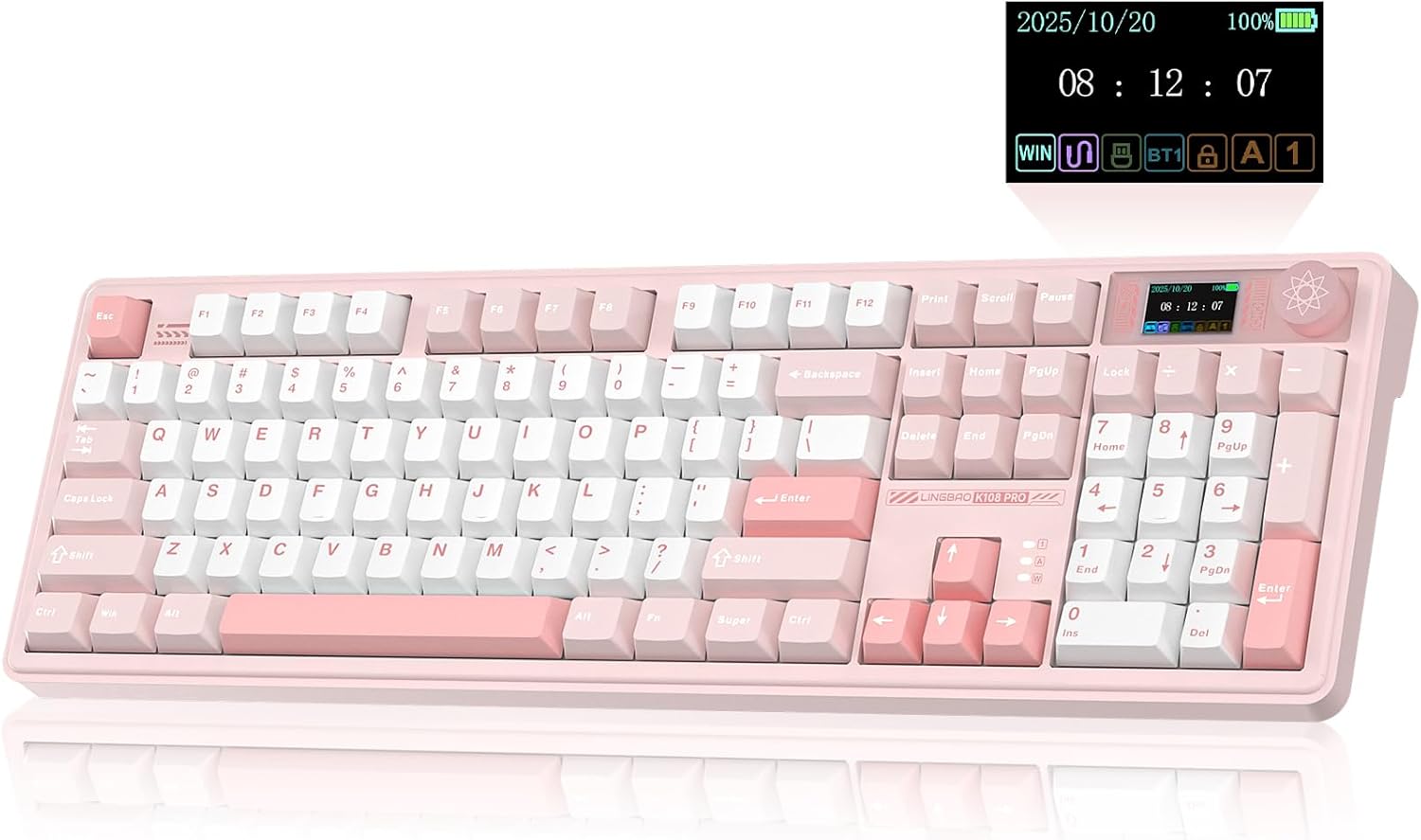
LINGBAO K108 Pro Wireless Mechanical Keyboard with Smart Display
A full-size wireless mechanical keyboard that combines productivity features with gaming credentials. The standout 1.14-inch smart display and multimedia knob offer quick access to system info and controls, while the hot-swappable switches and five-layer gasket structure appeal to customization enthusiasts. The massive 10000mAh battery delivers exceptional wireless runtime, making it practical for both office and gaming setups.
Pros
- Exceptional battery life: 53 hours with RGB on, 114 hours with RGB off, roughly double typical wireless keyboards
- Smart display with multimedia knob for volume, lighting control, and device switching without software
- Full hot-swappable design supports 3-pin or 5-pin switches for easy customization and repair
- Five-layer gasket structure and PBT keycaps deliver durable, acoustically refined typing feel
- Three-mode connectivity (2.4G wireless, Bluetooth, wired) with support for up to five paired devices
Cons
- Driver software is Windows-only and required for macro programming and screen customization, limiting cross-platform flexibility
- Smart display functions and full customization require driver installation and wired connection, adding setup friction
- Charging must use included cable connected to computer USB port, incompatible with standard fast chargers or phone chargers, which can damage the battery
Mechanical Keyboards Buying Guide
Buying a mechanical keyboard is not as simple as grabbing the first backlit board you see. Layout, switch type, connectivity, build construction, and keycap quality all interact to determine whether a keyboard delights you daily or ends up collecting dust.
The sections below walk through every factor that matters, so you can match the right board to your actual workflow.
If you are also putting together a full desk setup, pairing your keyboard with a quality gaming monitor and a precise wireless mouse makes a meaningful difference in how cohesive everything feels.
Layout and Form Factor

Form factor is the first decision to make, because it determines how much desk space the keyboard occupies and which keys are available without remapping.
Full-size (100%) layouts include a dedicated number pad and are the familiar choice for anyone who does heavy data entry or spreadsheet work.
96% layouts squeeze the numpad into a tighter footprint with minimal gaps, while 75% layouts drop the numpad and navigation cluster to keep things compact without sacrificing arrow keys or function row.
Smaller 65% and 60% boards are popular with gamers who want maximum mouse room, but they require firmware layers to access missing keys, which takes adjustment.
The keyboards in our ranked list cover the most useful layouts for most people: 75%, 96%, 98%, and full-size options all appear. If you mostly game, a 75% or 96% layout gives a good balance of function and desk real estate.
Writers and office workers who regularly use the numpad should look at full-size or 96% options.
Keep in mind that a compact layout also tends to mean a lighter, more portable board, which matters if you split your time between a desk and a laptop setup.
Speaking of laptops, if you need a portable computing companion, our roundup of laptops for work covers the most capable options across every budget.
Some boards in this category also include a knob or smart LCD screen, features that let you adjust volume, media playback, or custom macros without leaving your keyboard. These small ergonomic additions add genuine daily-use value, so factor them in when comparing otherwise similar models.
Switch Type and Feel

The switch underneath each keycap defines the entire typing experience.
Linear switches travel smoothly from top to bottom with no tactile bump or audible click, making them popular with gamers who want fast, consistent actuation and prefer a quieter, less fatiguing stroke during long sessions.
Most keyboards in this roundup ship with linear switches, typically pre-lubed from the factory to reduce scratchiness and improve smoothness out of the box.
Tactile switches have a noticeable bump partway through the keystroke that tells your finger the keypress registered without requiring you to bottom out. They are a strong choice for typists who want feedback without the loud click of clicky switches.
Clicky switches, such as classic blue-style variants, produce an audible click on each actuation that many enthusiasts love but office and household cohabitants often do not.
If you are uncertain which feel suits you, most expert reviewers recommend starting with a linear or tactile mid-weight option, as they are the most universally approachable.
Hot-swappable sockets are increasingly standard at this price tier and are a feature worth prioritizing. Hot-swap support means you can pull switches out without soldering and try different options over time, which protects your investment and lets the keyboard grow with your preferences.
Wired vs. Wireless and Connectivity
Wireless mechanical keyboards have matured significantly, and most picks in this list support tri-mode connectivity: Bluetooth 5.0, a dedicated 2.4 GHz wireless dongle, and wired USB-C.
Bluetooth is convenient for pairing with multiple devices such as a laptop, tablet, or phone, while the 2.4 GHz dongle delivers near-wired latency that is suitable even for competitive gaming.
Wired USB-C is always there as a reliable fallback and is often the fastest charging method when the battery runs low.
Battery life varies considerably between models. Boards with RGB lighting active tend to drain faster, so check whether the manufacturer rates battery life with backlighting on or off.
Some boards in this category carry very large batteries that extend wireless runtime dramatically. If you game competitively and cannot tolerate any risk of input lag, a wired-only or 2.4 GHz connection is the safer choice.
For general typing and casual gaming, Bluetooth is perfectly adequate. If building out a wire-free desk, pairing your keyboard with wireless mice worth considering will complete the cable-free setup.
Build Quality and Mount Type

The internal construction of a keyboard affects how it sounds and feels to type on just as much as the switches do.
Tray-mount designs, where the PCB screws directly into the bottom case, are common in budget boards and tend to produce a harder, clackier sound.
Gasket-mount designs suspend the internal plate within a layer of gasket material, which absorbs vibration and produces a softer, bouncier typing feel that enthusiasts strongly prefer.
Several keyboards in this roundup use gasket mounting at a price point that would have been unusual a few years ago, which speaks to how much value this market segment now delivers.
Some manufacturers also add acoustic foam layers, silicone dampening pads, or pre-applied switch pads between the PCB and the case. More layers generally mean a quieter, more refined sound profile.
If sound signature matters to you, look for boards advertised as having multi-layer padding or a “creamy” sound profile, language that has become common shorthand in the enthusiast community for a dampened, thocky keystroke.
Case material also matters. Aluminum or alloy top cases add rigidity and premium feel, while polycarbonate or ABS plastic cases are lighter and can transmit a brighter sound.
Neither is strictly better; it comes down to personal preference and how you plan to use the board. Programmers and power users logging long hours at a desk often appreciate the heft and stability of an aluminum frame.
Keycaps: Material, Profile, and Legends

Keycaps are the part of the keyboard you touch thousands of times a day, so their material and profile shape your entire experience.
PBT (polybutylene terephthalate) keycaps are harder, more resistant to shine and wear, and produce a crisper sound compared to the softer ABS plastic found on cheaper boards.
Nearly every keyboard in this roundup ships with PBT keycaps, which is a significant upgrade over what the budget segment offered just a few years ago.
Profile refers to the shape and height of the keycaps. Cherry profile is low and staggered, familiar from decades of mainstream keyboards. OEM profile is slightly taller and similarly shaped.
Newer profiles such as MOA, MDA, and the increasingly common spherical designs are shorter and more uniform in height across rows, which some typists find more comfortable for long sessions.
Side-printed or shine-through legends affect how the RGB backlighting looks, so if lighting aesthetics matter to you, check how the keycap legends are produced before purchasing.
RGB Lighting, Software, and Extras

Per-key RGB backlighting is nearly universal at this price tier, and most boards offer a generous selection of lighting effects accessible directly from the keyboard without needing to install any software.
Boards that offer dedicated software typically allow deeper macro programming, per-key remapping, and custom lighting profiles. If you prefer a clean, software-free setup, look for keyboards that store profiles onboard.
Some models add extra quality-of-life features such as a volume knob, a smart LCD screen that displays system stats or custom images, or multi-device switching shortcuts. These extras are increasingly found at mid-range prices and can meaningfully improve daily usability.
Anti-ghosting and N-key rollover (NKRO) are table-stakes features for gaming and should be confirmed before purchasing a board intended for competitive play.
If your setup also includes audio peripherals, pairing a quality keyboard with capable gaming headsets rounds out the experience nicely.
And for creators recording audio or doing voicework alongside their keyboard workflow, a look at microphones for every budget is well worth your time.
Why You Should Trust Us
REMOVU is an independent review publication with no manufacturer affiliations.
Every keyboard in this roundup was assessed using a consistent, multi-factor evaluation framework that examines published specifications, expert review consensus drawn from credible specialist sources, and verified buyer feedback gathered from confirmed purchasers.
We do not conduct our own product trials; our evaluations are grounded in research, published data, expert review consensus, and verified buyer feedback.
Each product receives a REMOVU Score on a 0 to 10 scale that reflects its composite performance across the criteria most relevant to that category: build quality, typing feel, wireless performance, keycap quality, value, and feature set.
Scores are assigned independently of price paid or manufacturer influence. Higher-priced boards are not automatically scored higher; a well-executed budget keyboard that delivers on its promises can and does outscore a pricier model that cuts corners where it matters.
REMOVU may earn a commission if you purchase through a link on this page. That affiliate relationship has no influence whatsoever on our scores, rankings, or editorial decisions. Products are ranked on evaluated merit, not on commission rate.
Our goal is straightforward: give you the most reliable shortlist possible so you spend less time researching and more time actually typing.
Final Thoughts
The mechanical keyboard market in 2026 offers remarkable quality across every price tier, from compact creamy boards to feature-packed wireless flagships.
After thorough research across specifications, community consensus, and verified buyer sentiment, a handful of models stand out with clear distinctions. Below are our editorial picks by use case, each linked to its full product card above for complete details.
- Best Overall: EPOMAKER x Aula F75 Gasket Mechanical Keyboard. This 75% wireless board earns the top REMOVU Score in the group thanks to its gasket mount construction, five-layer acoustic padding, tri-mode connectivity, hot-swap support, and a knob that adds genuine daily convenience. It delivers enthusiast-grade features at a mid-range price, making it the easiest recommendation for most buyers.
- Best Wireless Value: AULA F99 Wireless Mechanical Keyboard. The F99 pairs tri-mode connectivity with hot-swappable pre-lubed linear switches and strong RGB implementation at a competitive price. Expert reviewers consistently highlight its polished out-of-box experience, and verified buyers cite its reliable wireless performance as a standout trait.
- Best Full-Size Gaming Upgrade: ASUS ROG Strix Scope II X. For buyers who want the trust of an established gaming brand with hot-swappable ROG NX Snow V2 linear switches, PBT keycaps, and broad PC/Mac support in a full-size layout, this board delivers a premium wired experience backed by ASUS’s ecosystem and software. It earns its place for gamers who prioritize brand reliability and switch quality over wireless flexibility. Pair it with capable monitors and you have a desk that performs at every level.
- Best Feature-Rich Pick: Aula F98 Pro V3 Wireless Mechanical Gaming Keyboard. The F98 Pro V3 stands apart with its smart LCD screen, rotary knob, gasket mount, and large battery in a 96% layout. Buyers who want a board that feels premium and offers conversation-starting extras will appreciate the thoughtful feature integration. It is an especially strong pick for those who want a desk centerpiece that does more than just type. If you are building a full productivity station, a laptop built for programming pairs well alongside a keyboard this capable.
- Best Budget Mechanical Keyboard: RK ROYAL KLUDGE R98 Pro Wired Mechanical Keyboard. The R98 Pro brings gasket mounting, a volume knob, MDA profile PBT keycaps, and hot-swap support to the most accessible price in the roundup. For buyers entering the enthusiast mechanical keyboard space without a large budget, it is the clearest starting point. The monitors and peripherals category has more picks to complement it.
Whichever board you choose, the options in this list represent genuine value in a market that rewards informed buying. Use the buying guide criteria above, match the layout and switch type to your workflow, and you are unlikely to be disappointed.
Frequently Asked Questions
What is the difference between a mechanical keyboard and a membrane keyboard?
A mechanical keyboard uses an individual physical switch under each keycap that registers a keypress through a spring-loaded mechanism. This produces distinct tactile or auditory feedback and a consistent actuation point.
A membrane keyboard uses a pressure pad beneath a rubber dome layer; the feel is mushier, less precise, and the dome degrades more quickly over time.
Mechanical switches are rated for tens of millions of keystrokes compared to a few million for typical membrane designs, making mechanical boards a significantly more durable long-term investment.
For photo editing workstations or programming setups where hours at the keyboard are common, the ergonomic and durability difference is especially meaningful.
Are wireless mechanical keyboards good enough for gaming?
Yes, provided you use the 2.4 GHz wireless dongle rather than Bluetooth. The 2.4 GHz connection on modern wireless mechanical keyboards delivers latency that is effectively indistinguishable from wired in most gaming scenarios.
Bluetooth is convenient for multi-device use but introduces slightly higher and less consistent latency, which matters in fast-paced competitive play. All tri-mode boards in this roundup support both options, so you can switch based on context.
Battery management is the main practical consideration: keeping the board charged before long sessions prevents any interruption.
What does hot-swappable mean and why does it matter?
Hot-swappable (or hot-swap) means the switch sockets accept switches without soldering. You can use a switch puller to remove any installed switch and press in a different one in seconds.
This matters because it lets you change the typing feel of your keyboard whenever your preferences evolve, or if a switch fails, without needing a soldering iron or professional service.
It also means you can buy the keyboard with the included switches and upgrade to higher-end switches later without replacing the entire board.
Given that switches are available at modest cost per unit, hot-swap support significantly extends the practical lifespan of your investment.
What is gasket mounting and is it worth paying for?
Gasket mounting suspends the internal switch plate within a layer of soft gasket material rather than screwing it rigidly to the case.
The result is a keyboard that flexes slightly when you type, absorbing vibration and producing a softer, deeper, more pleasant sound profile.
Most enthusiasts consider gasket mount a meaningful improvement over tray or top-mount designs, and it used to appear only in expensive custom boards.
Today it is common at mid-range prices, which is one reason the mechanical keyboard market has become so compelling for value-conscious buyers.
If you type for extended periods and care about acoustics, a gasket-mount board is worth the modest price premium.
Should I get a compact 75% layout or a full-size keyboard?
It depends on how you use your computer.
If you regularly input numbers, work in spreadsheets, or use accounting software, the dedicated number pad on a full-size board is a genuine productivity tool that is hard to replace with a layer shortcut.
If you primarily type text, browse, code, or game, a 75% layout reclaims meaningful desk space for mouse movement without sacrificing the function row or arrow keys that most workflows need.
A 96% layout splits the difference well: it includes the numpad in a compressed footprint and suits people who want both without the full-size footprint.
Try to assess your actual numpad usage honestly before deciding, as many buyers who switch to a compact layout rarely look back.
If you pair a compact keyboard with a compact mini PC, you can build an impressively tidy and capable desk setup.
How do I know if a mechanical keyboard is compatible with my operating system?
Most modern mechanical keyboards are compatible with both Windows and macOS, and many explicitly list both in their specifications.
On macOS, some modifier keys (such as Alt and Windows key) swap roles but can be remapped in system settings or through the keyboard’s own firmware.
Keyboards that include macOS keycaps or dual-legend keys in the box make the transition smoother. Linux compatibility is generally strong for any keyboard using standard USB HID protocol, which covers virtually every board here.
If you primarily work on a Mac, check whether the keyboard includes macOS-specific keycaps or at minimum offers straightforward key remapping. For a deep dive into Mac-compatible productivity hardware, our coverage of work-focused computing options explores the broader ecosystem.
About the author
Levi writes about handheld gaming consoles for REMOVU, weighing processing power, battery life, and library depth. He helps players pick a handheld that fits both their backlog and their commute.