The 5 Best Smart Locks Under $200
Keyless entry, remote access, and fingerprint unlock no longer require a luxury budget. These are the smart locks under $200 that actually deliver on security and convenience.
 By Michelle Mendoza
Updated July 26, 2026
By Michelle Mendoza
Updated July 26, 2026
Upgrading to a smart lock is one of the most practical steps you can take toward a more connected, secure home.
The ability to grant access remotely, check lock status from anywhere, and ditch the fumbling-with-keys routine adds genuine convenience without requiring a full smart home overhaul.
The catch is that the market is crowded, and separating well-engineered locks from flashy-but-flimsy options takes real digging.
Fortunately, the under-$169.99 bracket has matured significantly, with brands like Philips, Yale, eufy, and Chamberlain/myQ now offering flagship-level features at accessible price points.
To put together this guide, the REMOVU editorial team researched manufacturer specifications, analyzed expert review consensus across dozens of published sources, and cross-referenced verified buyer feedback to surface the picks that deliver on real-world reliability, not just spec-sheet promises.
Every lock in this roundup fits within the $109.99 – $169.99 budget window and earns a place on our shortlist because it balances security, convenience, and long-term usability.
Whether you need a retrofit deadbolt, a fingerprint-forward lock, or an all-in-one entry system with a built-in camera, the picks below cover every major use case. Read on for our top-ranked smart locks under $169.99.
| Award | Product | REMOVU Score About REMOVU ScoreThe REMOVU Score is our own rating from 0 to 10, based on performance, design and build, ease of use, and value. It reflects independent research and is never influenced by manufacturers, retailers, or affiliate commissions. Learn more › | Price | |
|---|---|---|---|---|
| Best Value |
 Philips DDL240X Wi-Fi Smart Lock with Fingerprint
|
8.6/10 | Buy | |
| Best Premium |
 Yale Assure Lock 2 Wi-Fi Keypad Deadbolt
|
8.2/10 | Buy | |
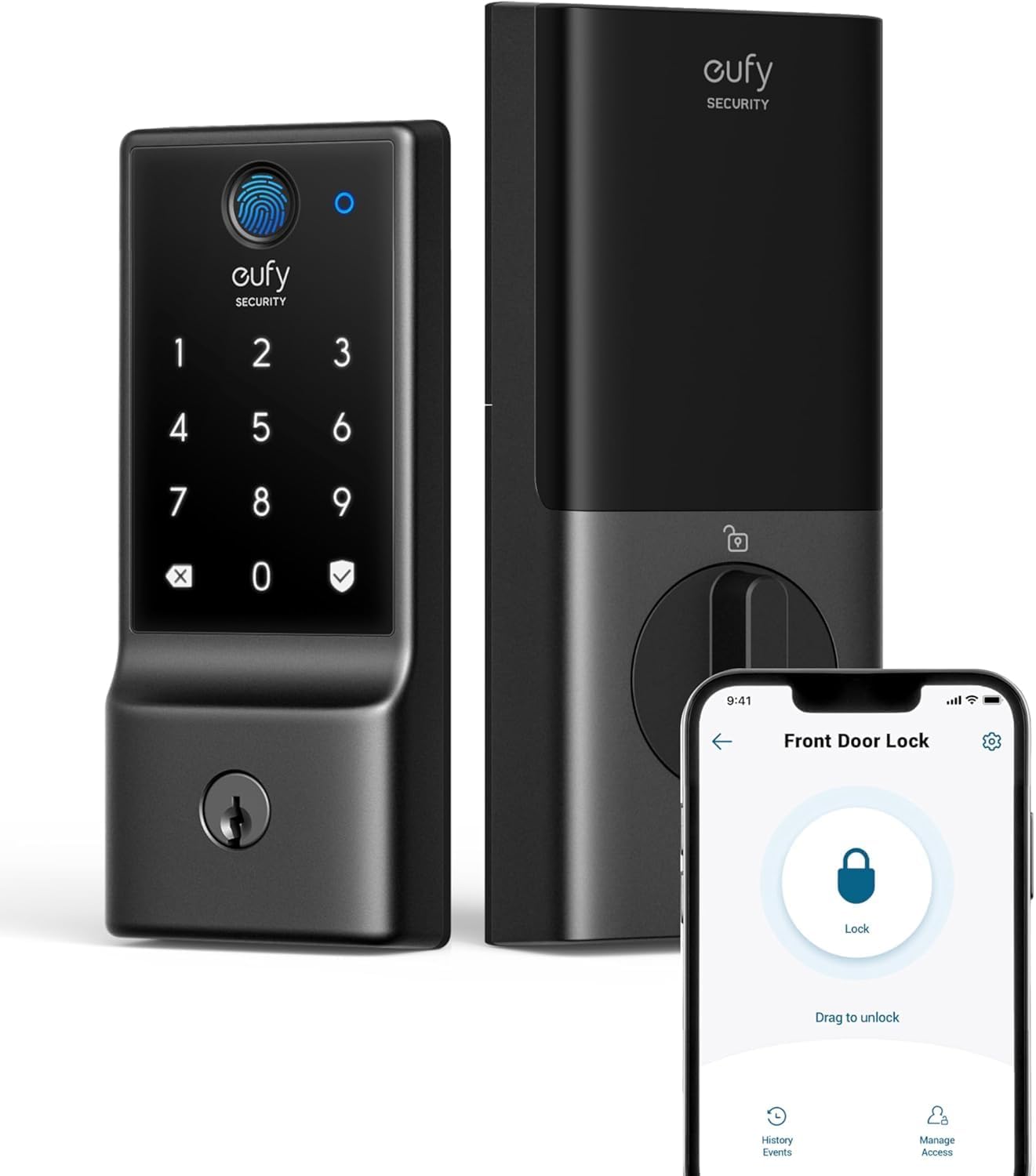 eufy Security C220 Smart Lock with Fingerprint & Wi-Fi
|
7.8/10 | Buy | ||
| Best Budget |
 Philips 4200 Series WiFi Smart Lock with Fingerprint
|
8.1/10 | Buy | |
| Best Overall |
 myQ Secure View 3-in-1 Smart Lock with 2K Camera
|
9.5/10 | Buy |
Philips DDL240X Wi-Fi Smart Lock with Fingerprint
A premium smart deadbolt with integrated handle that offers five unlock methods (app, fingerprint, PIN, key, voice) and auto-locking capability. Buyers praise easy installation and reliable performance, though some report occasional connectivity glitches that responsive customer service has addressed with replacements.
Pros
- Multiple authentication options provide genuine flexibility for household members and visitors
- Fast fingerprint recognition with 99.99% accuracy eliminates fumbling for keys or codes
- Responsive customer service with quick replacement shipping and proactive troubleshooting
- Simple installation with basic screwdriver, though optional security screws available for weak doors
Cons
- Occasional firmware glitches reported by some users requiring battery resets; moisture sensitivity noted in humid climates
- Keypad not visible in direct sunlight and black finish heats up in sun
- App lacks biometric login and password memory, requiring manual login each session
Yale Assure Lock 2 Wi-Fi Keypad Deadbolt
A Wi-Fi-enabled smart deadbolt with keypad entry, app control, and hands-free auto-unlock via smartphone proximity. Best for homeowners wanting remote access and guest code management without hiring a locksmith for installation.
Pros
- Flexible entry options accommodate different user preferences and guest scenarios
- Remote app access and real-time notifications useful for monitoring when away
- Straightforward installation without professional help required
- Integrates with Airbnb platform for vacation rental management
- Compact design in multiple finishes fits most door hardware aesthetics
Cons
- Requires 2.4 GHz Wi-Fi only; incompatible with 5 GHz networks
- No verified customer reviews available to assess real-world reliability and durability
- Electronics warranty limited to one year versus lifetime mechanical coverage
eufy Security C220 Smart Lock with Fingerprint & Wi-Fi
A budget-friendly smart deadbolt that combines fingerprint recognition, app control, and built-in Wi-Fi without requiring a separate hub. Works with Alexa and Google Assistant, stores up to 50 fingerprints and 100 passcodes, with roughly 8 months of battery life on included AA batteries.
Pros
- No bridge or hub needed for remote control, simplifying setup and ecosystem
- Reliable fingerprint recognition with self-learning AI that improves with use, according to verified buyers
- Extensive access management including temporary codes for guests, cleaners, or service people
- Easy 15-minute installation compatible with standard US and Canadian deadbolts
- Solid build quality and heavy aluminum construction noted across customer reviews
Cons
- Fingerprint recognition can struggle with moisture or unclear prints, requiring passcode fallback or re-registration
- Battery life degrades when placed far from Wi-Fi access point due to increased connection demand
- Not compatible with Apple HomeKit, Matter, or IFTTT, limiting smart home integration options
Philips 4200 Series WiFi Smart Lock with Fingerprint
A mid-range smart deadbolt combining WiFi remote access, fingerprint unlock, and keypad entry with voice control compatibility. Strong option for homeowners seeking multiple unlock methods and guest code management without requiring a separate hub.
Pros
- Fingerprint reader is fast and reliable, eliminating key carry and codes
- App control works seamlessly with Alexa and Google Assistant for voice unlocking
- One-time and recurring passcodes ideal for rental properties and temporary access
- Sleek matte black finish with concealed keyhole appeals to modern aesthetics
- Installation straightforward with screwdriver, fits standard door thickness (1.38-1.75 inches)
Cons
- Requires premium alkaline batteries to reach stated 6-month life; cheap batteries drain quickly within weeks
- WiFi range limited to 33 feet from router; walls and metal objects degrade signal
- App occasionally exhibits glitches like duplicate fingerprint entries, and fingerprint unlock behavior can be inconsistent (sometimes requires follow-up button press)
myQ Secure View 3-in-1 Smart Lock with 2K Camera
This combines a smart deadbolt, video doorbell, and security camera into one device with five unlock methods including face recognition, fingerprint, and PIN codes. Setup is straightforward, video quality is sharp day and night, but some biometric features are restricted in certain states and smart home automation integration is limited.
Pros
- Seamless 3-in-1 design eliminates clutter compared to separate devices
- Face recognition and fingerprint unlock work smoothly where available, offering genuine hands-free convenience
- Clear 2K video and color night vision perform better than typical doorbell cameras
- Battery lasts 4-6 months and recharges quickly; spare battery available
- Easy setup and reliable performance across diverse weather conditions
Cons
- Face access and fingerprint features are disabled in Texas and Illinois, a significant limitation not prominently disclosed at purchase
- Advanced features like smart detection and auto-lock require subscription service
- No integration with Alexa or other smart home automation systems, restricting voice control
Smart Locks Under $200 Buying Guide
Smart locks sit at the intersection of home security and everyday convenience, which means the tradeoffs you accept matter a lot.
A lock you find frustrating to use is a lock you will prop open or bypass, which defeats the purpose entirely. Use the criteria below to narrow your options before committing to a purchase.
Pairing a smart lock with other security cameras and video doorbells around your property is also worth considering for a more complete entry-point solution.
Connectivity: Wi-Fi, Bluetooth, or Hub-Dependent

The single biggest differentiator in this price range is how the lock connects to the outside world. Built-in Wi-Fi locks connect directly to your router and allow genuine remote access from anywhere, with no additional hardware required.
Bluetooth-only locks limit remote control to when your phone is within range, which is fine for keyless entry but frustrating if you want to let in a contractor while you are at the office.
Some budget-priced locks require a proprietary hub or bridge that adds cost and a dependency on one more device staying online.
For most households, built-in Wi-Fi is the most future-proof choice. It enables real-time lock/unlock notifications, remote access codes, and app-based management without relying on a separate gateway device.
Several picks in this roundup include built-in Wi-Fi directly in the lock body, which is the configuration we prioritized.
If you already have a broader smart home ecosystem built around a specific hub or voice assistant platform, verify compatibility before buying, since not every lock supports every ecosystem equally well.
Voice assistant integration (Alexa, Google Home, Siri) is a nice-to-have rather than a must-have, but if you already rely on smart displays or hubs, checking the smart displays and hubs compatibility list for a given lock is worth a few minutes of research.
Entry Methods: Fingerprint, Keypad, App, and Physical Key

The best smart locks in this price range offer multiple authentication methods rather than relying on a single point of entry.
Fingerprint readers have become standard on many mid-range models and add a genuinely fast, hands-free experience that keypad codes cannot match.
Fingerprint reliability varies quite a bit between brands, so pay attention to verified buyer feedback on read speed and wet-finger performance before deciding.
Keypad entry remains the workhorse method for guest codes, temporary access, and households with young children who cannot be trusted with a phone app. Look for locks that allow multiple unique codes and offer auto-delete or scheduled access windows.
App-based unlocking via Bluetooth or Wi-Fi is convenient but should always be treated as a secondary method rather than the primary one, since phone battery death or a Wi-Fi outage should not leave you locked out of your own home.
Physical key backup is non-negotiable for most buyers. Even if you never expect to use a traditional key, having that fallback during a power outage or connectivity failure is basic prudence.
Confirm that any lock you consider ships with physical keys and that the keyway is a standard locksmith-serviceable format.
Installation Compatibility and Door Prep
Most deadbolt-style smart locks in this category are designed to replace a standard single-cylinder deadbolt on doors with a 2-1/8-inch cross-bore hole. The installation is typically a straightforward swap that takes thirty to sixty minutes with basic tools.
Where things get complicated is with non-standard door thickness, doors with multiple locks, or retrofit installations where the existing hardware does not align with the new lock’s backset dimensions.
Lock sets that include both the deadbolt and the door handle (as a matched set) simplify the process significantly and eliminate the visual mismatch of pairing a modern smart lock with a decade-old handle.
Several options in this roundup ship as complete door-lock sets, which is worth factoring in if you are replacing an aging entry handle at the same time.
BHMA grading is also worth understanding. A BHMA Grade 1 rating indicates commercial-level strength and is ideal for primary exterior doors. Grade 2 suits most residential front doors, and Grade 3 is adequate for interior or secondary doors.
Knowing which grade your primary entry door warrants helps you avoid overbuying or underinvesting on security.
Battery Life and Power Management
Smart locks run on AA or AAA batteries, and battery life ranges enormously depending on how often the lock is used, which connectivity features are active, and how power-hungry the motor is.
Locks with built-in Wi-Fi radios drain batteries faster than Bluetooth-only models because Wi-Fi requires constant network polling.
Some manufacturers have addressed this with low-power Wi-Fi chips or hybrid sleep states, but it is worth checking real-world battery life reports from verified buyers rather than trusting spec-sheet claims alone.
In practical terms, a lock that lasts six to eight months on a set of batteries is very good for a Wi-Fi-connected model. Anything shorter than three months becomes a maintenance chore.
Most smart lock apps will push a low-battery warning well in advance, which is a feature worth confirming is available in the companion app.
Some higher-end models also support external USB-C emergency charging on the outside of the lock body, which can save you if you catch a dead battery situation before you are locked out entirely.
Weather Resistance and Durability

Exterior door locks are exposed to rain, humidity, temperature swings, and UV exposure year-round. IP-rated weather resistance is a meaningful spec here, not marketing fluff.
An IP53 rating, for example, indicates protection against dust ingress and water spray from any direction, which covers most real-world rain and splash scenarios for a front door lock.
Locks without any IP rating should only be considered for covered entryways or interior applications.
Finish durability is a separate consideration from weather resistance. Matte black and brushed nickel finishes are common in this range, and both can show wear at high-touch points like the keypad over time.
Look for buyer feedback specifically mentioning finish longevity at the twelve-month-plus mark, since that is typically when coating issues become visible. A good finish not only looks better longer but also resists fingerprint smearing on the keypad surround.
App Quality and Smart Home Integration

The hardware quality of a smart lock is only half the equation. The companion app determines how much of that hardware capability you can actually use day to day.
A well-designed app should let you create and manage access codes, view activity logs, set auto-lock schedules, and receive real-time push notifications.
Apps that require excessive permissions, crash frequently, or bury basic settings behind confusing menus will erode the value of even a well-built lock over time.
Check app store reviews specifically for the lock model you are considering, not just the brand in general, since manufacturers sometimes launch new apps for newer hardware lines.
Also confirm whether core features like remote unlock and activity history require a paid subscription. A lock that gates basic functionality behind a monthly fee represents a hidden cost that is not reflected in the purchase price.
The best options in this roundup offer full-featured free app access with no mandatory subscription tier.
Why You Should Trust Us
REMOVU is an independent review publication. We do not manufacture, sell, or distribute any of the products we cover, and we have no commercial relationship with any brand that could influence what appears in our roundups.
Every product in this guide was assessed using the REMOVU Score, our 0-to-10 evaluation framework that weights security engineering, connectivity reliability, authentication versatility, battery performance, weather resistance, app quality, and real-world value relative to price.
We do not conduct our own product trials; our evaluations are grounded in research, published data, expert review consensus, and verified buyer feedback.
Our editorial team analyzes publicly available specifications, cross-references expert review consensus from independent security and smart home publications, and synthesizes verified buyer feedback at scale to identify consistent patterns of performance and failure.
When a product earns a high REMOVU Score, it is because multiple independent data sources converge on the same conclusion, not because one reviewer had a favorable experience on a single occasion.
REMOVU may earn an affiliate commission if you purchase through a link on this page. That relationship does not influence our rankings, scores, or editorial selections in any way.
Products are ordered by REMOVU Score, and no brand can pay for a higher placement. Our goal is to give you the clearest, most honest picture of what each lock actually delivers so you can make a confident purchase decision.
Final Thoughts
The smart lock market under $169.99 is stronger than it has ever been in 2026, and the five picks in this roundup represent genuinely excellent options across different priorities and households. Here is how we would summarize the standout choices:
- Best Overall: myQ Secure View 3-in-1 Smart Lock with 2K HDR Video Doorbell Camera earns the top REMOVU Score in this roundup by combining a full-featured deadbolt with a built-in 2K HDR video doorbell, face access, fingerprint recognition, PIN entry, and app control in a single integrated package. For buyers who want to consolidate their front-door security into one device, nothing else in this price range comes close.
- Best Premium Deadbolt Set: Philips Wi-Fi Smart Lock with Handle stands out as the strongest complete door-lock set in the group, pairing a deadbolt and handle in a matched unit with fingerprint unlock, PIN code entry, auto-locking, and a bundled Wi-Fi gateway for remote access at a mid-range price.
- Best Brand-Name Reliability: Yale Assure Lock 2 Keypad Deadbolt with Wi-Fi brings Yale’s decades of lock-manufacturing credibility to the smart lock category. Its no-key-required keypad design in a sleek Black Suede finish, combined with native Wi-Fi and broad smart home compatibility, makes it the go-to pick for buyers who prioritize a trusted hardware pedigree.
- Best Budget-Friendly Pick: eufy Security Smart Lock C220 delivers built-in Wi-Fi, fingerprint access, app remote control, IP53 weather resistance, and an impressive claimed battery life at one of the lowest price points in the roundup, making it the strongest value pick for cost-conscious buyers who do not want to sacrifice core smart lock functionality.
- Best Upgrade from a Basic Keypad: Philips WiFi Keypad Door Lock with Handle offers a compelling step up from a simple keypad lock, adding voice control, fingerprint unlock, auto lock, and a matched handle set with built-in Wi-Fi at a budget-friendly price, making it an easy recommendation for first-time smart lock buyers.
If you are building out a broader connected home setup, pairing your new smart lock with smart thermostats and robot vacuums on compatible platforms can unlock genuinely useful automation routines, such as adjusting climate settings or pausing cleaning cycles when the front door is unlocked.
Rounding out your entry security with Bluetooth trackers for keys and bags is also worth considering as a low-cost backup layer.
Frequently Asked Questions
Do smart locks under $200 work without a hub or bridge?
Many do. Several picks in this roundup feature built-in Wi-Fi that connects directly to your home router, eliminating the need for a separate hub.
However, some models, particularly older designs or those built around Z-Wave or Zigbee protocols, do require a compatible hub for remote access.
Always check the product listing and the manufacturer’s compatibility page before purchasing, especially if you already have a specific smart home ecosystem in place.
Are smart locks as secure as traditional deadbolts?
A high-quality smart lock is generally as physically secure as a conventional deadbolt of the same grade rating.
The BHMA grading system applies equally to smart locks, and a Grade 1 or Grade 2 certified smart lock offers the same resistance to kick-in and forced entry as its non-smart equivalent.
The additional attack surface that smart locks introduce is digital rather than physical, so factors like encrypted Bluetooth communication, two-factor authentication support, and the manufacturer’s track record on firmware security updates become relevant considerations that traditional locks simply do not have.
What happens to a smart lock during a power outage or Wi-Fi failure?
Because smart locks run on batteries rather than hardwired power, a home power outage does not affect lock operation at all.
Wi-Fi or internet outages will disable remote access and app control, but local access methods including keypad codes, fingerprint readers, physical keys, and Bluetooth unlock via a phone in close proximity will continue to work normally.
This is one reason maintaining a physical key backup is always recommended even if you plan to use keyless entry as your primary method.
Can I share access with guests or family members?
Yes, and this is one of the most practical advantages smart locks offer over traditional hardware.
Most locks in this roundup allow you to create multiple unique PIN codes, each of which can be assigned a specific access schedule or set to expire automatically.
App-based access sharing lets you invite family members or recurring guests to control the lock from their own smartphone without sharing your credentials.
Temporary or one-time codes are ideal for service providers, delivery windows, or short-term rental guests, and most companion apps let you generate and revoke these codes remotely in seconds.
How long does installation typically take for a smart deadbolt?
For a standard residential door with an existing deadbolt, most smart lock replacements take between thirty and sixty minutes using a Phillips screwdriver and a measuring tape.
The process involves removing the existing deadbolt hardware, fitting the new lock’s exterior and interior assemblies, and running the setup sequence in the companion app.
Locks that include a matched handle set take slightly longer since you are replacing two pieces of hardware rather than one.
If your door has non-standard thickness, an unusual backset measurement, or a multi-point locking system, consult the manufacturer’s compatibility guide before purchasing.
Should I also look at video doorbells to complement my smart lock?
Pairing a smart lock with a video doorbell creates a much more complete front-entry security setup, letting you see, speak to, and grant or deny access to visitors entirely from your phone.
If you prefer an all-in-one solution that combines both functions in a single device, the myQ Secure View in this roundup is the only pick that integrates a full 2K HDR video doorbell camera directly into the lock body itself.
For households that want dedicated, separate devices for each function, a standalone smart lock paired with a compatible video doorbell from your preferred ecosystem is usually the more flexible long-term approach.
You might also find our coverage of baby monitors and pet tech useful if you are building out a broader home monitoring setup alongside your new entry hardware.
Related Guides
About the author
Michelle covers soundbars for REMOVU, comparing clarity, bass, and Atmos support across single bars and full systems. She helps readers fix thin TV audio at any budget.