The 8 Best Smart Locks for Front Doors
Keypad codes, fingerprint scanners, or full Wi-Fi control: the right smart lock depends on your door, your routine, and your smart home setup. Here are the picks that actually deliver.
 By Ken Mendoza
Updated July 26, 2026
By Ken Mendoza
Updated July 26, 2026
Your front door is the first line of defense for your home, and a smart lock brings real convenience without sacrificing security.
Whether you want to ditch physical keys entirely, grant temporary access to guests, or simply check whether the door is locked from anywhere in the world, the right smart lock makes all of it possible from your phone.
The market has exploded with options ranging from budget-friendly keypad deadbolts to fully connected locks with fingerprint scanners, built-in Wi-Fi, and voice assistant support, making it harder than ever to know which one is actually worth buying.
To cut through the noise, our editorial team at REMOVU researched and evaluated eight of the most relevant models available right now, drawing on published specifications, expert review consensus, and verified buyer feedback to surface the picks that genuinely deliver.
We cover everything from the most affordable entry point to premium feature-packed sets, so you can match the right lock to your door, your budget, and your smart home setup. Read on for our top-ranked picks for 2026.
| Award | Product | REMOVU Score About REMOVU ScoreThe REMOVU Score is our own rating from 0 to 10, based on performance, design and build, ease of use, and value. It reflects independent research and is never influenced by manufacturers, retailers, or affiliate commissions. Learn more › | Price | |
|---|---|---|---|---|
| Best Budget |
 Wyze Lock Bolt v2 Fingerprint Smart Lock
|
7.4/10 | Buy | |
| Best Value |
 Philips AK-AZFP-8RAL Smart Deadbolt with Fingerprint
|
8.4/10 | Buy | |
| Best Premium |
 Philips 4200 Series WiFi Smart Lock with Fingerprint
|
8.1/10 | Buy | |
 Firstriver T2 WiFi Smart Lock with Handle Set
|
7.4/10 | Buy | ||
 Veise VE017G-H Wi-Fi Smart Fingerprint Deadbolt with Handle
|
7.3/10 | Buy | ||
 Veise VE027-K WiFi Smart Lock with Fingerprint
|
8.1/10 | Buy | ||
 Veise KS02B Fingerprint Door Lock with Keypad
|
7.1/10 | Buy | ||
| Best Overall |
 TEEHO TE001 Keypad Deadbolt, 20 User Codes, IP54 Waterproof
|
8.9/10 | Buy |
Wyze Lock Bolt v2 Fingerprint Smart Lock
A Wi-Fi-enabled deadbolt with AI-learning fingerprint recognition that unlocks in 0.5 seconds and includes multiple entry methods (fingerprint, keypad codes, app control, physical keys). Backed by strong user ratings for ease of setup and reliability, though fingerprint enrollment can be inconsistent for some users.
Pros
- Multiple unlock methods (fingerprint, keypad, app, physical keys) provide flexibility and eliminate lockout scenarios
- Fast, responsive setup under 10 minutes with no special tools required
- Comprehensive app features including temporary access codes, activity logs, and seamless Wyze ecosystem integration
- Long battery life and USB-C emergency power offer reliable backup compared to 9V emergency systems
- Consistent positive feedback on fingerprint speed and keypad responsiveness
Cons
- Fingerprint enrollment can struggle with certain users (elderly, poor circulation, dry skin) despite being fast once registered
- Larger profile than standard deadbolts may not fit all door aesthetics or existing installations
- Relies on Wi-Fi connectivity for remote features, not compatible with Z-Wave or other wireless protocols
Philips AK-AZFP-8RAL Smart Deadbolt with Fingerprint
A Wi-Fi-enabled deadbolt offering five unlock methods (fingerprint, PIN, app, voice, key) with solid build quality and straightforward installation on standard doors. Works well for homeowners and rental properties, though app connectivity issues and plastic interior components have been reported by some users.
Pros
- Easy installation on standard doors (1.38-2 inch thickness) in under 30 minutes with clear instructions and video guides
- Reliable fingerprint sensor and multiple unlock options provide genuine flexibility for daily use and guest management
- Solid aluminum exterior construction with premium feel; backed by established Philips brand
- Real-time notifications, complete activity log, and low battery alerts via app
- Functions without Wi-Fi or internet, using fingerprint, PIN, or physical key as fallback
Cons
- App experienced glitchy behavior during setup and occasional connection drops, requiring manual refresh to function
- Interior assembly made of plastic rather than metal, lowering overall durability perception
- Requires 8 AA alkaline batteries (not included) with ongoing replacement costs and Wi-Fi dependency for remote features
Philips 4200 Series WiFi Smart Lock with Fingerprint
A mid-range smart deadbolt combining WiFi remote access, fingerprint unlock, and keypad entry with voice control compatibility. Strong option for homeowners seeking multiple unlock methods and guest code management without requiring a separate hub.
Pros
- Fingerprint reader is fast and reliable, eliminating key carry and codes
- App control works seamlessly with Alexa and Google Assistant for voice unlocking
- One-time and recurring passcodes ideal for rental properties and temporary access
- Sleek matte black finish with concealed keyhole appeals to modern aesthetics
- Installation straightforward with screwdriver, fits standard door thickness (1.38-1.75 inches)
Cons
- Requires premium alkaline batteries to reach stated 6-month life; cheap batteries drain quickly within weeks
- WiFi range limited to 33 feet from router; walls and metal objects degrade signal
- App occasionally exhibits glitches like duplicate fingerprint entries, and fingerprint unlock behavior can be inconsistent (sometimes requires follow-up button press)
Firstriver T2 WiFi Smart Lock with Handle Set
A built-in WiFi deadbolt with handle set offering six unlock methods including fingerprint, app control, keypad, and voice commands via Alexa or Google Assistant. The installation is straightforward, fingerprint recognition is fast, and it requires no separate hub, making it a practical choice for homeowners seeking affordable smart door security.
Pros
- No gateway or hub needed, built-in WiFi and Bluetooth connectivity simplify setup
- Fast and responsive fingerprint reader with capacity to store family members and temporary guests
- Straightforward installation with clear instructions and included hardware for different door types
- Multiple access methods provide flexibility while maintaining security logs and notifications
- Responsive customer support with 3-year warranty and 30-day return policy
Cons
- Some users reported occasional fingerprint registration issues when door is open, requiring troubleshooting
- One verified reviewer experienced random locking and unlocking cycles, suggesting potential connectivity or firmware issues in rare cases
- Requires eight batteries, necessitating periodic maintenance monitoring for battery life
Veise VE017G-H Wi-Fi Smart Fingerprint Deadbolt with Handle
A full-featured smart deadbolt with handle set that combines fingerprint recognition, Wi-Fi control, and voice integration for households wanting multiple entry methods. Verified buyers praise the 0.2-second fingerprint unlock, app reliability, and customer service, though some durability concerns with interior components have been reported.
Pros
- Comprehensive access control with 8 entry method options, ideal for busy families and property managers
- Real-time app notifications, activity logs, and lock status monitoring from anywhere
- Quick and straightforward 15-minute installation with included screwdriver-only tools
- Strong customer service response with warranty replacement program (2 years total with registration)
- Silent operation with backlit keypad and voice feedback in three languages
Cons
- Interior handle coating chipped on arrival for some units, raising durability concerns with daily wear
- Interior latch mechanism failure reported within weeks of use in at least one case
- Does not support multi-factor authentication (requiring both fingerprint and PIN simultaneously)
Veise VE027-K WiFi Smart Lock with Fingerprint
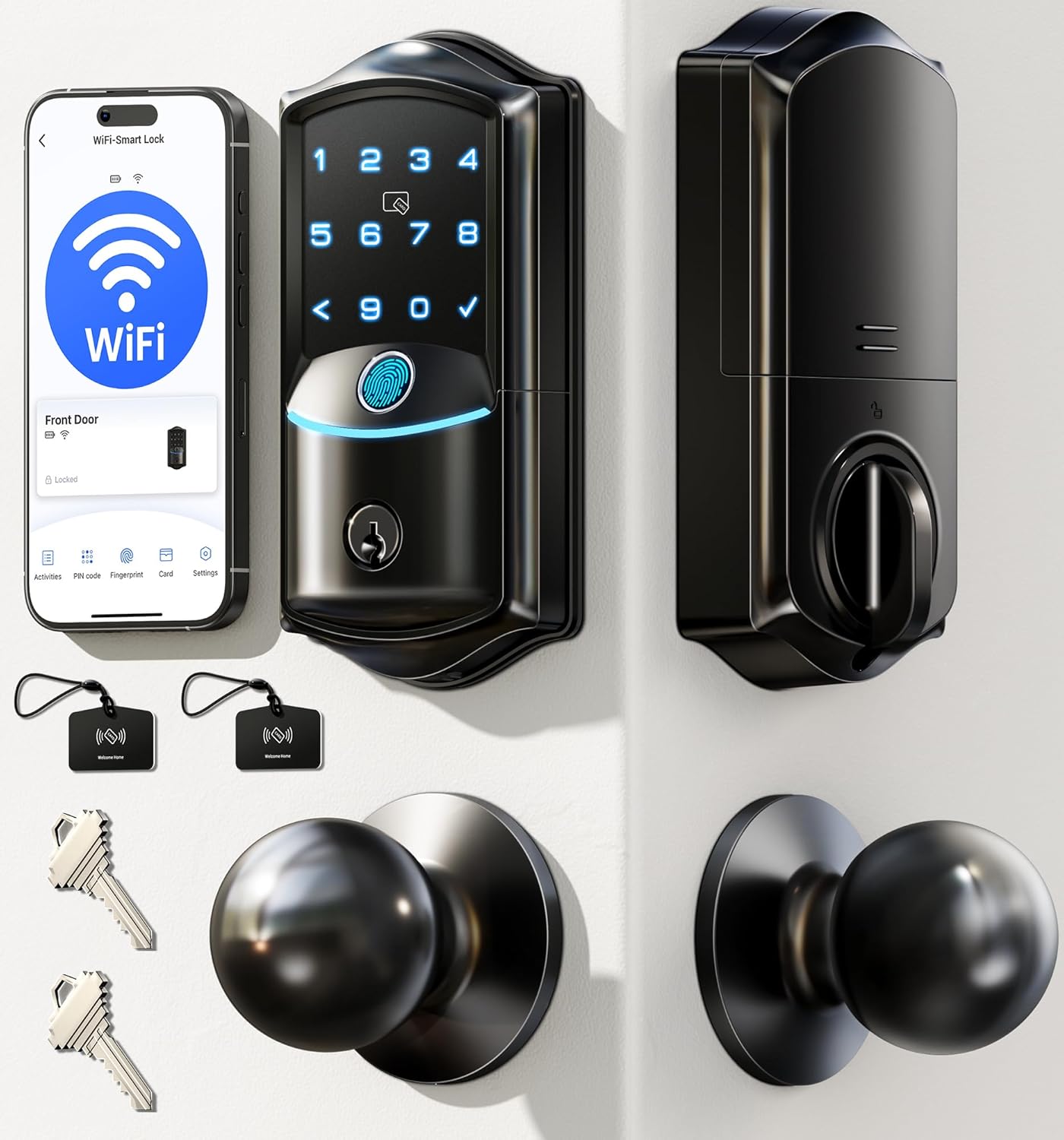
Built-in WiFi deadbolt with fingerprint, app control, and voice assistant integration. Offers eight unlock methods including 0.2-second fingerprint recognition and supports up to 100 PIN codes, making it practical for families and rental properties.
Pros
- Straightforward DIY installation in 10-15 minutes, auto-detects door swing direction
- Highly responsive fingerprint sensor praised for reliability, especially with challenging fingerprints
- Intuitive app interface for remote access management, real-time activity logs, and flexible user permissions
- Multiple unlock options reduce key dependency for busy households and service visitors
- Solid build quality with BHMA certification and responsive US-based customer support
Cons
- Some users reported screws loosening over time with heavy use, requiring periodic maintenance
- Auto-lock maximum duration capped at 3 minutes, shorter than some prefer for households with frequent entries
- Interior components are plastic rather than full metal, despite aluminum exterior
Veise KS02B Fingerprint Door Lock with Keypad
A budget-friendly smart deadbolt that combines fingerprint recognition, keypad codes, and physical keys for flexible home access. Easy 15-minute installation and reliable performance make it appealing for families and renters seeking keyless convenience without premium pricing.
Pros
- Genuinely easy installation and programming, praised by first-time users
- Fingerprint unlocking works reliably on first attempt with minimal finger repositioning
- Multiple access options accommodate households with varied needs (kids, elderly, visitors)
- One-time passcodes automatically delete, useful for temporary access without re-programming
- Reasonable price point for a biometric deadbolt with full feature set
Cons
- Build quality reflects budget pricing: exterior metal housing paired with interior plastic components
- Auto-lock timing can engage slightly later than programmed setting
- Fingerprint model only; base versions limited to code and key access
TEEHO TE001 Keypad Deadbolt, 20 User Codes, IP54 Waterproof
A budget-friendly keyless deadbolt that delivers solid security and convenience for families and rentals. Supports 20 individual PIN codes, auto-locks, and runs for up to a year on four AA batteries, though it lacks smart home connectivity.
Pros
- Simple installation with just a screwdriver, works on both left and right-hinged doors
- Long battery life (up to 365 days) and clear red light warning when below 15%
- Anti-peeping code entry lets you add decoy digits before or after your real PIN
- Includes 2 backup mechanical keys for battery failure or emergency access
- Highly rated by verified owners (4.6/5 across 23,932 reviews) for reliability and ease of use
Cons
- No smart home or app control, no remote locking or status monitoring
- Requires 4 AA batteries purchased separately; not included with lock
- Only compatible with 2-1/8-inch door holes, not 1-1/2-inch (38mm) holes
Smart Locks for Front Doors Buying Guide
Choosing the right smart lock requires more than picking the one with the most features. Security grade, connectivity, compatibility with your existing door hardware, and how you actually plan to unlock the door every day all matter enormously.
The subsections below walk through each criterion so you can make a confident, informed decision.
Security Grade and Build Quality
Not all smart locks are created equal when it comes to physical security.
The ANSI/BHMA grading system is the most reliable shorthand: Grade 1 is commercial-grade and the most resistant to forced entry, Grade 2 is residential-heavy-duty, and Grade 3 covers basic residential use.
A smart lock that scores well on convenience but carries only a Grade 3 rating is still a Grade 3 deadbolt at the end of the day, so weigh that honestly against your neighborhood and threat model.
Beyond the grade stamp, look at the materials. Zinc alloy and reinforced steel housings hold up better to physical attack than lightweight plastic-heavy designs.
Anti-pick, anti-drill, and anti-pry resistance are features worth confirming in the product specs or manufacturer documentation before committing. If your front door faces harsh weather, pair this with the waterproofing criterion below.
Pairing a strong deadbolt with other layers of security cameras around your entryway creates a much more complete deterrent than any single device alone.
Connectivity and Smart Home Integration

Smart locks connect in a few different ways, and each has real trade-offs. Bluetooth-only locks are simpler and battery-efficient but require your phone to be in range for remote access.
Wi-Fi built-in locks let you lock, unlock, and check status from anywhere with no additional hardware required, which is a meaningful convenience upgrade. Z-Wave and Zigbee locks offer rock-solid smart home integration but need a compatible hub to function remotely.
Voice assistant compatibility with Alexa and Google Assistant is worth checking if you already have a smart home ecosystem.
Locks like those from Firstriver and the Philips lineup explicitly support both platforms, which means you can work them into your existing automations and routines.
If you rely on a smart display or hub as your home control center, confirm the lock protocol matches before purchasing.
App quality matters too. Read recent verified buyer feedback specifically about the companion app, since a lock with excellent hardware can be undermined by an unstable or unintuitive app experience. Look for consistent mentions of reliable notifications, straightforward user code management, and stable remote access.
Unlock Methods and Access Control
The best smart locks for front doors offer multiple ways to get inside, because redundancy matters when your phone battery dies or a guest arrives without the app.
The most common unlock methods are keypad codes, fingerprint biometrics, physical backup keys, smartphone app, and voice command. The more methods a lock supports, the more flexible it is for households with kids, cleaners, dog walkers, or frequent visitors.
User code capacity varies significantly across models. Some locks store as few as 10 user codes while others hold 100 or more. If you manage a rental property or a busy household, that ceiling matters.
Look for locks that also support temporary or scheduled codes, which let you grant time-limited access to service providers without handing out a permanent code.
Fingerprint scanners deserve a closer look when comparing models.
AI-learning fingerprint technology, as found in the Wyze Auto-Lock Bolt v2, is designed to improve recognition accuracy over time, which addresses one of the most common complaints about older capacitive fingerprint readers on smart locks.
Verified buyer feedback tends to be the most honest signal on real-world fingerprint reliability.
Weatherproofing and Outdoor Durability

A front door lock lives outdoors, exposed to rain, humidity, temperature swings, and UV light year-round.
The IP rating on the lock tells you exactly how protected it is: IP54 resists splashing water from any direction, IP55 adds some protection against low-pressure water jets, and IP65 is fully dust-tight and protected against sustained water jets.
Higher IP ratings matter most in climates with heavy rain, coastal humidity, or freezing winters.
The keypad backlight is another overlooked durability and usability factor. A backlit keypad that remains readable in bright sunlight and at night is essential for practical daily use.
Anti-peep password features, which let you type extra random digits before or after your real code without triggering a lockout, are also a worthwhile security addition that many keypad locks now include.
Installation and Door Compatibility
Most smart deadbolts are designed to fit standard US door prep, typically a 2-1/8-inch bore hole, and replace an existing deadbolt without needing a locksmith.
However, lock sets with integrated handle hardware are a different story and require more careful measurement. Check your door thickness (most fall between 1-3/8 and 1-3/4 inches) and backset (2-3/8 or 2-3/4 inches) before ordering.
The difference between a standalone deadbolt and a full lock set with handle matters practically.
A lock set replaces both your existing deadbolt and your door lever or knob in one installation, which gives a cleaner, more unified look but requires more door prep work.
Standalone deadbolts that sit above your existing handle are typically faster to install and easier to swap out if you want to change handle styles later.
Battery life is the final installation consideration that often gets overlooked until it becomes a problem. Most smart locks run on AA or AAA batteries and offer low-battery alerts via the app or an audible beep.
Locks with longer battery life, like those claiming eight months or more between changes, reduce maintenance friction considerably.
Always confirm there is a physical backup key option or an emergency power port, since getting locked out due to a dead battery is an entirely avoidable situation.
Auto-Lock and Convenience Features

Auto-lock is one of the most underrated smart lock features for everyday households. It automatically re-engages the deadbolt after a set time interval, eliminating the “did I lock the door?” anxiety entirely.
Most Wi-Fi connected locks in this price range include auto-lock, but the configurability of the timer varies. Some allow you to set it in 30-second increments, others only in broader intervals.
Access logs and real-time notifications round out the convenience picture. Being able to see who unlocked the door and when is genuinely useful for families with kids coming home from school or households with recurring service providers.
These features are almost exclusively tied to app-connected locks, reinforcing the value of Wi-Fi or hub-connected models over pure Bluetooth designs for most front door use cases.
If you are building out a broader smart home setup, pairing a smart lock with a video doorbell at your front entry creates a highly capable entryway security system.
You can see who is at the door and grant or deny access all from your phone, without ever leaving the couch.
Why You Should Trust Us
REMOVU is an independent editorial review site. We do not sell products, manage orders, or handle returns. Every recommendation on this page is the result of structured, impartial research, not commercial relationships or brand partnerships.
Each smart lock in this roundup was evaluated against a consistent set of criteria covering security grade, connectivity, unlock methods, weatherproofing, installation requirements, and overall value.
We assigned each model a REMOVU Score on a 0 to 10 scale based on how well it performed across those dimensions.
We do not conduct our own product trials; our evaluations are grounded in research, published data, expert review consensus, and verified buyer feedback.
Our sourcing draws on published manufacturer specifications, independent expert analysis from across the hardware review community, and verified buyer feedback from confirmed purchasers at scale.
When the expert consensus and real-world buyer experience diverge, we note both and let the data speak rather than forcing a single verdict.
Transparency on affiliate relationships: REMOVU may earn a commission if you purchase through a link on this page. That relationship has zero influence on our rankings, scores, or product selection. Products are ranked on research merit alone.
We apply the same evaluation framework whether a product carries a high commission rate or none at all.
Final Thoughts
The eight smart locks in this roundup cover a wide range of needs, from a no-frills keypad deadbolt for renters on a tight budget to fully connected lock sets with fingerprint biometrics, remote app control, and smart home platform support.
The right choice depends on how much connectivity you need, whether you want a complete lock set or just a deadbolt replacement, and how much weight you put on physical security ratings versus convenience features.
Here is how our top picks break down by use case and REMOVU Score:
- Best Overall: TEEHO TE001 Keyless Entry Deadbolt earns the top REMOVU Score in this roundup with a combination of reliable keypad performance, anti-peep password protection, and a budget-friendly price point that over-delivers on value for straightforward front door use.
- Best Fingerprint Smart Deadbolt: Philips Wi-Fi Smart Deadbolt stands out for its clean design, reliable biometric entry, and seamless compatibility with both Alexa and Google, earning one of the highest scores in the group for connected deadbolts without a handle.
- Best Full Lock Set with Wi-Fi: Philips WiFi Keypad Door Lock with Handle is the pick for anyone replacing both their deadbolt and handle hardware in one go, combining built-in Wi-Fi, fingerprint unlocking, voice control, and auto-lock in a single installation.
- Best for Long Battery Life: Wyze Auto-Lock Bolt v2 is purpose-built for low-maintenance households, with an AI-learning fingerprint scanner, BHMA Grade 2 certification, and a battery life claim that makes it one of the most hands-off options in the group.
- Best Budget Pick: TEEHO TE001 also earns this distinction outright: at the most accessible price in the roundup, it delivers ANSI Grade 3 security, 20 user codes, and IP54 weather resistance, making it the most sensible entry point for renters or secondary doors.
If you are still building out your smart home security layer by layer, pairing a strong front door lock with Bluetooth trackers for keys and bags or investing in a broader smart home ecosystem can meaningfully raise your overall home security posture.
Any of the picks above will serve as a reliable foundation.
Frequently Asked Questions
Are smart locks actually secure enough for a front door?
Yes, provided you choose a model with a credible security grade. ANSI/BHMA Grade 1 and Grade 2 rated smart locks offer physical resistance to forced entry that is on par with or better than most traditional deadbolts.
The software side, including encrypted communication and secure app authentication, has also matured considerably in recent product generations.
The weakest point in most smart lock setups is not the lock itself but the door frame and strike plate, so reinforcing those is worthwhile regardless of which lock you install.
What happens to a smart lock when the Wi-Fi goes down or the battery dies?
A well-designed smart lock should always have at least one offline fallback. Physical backup keys are the most universal safety net and are included with virtually every lock in this roundup.
Keypad codes work without internet connectivity on most Wi-Fi models since the codes are stored locally on the lock itself.
For battery failure, look for locks with a low-battery alert system and confirm whether the model has an external emergency power port, which lets you jump the lock with a 9V battery even when the internal cells are fully drained.
Can I install a smart lock myself, or do I need a locksmith?
Most standalone smart deadbolts are genuinely DIY-friendly and fit standard US door prep with a screwdriver and about 30 minutes of time.
Full lock sets that include an integrated handle require a bit more precision, particularly around backset measurement and door thickness confirmation.
As long as your door has a standard 2-1/8-inch bore hole and falls within the typical thickness range, a locksmith is not necessary for the vast majority of installations.
The product manuals and companion apps for brands like TEEHO, Veise, Wyze, and Philips walk through installation step by step.
Do smart locks work with Alexa and Google Assistant?
Many do, but not all. Voice assistant compatibility is typically limited to locking commands rather than unlocking, for security reasons, unless you configure a PIN for voice unlocking within the respective platform.
The Firstriver and Philips models in this roundup explicitly support both Alexa and Google Assistant.
If smart speaker integration is a priority for your setup, check the product listing for confirmed platform compatibility before purchasing rather than assuming it based on brand.
Is a lock set with a handle better than a standalone deadbolt for a front door?
It depends on your existing door hardware and aesthetic preferences. A lock set with an integrated handle replaces everything in one go and typically looks cleaner and more intentional.
A standalone deadbolt that sits above your existing handle is faster to install and easier to swap if you want a different handle style later.
From a pure security standpoint, a high-quality standalone deadbolt is not meaningfully weaker than a lock set, so the decision mostly comes down to installation preference and how your door is currently set up.
For renters, a standalone deadbolt is almost always the more practical option.
How do smart lock keypad and fingerprint features compare for daily use?
Keypad codes are reliable in nearly all weather conditions and easy to share with guests or family members.
Fingerprint scanners offer a faster, hands-free experience and eliminate the need to remember or communicate codes, but older capacitive fingerprint readers can struggle in wet or very cold conditions.
Newer AI-learning fingerprint technology addresses some of those consistency issues over time. For most households, having both options available, as many of the locks in this roundup provide, gives you the best of both worlds without committing exclusively to either.
A smart thermostat paired with a fingerprint-enabled lock and a video doorbell represents a genuinely modern, low-friction home entry experience.
Related Guides
About the author
Ken covers motherboards for REMOVU, comparing features, power delivery, and value across sockets. He helps builders pick a solid foundation with room to upgrade.