The 12 Best Motherboards for Amd Ryzen
Picking the right AMD Ryzen motherboard means matching socket, chipset, and VRM quality to your CPU. Our research-backed guide covers top AM4 and AM5 picks.
 By Ryan Richardson
Updated July 26, 2026
By Ryan Richardson
Updated July 26, 2026
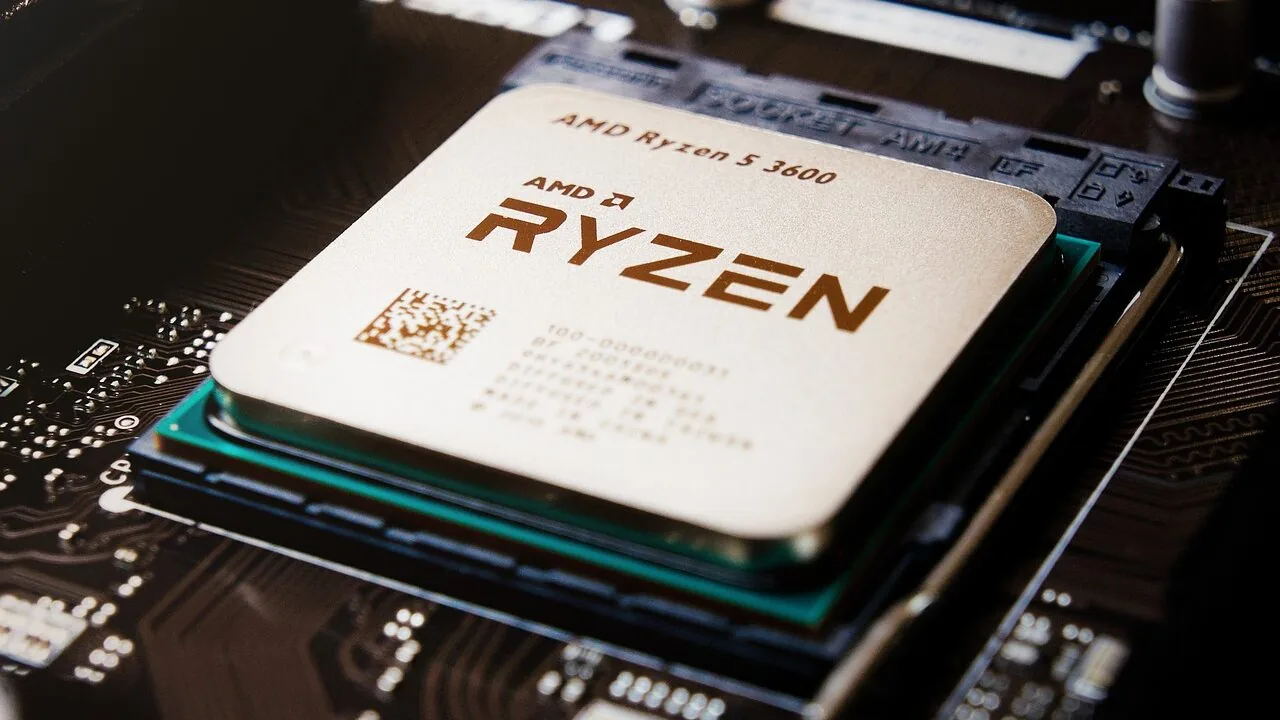
Choosing the right motherboard for an AMD Ryzen build shapes every aspect of your system’s performance, from how fast your CPU can boost to how many storage devices you can run simultaneously.
The AM4 and AM5 platform ecosystems now span dozens of chipsets and form factors, making the decision genuinely complex whether you are pairing a budget Ryzen 5 chip with an entry-level board or building a high-end AM5 rig around a Ryzen 9 processor.
A mismatched board can cap your CPU’s potential, limit future upgrade paths, or leave connectivity features you rely on sitting unused.
Paired with the right RAM and a capable processor, a well-chosen motherboard is the foundation that holds your entire build together.
At REMOVU, we evaluated each board in this guide through rigorous research synthesis, weighing published specifications, expert review consensus across the enthusiast community, and verified buyer feedback to surface the options that genuinely deliver value at their respective price points.
Our picks cover AMD Ryzen motherboards from budget mATX boards to feature-packed ATX flagships, spanning both the legacy AM4 socket and the current-generation AM5 platform. Read on to see which board earns a spot at the top of our rankings.
| Award | Product | REMOVU Score About REMOVU ScoreThe REMOVU Score is our own rating from 0 to 10, based on performance, design and build, ease of use, and value. It reflects independent research and is never influenced by manufacturers, retailers, or affiliate commissions. Learn more › | Price | |
|---|---|---|---|---|
| Best Value |
 ASUS ROG Strix B850-A Gaming WiFi AM5
|
8.6/10 | Buy | |
 MSI B850 Gaming Plus WiFi ATX Motherboard
|
8.3/10 | Buy | ||
| Best Budget |
 GIGABYTE B650 Eagle AX AM5 Motherboard
|
8.2/10 | Buy | |
| Best Overall |
 Asus ROG Strix B550-F WiFi II AM4 Motherboard
|
8.6/10 | Buy | |
 MSI MAG B550 Tomahawk MAX WiFi
|
8.0/10 | Buy | ||
| Best Premium |
 Micro Center Ryzen 9 9900X + ASUS ROG B650-A Combo
|
7.6/10 | Buy | |
 MSI B550M-VC WiFi Micro-ATX AM4 Motherboard
|
7.3/10 | Buy | ||
 Gigabyte B550 Gaming X V2 AM4 ATX Motherboard
|
7.1/10 | Buy | ||
 Gigabyte B550M K Micro-ATX AM4 Motherboard
|
6.2/10 | Buy | ||
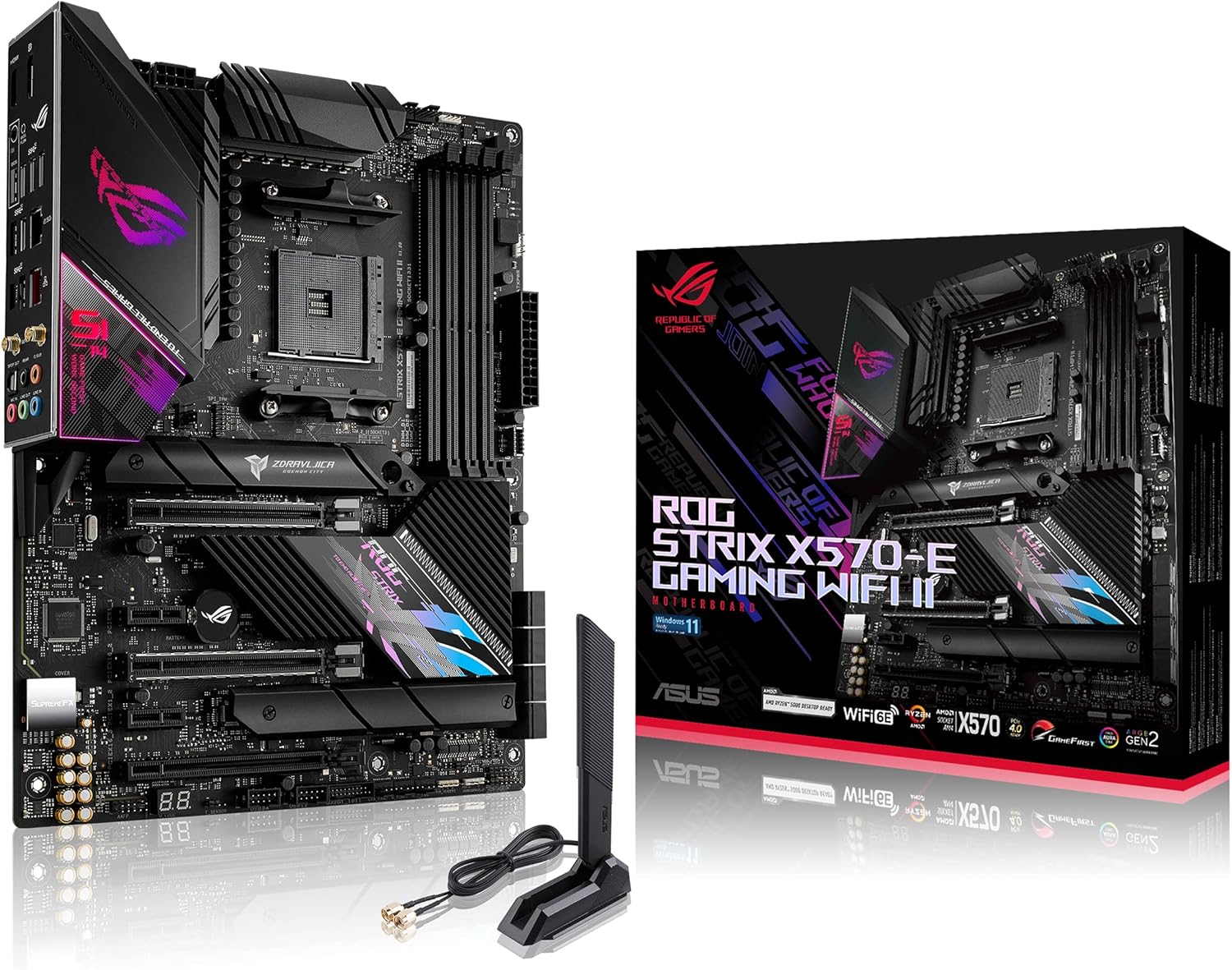 ASUS ROG Strix X570-E Gaming WiFi II AM4
|
6.3/10 | Buy | ||
 MINISFORUM BD775i SE Ryzen 7 7745HX Mini PC Motherboard
|
6.2/10 | Buy | ||
 Minisforum BD895i SE Ryzen 9 8945HX Mini PC
|
6.2/10 | Buy |
ASUS ROG Strix B850-A Gaming WiFi AM5
A feature-rich AM5 motherboard built for Ryzen 9000 and next-gen AI workloads. The 14+2+2 power delivery, DDR5 support with AEMP, and PCIe 5.0 connectivity make it a solid choice for high-performance builds, though it's positioned at the premium end of the B850 segment.
Pros
- Robust 14+2+2 power solution rated for 80A per stage, suited for multi-core Ryzen processors
- Comprehensive connectivity: WiFi 7 with Q-Antenna, 2.5G LAN, USB 20Gbps Type-C, and four M.2 slots with PCIe 5.0 support
- AI-focused features including ASUS AI Advisor and AI Networking II for simplified configuration and optimized performance
- Substantial thermal design with thick heatsinks and high-conductivity thermal pads for sustained stability
- Strong user satisfaction with 4.6/5 rating from 408 verified reviews
Cons
- Premium pricing reflects feature density, making it less accessible for budget-conscious builders
- Complex feature set may require learning curve for users unfamiliar with ASUS AI utilities and advanced BIOS tuning
- B850 chipset offers incremental improvements over B800, so value proposition depends on specific upgrade needs
MSI B850 Gaming Plus WiFi ATX Motherboard
A solid mid-range AM5 platform built for Ryzen 9000/8000/7000 processors, the B850 Gaming Plus WiFi balances modern connectivity (Wi-Fi 7, 5G LAN) with practical gaming features like PCIe 5.0 support and DDR5 overclocking. Best suited for builders prioritizing value-oriented performance without cutting corners on core specs.
Pros
- Strong 12 Duet Rail Power System VRM with dual 8-pin connectors handles latest Ryzen 9000 CPUs reliably
- Comprehensive storage flexibility with Gen5 M.2 slot plus dual Gen4 M.2 options
- DDR5 support up to 8200+ MT/s (OC) with isolated DDR circuit for stable overclocking
- Full-speed Wi-Fi 7 and 5Gbps LAN connectivity reduce gaming latency
- DIY-friendly design with tool-free M.2 shield and easy-clip GPU retention
- Solid 4.6 rating from 126 verified reviews indicates consistent user satisfaction
Cons
- Only one PCIe 5.0 x16 slot limits multi-GPU expansion options
- B850 chipset sits at mid-range tier, missing some premium features found on X870/X870E boards
- Limited onboard fan headers (CPU 2A, Combo 3A) may constrain cooling customization for high-end builds
GIGABYTE B650 Eagle AX AM5 Motherboard
A solid mid-range AM5 platform built for Ryzen 7000/8000/9000 processors with DDR5 support and modern connectivity. The B650 Eagle AX balances performance features like PCIe 5.0 storage and WiFi 6E with practical thermal management, making it a reliable choice for builders seeking stable overclocking and smooth daily operation without premium pricing.
Pros
- PCIe 5.0 M.2 slot for future-ready NVMe storage alongside two PCIe 4.0 slots
- 12+2+2 phase digital VRM with dedicated thermal guards for stable power delivery and SSD performance
- WiFi 6E and Gigabit LAN for comprehensive networking options
- DDR5 compatibility with AMD EXPO and Intel XMP support for flexible memory tuning
- 4.6-star rating across 965 reviews indicates consistent user satisfaction
Cons
- ATX form factor takes up full case space, limiting options for compact builds
- B650 chipset sits between entry-level B550 and high-end X870E, offering less cutting-edge features than flagship models
- No information on BIOS update frequency or long-term driver support consistency
Asus ROG Strix B550-F WiFi II AM4 Motherboard
A feature-rich B550 platform built for AMD Ryzen 3000 and 5000 series processors, combining PCIe 4.0 storage, WiFi 6E, and 2.5Gb Ethernet for gaming and content creation workloads. The robust power delivery, comprehensive cooling options, and premium audio processing make it a solid choice for enthusiasts seeking balanced performance and connectivity without premium-tier pricing.
Pros
- Dual M.2 slots with PCIe 4.0 support on one slot for fast NVMe storage
- WiFi 6E and 2.5Gb Ethernet provide strong wireless and wired connectivity options
- 12+2 power stages with quality components support stable overclocking and multitasking
- AI noise-canceling microphone and SupremeFX audio codec deliver competitive streaming and gaming audio quality
- BIOS FlashBack, pre-mounted I/O shield, and Q-LEDs simplify building and troubleshooting
- Aura Sync RGB ecosystem with dedicated headers allows extensive lighting customization
Cons
- B550 chipset lacks PCIe 5.0 support found on newer X670 platforms, limiting future-proofing
- Only one M.2 slot supports PCIe 4.0, the second remains on PCIe 3.0
- Premium positioning relative to other B550 boards means you're paying for aesthetics and software integration that budget alternatives don't include
MSI MAG B550 Tomahawk MAX WiFi
A solid mid-range AM4 motherboard built for Ryzen 5000 systems with Wi-Fi 6E and PCIe 4.0 support. Delivers dependable performance for gaming and content creation without premium pricing, backed by strong user ratings and straightforward setup.
Pros
- Wi-Fi 6E and Bluetooth 5.2 for modern wireless connectivity
- PCIe 4.0 and Gen 4 M.2 support for fast storage expansion
- 2.5G LAN with dedicated LAN Manager for stable networking
- Extended heatsink design and reinforced PCB for thermal stability
- 4 DIMM slots supporting DDR4 up to 4400 MHz overclocked
Cons
- Single PCIe 4.0 x16 slot limits multi-GPU expansion compared to higher-end boards
- Only one Gen 4 M.2 slot, with additional M.2 slots limited to Gen 3 speeds
- 7.1 Audio Boost is basic compared to premium motherboards with dedicated audio processors
Micro Center Ryzen 9 9900X + ASUS ROG B650-A Combo
A high-performance CPU-motherboard bundle pairing AMD's 12-core Ryzen 9 9900X with ASUS's feature-rich ROG Strix B650-A. Built for gamers and creators seeking strong multi-threaded performance and extensive overclocking support, this combo delivers PCIe 5.0 storage connectivity, Wi-Fi 6E, and robust power delivery in a single package.
Pros
- 12-core, 24-thread processor with 5.6 GHz boost clock handles demanding gaming and content creation workloads
- Comprehensive connectivity: PCIe 5.0 M.2 slot, Wi-Fi 6E, 2.5G Ethernet, and multiple USB 3.2 Gen 2 ports
- Solid power delivery with 12+2 power stages rated to 60A each and dual VRM heatsinks for stability
- Extensive overclocking support via EXPO profiles and detailed UEFI controls for enthusiasts
- High-quality audio codec (ALC4080) with 32-bit/384 kHz playback and AI noise cancellation
Cons
- CPU cooler not included; requires separate purchase for thermal solution
- Premium pricing reflects the high-end positioning of both components
- Wi-Fi 6E performance depends on regional regulatory support and availability of 6 GHz spectrum
MSI B550M-VC WiFi Micro-ATX AM4 Motherboard
A compact B550 board built for AMD Ryzen 5000/3000 systems that balances professional stability with gaming features. The micro-ATX form factor suits smaller builds, while PCIe 4.0, Wi-Fi 6E, and quality power delivery appeal to content creators and enthusiasts who need reliable performance without unnecessary bulk.
Pros
- PCIe 4.0 support with Lightning Gen 4 M.2 for fast NVMe drives
- Wi-Fi 6E and Bluetooth 5.2 for modern wireless connectivity
- 2oz thickened copper PCB and Core Boost power delivery for stable performance
- Compact micro-ATX form factor fits smaller cases and builds
- Flash BIOS button enables BIOS updates without CPU or RAM installed
- Premium audio components and thermal solutions rated for sustained workloads
Cons
- Limited PCIe slot configuration compared to full-size ATX alternatives
- No Mystic Light RGB support on this model variant
- Requires processor with integrated graphics for video output via HDMI/DisplayPort
Gigabyte B550 Gaming X V2 AM4 ATX Motherboard
A solid mid-range AM4 platform that supports the full Ryzen 5000 lineup with a 10+3 power phase design and PCIe 4.0 connectivity. Built-in StoreMI technology lets you pair SSDs and HDDs for faster storage performance without extra software complexity. Best suited for builders seeking stable power delivery and modern I/O without premium pricing.
Pros
- Supports Ryzen 5000, 4000, and 3000 series processors with BIOS update capability via Q-Flash Plus
- Dual M.2 slots with PCIe 4.0 and 3.0 support for flexible storage expansion
- 10+3 Digital Twin power phase with premium capacitors ensures stable power to CPU and VRM
- AMD StoreMI technology combines SSD speed with HDD capacity for improved storage performance
- Q-Flash Plus allows BIOS updates without installing CPU, RAM, or GPU for easier maintenance
- Comprehensive rear I/O including USB 3.2 Gen 2 Type-A, front USB-C header, and Bluetooth 5.3
Cons
- No user reviews available yet, limiting real-world feedback on reliability and long-term performance
- PCIe 4.0 limited to single x16 slot and one M.2 slot, with second M.2 running PCIe 3.0
- ATX form factor may be oversized for compact or mini-ITX build requirements
Gigabyte B550M K Micro-ATX AM4 Motherboard
A budget-friendly micro-ATX board built for Ryzen 5000, 4000, and 3000 series CPUs. The 3+3 VRM design and PCIe 4.0 support offer solid value for mid-range builds, though it skips some premium features found on higher-end models. Best suited for builders prioritizing core stability over extensive connectivity.
Pros
- PCIe 4.0 support on both x16 slot and one M.2 slot for future-proofing
- Dual M.2 slots (one PCIe 4.0, one PCIe 3.0) for flexible storage expansion
- Solid 3+3 digital VRM with quality chokes and capacitors for stable power delivery
- DDR4 support with 4 DIMM slots and XMP compatibility for memory tuning
- Chipset thermal armor aids passive cooling in compact cases
Cons
- Micro-ATX form factor limits expansion compared to full-size ATX boards
- 3+3 VRM is modest for heavy overclocking or high-end Ryzen chips
- Limited USB 3.2 Gen 1 ports (4 total) may feel sparse for connectivity-heavy setups
ASUS ROG Strix X570-E Gaming WiFi II AM4
A premium AM4 motherboard built for high-end Ryzen builds with robust power delivery, comprehensive cooling, and modern connectivity including WiFi 6E and PCIe 4.0. Best suited for enthusiasts and content creators who need reliable power stages and multiple M.2 storage options.
Pros
- Strong 12+4 power stage design with ProCool II connectors handles multi-core processors reliably
- Comprehensive thermal management with passive chipset heatsink, VRM heatsink, and dual M.2 heatsinks
- Fast networking with WiFi 6E, 2.5 Gbps LAN, and dual M.2 NVMe slots for storage expansion
- Excellent compatibility with full Ryzen lineup from 2000 to 5000 series
- High user satisfaction with 4.6-star rating across 3,315 reviews
Cons
- Premium positioning makes it overkill for budget or entry-level builds
- X570 chipset still requires active cooling solutions despite passive PCH heatsink improvements
- Limited upgrade path as AM4 socket approaches end of lifecycle
MINISFORUM BD775i SE Ryzen 7 7745HX Mini PC Motherboard
A compact motherboard built around the Ryzen 7 7745HX processor, designed for builders seeking desktop-class performance in a mini PC form factor. The triple video outputs (USB-C 8K, HDMI and DisplayPort 4K) and DDR5 memory support make it suitable for gaming, content creation, and multi-monitor setups. Best for users comfortable with barebone assembly who want powerful mobile-class CPU architecture in a space-constrained build.
Pros
- Ryzen 7 7745HX delivers strong multi-core performance with 8 cores, 16 threads, and 5.1GHz boost for gaming and productivity tasks
- Triple video outputs including 8K@60Hz via USB-C provide flexibility for high-resolution or multi-display configurations
- DDR5 memory support up to 96GB with PCIe 5.0 x16 slot enables future-proofing for demanding applications
- Compact motherboard design with customized CPU cooler included, ideal for mini PC and HTPC builds
- 5-star rating from verified buyers reflects strong user satisfaction
Cons
- Barebone design requires separate purchase of SSD, WiFi card, and RAM, increasing total build cost and complexity
- Radeon 610M integrated graphics limits standalone gaming performance for demanding titles without discrete GPU
- Limited information on thermal management and noise levels under sustained load despite marketing claims of quiet operation
Minisforum BD895i SE Ryzen 9 8945HX Mini PC
A compact barebone system built around AMD's powerful Ryzen 9 8945HX processor, offering 16 cores and up to 5.4GHz performance in a mini form factor. The triple video outputs (HDMI, DisplayPort, USB-C) and PCIe 5.0 support make it flexible for both productivity and gaming setups. Best suited for users who want high-performance computing in a space-efficient package and are comfortable with custom configuration.
Pros
- Powerful 16-core, 32-thread Ryzen 9 8945HX with 5.4GHz boost for demanding workloads
- Three video outputs (HDMI, DP, USB-C) with up to 8K support for multi-monitor setups
- PCIe 5.0 SSD slot and DDR5 support for future-proof upgrades
- Integrated Radeon 610M graphics with RDNA 2 architecture and AV1 decoding
- Extensive connectivity including USB 3.2 Gen2 Type-C and multiple fan headers
Cons
- Barebone system requires separate RAM, storage, and case assembly, adding complexity and cost
- Limited independent user reviews available to assess real-world reliability and thermals
- Integrated graphics may not satisfy serious gamers despite decent specs
AMD Ryzen Motherboards Buying Guide
Picking the right AMD Ryzen motherboard is about matching a board’s capabilities to your CPU, your use case, and the upgrade path you realistically plan to take.
The guide below walks through the six criteria that matter most so you can make a confident, well-informed decision rather than defaulting to the flashiest-looking option.
Socket Compatibility and Chipset Generation
The single most important compatibility check is confirming that the board’s socket matches your CPU. Ryzen 3000, 4000, and 5000 series processors use the AM4 socket, while Ryzen 7000, 8000, and 9000 series processors require the newer AM5 socket.
These sockets are not interchangeable, so buying the wrong platform is a costly mistake that no BIOS update can fix.
Within each socket, the chipset determines which features are unlocked. On AM4, B550 boards offer PCIe 4.0 from the CPU lanes and support Ryzen 5000 series with a BIOS update, while X570 adds more PCIe 4.0 lanes and higher bandwidth at a premium.
On AM5, B650 provides a cost-effective entry point with PCIe 5.0 on the primary x16 slot, while B850 and X670E scale up overclocking headroom and connectivity.
Paying for a chipset tier above your CPU’s needs rarely yields a tangible real-world benefit, so match the chipset to your actual workload rather than aspirational specs.
Always verify the manufacturer’s CPU support list before purchasing, especially if you are buying a board that predates your CPU’s launch.
Many B550 boards required a BIOS flash using an older supported CPU before Ryzen 5000 would post, and some AM5 boards similarly need a firmware update for Ryzen 9000 series support.
Features like Q-Flash Plus on GIGABYTE boards let you update BIOS without a CPU installed, which can save significant frustration.
Power Delivery and VRM Quality

The voltage regulator module is the component that feeds clean, stable power to your CPU, and it is arguably the most consequential spec that marketing materials tend to underplay.
A board with a weak VRM will throttle a high-core-count Ryzen processor under sustained loads, negating much of the reason you bought a premium CPU in the first place.
Higher-tier Ryzen chips like the Ryzen 9 series are particularly sensitive to VRM quality because their sustained TDPs are substantially higher than those of Ryzen 5 or Ryzen 7 parts.
Phase counts and power stage ratings are the primary indicators of VRM capability, but raw numbers can be misleading without knowing the amperage rating of the individual power stages.
A 10+2 phase design using 60-amp stages outperforms a 16+2 design using 30-amp stages. Look for independent analyses from hardware-focused publications that measure VRM temperatures under load rather than relying solely on phase count marketing.
Boards like the ASUS ROG Strix lineup consistently earn high marks here, with robust heatsinks and quality power stages that maintain stable thermals even under extended all-core loads.
If you are building around a Ryzen 5 or Ryzen 7 processor for everyday gaming or productivity, a mid-range board’s VRM is almost always sufficient.
The calculus changes if you are targeting a Ryzen 9 chip with heavy workstation workloads or all-core overclocking, where investing in a board with higher-rated power stages becomes genuinely worthwhile rather than mere marketing upsell.
Memory Support: DDR4 Versus DDR5, Speed, and Capacity
AM4-based boards universally use DDR4 memory, while AM5 boards require DDR5.
This is a platform-level decision, not a board-level one, but it directly informs total build cost since DDR5 kits carry a cost premium over equivalent DDR4 kits, though the gap has narrowed considerably.
For most gaming builds on AM5, DDR5-6000 represents the sweet spot of performance and stability, and B850 boards like the ASUS ROG Strix B850-A support AEMP profiles that make reaching those speeds straightforward.
Maximum memory capacity is worth checking if you run memory-intensive workloads. Most consumer AM4 and AM5 boards support up to 128 GB across four DIMM slots, which is more than enough for gaming and content creation.
The more practical consideration for most builders is the board’s overclocking support and the quality of its memory traces, since poorly routed boards can struggle to hit high-frequency profiles even with premium RAM kits.
Our broader guide to desktop RAM covers speed tiers in more depth if you want to read alongside this guide.
Two DIMM slot boards, which appear on some mATX and mini-ITX designs, limit your maximum capacity and leave no room for a future upgrade without replacing existing sticks.
Four DIMM slot boards give you more flexibility and are worth prioritizing unless physical space is the binding constraint in your build.
Storage and Expansion: M.2 Slots and PCIe Configuration

The number and generation of M.2 slots on a motherboard has become a primary differentiator at every price point.
A single M.2 slot is a minimum baseline, but modern builds increasingly benefit from two or three slots to separate the OS drive, a games drive, and a scratch or cache volume.
Boards in the mid-range and above, such as the GIGABYTE B650 Eagle AX and the MSI B850 Gaming Plus WiFi, offer triple M.2 configurations that accommodate this layout without needing a PCIe adapter card.
PCIe generation matters for M.2 slots as well as the primary x16 GPU slot. A PCIe 5.0 M.2 slot delivers approximately twice the bandwidth ceiling of a PCIe 4.0 slot, which currently benefits only the fastest Gen5 NVMe drives.
For most users running PCIe 4.0 SSDs, the practical difference is negligible.
The primary x16 slot’s generation determines GPU bandwidth, though current graphics cards do not saturate PCIe 4.0 x16 bandwidth even in demanding workloads, making the Gen5 GPU slot more of a future-proofing feature than an immediate performance unlock.
Pairing your board with a strong graphics card still matters far more for gaming frame rates than PCIe generation alone.
SATA port count is relevant if you maintain a spinning hard drive for bulk storage or have multiple SATA SSDs from a previous build. Most ATX boards provide six SATA ports, while mATX designs may offer four.
Check whether enabling certain M.2 slots disables specific SATA ports, a common design trade-off that manufacturers disclose in the product manual but rarely in spec summaries.
Connectivity: USB, Networking, and Wireless

Rear panel USB connectivity is a frequently overlooked spec until you run out of ports six months into a build. For modern desktop use, at least one USB 3.2 Gen 2 Type-A port and one USB Type-C port are strong baseline expectations.
Boards like the ASUS ROG Strix B850-A and the MICRO CENTER AMD 9900X combo board go further with USB 20 Gbps Type-C ports, which are genuinely useful for fast external SSDs and modern peripherals.
If you regularly connect high-speed storage or capture devices to your PC, the specific USB standard matters, not just the port count.
Wired networking has seen a meaningful upgrade cycle across the board lineup covered here. Gigabit Ethernet remains the minimum on budget boards, while 2.5 Gigabit LAN has become standard on mid-range and enthusiast options.
The MSI B850 Gaming Plus WiFi steps this up further with 5G LAN, which benefits users on multi-gigabit internet connections or high-speed local networks.
For competitive gaming, wired Ethernet provides lower and more consistent latency than Wi-Fi regardless of the wireless standard in use.
Wi-Fi 6E has become the de facto standard on mid-range and above boards in this guide, with Wi-Fi 7 appearing on higher-end options like the ASUS ROG Strix B850-A.
Wi-Fi 7’s tri-band architecture and increased throughput ceiling are most beneficial in environments with a Wi-Fi 7 capable router and congested airspace.
Bluetooth 5.2 or higher is worth confirming if you use wireless peripherals or audio devices directly paired to your PC rather than through a USB dongle.
For users building a compact or living-room system, strong wireless specs can reduce the need for cable runs entirely.
Form Factor and Build Compatibility

ATX remains the most common form factor for desktop Ryzen builds, offering the highest expansion slot count, the most M.2 slots, and the best VRM real estate for robust power delivery.
If you are building in a standard mid-tower or full-tower case, ATX is the straightforward default.
Micro-ATX boards sacrifice one or two expansion slots and sometimes reduce M.2 slot count but fit in smaller enclosures while still accommodating a full desktop CPU cooler and standard DDR DIMM modules.
The mATX options in this guide, specifically the MSI PRO B550M-VC WiFi and the GIGABYTE B550M K, are strong choices for compact builds where footprint is a genuine priority rather than an afterthought.
Both retain dual M.2 slots and PCIe 4.0 support, meaning the compromises are primarily about physical expansion rather than platform features.
A quality PC case that matches your chosen form factor will also influence airflow and ultimately the thermals your VRM and storage drives operate at, so consider the case and board together rather than independently.
Mini-ITX and the integrated barebone formats from MINISFORUM represent an entirely different trade-off: maximum space efficiency at the cost of upgradeability.
The MINISFORUM boards in this guide come with integrated Ryzen mobile processors soldered to the board, making them ideal for compact home theater PCs, secondary workstations, or low-profile office machines rather than high-performance gaming desktops.
Pair a small-form-factor build with a properly rated power supply to avoid headroom issues under peak load.
Why You Should Trust Us
REMOVU is an independent review publication. We have no manufacturer relationships that influence our rankings, and our editorial team operates separately from any commercial partnerships.
Every product in this guide was assessed using the REMOVU Score, a consistent 0 to 10 rating scale applied across categories to give you a reliable, apples-to-apples comparison rather than a subjective impression from a single reviewer.
Our evaluation methodology for AMD Ryzen motherboards draws on published hardware specifications, expert review consensus from the enthusiast PC community, verified buyer feedback aggregated across multiple verified purchase channels, and publicly available data from manufacturers and independent hardware analysts.
We do not conduct our own product trials; our evaluations are grounded in research, published data, expert review consensus, and verified buyer feedback.
This approach lets us cover a broader range of products at all price points without introducing the inconsistencies that come from single-reviewer subjectivity.
REMOVU may earn a commission if you purchase through a link on this page. That affiliate relationship does not influence which products are included, how they are ranked, or the scores they receive.
Our rankings are determined solely by research-based merit. If a product earns a low REMOVU Score, we say so, regardless of its commission rate.
Final Thoughts
The AMD Ryzen motherboard market in 2026 is genuinely competitive at every price tier, from capable budget mATX boards to feature-rich AM5 flagships loaded with Wi-Fi 7 and PCIe 5.0 connectivity.
Whether you are building your first Ryzen system on a tight budget or upgrading to a current-generation AM5 platform, there is a board in this guide that fits your needs.
Below are our top recommendations by use case, each linked to its full product listing for deeper detail on specifications and scoring.
- Best Overall: ASUS ROG Strix B550-F Gaming WiFi II earns the top spot with the highest REMOVU Score in the group, combining robust power delivery, Wi-Fi 6E, 2.5 Gb LAN, and broad Ryzen 5000 series compatibility in a package that balances features and value better than any other board here.
- Best AM5 Upgrade: ASUS ROG Strix B850-A Gaming WiFi is the standout pick for builders moving to the current-generation AM5 platform, offering Wi-Fi 7, four M.2 slots, PCIe 5.0, and a robust 14-phase power design that is well-matched to top-tier Ryzen 9000 series processors.
- Best Value AM5 Board: MSI B850 Gaming Plus WiFi delivers an impressive AM5 feature set at a mid-range price, with 5G LAN, Wi-Fi 7, PCIe 5.0 x16, and M.2 Gen 5 support making it one of the most capable boards per dollar in the AM5 ecosystem.
- Best Budget AM4 Pick: GIGABYTE B550 Gaming X V2 represents excellent value for AM4 builds, offering 10+3 power phases, PCIe 4.0, dual M.2, and Q-Flash Plus at a budget-friendly price that leaves more room in your build for a stronger NVMe SSD or CPU cooler.
- Best Compact Build Option: MSI PRO B550M-VC WiFi brings Wi-Fi 6E, Bluetooth 5.2, and PCIe 4.0 into a Micro-ATX footprint without sacrificing the connectivity essentials that small-form-factor builders still need. It pairs naturally with a compact CPU cooler in tight enclosures.
Whichever board you choose, confirm CPU compatibility, verify your RAM kit against the QVL, and account for your storage configuration needs before finalising your build.
The right motherboard is the one that fits your CPU, your case, and your long-term upgrade intentions rather than the one with the most RGB headers or the longest spec sheet.
Frequently Asked Questions
What is the difference between AM4 and AM5 motherboards for AMD Ryzen?
AM4 is the legacy AMD socket used by Ryzen 1000 through 5000 series processors and exclusively supports DDR4 memory. AM5 is the current-generation platform for Ryzen 7000, 8000, and 9000 series processors and requires DDR5 memory.
The two sockets are physically incompatible, so you must match your motherboard socket to your CPU generation.
AM4 boards remain a strong value proposition for builders not ready to move to DDR5, while AM5 offers a longer forward upgrade path since AMD has committed to AM5 socket longevity through at least the next several CPU generations.
Do I need an X570 or X670 board to unlock PCIe 4.0 or PCIe 5.0 on Ryzen?
No. On AM4, B550 motherboards already provide PCIe 4.0 from the CPU lanes for the primary M.2 and GPU slots, making X570 unnecessary for most builds. On AM5, B650 and B850 boards both support PCIe 5.0 on the primary x16 slot.
The X670 and X670E chipsets add more PCIe 5.0 bandwidth for additional M.2 slots and offer greater overclocking flexibility, but they come at a significant cost premium that is rarely justified outside enthusiast or workstation use cases.
For the vast majority of gaming and productivity builds, a B550 or B650 board provides full access to the PCIe generation your CPU supports.
Is Wi-Fi built into AMD Ryzen motherboards, or do I need a separate adapter?
Wi-Fi is not a feature of the Ryzen CPU itself. It is an optional component included on select motherboards, usually indicated by “WiFi”, “AX”, or “AC” in the board’s name.
All of the Wi-Fi-equipped boards in this guide include an M.2 Wi-Fi key slot with an onboard Intel or MediaTek wireless module supporting Wi-Fi 6E or Wi-Fi 7.
Boards without integrated Wi-Fi can still connect wirelessly using a PCIe Wi-Fi adapter card or a USB Wi-Fi adapter.
If wireless connectivity is important to your build, choosing a board with integrated Wi-Fi simplifies installation and typically delivers better antenna performance than an aftermarket adapter.
Can I use a Ryzen 5000 series CPU in a B450 or B550 motherboard?
Ryzen 5000 series processors are supported on B550 boards universally, and on most B450 boards through a BIOS update, though AMD left the decision to individual manufacturers and some B450 boards dropped Ryzen 5000 support.
The key caveat is that some boards require a BIOS update before a Ryzen 5000 chip will boot, which may require an older supported CPU to perform the flash unless the board includes a BIOS Flashback or Q-Flash Plus feature.
If you are buying a B550 board specifically for a Ryzen 5000 build, verify the board ships with a BIOS that already supports your CPU or confirm it has a no-CPU BIOS flash capability to avoid a compatibility dead-end.
What should I look for in a motherboard for a small form factor or compact PC build?
For compact builds, Micro-ATX is the most practical step down from full ATX since mATX boards retain standard DDR DIMM slots, full-size M.2 slots, and desktop CPU cooler mounting.
Mini-ITX reduces the footprint further but typically limits you to two memory slots and one M.2 slot, which constrains future upgrades.
The barebone mini PC boards from MINISFORUM in this guide take compactness to an extreme by integrating the CPU directly, which is ideal for home theater PCs or secondary workstations but not for performance gaming builds where you want to swap components independently.
Always check the compatibility between your chosen board’s form factor and your case’s supported form factors before committing to either.
How does the motherboard choice affect the overall performance of a Ryzen system?
The motherboard directly influences CPU performance through VRM quality, which determines how cleanly sustained power is delivered to the processor under load. A weak VRM can cause a high-core-count Ryzen CPU to throttle, reducing performance below its rated specifications.
Memory compatibility and the quality of the board’s memory traces affect whether you can reach your RAM kit’s rated speed without instability. Connectivity choices, including PCIe generation and USB standards, determine the ceiling for storage and peripheral bandwidth.
However, for most gaming builds with a Ryzen 5 or Ryzen 7 processor, the GPU, RAM speed, and storage tier have a more direct day-to-day performance impact than the difference between mid-range and premium motherboard tiers.
Investing in a strong GPU alongside a capable but not extravagant board is almost always the better allocation of a fixed budget.
About the author
Ryan writes about streaming gear for REMOVU, comparing mics, lighting, and control decks that polish a broadcast. He helps creators build a clean setup around the game.