The 8 Best Motherboards for Intel
Socket generation, chipset tier, VRM quality, and storage connectivity all shape how well an Intel motherboard serves your build. Here are the strongest options across every budget and use case.
 By Gordon Matthews
Updated July 26, 2026
By Gordon Matthews
Updated July 26, 2026
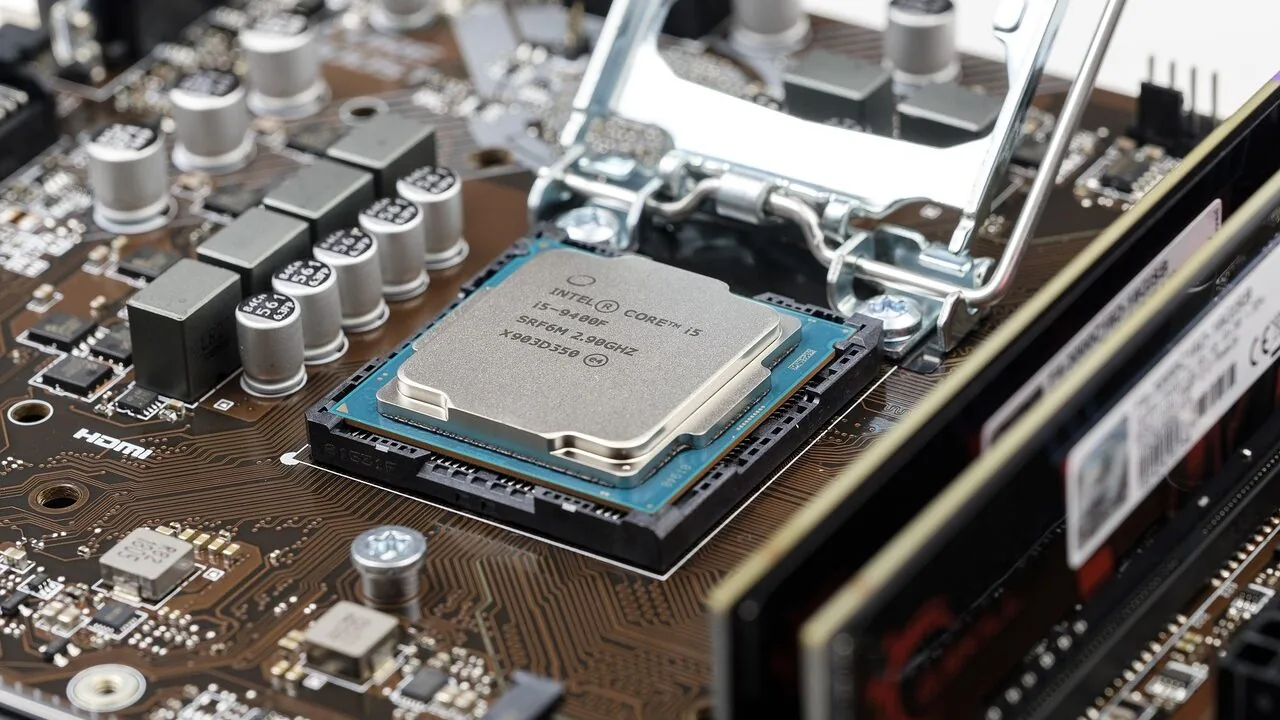
Picking the right motherboard for an Intel build is one of the most consequential decisions you’ll make when assembling a PC.
The motherboard dictates which CPUs you can use, how much memory the system will support, what expansion slots and storage interfaces are available, and how much headroom you’ll have for future upgrades.
With Intel spanning multiple socket generations, from the legacy LGA 1151 platform to the modern LGA 1700 ecosystem, the choices can feel overwhelming.
Whether you’re building a budget-friendly home office machine, a mid-range gaming rig, or a high-end enthusiast workstation, the right board makes the difference between a system that just works and one that genuinely performs.
This guide draws on a comprehensive research process: we analyzed published specifications, cross-referenced expert review consensus from across the enthusiast community, and synthesized verified buyer feedback to identify the strongest Intel motherboards across price tiers and use cases.
Our picks span ASUS and MSI options covering LGA 1151, LGA 1200, and LGA 1700 sockets, giving you a clear shortlist no matter which Intel generation you’re targeting.
Read on for our top-ranked picks, followed by a practical buying guide to help you match the right board to your build goals.
| Award | Product | REMOVU Score About REMOVU ScoreThe REMOVU Score is our own rating from 0 to 10, based on performance, design and build, ease of use, and value. It reflects independent research and is never influenced by manufacturers, retailers, or affiliate commissions. Learn more › | Price | |
|---|---|---|---|---|
| Best Overall |
 ASUS ROG Maximus XI Hero Z390 ATX Motherboard
|
8.5/10 | Buy | |
| Best Value |
 ASUS TUF Gaming Z790-Plus WiFi ATX Motherboard
|
7.6/10 | Buy | |
| Best Premium |
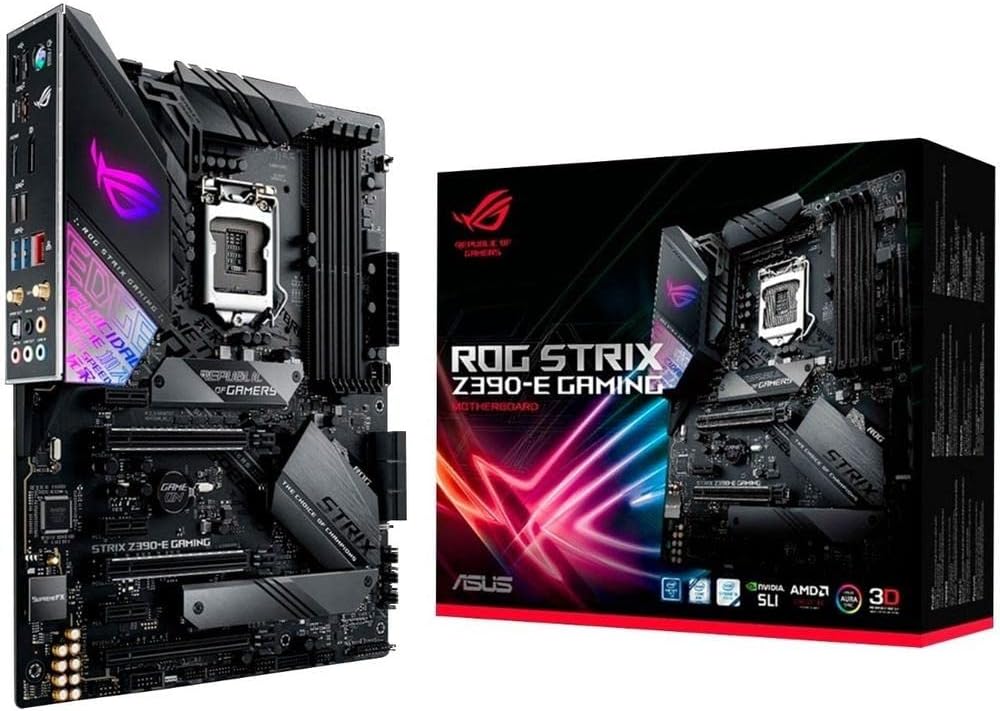 ASUS ROG Strix Z390-E Gaming Motherboard
|
8.2/10 | Buy | |
| Best Budget |
 MSI PRO B760-P WiFi DDR4 ATX Motherboard
|
7.1/10 | Buy | |
 Asus Prime Z390-A ATX Motherboard
|
7.4/10 | Buy | ||
 MSI MPG Z490 Gaming Plus ATX Motherboard
|
7.1/10 | Buy | ||
 MSI PRO B760M-P DDR4 Micro-ATX Motherboard
|
6.8/10 | Buy | ||
 MSI PRO H610M-G DDR4 Micro-ATX Motherboard
|
6.4/10 | Buy |
ASUS ROG Maximus XI Hero Z390 ATX Motherboard
A premium Z390 motherboard built for 8th and 9th generation Intel processors, offering robust overclocking tools through 5-Way Optimization and FanXpert 4 cooling controls. The board combines practical gaming features like dual M.2 slots, USB 3.1 Gen 2, and integrated 802.11ac Wi-Fi with extensive RGB customization via Aura Sync. Best suited for enthusiasts and high-end gaming builds seeking serious tuning capability.
Pros
- Intelligent 5-Way Optimization with thermal telemetry for streamlined overclocking
- OptiMem II technology and dedicated clock generator enhance memory stability and CPU headroom
- Comprehensive Fan Xpert 4 cooling controls with multi-sensor thermal monitoring
- Dual M.2 slots, USB 3.1 Gen 2, and onboard 802.11ac Wi-Fi for modern connectivity
- SupremeFX S1220 audio codec delivers neutral, detailed sound for gaming headsets
- Pre-mounted I/O shield simplifies installation
Cons
- Premium pricing positions it above entry-level Z390 alternatives
- Extensive BIOS customization and tuning options may overwhelm casual users
- No Wi-Fi 6 or newer wireless standard, limited to 802.11ac
ASUS TUF Gaming Z790-Plus WiFi ATX Motherboard
A solid mid-to-premium Z790 platform built for stability and gaming performance. The TUF Gaming Z790-Plus WiFi combines military-grade components, PCIe 5.0 support, and comprehensive cooling to handle 12th through 14th gen Intel processors without breaking stride. Best suited for gamers and content creators who prioritize durability and thermal management over cutting-edge features.
Pros
- Robust 16+1 DrMOS power delivery with six-layer PCB ensures stable performance under load
- Comprehensive cooling system with enlarged VRM and M.2 heatsinks keeps temperatures in check
- Next-gen connectivity: PCIe 5.0, WiFi 6E, Thunderbolt 4 header, and 2.5Gb LAN for future-proofing
- Four M.2 slots with NVMe RAID support and DDR5 compatibility unlock high-speed storage configurations
- Military-grade TUF components and proven design deliver long-term reliability
Cons
- No PCIe 5.0 M.2 slots; only four PCIe 4.0 M.2 sockets limit next-gen NVMe adoption
- WiFi 6E and Thunderbolt 4 are header-based, requiring compatible add-on cards rather than onboard connectors
- Premium positioning may feel overkill for budget builds or users with modest upgrade timelines
ASUS ROG Strix Z390-E Gaming Motherboard
A high-end Z390 platform motherboard built for 9th and 8th generation Intel Core processors, featuring AI-driven overclocking through 5-Way Optimization and comprehensive cooling control. It combines strong connectivity options, robust power delivery for overclocking, and gaming-focused aesthetics with RGB Aura Sync support. Best suited for enthusiasts and gamers seeking a feature-rich platform with solid stability for both stock and overclocked configurations.
Pros
- 5-Way Optimization delivers intelligent CPU overclocking based on thermal telemetry, reducing manual tuning time
- Dual M.2 slots with PCIe 3.0 x4 support plus 802.11ac Wi-Fi and USB 3.1 Gen2 for fast storage and connectivity
- Comprehensive cooling headers including dedicated CPU cooler, water-cooling, and high-performance pump support via Fan Xpert 4
- Gamer's Guardian protection features SafeSlot, ESD guards, and DRAM overcurrent protection for component longevity
- Pre-mounted I/O shield and Q-DIMM clips simplify installation and handling
Cons
- Premium pricing reflects high-end positioning, making it less accessible for budget-conscious builders
- MemOK II automatic memory fix is helpful but indicates the board targets users who may attempt aggressive overclocking
- Primarily optimized for Intel 9th gen; limited future upgrade path as platform is now several generations old
MSI PRO B760-P WiFi DDR4 ATX Motherboard
A business-focused ATX motherboard built for Intel's 12th-14th gen processors with solid thermal management and modern connectivity. The extended heatsink design, M.2 Shield Frozr, and reinforced PCIe slots cater to users running sustained workloads, while Wi-Fi 6E and 2.5G LAN provide reliable networking for productivity-heavy setups.
Pros
- Robust power delivery with 12+1 Duet Rail system and dual CPU power connectors for stable heavy-load performance
- Comprehensive thermal solution including extended VRM heatsink, MOSFET thermal pads, and M.2 Shield Frozr to prevent throttling
- Modern connectivity: Wi-Fi 6E, Bluetooth 5.3, 2.5Gbps LAN, and USB 3.2 Gen 2 Type-C for fast data transfers
- DDR4 support up to 5333MHz OC with Memory Boost for optimized overclocking stability
- PCIe 4.0 slots with Steel Armor reinforcement for better signal integrity and heavier GPU support
Cons
- DDR4-only memory support limits future upgrade path compared to DDR5 alternatives on newer platforms
- B760 chipset is mid-range, so lacks some premium features found on Z790 boards for enthusiasts
- Only 2 Gen4 M.2 slots, with just one featuring active cooling, which may constrain multi-SSD storage configurations
Asus Prime Z390-A ATX Motherboard
A solid mid-range Z390 platform for Intel 8th and 9th gen builds, this board emphasizes practical features over premium extras. The 5-Way Optimization AI overclocking, dual M.2 slots with fast PCIe 3.0 speeds, and robust power delivery appeal to builders seeking stability and expandability without the cost of high-end ROG models.
Pros
- AI-driven 5-Way Optimization simplifies CPU overclocking with smart thermal prediction
- Dual M.2 slots and USB 3.1 Gen2 (Type-A and Type-C) for modern storage and peripheral speeds
- OptiMem II memory routing and T-Topology layout enhance DDR4 overclocking headroom
- 5X Protection III (SafeSlot Core, LANGuard, overvoltage protection) ensures hardware longevity
- Strong 4.7-star rating from 4,329 verified reviews reflects consistent user satisfaction
Cons
- No Wi-Fi connectivity built-in, unlike some competing Z390 boards in similar price range
- Limited to HDMI and DVI-D video outputs, lacking DisplayPort found on higher-tier models
- 8-channel audio codec is competent but not the flagship SupremeFX S1220A in premium variants
MSI MPG Z490 Gaming Plus ATX Motherboard
A solid mid-range Z490 board built around Intel 10th Gen processors with practical gaming-focused features. The M.2 Shield Frozr, 2.5G LAN, and Core Boost technology deliver reliable performance for builders prioritizing stability over premium extras, though it skips Wi-Fi found on higher-tier variants.
Pros
- M.2 Shield Frozr with dual M.2 slots supports fast NVMe SSDs up to 32 GB/s transfer speeds
- 2.5G LAN plus Audio Boost ensure solid connectivity and audio quality for gaming
- Core Boost with optimized power delivery and dual CPU connectors provides stable overclocking headroom
- Mystic Light RGB with 16.8 million colors for customization
- Pre-installed I/O shielding reduces assembly friction and ESD risk
Cons
- No Wi-Fi or Bluetooth, requiring a separate adapter for wireless connectivity
- Only 2 PCIe x16 slots versus 3 on higher-tier Z490 models, limiting multi-GPU or expansion card options
- ATX form factor takes up more case space compared to Micro-ATX alternatives
MSI PRO B760M-P DDR4 Micro-ATX Motherboard
A business-focused micro-ATX board built around Intel's B760 chipset with solid support for 12th and 13th gen processors. It combines practical productivity features like dual-channel DDR4 memory up to 4800MHz, PCIe 4.0 connectivity, and thermal management through M.2 Shield Frozr. Best suited for office builds and small-form-factor systems where reliability and efficiency matter more than cutting-edge gaming performance.
Pros
- Supports 12th and 13th gen Intel Core processors with up to 128GB DDR4 capacity
- M.2 Shield Frozr thermal solution prevents SSD throttling and maintains consistent speeds
- PCIe 4.0 x16 slot with Steel Armor reinforcement for stable GPU mounting
- Compact micro-ATX form factor ideal for space-constrained builds
- Dual Gen4 M.2 slots deliver fast NVMe storage performance
Cons
- Limited to 1Gbps LAN controller, not ideal for high-speed network applications
- Micro-ATX layout restricts expandability compared to full-size ATX boards
- No 14th gen Intel processor support despite newer chipset availability
MSI PRO H610M-G DDR4 Micro-ATX Motherboard
A business-focused micro-ATX board built around Intel's H610 chipset for 12th/13th/14th Gen Core processors. It delivers straightforward productivity features including PCIe 4.0 support, dual-channel DDR4, and legacy display connectivity, making it practical for office builds and small-form-factor systems where reliability matters more than overclocking headroom.
Pros
- Supports latest Intel Core 12th/13th/14th Gen processors on compact micro-ATX form factor
- PCIe 4.0 x16 slot with Steel Armor protection for graphics card stability and EMI shielding
- Multiple display outputs (HDMI 2.1, DisplayPort 1.4, VGA) suit business environments with mixed monitor standards
- Passive chipset cooling and Frozr AI fan management reduce noise for office use
- Strong 4.5-star rating from 547 verified buyers reflects consistent reliability in real-world deployments
Cons
- H610 chipset limits overclocking and advanced power tuning compared to B/Z series boards
- Single M.2 Gen3 slot may bottleneck faster NVMe drives; no Gen4 M.2 support
- Only 2 DIMM slots cap memory at 64GB, which may constrain future upgrades for workstations
Intel Motherboards Buying Guide
Choosing an Intel motherboard involves more than matching a socket to a CPU. The board’s chipset, VRM quality, memory support, connectivity suite, and form factor all shape the long-term value of your build.
Below are the six criteria that matter most when evaluating Intel motherboards for any use case, from everyday productivity to serious gaming and content creation.
Socket Compatibility and Chipset Generation
Intel has used several distinct sockets in recent years: LGA 1151 for 8th and 9th Gen Core processors, LGA 1200 for 10th and 11th Gen, and LGA 1700 for 12th, 13th, and 14th Gen.
These sockets are physically and electrically incompatible, so the first step is confirming which socket your chosen CPU requires. Buying a board with the wrong socket is a mistake that no BIOS update can fix.
Within each socket, the chipset tier matters. Premium chipsets like Z390, Z490, and Z790 unlock CPU overclocking, more PCIe lanes, and expanded storage connectivity. Mid-range chipsets such as B760 offer most connectivity features without overclocking support and typically cost less.
Budget chipsets like H610 strip things back to the essentials for no-frills builds. Matching chipset to actual workload, rather than defaulting to the priciest option, is how you get real value.
Pairing the right board with a capable Intel processor from the correct generation is the single most important compatibility check before any purchase.
If you plan to pair your build with a discrete graphics card, also confirm whether the chipset provides PCIe 5.0 or 4.0 for the primary x16 slot, since that affects bandwidth headroom for current and next-generation GPUs.
VRM Quality and Overclocking Headroom

The voltage regulator module (VRM) is the cluster of power delivery components that feeds clean, stable power to the CPU. A robust VRM with a high phase count and quality MOSFETs is critical for sustained workloads and, especially, for overclocking.
Boards with weak VRMs can throttle under sustained loads, negating the performance premium of a higher-tier CPU.
For enthusiast Z-series boards, look for at least 12 to 16 power phases with DrMOS or teamed configurations and adequate heatsink coverage. ASUS ROG and TUF Gaming lines typically spec this clearly in their feature lists.
Budget B-series and H-series boards prioritize cost reduction here, so they’re best matched with non-K processors that don’t demand heavy overclocking.
If you’re running a demanding workload that stresses the CPU continuously, VRM thermal headroom is just as important as phase count.
Proper VRM cooling also depends on having good airflow inside the chassis. Pairing a VRM-heavy board with quality PC case ventilation reduces thermal throttling risk during intensive sessions.
Memory Support: DDR4 vs. DDR5 and Capacity Limits
Intel’s LGA 1700 platform introduced DDR5 support alongside continued DDR4 compatibility, but a single motherboard supports only one memory type, never both.
DDR5 offers higher bandwidth and better scalability at higher capacities, but DDR4 kits remain widely available and cost less per gigabyte. For most gaming and productivity builds on LGA 1700, either type performs comparably in real-world tasks at matched speeds.
Check the maximum supported memory capacity (typically 64 GB or 128 GB depending on tier) and the number of DIMM slots. A board with four DIMM slots gives you more flexibility when upgrading.
Also verify the XMP or EXPO profile support for your RAM kit, since most boards require a manual profile enable in BIOS to reach advertised speeds.
Our guide to DDR5 and DDR4 RAM kits covers compatible memory options worth pairing with a new Intel build.
On legacy LGA 1151 and LGA 1200 boards, DDR4 is the only option, so the focus shifts to supported frequency ceilings and the number of available slots. Higher frequency support on Z-series boards lets you extract more performance from premium memory modules without changing the physical kit.
Storage Connectivity: M.2 Slots and SATA Ports

Modern Intel builds depend heavily on NVMe SSDs for fast boot and load times. The number of M.2 slots and their lane configuration directly determines how much high-speed storage you can connect without using adapters.
Budget boards may offer a single M.2 slot; mid-range and premium boards typically provide two to four slots, some supporting PCIe 5.0 speeds on LGA 1700 platforms.
Be aware of bandwidth sharing: on some boards, populating certain M.2 slots disables SATA ports, or running multiple M.2 drives splits PCIe lanes from the primary GPU slot.
Read the specification table carefully, particularly if you plan to run a large NVMe array. Our roundup of high-performance SSDs includes options that pair well across multiple LGA 1700 boards.
For builds that also use traditional 2.5-inch or 3.5-inch drives, confirm SATA port count. Budget mATX boards often reduce SATA connectivity to four ports, which can be limiting in a storage-heavy NAS-adjacent build or media server configuration.
Larger hard drive arrays may require a board with a full complement of six SATA ports.
Connectivity: USB, Networking, and Wireless
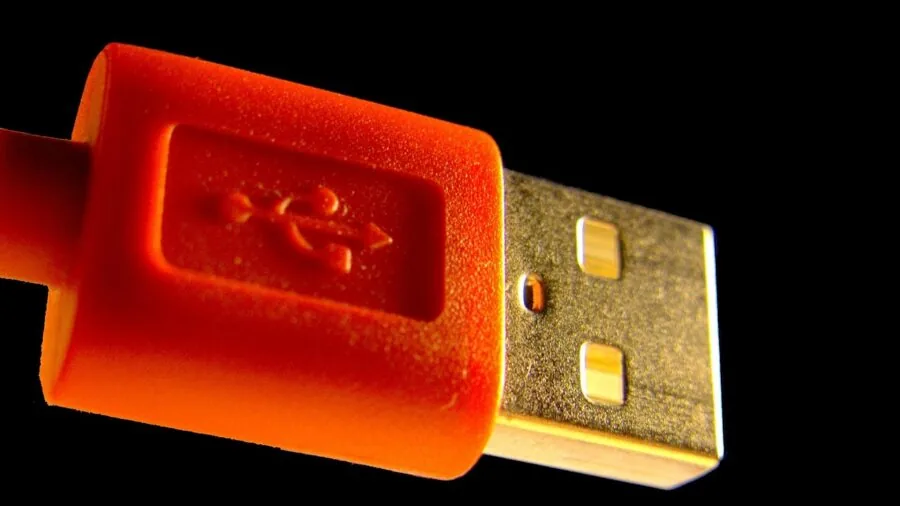
Rear I/O and front panel headers define the day-to-day connectivity experience. For gaming and content creation desktops, look for at least one USB 3.2 Gen 2 Type-A port and ideally a USB 3.2 Gen 2 Type-C port on the rear I/O panel.
Premium boards increasingly include Thunderbolt 4 or USB4 headers, which enables high-bandwidth peripherals and external GPU enclosures.
Networking matters more than many builders realize. Gigabit Ethernet is the baseline, but 2.5 Gbps LAN has become common on mid-range and premium boards and makes a measurable difference in file transfers across a local network.
For wireless connectivity, Wi-Fi 6 (802.11ax) is the current sweet spot, while Wi-Fi 6E adds the 6 GHz band for less congested connections in dense environments.
Not all boards include built-in Wi-Fi, so if you’re in a location where running a cable is impractical, confirm that the board either includes an integrated Wi-Fi module or has an M.2 Key E slot for an add-in card.
Front panel headers, including USB 3.2 Gen 2 Type-C, are also worth checking against your case’s front I/O. Mismatched headers between board and case are a surprisingly common compatibility miss that forces the use of adapters.
Form Factor and Case Compatibility

Motherboards ship in several standardized form factors.
ATX (305 x 244 mm) is the most common and offers the most slots, ports, and expansion room. mATX (244 x 244 mm) trades some expansion slots and M.2 slots for a smaller footprint that fits mid-tower and compact cases.
Mini-ITX boards are the smallest standard option and suit small form factor builds, though they typically offer only two DIMM slots and limited expansion.
Confirm that your chosen case supports the motherboard’s form factor before purchasing. A full-tower case can accommodate ATX, mATX, and Mini-ITX boards, but a compact mid-tower or small form factor case may only fit mATX or smaller.
The choice of form factor also influences CPU cooler clearance, since taller tower coolers can conflict with the VRM heatsink on boards where the socket sits close to the top edge of the board.
A well-matched power supply form factor (ATX vs. SFX) follows from the same case decision.
If you’re working within a compact build, see our overview of the broader PC components ecosystem to confirm compatibility across all major parts before committing to a specific board size.
Why You Should Trust Us
REMOVU is an independent review platform. We do not sell products, fulfill orders, or have any involvement in after-sale support.
Every recommendation is reached through a structured research methodology: we evaluate each product against a consistent set of criteria covering compatibility, feature completeness, build quality, value relative to price tier, and long-term reliability signals drawn from verified buyer feedback.
Each board is assigned a REMOVU Score on a 0 to 10 scale, reflecting how well it performs across those criteria relative to competing options in its price range and use-case category.
We do not conduct our own product trials; our evaluations are grounded in research, published data, expert review consensus, and verified buyer feedback.
This approach lets us cover a wider range of products and price points than any single in-house evaluation program could, while remaining transparent about the basis for every recommendation.
Sources include manufacturer specification sheets, published chipset documentation from Intel, and aggregated buyer feedback from verified purchasers.
REMOVU may earn a commission if you purchase through links in this article. That affiliate relationship has no influence on product rankings, REMOVU Scores, or which products are included or excluded.
Our editorial decisions are made independently of commercial relationships, and all scoring is based on the merits of each product against the criteria described above.
Final Thoughts
Intel motherboards span a wide range of prices, chipset capabilities, and socket generations, and the right pick depends entirely on your CPU, your budget, and the features your build actually needs.
After evaluating all eight boards in this guide, here are our standout picks and the contexts where each earns its place:
- Best Overall: ASUS ROG Maximus XI Hero (Wi-Fi) Z390 earns the highest REMOVU Score in this group thanks to its class-leading VRM configuration, comprehensive connectivity suite including Wi-Fi and front-panel USB 3.1 Gen 2, and strong long-term reliability track record among LGA 1151 enthusiast boards.
- Best for LGA 1700 Enthusiast Builds: ASUS TUF Gaming Z790-Plus WiFi delivers a compelling combination of PCIe 5.0 support, four M.2 slots, a 16+1 DrMOS power stage, and Wi-Fi 6 with Thunderbolt 4 at a mid-premium price that undercuts comparable Z790 competition meaningfully.
- Best Mid-Range LGA 1151 Pick: ASUS ROG Strix Z390-E Gaming sits a step below the Maximus XI in tier but retains integrated Wi-Fi, dual M.2 slots, and a clean ATX layout that serves gaming builds well without the full enthusiast premium.
- Best Budget LGA 1700 Board: MSI PRO B760M-P DDR4 offers a sensible mATX package for budget-focused 12th, 13th, and 14th Gen Intel builds, covering PCIe 4.0 and USB 3.2 Gen 2 at an accessible price point that makes it the most approachable entry in this lineup.
- Best for Clean Everyday Builds: ASUS Prime Z390-A pairs a clean aesthetic with solid fundamental connectivity, making it a reliable foundation for productivity and light gaming systems that don’t need RGB lighting or premium overclocking infrastructure.
Whichever board you choose, pairing it thoughtfully with matched memory, a compatible CPU cooler, and a well-specced power supply is what turns a good parts list into a build that performs reliably for years.
See our broader PC components coverage for guidance on completing your Intel build.
Frequently Asked Questions
Does the motherboard affect gaming performance?
For the most part, two boards using the same chipset and supporting the same CPU and memory configuration will deliver nearly identical gaming frame rates.
Where the board makes a tangible difference is in sustained workloads: a board with a weaker VRM may throttle the CPU during extended gaming sessions or CPU-intensive tasks, reducing performance below the processor’s rated capability.
Premium boards also support faster XMP memory profiles, which can offer modest gains in memory-bandwidth-sensitive titles.
Can I use a 14th Gen Intel CPU on an older Z490 or Z390 board?
No. Intel’s 14th Gen Core processors use the LGA 1700 socket, which is physically incompatible with the LGA 1200 socket on Z490 boards and the LGA 1151 socket on Z390 boards.
You need a 600-series or 700-series chipset board with an LGA 1700 socket to run 12th, 13th, or 14th Gen Intel CPUs.
LGA 1700 boards launched with 12th Gen support are upgradeable to 14th Gen via a BIOS update in most cases, but a BIOS update cannot change the physical socket on an older platform board.
Is DDR5 worth it over DDR4 for an LGA 1700 build in 2026?
For gaming, the real-world performance gap between DDR4 and DDR5 at matched capacity remains modest in most titles. DDR5 shows clearer advantages in memory-bandwidth-heavy workloads like video encoding, large data processing, and AI inference tasks.
The more meaningful consideration in 2026 is total system cost: DDR5 kits carry a price premium over equivalent DDR4 kits.
If budget is a primary constraint, a DDR4-based LGA 1700 board paired with a fast DDR4 kit is a rational choice. If you’re building for longevity and plan to upgrade to future Intel platforms, DDR5 offers better forward compatibility.
How many M.2 slots do I actually need?
For most users, two M.2 slots are sufficient: one for the primary operating system and applications drive, and one for a secondary storage drive or scratch disk.
Content creators handling large raw video or photo libraries may benefit from three or four slots to avoid SATA cable clutter and to maximize sequential throughput across multiple NVMe drives.
If you’re running a single-drive build focused on gaming or everyday productivity, even a one-slot budget board covers your needs without waste.
What is the difference between ATX and mATX motherboards?
ATX boards are the full-size standard, measuring 305 x 244 mm, and typically offer more PCIe slots, more DIMM slots, more M.2 slots, and a denser rear I/O panel than smaller form factors. mATX boards measure 244 x 244 mm and fit into a wider range of case sizes, including compact mid-towers, at the cost of some expansion slots and occasionally fewer M.2 or SATA ports.
For most single-GPU gaming builds with two storage drives and 32 GB of RAM, an mATX board provides everything necessary at a smaller footprint and often a lower price.
ATX becomes advantageous when you need multiple PCIe expansion cards, extensive storage, or the maximum DIMM slot count for large memory configurations.
Do I need a Wi-Fi-enabled motherboard if I plan to use a wired connection?
Not necessarily. If your build will always be connected via Ethernet, an integrated Wi-Fi module adds cost without benefit. Wired Gigabit or 2.5 Gbps Ethernet connections are more consistent and lower latency than Wi-Fi for desktop builds in a fixed location.
However, if there’s any chance you’ll need wireless connectivity later, selecting a board with built-in Wi-Fi eliminates the need to purchase a separate PCIe Wi-Fi card that occupies an expansion slot.
Boards with Wi-Fi 6 or Wi-Fi 6E are a sensible default for home office and living room builds where running a cable is impractical.
About the author
Gordon is REMOVU's printer and scanner writer, comparing print quality, running costs, and value for home and office. He helps readers weigh ink against laser over the long haul.