The 8 Best Ups Battery Backups
Power outages and voltage spikes can corrupt data and damage gear instantly. These eight UPS picks cover every budget and load size, from compact router protectors to full 1500VA workstation units.
 By Nevaeh Ross
Updated July 26, 2026
By Nevaeh Ross
Updated July 26, 2026

A sudden power outage or voltage spike can corrupt unsaved work, damage sensitive electronics, and knock out the devices your home depends on.
A UPS (uninterruptible power supply) sits between your wall outlet and your gear, providing battery-backed power during outages and filtering out the electrical noise that shortens the lifespan of everything plugged into it.
Whether you’re protecting a home office workstation, a network closet full of routers and switches, or a gaming rig mid-session, the right UPS keeps you running long enough to save your work and shut down gracefully.
If you want to go deeper on specific use cases, our roundup of UPS battery backups for home use covers household setups in detail.
This guide covers eight carefully selected UPS models spanning a wide range of budgets and load capacities, from compact units designed to keep a router alive during brief outages to full-featured 1500VA tower units built for power-hungry workstations.
REMOVU’s picks are based on thorough research across published specifications, expert review consensus, and verified buyer feedback, so every recommendation reflects real-world reliability rather than marketing claims.
Read on for the top picks, followed by a practical buying guide to help you match the right model to your setup.
| Award | Product | REMOVU Score About REMOVU ScoreThe REMOVU Score is our own rating from 0 to 10, based on performance, design and build, ease of use, and value. It reflects independent research and is never influenced by manufacturers, retailers, or affiliate commissions. Learn more › | Price | |
|---|---|---|---|---|
| Best Overall |
 CyberPower CP1500PFCLCD 1500VA Pure Sine Wave UPS
|
8.9/10 | Buy | |
 APC Back-UPS BE600M1 600VA Battery Backup
|
6.2/10 | Buy | ||
| Best Premium |
 APC Back-UPS Pro BX1500M 1500VA UPS
|
8.5/10 | Buy | |
| Best Value |
 APC Back-UPS BE850G2 850VA UPS Battery Backup
|
7.9/10 | Buy | |
 Vertiv PST6-1100LVMT 1100VA UPS with USB Charging
|
7.3/10 | Buy | ||
 CyberPower AVRG900LCD 900VA LCD UPS Battery Backup
|
7.5/10 | Buy | ||
| Best Budget |
 CyberPower ST900U 900VA Standby UPS
|
6.4/10 | Buy | |
 APC BE425M 425VA Battery Backup UPS
|
6.2/10 | Buy |
CyberPower CP1500PFCLCD 1500VA Pure Sine Wave UPS
A line-interactive UPS with pure sine wave output and AVR, designed for PFC-compatible equipment like gaming PCs, workstations, and network gear. Delivers 1000W capacity with 12 outlets (6 battery-backed, 6 surge-only), a color LCD display, and dual USB charging ports, backed by a 3-year warranty and strong user reliability ratings.
Pros
- Pure sine wave output compatible with active PFC power supplies, including high-end gaming and Mac systems
- Solid runtime at partial load, 10 minutes at half load, with real-time watt and runtime estimates on color LCD
- 12 total outlets with 6 battery backup and surge protection plus 6 surge-only outlets, plus USB-A and USB-C charging
- AVR reduces unnecessary battery drain during minor voltage fluctuations
- Affordable pricing relative to comparable pure sine wave UPS units, #1 best seller in its category
Cons
- Runtime significantly shorter at full load, only 2.5 minutes at 1000W draw, limiting use for sustained high-power scenarios
- Internal charging circuit can fail after several years of use, though batteries are user-replaceable
- Software must be downloaded separately from CyberPower website, not included, adding setup friction for users unfamiliar with UPS management
APC Back-UPS BE600M1 600VA Battery Backup
Compact UPS that keeps computers, routers, and modems running for about 23 minutes during outages at 100W load, with built-in surge protection across 7 outlets and USB charging. Rated 4.5 stars from nearly 30,000 verified buyers, with most praising reliability and quiet operation.
Pros
- Proven long-term reliability: multiple verified buyers report 8+ years of continuous use with minimal issues
- Quiet operation and instant failover prevents disruption to connected devices
- Well-spaced outlets accommodate larger power adapters without blocking adjacent sockets
- Straightforward setup with battery arriving pre-charged
- Responsive customer service with warranty replacements for out-of-warranty units
Cons
- Intermittent beeping occurs when operating on battery power, which some users find annoying (can be disabled)
- 23-minute runtime only sufficient for graceful shutdown at typical computer loads, not extended operation
- Must plug directly into wall outlet for optimal performance; extension cords can trigger battery mode unnecessarily
APC Back-UPS Pro BX1500M 1500VA UPS
A reliable 1500VA battery backup with 10 outlets and LCD display, designed for home offices and small business setups needing protection against outages and power fluctuations. Delivers up to 68 minutes of runtime at 100W load, with automatic voltage regulation to handle brownouts without draining the battery.
Pros
- Strong runtime performance and capacity suitable for powering computers, routers, and networking gear simultaneously
- AVR feature extends battery life by stabilizing voltage fluctuations rather than relying on battery power alone
- Trusted APC brand with long user history; many reviewers report years of reliable operation
- Compact tower design fits on desks without taking excessive space
- Built-in Ethernet and coaxial surge protection for modems and network equipment
Cons
- Lead-acid battery has shorter lifespan (approximately 3-5 years) compared to lithium alternatives, requiring eventual replacement at additional cost
- Some users report intermittent false battery depletion alerts and loud alarms during self-reviews, though power cycling typically resolves the issue
- Runtime varies significantly based on connected load; rated 68 minutes only at 100W, dropping substantially with heavier loads
APC Back-UPS BE850G2 850VA UPS Battery Backup
A compact tower UPS that combines battery backup and surge protection across 9 outlets plus 2 USB ports, suitable for home office setups. Delivers up to 35 minutes of runtime at 100W load and features a user-replaceable lead-acid battery with 3-5 year lifespan.
Pros
- 9 outlets (6 battery-backed, 3 surge-only) plus 2 USB-A charging ports provide flexible connectivity for multiple devices
- Fast 6-10ms transfer time to battery power minimizes disruption during outages
- User-replaceable battery (RBC17) eliminates need for technician service; typical 3-5 year lifespan
- Surge protection up to 354 Joules safeguards against power spikes and electrical damage
- LED status indicators and silenceable alarm offer at-a-glance monitoring without excessive noise
Cons
- 35-minute runtime at 100W is modest for extended outages; capacity and actual runtime vary with connected device load
- No automatic voltage regulation (AVR) unlike higher-tier APC models, limiting protection against voltage fluctuations
- Battery installation requires opening bottom panel and can produce small spark when initially connected
Vertiv PST6-1100LVMT 1100VA UPS with USB Charging
A compact standby UPS delivering 1100VA/670W capacity with 8 outlets (6 battery-backed, 2 surge-only), USB-A and USB-C charging ports, and user-replaceable batteries. Designed for desktop PCs, networking equipment, and office electronics needing reliable power backup during outages and surge protection.
Pros
- Strong 1100VA/670W capacity handles multiple devices including high-draw equipment like gaming PCs without excessive beeping
- 8-outlet layout with dedicated battery-backup and surge-only outlets lets you allocate power strategically
- Mute button silences alerts, addressing a pain point reviewers noted with older UPS models
- User-replaceable VRLA battery extends unit lifespan and reduces long-term maintenance costs
- Integrated USB-A and USB-C ports plus optional Power Assist software for safe device shutdown during outages
- 3-year full warranty with hassle-free advanced replacement and strong verified buyer satisfaction (5.0 rating)
Cons
- LED display brightness cannot be dimmed, making it intrusive in dark rooms
- Capacity demands discipline, overloading with 3+ PCs will trigger battery drain faster than smaller devices
- Standby mode switches to battery only during outages; does not provide continuous online protection like true online UPS models
CyberPower AVRG900LCD 900VA LCD UPS Battery Backup
A compact line-interactive UPS with LCD display and automatic voltage regulation, designed to keep desktop computers, networking equipment, and home entertainment systems running during power outages. Rated 4.5 stars from 665 verified buyers, it offers sufficient runtime for safe shutdowns and includes free management software.
Pros
- AVR technology extends battery life by avoiding unnecessary battery drain during voltage sags and spikes
- Free PowerPanel software provides easy monitoring and scheduling; makes up for limited physical button controls
- Dual outlet configuration (battery + surge vs. surge-only) lets you prioritize critical devices
- Strong warranty coverage and connected equipment guarantee reduce risk
- Consistently praised by users protecting NAS systems, home networks, and multi-monitor setups
Cons
- Limited runtime at full load (2 minutes) requires proper setup planning and prioritization of which devices get battery power
- Requires correct initialization sequence (power down, plug devices first, then plug UPS in) or it will beep continuously; manual instructions unclear about this
- Simulated sine wave output (not pure sine) may cause issues with sensitive electronics like medical equipment or high-end audio gear
CyberPower ST900U 900VA Standby UPS
A compact standby UPS designed for home offices and entertainment setups, offering 12 outlets with six battery-backed slots and enough runtime to safely shut down systems during outages. The 4.6-star rating from nearly 900 reviews reflects solid reliability for protecting computers, gaming consoles, and networking equipment from power disruptions.
Pros
- Abundant outlet count with widely spaced outlets that accommodate larger transformer plugs without blocking adjacent slots
- Generous 7.5-minute runtime at half load provides realistic shutdown window for typical home office gear
- Strong $125,000 connected equipment guarantee and 3-year battery warranty demonstrate manufacturer confidence
- Simulated sine wave output suitable for most home electronics including gaming consoles and entertainment systems
Cons
- Runtime drops significantly at full load to just 2 minutes, limiting usefulness during extended outages with multiple power-hungry devices
- Standby topology means there is a brief switchover delay when power fails, not ideal for UPS-sensitive equipment
- No battery life monitoring details provided beyond generic 3-year average lifespan
APC BE425M 425VA Battery Backup UPS
Budget-friendly UPS designed for low-power devices like routers, modems, and small home electronics, offering 15 minutes of runtime at 100W load plus surge protection across six outlets. Best suited for brief outages and surge protection rather than extended backup scenarios.
Pros
- Reliable surge protection at budget price point, praised by reviewers for preventing damage to computers and smart devices
- Simple plug-and-play setup with no app or computer configuration required
- Effective for brief outages when paired with generators or backup systems, per verified user feedback
- Low 6-watt standby power consumption reduces phantom loads
Cons
- Limited to 15 minutes of backup at 100W load, unsuitable for high-power devices like gaming PCs or multiple monitors
- No low battery warning while AC power is present; only alerts when power actually fails, creating false sense of security
- Soft power button can be unreliable; some users report inconsistent behavior
UPS Battery Backups Buying Guide
Shopping for a UPS is more nuanced than picking the unit with the biggest number on the box.
Capacity, waveform type, runtime, form factor, and software support all interact in ways that make one model a perfect fit for a home office and another a poor choice for the same setup.
The sections below break down every factor worth understanding before you buy.
VA Rating and Wattage: Matching Capacity to Your Load
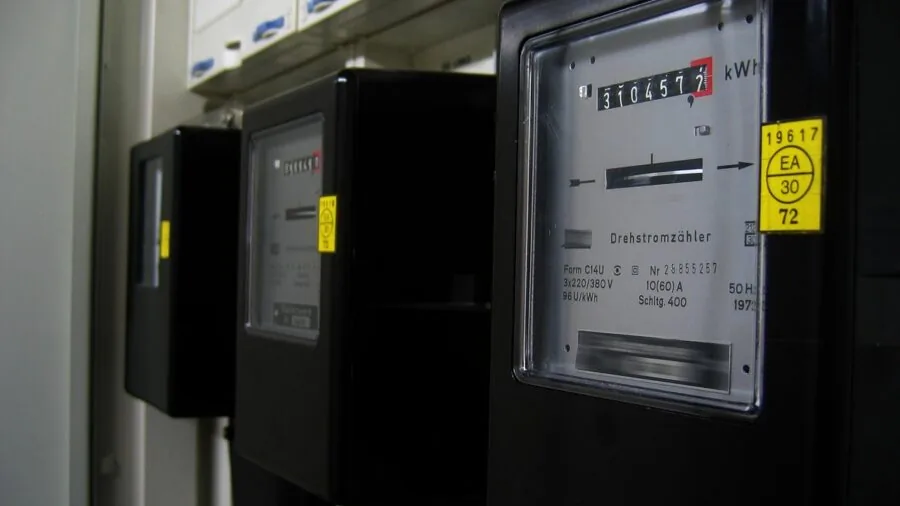
Every UPS carries two capacity figures: a VA (volt-ampere) rating and a watt rating. The watt figure is the one that actually limits how much real load the unit can sustain.
A general rule of thumb is to add up the wattage of every device you plan to connect, then choose a UPS rated for at least 20 to 25 percent more than that total.
This headroom prevents the unit from running hot and gives the battery reasonable longevity.
For a basic home router and modem setup, a 425VA to 600VA unit is typically sufficient. A home office PC with a monitor and a few peripherals generally needs something in the 850VA to 1000VA range.
A high-end workstation, a NAS array, or a gaming PC with a power-hungry GPU will often require 1500VA or more to handle startup surges without tripping the overload protection.
Keep in mind that VA ratings look impressive but can obscure a low power factor. Always check the watt figure in the spec sheet, and cross-reference it against the actual power draw of your devices rather than their theoretical maximums.
Manufacturer documentation and published power consumption data are the most reliable sources here.
Waveform Type: Simulated Sine Wave vs. Pure Sine Wave

This is one of the most consequential decisions in a UPS purchase and also one of the most misunderstood. Most budget and mid-range UPS units produce a simulated (stepped approximation) sine wave when running on battery.
This works fine for basic electronics, but some devices, particularly those with Active PFC power supplies, can behave erratically or sustain damage when powered by a simulated sine wave during an outage.
Pure sine wave UPS units replicate the smooth AC waveform that comes from the wall, which is compatible with every class of device including medical equipment, high-end audio gear, and modern PC power supplies with Active PFC.
If your desktop PC, workstation, or any piece of sensitive equipment shipped with an Active PFC power supply, a pure sine wave UPS is the appropriate choice.
The CyberPower CP1500PFCLCD is specifically designed around this requirement and earned the highest REMOVU Score in this roundup as a result.
For a router, modem, small NAS, or budget desktop with a non-PFC supply, a simulated sine wave unit at a lower price point is a practical, cost-effective solution. The key is knowing which camp your equipment falls into before you buy.
Runtime: How Long Does It Actually Need to Last?
Runtime expectations are one of the biggest sources of buyer disappointment with UPS units. Advertised runtime figures are calculated at specific load levels, often well below a realistic real-world load.
A unit rated for 68 minutes at 100W will deliver far less runtime if your connected devices draw 400W. Always look at the runtime curve in the spec sheet or on the manufacturer’s website, not just the headline figure.
For most home and office users, the goal of a UPS is not to run indefinitely but to provide enough time to save work and shut down gracefully, typically five to fifteen minutes at full load.
If you need extended runtime during longer outages, look for models that support external battery packs, or consider pairing a UPS with a portable power station for non-sensitive loads like lamps and phone chargers.
Battery age is also a critical variable. UPS batteries typically last three to five years before capacity degrades noticeably. Verified buyer feedback across multiple models consistently flags diminished runtime as the top long-term complaint.
Choosing a unit with user-replaceable batteries extends the useful life of your investment considerably.
Automatic Voltage Regulation (AVR) and Surge Protection

A UPS does more than provide backup power. Models with automatic voltage regulation (AVR) continuously boost or trim incoming voltage to keep output stable even when the grid delivers under- or over-voltage conditions.
This matters in areas prone to brownouts or in older buildings with variable power quality. Without AVR, a UPS switches to battery every time voltage sags, which accelerates battery wear and can cause unnecessary shutdowns.
Surge protection is a baseline expectation for any UPS, but the quality of surge protection varies. Look for the joule rating listed in the spec sheet: higher joule ratings absorb more energy from a spike before failing.
Units with both battery backup outlets and surge-only outlets give you flexibility to protect lower-priority devices like printers or desk lamps without consuming battery capacity. Several models in this roundup, including the APC BX1500M, offer this mixed-outlet configuration.
Management Software and Connectivity

A UPS without software integration is a passive safety device.
A UPS with USB connectivity and power management software can automatically initiate a safe shutdown of your PC when the battery reaches a critical level, log power events, and alert you to battery health issues before they become a problem.
Both APC and CyberPower offer free software utilities (PowerChute and PowerPanel respectively) that integrate with Windows, macOS, and Linux.
For home office and remote work setups, automatic shutdown software is especially valuable during overnight outages or times when no one is at the desk to respond manually.
If you’re protecting a NAS or a server running continuously, this feature moves from nice-to-have to essential.
The presence of a USB-A and USB-C charging port, as seen on several models here, also allows the UPS to double as a charging hub during normal operation, adding everyday utility beyond pure protection.
Form Factor and Outlet Count

UPS units come in desktop/mini-tower configurations suited for sitting beside or under a desk, and rack-mount units built for server rooms. Every model in this roundup is a desktop/tower form factor aimed at home and home office use.
Within that category, size still varies meaningfully: a compact unit like the APC BE425M has a small footprint suited to a router shelf or side table, while a 1500VA tower needs real desk or floor space.
Outlet count matters too. Count not just how many devices you’re protecting today but how many you’re likely to add. Models with 10 to 12 outlets give you room to grow and typically split battery-backed and surge-only outlets clearly.
For households managing a mix of gear, including a router, modem, smart home hub, and desktop, our guide to UPS units under a budget-friendly ceiling highlights models that balance outlet count with value.
For those specifically focused on keeping their internet connection alive, a compact unit tailored to Wi-Fi router protection may be the most efficient choice.
Why You Should Trust Us
REMOVU is an independent review publication. We have no manufacturer relationships, sponsored rankings, or preferred vendor arrangements. Every product in this roundup was evaluated using the REMOVU Score, our 0-to-10 rating system applied consistently across the category.
Scores are derived from a structured research process that encompasses published specifications, expert review consensus drawn from authoritative technical sources, and verified buyer feedback from confirmed purchasers across major retail platforms.
We do not conduct our own product trials; our evaluations are grounded in research, published data, expert review consensus, and verified buyer feedback.
This methodology allows us to assess a wider range of products with consistent criteria rather than limiting coverage to units we happen to have on hand.
When expert consensus and buyer feedback diverge, we note the discrepancy and weight both signals in the final score rather than defaulting to one source.
REMOVU may earn an affiliate commission when you purchase through links on this page. That relationship does not influence which products appear in our roundups, how they are ranked, or what scores they receive.
Affiliate income supports the cost of independent editorial research. Rankings are determined solely by REMOVU Score and editorial judgment, not by commission rates or advertiser preference.
Final Thoughts
The UPS market spans a wide spectrum of capability and price, and the right pick depends almost entirely on what you’re protecting and how critical uptime is to you.
After evaluating specifications, analyzing expert review consensus, and reviewing verified buyer feedback across all eight models, here are our standout picks by use case.
- Best Overall: CyberPower CP1500PFCLCD PFC Sinewave UPS earns the top REMOVU Score in this roundup by delivering pure sine wave output, AVR, a full-featured color LCD, and 12 outlets in a package that covers modern Active PFC power supplies and demanding home office loads equally well.
- Best for Home Office PCs: APC BX1500M brings a strong combination of runtime, AVR, and a 10-outlet layout that handles a full desktop workstation setup with headroom to spare, making it one of the most capable picks at a mid-range price point.
- Best Mid-Range Pick: APC Back-UPS 850VA hits a practical sweet spot for home office setups that don’t require pure sine wave output, offering solid runtime, dual USB-A charging, and APC’s well-regarded surge protection in a compact form factor.
- Best Budget Pick for Routers and Small Electronics: APC BE425M is the most affordable entry in the roundup and well suited to keeping a router, modem, or smart home hub alive through brief outages without occupying much space or budget.
If you’re building or upgrading a full desktop setup and want to understand how a UPS fits into the bigger power protection picture, pairing one of these units with a capable graphics card and a quality display rounds out a reliable workstation.
For whole-home power resilience, exploring power and charging solutions alongside a UPS gives you layered protection across all your devices.
Frequently Asked Questions
What Is the Difference Between a UPS and a Surge Protector?
A surge protector diverts excess voltage during a spike but provides no power when the electricity goes out entirely. A UPS includes an internal battery that keeps connected devices running during a full outage, in addition to providing surge protection.
For anything where data loss or an abrupt shutdown causes damage, a UPS is the correct tool.
How Do I Know What Size UPS I Need?
Add up the wattage draw of every device you plan to connect, then choose a UPS rated for at least 20 to 25 percent above that total.
Manufacturer spec sheets and power supply labels are the most reliable sources for real wattage figures.
If you’re protecting a gaming rig or workstation with a high-draw GPU, consult our guide on UPS battery backups for gaming PCs for load-specific recommendations.
Does a UPS Work for a Wi-Fi Router During a Power Outage?
Yes, and a UPS is one of the most practical ways to maintain internet access during short outages. Routers and modems draw very little power, so even a compact 425VA unit can keep them running for well over an hour.
For households where internet continuity during outages is the primary concern, a dedicated small-form-factor UPS is a cost-effective solution. Our roundup of UPS units for Wi-Fi routers covers the best options for this specific use case.
How Long Does a UPS Battery Last Before It Needs Replacing?
Most sealed lead-acid batteries inside consumer UPS units have a service life of three to five years under normal conditions. Heat, frequent deep discharges, and leaving the unit on extended battery cycles all accelerate degradation.
Many UPS models support user-replaceable batteries, which is a meaningful long-term value factor. The unit’s management software will typically flag battery health decline before it becomes critical.
Can I Use a UPS to Power a NAS or Home Server?
Absolutely, and this is one of the highest-value applications for a UPS. A NAS storing irreplaceable data is especially vulnerable to abrupt power loss, which can corrupt file systems and damage drives.
A UPS paired with USB-connected power management software can automatically command the NAS to shut down cleanly when the battery drops to a set threshold.
Choose a model with sufficient wattage headroom for the NAS plus any attached drives, and verify that the NAS operating system supports the UPS software protocol. Most modern NAS platforms support both APC and CyberPower protocols natively.
Pairing your NAS with a reliable external hard drive for offsite backups further protects your data beyond what a UPS alone can provide.
Is a Pure Sine Wave UPS Worth the Extra Cost?
For any device with an Active PFC power supply, which includes most modern desktop PCs, high-end workstations, and certain audio equipment, a pure sine wave UPS is strongly recommended.
Running an Active PFC supply on a simulated sine wave during an outage can cause instability, unexpected shutdowns, or in some cases long-term component stress.
For simpler loads like routers, older desktops with non-PFC supplies, and basic peripherals, a simulated sine wave unit at a lower price point performs reliably. When in doubt, check the power supply specification or the device manual.
About the author
Nevaeh is REMOVU's over-ear headphone writer, judging sound, comfort, and value across wireless and wired models. She helps readers find a spacious, long-wear pair for home or travel.