The 9 Best Capture Cards Under $200
Capture cards vary wildly in actual quality, from plug-and-play reliability to frustrating dropouts. We cut through the noise to surface the picks that genuinely deliver at this price.
 By Jamie Kuhn
Updated July 26, 2026
By Jamie Kuhn
Updated July 26, 2026

A capture card is the bridge between your console, camera, or PC and your streaming or recording setup.
Whether you’re broadcasting gameplay from a PS5, bringing a DSLR into a Zoom call, or archiving Switch sessions for a YouTube channel, the right capture card determines your signal quality, latency, and workflow compatibility.
The market is crowded with options spanning from entry-level dongles to prosumer-grade hardware, and the price gap between “barely functional” and “genuinely great” is surprisingly narrow once you know what to look for.
For this guide, REMOVU researched capture cards priced within an accessible budget by analyzing published specifications, expert review consensus, and verified buyer feedback across a wide range of use cases, from casual streamers to educators and content creators.
If you’re also setting up the rest of your streaming gear, we’ve got you covered across the full category. Here are our top picks ranked below.
| Award | Product | REMOVU Score About REMOVU ScoreThe REMOVU Score is our own rating from 0 to 10, based on performance, design and build, ease of use, and value. It reflects independent research and is never influenced by manufacturers, retailers, or affiliate commissions. Learn more › | Price | |
|---|---|---|---|---|
| Best Overall |
 Elgato Cam Link 4K HDMI Capture Card
|
8.9/10 | Buy | |
| Best Budget |
 Guermok HDMI to USB-C Capture Card, 1080P 60FPS
|
8.3/10 | Buy | |
 Audio Express AXHDCAP USB 2.0 HDMI Capture Card 1080p
|
7.6/10 | Buy | ||
| Best Value |
 Acer OCB5B0 USB 3.0 Capture Card, 1080p60 with 4K Pass-Through
|
7.5/10 | Buy | |
 XIIXMASK USB 3.0 HDMI Capture Card, 1080p 60fps
|
7.1/10 | Buy | ||
| Best Premium |
 Vixlw 4K HDMI Capture Card, USB 3.0, 1080P 60FPS Output
|
6.8/10 | Buy | |
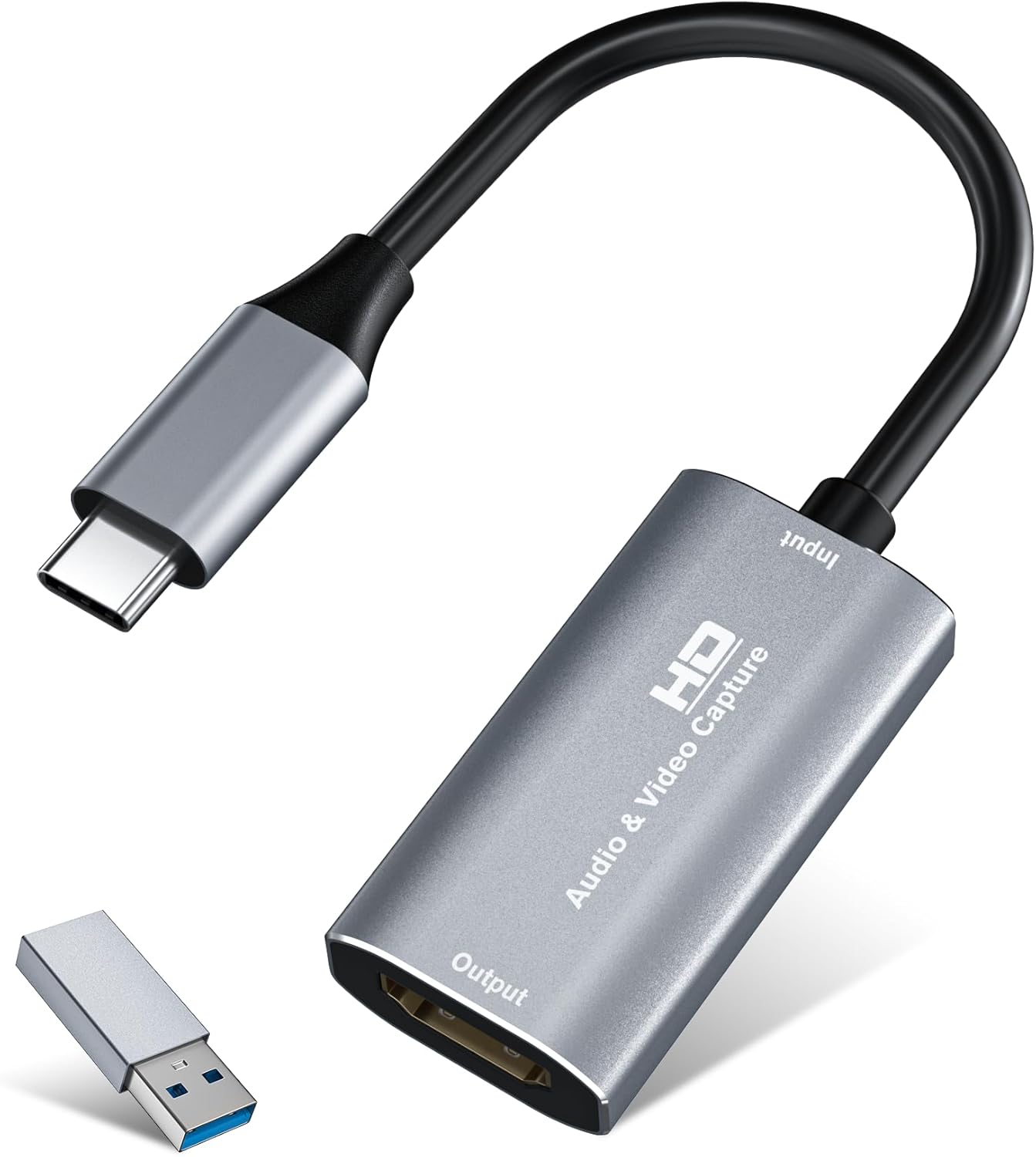 VIXLW U168-1 4K HDMI Capture Card, 1080P60 Recording
|
6.6/10 | Buy | ||
 Dcyfol 4K HDMI Capture Card USB 3.0, 1080P 60FPS
|
6.5/10 | Buy | ||
 Generic 4K Capture Card 1080P 60FPS
|
6.2/10 | Buy |
Elgato Cam Link 4K HDMI Capture Card
Transform a DSLR, mirrorless camera, or camcorder into a professional webcam with genuine 4K capture at up to 60 fps. Plug-and-play compatibility with OBS, Zoom, Discord, and iPad makes it straightforward for content creators and remote workers seeking camera-quality video feeds.
Pros
- Legitimate 4K capture output with clean colors and sharp detail, outperforming budget alternatives
- Plug-and-play setup works immediately on Windows, Mac, and iPad without driver installation
- Supports multiple resolutions including 4K60 (latest model), 4K30, and 1080p60 for flexible streaming and recording
- Works with DSLRs, mirrorless cameras, camcorders, action cameras, and even iPhones via appropriate cables
- Compact design at 20g with 30cm USB 3.0 extension cable included
Cons
- Latency is noticeably higher than marketing suggests, making live self-monitoring uncomfortable for some workflows
- Device runs warm during use, raising concerns about long-term reliability with extended sessions
- Stability depends heavily on source device and USB setup; some sources may require resolution adjustments or additional Elgato Capture software to eliminate stuttering
- Requires USB 3.0 port and HDMI/micro-HDMI cable (not included); dummy battery recommended for continuous camera power
Guermok HDMI to USB-C Capture Card, 1080P 60FPS
Budget-friendly capture card that handles 4K input and outputs up to 1080P at 60fps or 2K at 30fps, making it suitable for streamers and content creators on a tight budget. Plug-and-play setup with broad device compatibility across consoles, cameras, and computers. Works best with established capture software like OBS Studio rather than standalone streaming.
Pros
- No drivers or external power required, plug-and-play operation
- Wide compatibility across PS5, Switch, Xbox, Quest 3, iPad, Mac, Windows, and Android devices
- Supports multiple video capture software including OBS Studio, VLC, Potplayer, and platform-specific apps
- Aluminum alloy construction with heat dissipation for sustained use
- Compact and portable design suitable for mobile streaming setups
Cons
- Output limited to 1080P 60fps or 2K 30fps despite 4K input support, requiring resolution compromise
- Requires dedicated capture software to function, not suitable for direct display output to monitors or TVs
- USB 3.0 recognition issues reported when using adapters, sometimes requiring device reconnection or flipping the card
Audio Express AXHDCAP USB 2.0 HDMI Capture Card 1080p
A budget-friendly HDMI to USB capture card designed for streamers and content creators on a tight budget. It captures 4K input and outputs 1080p at 30fps with plug-and-play operation, making it accessible for gaming streams, video calls, and basic live broadcasts without requiring external drivers or power.
Pros
- True plug-and-play design eliminates setup friction for beginners
- Broad platform compatibility covers most streaming software and operating systems
- Aluminum casing provides durability for frequent use
- Lifetime warranty with responsive customer support
- Compact form factor makes it travel-friendly for content creators
Cons
- USB 2.0 bandwidth limits output to 1080p 30fps, not suitable for high-frame-rate gaming or professional work
- Requires high-quality HDMI cables under 10 feet and stable USB power to avoid signal dropouts and frame drops
- Performance issues during fast-motion sequences in games may result in pixel misalignment and frame drops
Acer OCB5B0 USB 3.0 Capture Card, 1080p60 with 4K Pass-Through
This budget-friendly capture card handles 1080p60 recording from gaming consoles and cameras with zero-hassle plug-and-play setup, plus built-in mic input for live commentary. It passes 4K video to your display while capturing at 1080p, making it ideal for streamers and content creators who want solid performance without proprietary software headaches.
Pros
- Genuine plug-and-play with no driver installation required, works immediately with Windows, Mac, Linux, and apps like OBS
- 4K loop-out lets you game in 4K on your main display while capturing 1080p60 simultaneously
- Integrated 3.5mm mic input embeds audio directly at the hardware level, eliminating post-sync issues
- Compact aluminum chassis with solid build quality, dual USB-A and USB-C ports for broad device compatibility
- Works across PS5, PS4, Switch 1 and 2, Xbox, DSLR cameras, and other HDMI sources without adapters
Cons
- Capture output is strictly 1080p60, not suitable for those needing true 4K recording
- Some users report audio dropout issues after extended use (6+ hours), requiring device reconnection
- HDMI passthrough can introduce noticeable lag on longer cables when monitoring playback on a secondary display, impacting gameplay response
XIIXMASK USB 3.0 HDMI Capture Card, 1080p 60fps
Budget-friendly USB 3.0 capture card that accepts 4K HDMI input and loops it out to your display while capturing clean 1080p 60fps or 2K 30fps video. Works plug-and-play with PS5, Switch, cameras, and PC via OBS without requiring drivers, making it accessible for beginner streamers and content creators.
Pros
- 4K HDMI loop-out lets you play games at full 4K 60Hz on your display while capturing at 1080p 60fps simultaneously
- Plug-and-play setup with no driver installation needed; recognized immediately by OBS and other capture software
- Aluminum alloy construction with strong heat dissipation handles extended recording sessions without throttling
- Ultra-low latency and stable connection reported across verified purchases with PS5, Xbox, Switch, and DSLR sources
- Includes 3.5mm mic-in port for adding commentary or external audio during streams
Cons
- Captures only at 1080p 60fps or 2K 30fps maximum, despite accepting 4K input - marketing emphasizes 4K passthrough rather than capture resolution
- USB cable included is short; may require additional cable depending on desk setup between capture source and PC
- Audio capture requires manual configuration in OBS (adding as separate audio source); some users report confusion around this setup step
Vixlw 4K HDMI Capture Card, USB 3.0, 1080P 60FPS Output
A plug-and-play capture card that accepts 4K 60Hz input and outputs 1080P 60FPS, suitable for streamers and content creators using consoles, cameras, or set-top boxes. No external power or drivers required, with HDMI loop-out for zero-delay monitoring during live broadcasts.
Pros
- 4K input capture with stable performance and zero-delay loop-out for live streaming
- Cross-platform compatibility including Windows, Mac, Linux, and Android
- True plug-and-play setup without driver installation or external power requirements
- Includes cables and manual in the box for immediate use
- Affordable solution for console and content creator streaming
Cons
- Output limited to 1080P 60Hz despite 4K input support, downscaling video quality
- Does not support 4K 120Hz or 144Hz output, restricting high-refresh capture
- No customer reviews available, limiting real-world reliability feedback
VIXLW U168-1 4K HDMI Capture Card, 1080P60 Recording
A plug-and-play capture card designed for streamers and gamers, supporting 4K HDMI input with 1080P60 or 2K30 recording via USB 3.0. Compact, driver-free, and compatible with Windows, Mac, and popular streaming software like OBS and Zoom.
Pros
- Accepts 4K input, making it future-compatible even if recording at lower resolutions
- Truly plug-and-play with no driver installation required on modern systems
- Dual-channel audio capture and output via USB
- Ranked #1 in Internal TV Tuner & Video Capture Cards category
- Includes USB-C adapter for versatile connectivity options
Cons
- Records at maximum 2K30Hz or 1080P60Hz despite 4K input capability, not true 4K recording
- No user reviews available to verify real-world performance and reliability
- Requires adequate host system processing power for smooth 1080p capture
Dcyfol 4K HDMI Capture Card USB 3.0, 1080P 60FPS
A budget-friendly capture card that delivers solid 1080p 60fps performance with plug-and-play setup for Switch, PS5, PS4, and Xbox. Works reliably across Windows and Mac with OBS, though audio configuration and USB connection stability require attention.
Pros
- Delivers sharp, clear 1080p 60fps video output with excellent color reproduction
- True plug-and-play operation with instant recognition on Windows and Mac systems
- HDMI loop-out allows zero-lag gameplay monitoring while recording
- Compact metal build feels durable and portable for creators on the go
- Exceptional value for the feature set at budget pricing
Cons
- Audio setup requires manual configuration in OBS (adding audio input capture source), and volume control options are limited
- USB 3.0 connection can be fragile; disconnection during use freezes streams and requires manual reset rather than automatic reconnection
- No HDR passthrough support and occasional reports of freezing during extended recording sessions
Generic 4K Capture Card 1080P 60FPS
A budget capture card that handles 4K input down to 1080p60fps output with simultaneous audio capture and 3.5mm mic/headphone ports. Best for streamers and content creators on a tight budget who need basic live streaming and recording without driver installation.
Pros
- No driver installation required, auto-detects as webcam on plug-in
- Dual audio I/O lets you add external mic input while monitoring with headphones
- Broad device compatibility covers gaming consoles, cameras, and computers
- Low-latency signal loop-out suitable for live streaming to OBS, Twitter, VLC
Cons
- Maximum output capped at 1080p60Hz only, despite 4K input support
- Requires direct USB 3.0 connection to computer, no hub or extension cable support
- Generic brand with limited information on build quality or long-term durability
Capture Cards Under $200 Buying Guide
Picking the right capture card comes down to matching its capabilities with your specific workflow. The specs printed on a box can be misleading, particularly around resolution and frame rate claims that only hold at specific encoder settings.
Below are the most important criteria to evaluate before you buy.
Passthrough vs. No Passthrough

A capture card that includes an HDMI loop-out lets your source device send a separate full-resolution signal directly to your TV or monitor while simultaneously feeding a compressed stream to your PC.
This is essential for console gaming, where playing through the capture card’s preview window introduces noticeable lag. Cards without loop-out are better suited for camera-to-PC workflows where latency tolerance is higher, such as video conferencing or remote teaching.
Budget cards in this range vary widely here. Some explicitly advertise 4K HDMI loop-out, which means your display sees the full native signal while the recorded feed is downscaled to 1080p or 2K for your computer.
If you game on a 4K TV and stream simultaneously, loop-out support is non-negotiable. Always confirm this in the product specifications, not just the marketing headline.
Actual Capture Resolution and Frame Rate

“4K capture card” is one of the most misused phrases in this category. Many cards labeled 4K can only capture at 4K at 30 fps or lower, while 1080p at 60 fps is the true benchmark most streamers and recorders care about.
For live streaming to platforms like Twitch or YouTube, 1080p60 is the target that matters, and cards that deliver a clean, stable signal at that spec are more valuable than those that technically touch 4K but with compromised frame timing or increased compression artifacts.
If you record for post-production rather than live streaming, 2K at 30 fps can be a reasonable middle ground. Always check whether the advertised frame rate applies to the capture output or only to the passthrough.
Expert reviews consistently flag this distinction as the number-one source of buyer disappointment in the budget capture card segment.
USB Version and Host Port Compatibility
USB 3.0 bandwidth is the minimum recommended for stable 1080p60 capture.
Cards that rely on USB 2.0 are forced to apply heavier compression in hardware to push data through the narrower pipe, which translates into softer image quality and more encoding overhead on your CPU.
The Elgato Cam Link 4K is a well-known example of a card that requires a proper USB 3.0 port, not a USB 2.0 port, to reach its rated performance.
Several cards in this range now ship with both USB-A and USB-C connectors or include a USB-C adapter, which adds flexibility for users connecting to a modern laptop or an iPad.
Before purchasing, confirm your PC or Mac has a free USB 3.0 port, since plugging a USB 3.0 capture card into a USB 2.0 hub will silently throttle performance.
Software Compatibility and Driver Requirements

The best capture cards in this price range are plug-and-play on both Windows and macOS, meaning your operating system recognizes them as a standard UVC (USB Video Class) device without installing any additional drivers.
This makes them immediately usable in OBS Studio, Streamlabs, Zoom, Microsoft Teams, Discord, and virtually any software that accepts a webcam input. Driver-dependent cards introduce a point of failure every time your OS updates.
Verified buyer feedback consistently highlights software compatibility as a top concern for first-time capture card buyers. Cards that work natively with OBS draw far fewer complaints about dropped frames, audio sync issues, and system crashes than proprietary-software-only alternatives.
If you plan to stream alongside console gaming, pairing your capture card with a capable gaming monitor for your PC feed keeps your workflow smooth.
Latency and Audio Sync
Ultra-low latency capture matters most when you are monitoring your stream preview in real time or using the card as a webcam substitute in a video call.
High-latency cards create a noticeable delay between what you do and what appears on your screen, which is disorienting during live interaction.
Cards built on well-established chipsets, like those powering the Elgato line, have a strong track record of maintaining sub-frame latency in verified buyer reports and expert evaluations.
Audio sync is a related but separate issue. Some budget cards introduce a fixed audio offset between the HDMI audio track and the video signal.
This can be corrected in OBS with a manual audio delay offset, but it requires initial calibration. Cards that pass audio without offset are preferable out of the box, especially for users who are new to streaming software.
Build Quality and Form Factor
Most external capture cards in this budget tier are compact, bus-powered USB dongles or small boxes that sit on your desk. Build quality varies significantly.
Premium options like the Elgato Cam Link 4K use a compact aluminum or reinforced chassis that survives daily travel in a camera bag, which is a meaningful advantage for content creators on the move.
Generic cards from lesser-known brands may use lighter plastics, and connector tolerances can be inconsistent.
If portability is a priority, such as capturing footage at events or in a classroom setup, invest in a card with a sturdy HDMI port and a short, well-reinforced cable rather than a bare dongle that torques the port with the weight of the cable.
For permanent desktop setups, form factor matters less, and the focus should shift entirely to capture performance. If you’re building out a complete content creation rig, a solid desktop PC with adequate USB bandwidth is a worthwhile foundation.
Why You Should Trust Us
REMOVU is an independent review publication. We have no affiliation with any of the brands featured in this guide, including Elgato, Audio Express, vixlw, Dcyfol, XIIXMASK, Guermok, and Acer.
Our editorial team evaluates each product by analyzing manufacturer-published specifications, expert review consensus drawn from credible third-party sources, and verified buyer feedback from confirmed purchasers.
We do not conduct our own product trials; our evaluations are grounded in research, published data, expert review consensus, and verified buyer feedback.
Each product in this guide is assigned a REMOVU Score on a 0 to 10 scale using a consistent set of criteria applied equally across all models.
That framework weighs signal quality, compatibility, build reliability, value, and real-world usability based on aggregated buyer experience. A higher REMOVU Score reflects stronger performance across those weighted dimensions relative to the category.
REMOVU may earn a commission if you purchase through links in this article. That affiliate relationship has no bearing on product selection, ranking order, or the REMOVU Score assigned to any product. Our recommendations are editorially independent.
Final Thoughts
The capture card market at this price point is more capable than it has ever been, but the gap between a genuinely reliable card and a frustrating one is still wide enough to matter.
Our research points to a clear tier structure within this group, and the picks below represent the strongest performers by use case.
- Best Overall: Elgato Cam Link 4K Capture Card earns the top REMOVU Score in this roundup through its combination of ultra-low latency, broad software compatibility, solid build quality, and a track record of reliable performance validated by expert and buyer consensus alike.
- Best Budget-Friendly Pick: Guermok 4K USB 3.0 Capture Card delivers a strong REMOVU Score for its price tier, offering USB-C connectivity and compatibility with a wide range of devices including Quest 3, Switch, and PS5 at an entry-level spend.
- Best for Webcam and Conference Use: Audio Express AXHDCAP 4K HDMI Capture Card stands out for video conferencing, teaching, and live broadcasting scenarios where simplicity and HDMI-to-USB convenience matter more than passthrough gaming performance.
- Best Mid-Range Value with Loop-Out: Acer USB 3.0 Video Capture Card earns recognition for pairing a 4K HDMI loop-out with both USB-A and USB-C ports and broad console compatibility, making it a versatile pick for streamers who need flexible connectivity without stepping up to a premium price.
- Best for Console Streamers on a Tight Budget: XIIXMASK Video Capture Card rounds out the list with 4K HDMI loop-out support and USB 3.0 throughput at a competitive price, a combination that suits PS5, Switch, and Xbox setups where passthrough display quality is a priority alongside recording.
For anyone just entering the streaming world, pairing one of these picks with a good gaming headset with a microphone covers the two most immediate production quality upgrades.
And if you are building around a game console as your primary source, consider your full setup holistically, since the capture card is only one piece of a streamlined broadcast workflow.
Frequently Asked Questions
Do I Need a Capture Card if I Already Have a Gaming PC?
If you game and stream entirely on the same PC, you can record and stream directly using OBS or similar software without a capture card.
A capture card becomes necessary when you want to capture footage from an external source, such as a PlayStation, Xbox, Nintendo Switch, camera, or a second PC.
It also helps content creators who want to offload encoding to a dedicated streaming machine.
What Resolution Should I Look for in a Capture Card for Streaming?
For the vast majority of live streaming platforms, 1080p at 60 fps is the practical ceiling. Most platforms cap bitrate at levels that make 4K streaming impractical for real-time broadcasting.
A capture card that delivers a stable, clean 1080p60 signal will serve you better than one that advertises 4K capture but struggles to maintain consistent frame delivery at that resolution.
Will a Capture Card Work with an iPad or Mac?
Many capture cards in this range explicitly support macOS and iPad via USB-C, including several picks in this guide.
The key requirement is that the card presents itself as a UVC device, which allows macOS and iPadOS to recognize it natively without extra drivers.
Always confirm macOS and iOS compatibility in the product listing before purchasing, since not all budget cards include this support.
Can I Use a Capture Card as a Webcam?
Yes, this is one of the most popular use cases for cards like the Elgato Cam Link 4K.
By connecting a DSLR, mirrorless camera, or camcorder to the capture card via HDMI, your video call software sees the camera as a standard webcam input. This gives you far superior image quality compared to a typical built-in laptop camera.
The same approach works well for educators, podcasters, and remote professionals who want broadcast-quality video in Zoom, Teams, or Discord without a complex setup.
For complementary audio in your streaming rig, quality headsets for Nintendo Switch also work well as voice monitoring solutions when capturing Switch footage.
Is There a Meaningful Difference Between USB-A and USB-C Capture Cards?
The connector type itself (USB-A versus USB-C) does not determine performance; the USB generation (3.0 versus 2.0) is what matters for bandwidth. USB-C is simply more convenient on modern laptops and tablets that have replaced USB-A ports.
Some cards now include both connector types or ship with an adapter, giving you the flexibility to connect to older desktops and newer portable machines.
If your setup revolves around a recent laptop, a card with a native USB-C output reduces cable clutter and ensures a secure connection.
For a deeper look at PC and peripheral pairing, our gaming category hub covers everything from monitors to controllers.
Do Capture Cards Work with Nintendo Switch 2?
Several cards in this guide explicitly list Nintendo Switch 2 compatibility in their product specifications. In practice, any capture card that handles standard HDMI input should work with Switch 2 in docked mode, as Nintendo uses a conventional HDMI output.
Always verify that the card’s HDCP handling is compatible, since some HDMI sources with copy protection enabled can block capture. Disabling HDCP in the console’s settings typically resolves this, and most streaming platforms do not require HDCP for gameplay capture.
About the author
Jamie is REMOVU's gaming monitor writer, comparing refresh rate, response time, and motion clarity across panel types. He helps players find smooth, responsive displays at every budget.