The 8 Best Wireless Gaming Keyboards
Freedom from cables does not mean compromising on feel or speed. Our picks cover every budget and layout, from budget membrane boards to premium gasket-mount mechanicals with tri-mode wireless.
 By Isabella Black
Updated July 26, 2026
By Isabella Black
Updated July 26, 2026

Cutting the cord on your gaming setup does not mean cutting corners on performance.
The best wireless gaming keyboards today deliver response times and actuation feel that rival their wired counterparts, while freeing your desk from cable clutter and giving you the flexibility to game from any angle.
Whether you are building a clean battlestation, setting up a couch-gaming rig, or simply tired of wrestling with a tangle of cables mid-session, the market in 2026 has genuine options at every price point from budget-friendly membrane boards to premium mechanical flagships with gasket-mount acoustics and hot-swap sockets.
To help you cut through the noise, our team at REMOVU researched and compared eight wireless gaming keyboards spanning a wide range of budgets, layouts, and feature sets.
We synthesized manufacturer specifications, expert review consensus, and verified buyer feedback to score each model on the REMOVU Score scale.
Whether you need tri-mode connectivity, a satisfying thocky sound profile, or simply the most value per dollar, the picks below represent the strongest options available right now. Scroll down to see our top-ranked selections.
| Award | Product | REMOVU Score About REMOVU ScoreThe REMOVU Score is our own rating from 0 to 10, based on performance, design and build, ease of use, and value. It reflects independent research and is never influenced by manufacturers, retailers, or affiliate commissions. Learn more › | Price | |
|---|---|---|---|---|
| Best Premium |
 ASUS ROG Strix Scope II 96 Wireless Mechanical Keyboard
|
8.9/10 | Buy | |
 Logitech G515 TKL Wireless Gaming Keyboard
|
8.4/10 | Buy | ||
| Best Value |
 AULA S98 Pro Wireless Mechanical Keyboard with LCD Screen
|
7.8/10 | Buy | |
 AULA F75 Pro 75% Wireless Mechanical Keyboard
|
7.3/10 | Buy | ||
| Best Budget |
 Redragon K673 PRO 81-Key Wireless Gaming Keyboard
|
7.1/10 | Buy | |
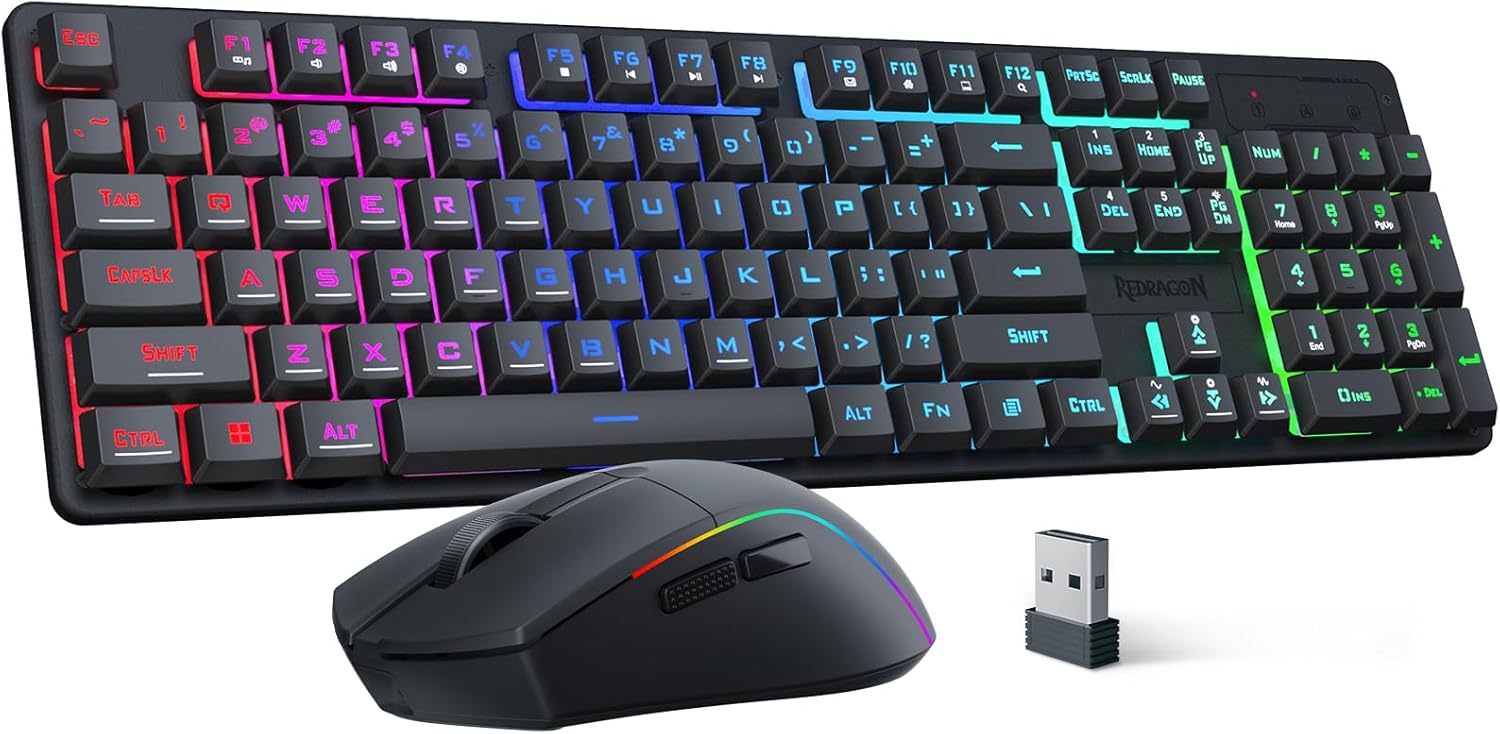 Redragon S107KS Wireless Gaming Keyboard and Mouse Combo
|
6.8/10 | Buy | ||
 Redragon K503 Wireless Gaming Keyboard
|
6.2/10 | Buy | ||
| Best Overall |
 GravaStar Mercury K1 Lite 75% Gaming Keyboard
|
9.8/10 | Buy |
ASUS ROG Strix Scope II 96 Wireless Mechanical Keyboard
A compact 96% mechanical keyboard that delivers full-size functionality without eating your desk space. Built around ASUS's SpeedNova wireless tech and factory-lubed ROG NX Snow switches, it handles gaming, streaming, and daily work equally well. The tri-mode connectivity and 1,500-hour battery life make it genuinely versatile for users who switch between devices.
Pros
- Space-saving 96% layout retains number pad and arrow keys while staying just 1cm wider than 80% boards
- Tri-mode connectivity (USB, 2.4GHz wireless with low latency, Bluetooth for up to 3 devices) covers most use cases
- Hot-swappable switches and web-based Gear Link software let you customize without installing bloatware
- Dual dampening system (silicone layer plus switch pads) effectively reduces pinging for cleaner acoustics
- Excellent 4.6-star rating from over 1,000 reviews indicates consistent real-world satisfaction
Cons
- Premium positioning means it costs more than entry-level gaming keyboards with fewer connectivity options
- Web-based software dependency could be frustrating if you prefer offline control or need offline macro editing
- Limited to ROG NX Snow or Storm switches out of box; switching to third-party switches requires compatibility verification
Logitech G515 TKL Wireless Gaming Keyboard
A slim, tenkeyless mechanical keyboard with factory-lubed linear switches and tri-mode connectivity (LIGHTSPEED wireless, Bluetooth, wired). Delivers 36 hours of battery life and customizable RGB lighting via G HUB, making it suitable for both gaming and extended work sessions.
Pros
- Ultra-thin 22mm profile with responsive 1.3mm actuation distance and factory-lubed switches for smooth typing
- Tri-mode connectivity with 1ms LIGHTSPEED wireless report rate and 2:1 pairing capability
- 36-hour battery life supports extended use without frequent charging
- Double-shot PBT keycaps resist oils and provide durability; customizable via KEYCONTROL technology
- Quiet operation thanks to sound dampening construction and foam layer
Cons
- Backlighting customization requires Logitech G HUB software; built-in Windows 11 lighting controls don't work as smoothly
- RGB brightness insufficient for some users in well-lit environments, even at maximum setting
- Compact tenkeyless design means no numpad, which some users regret after purchase
AULA S98 Pro Wireless Mechanical Keyboard with LCD Screen
A feature-rich 96-key mechanical keyboard combining a built-in LCD screen with multi-function knob, hot-swappable switches, and tri-mode connectivity. Suited for gamers and professionals seeking customization and device flexibility, though driver support is Windows-only in wired mode.
Pros
- LCD screen with knob control adds unique productivity feature for monitoring system status and quick device switching across five saved devices
- Hot-swappable design with included switch puller allows customization without soldering
- Tri-mode connectivity supports Windows, Mac, iOS and Android devices including gaming consoles
- Pre-lubricated switches and five-layer sound deadening construction deliver smooth typing and reduced hollow noise
- Durable PBT keycaps with south-facing LEDs provide clear backlighting and long-term wear resistance
Cons
- Driver software and customization features including screen GIF upload, time sync, and macro programming require Windows system in wired mode only
- No water resistance rating makes it unsuitable for spill-prone environments
- Charging requires standard USB computer port, incompatible with fast chargers which limits convenience
AULA F75 Pro 75% Wireless Mechanical Keyboard
A compact 75% mechanical keyboard built for gamers and professionals who want flexibility without sacrificing desk space. The tri-mode connectivity (Bluetooth, 2.4GHz, USB-C) lets you jump between five devices seamlessly, while the hot-swappable design and pre-lubed Reaper switches deliver smooth, creamy typing right out of the box. The multi-function knob and programmable keys add practical control for gaming and office work alike.
Pros
- Tri-mode connectivity with five-device pairing simplifies switching between PC, laptop, tablet, and phone
- Hot-swappable socket supports both 3-pin and 5-pin switches for easy customization without soldering
- Pre-lubricated stabilizers and Reaper switches provide smooth keystroke feel with minimal rattle
- 4000mAh battery delivers extended wireless runtime on a single charge
- Side-printed PBT keycaps resist fading and sweat, with gradient finish that complements RGB lighting
- Multi-function knob controls brightness and media in one tactile control
Cons
- 75% layout removes numpad and some function keys, which may inconvenience heavy spreadsheet users
- RGB customization requires driver software installation for full macro and lighting effect access
- Limited information on actual battery life duration under typical use conditions
Redragon K673 PRO 81-Key Wireless Gaming Keyboard
A compact 80% mechanical keyboard with tri-mode connectivity (USB-C, Bluetooth, 2.4GHz), gasket mounting with 5-layer noise dampening for a creamy typing feel, and a single control knob for brightness and media. Reviewers praise the build quality, quiet-but-tactile sound, and strong battery life for the price point.
Pros
- Flexible multi-mode connectivity lets you switch between wired, Bluetooth, and 2.4GHz wireless without re-pairing
- Gasket construction with 5-layer noise dampening delivers a softer, quieter mechanical typing experience than typical budget boards
- Hot-swappable sockets accept 3-pin and 5-pin switches for future customization
- Single knob control for brightness and media playback simplifies daily use without extra key combinations
- Exceptional battery longevity reported by users, with some charging only monthly despite daily use
Cons
- Compact 81-key layout omits dedicated media keys and navigation cluster, limiting productivity workflows
- Charging indicator unclear (LED turns off when charged, risking confusion about battery status)
- Keyboard sits higher than membrane keyboards, potentially causing wrist fatigue without a palm rest
Redragon S107KS Wireless Gaming Keyboard and Mouse Combo
A budget-friendly wireless keyboard and mouse set with tri-mode connectivity (2.4G, Bluetooth, wired), RGB lighting, and a 10,000 DPI mouse. Solid for casual gaming and everyday use, though it's a membrane keyboard rather than mechanical.
Pros
- Stable wireless connection with minimal lag across all three connection modes
- Lightweight mouse design reduces hand fatigue during extended use
- Excellent battery endurance, reaching up to 200 hours per charge
- Comprehensive software customization for macros, DPI, polling rate, and RGB effects
- Good value for a wireless combo with both keyboard and mouse included
Cons
- Membrane keyboard, not mechanical, which limits tactile feedback and keycap customization options
- 2.4G mode can experience slow reconnection after idle periods, sometimes requiring receiver replug
- Bluetooth setup reported as occasionally difficult by some users
- Mouse lighting mode switches to breathing/color-changing after inactivity, with limited control over default behavior
Redragon K503 Wireless Gaming Keyboard
A tri-mode wireless gaming keyboard with RGB backlighting and programmable keys, designed for PC gamers seeking multi-device connectivity. The 4000mAh battery and 25-key anti-ghosting support extended gaming sessions with customizable lighting and macro assignments.
Pros
- Seamless multi-device switching within 10-meter range, ideal for desk setup with multiple devices
- Extended battery life (300 hours with RGB off) reduces frequent recharging
- Programmable software allows custom macro assignments and lighting profiles
- Anti-ghosting support enables reliable simultaneous key presses for gaming
- Includes wrist rest and comes with warranty plus technical support
Cons
- Membrane switches provide less tactile feedback compared to mechanical alternatives, less suitable for typists
- Limited reviews available (4.4 rating with zero verified buyer reviews) restricts real-world durability insights
- Software download required for customization; functionality depends on Redragon.com availability
GravaStar Mercury K1 Lite 75% Gaming Keyboard
A compact 75% mechanical keyboard with transparent design and tri-mode wireless connectivity, built around custom GravaStar x BSUN linear switches praised for smooth, satisfying acoustics. Best suited for gamers and typists who value aesthetics, portability, and mid-range pricing without premium materials.
Pros
- Striking visual design with fully transparent construction that amplifies RGB lighting
- Smooth, satisfying typing sound described by users as creamy and buttery without excessive noise
- Responsive linear switches deliver consistent performance for gaming and long typing sessions
- Flexible connectivity options eliminate re-pairing hassles across gaming PC, laptop, and tablets
- Includes extra switches and cleaning tools for maintenance and customization
Cons
- Plastic enclosure rather than aluminum limits perceived premium feel at higher price points
- No visible battery level indicator, requiring guesswork on charging intervals
- Clear keycaps with RGB lighting limited to key caps only, not surrounding case
Wireless Gaming Keyboards Buying Guide
Choosing a wireless gaming keyboard involves more trade-offs than a standard wired board. Latency, battery life, switch type, form factor, and acoustic tuning all interact in ways that matter differently depending on how and where you play.
The subsections below break down every factor you should weigh before committing to a purchase.
Wireless Protocol and Latency

Not all wireless is created equal. The three common protocols you will encounter are 2.4 GHz RF dongle, Bluetooth 5.0, and USB-C wired passthrough.
Among these, 2.4 GHz RF is the gold standard for competitive gaming because it achieves sub-millisecond polling intervals that are effectively indistinguishable from wired input in real-world play.
Logitech’s LIGHTSPEED and ASUS ROG’s own 2.4 GHz implementations are widely cited by expert reviewers as class-leading examples of this technology.
Bluetooth 5.0, while improved over earlier versions, introduces slightly higher and more variable latency, making it better suited for productivity, typing, or casual gaming rather than fast-paced competitive titles like FPS games.
If you plan to use the keyboard across multiple devices simultaneously, a good Bluetooth implementation is a genuine convenience. For single-device, performance-first setups, always prioritize 2.4 GHz.
Many of the picks in this guide offer tri-mode connectivity, so you get the best of both worlds without compromise.
If you play a lot of precision shooters, you may also want to read about gaming keyboards built for FPS to see how wireless latency stacks up against wired in that context.
Battery life varies dramatically across this category. Entry-level boards with heavy RGB lighting may drain in as few as 10 to 15 hours, while more efficient boards with optimized backlighting can last several weeks on a single charge.
Check whether the keyboard supports USB-C charging while in use, as this eliminates downtime entirely during longer sessions.
Switch Type: Mechanical vs. Membrane

Mechanical switches remain the dominant choice for serious gamers because they offer consistent actuation, a defined tactile or linear travel, and a much longer rated lifespan than membrane alternatives.
Within the mechanical category, linear switches (no tactile bump, smooth travel) are popular for fast key presses in gaming, while tactile switches provide deliberate feedback that many typists and hybrid-use players prefer.
If a keyboard advertises pre-lubed switches from the factory, that typically means smoother travel and reduced spring ping straight out of the box, which is a genuine quality-of-life upgrade.
Membrane keyboards are considerably quieter and tend to be less expensive. The Redragon K503 in this guide is a strong example of a wireless membrane board that punches above its price point with programmable RGB and a bundled wrist rest.
If your gaming environment requires discretion, such as a shared office or bedroom setup, silent membrane may genuinely suit your needs better than a loud clicky mechanical board.
That said, membrane switches generally feel mushier and wear out faster, so set your expectations accordingly.
Hot-swappable sockets are increasingly common even at mid-range price points.
Hot-swap lets you pull and replace switches without soldering, which is transformative for long-term ownership: you can start with linear switches and swap to tactile or clicky later without buying a whole new board.
Several picks here, including the AULA F75 Pro and the GravaStar Mercury K1 Lite, include hot-swap support as a standard feature.
Form Factor and Layout
Wireless gaming keyboards come in several standardized layouts, and the right one depends on your desk space, gaming habits, and whether you also use the keyboard for productivity.
Full-size boards include a numpad and function row, providing maximum key coverage but requiring the most desk real estate. The Redragon K503 targets this segment.
TKL (tenkeyless, roughly 87 keys) strips the numpad while retaining the function row and arrow cluster, striking a balance many gamers prefer.
Compact layouts have surged in popularity. The 96% layout used by the ASUS ROG Strix Scope II 96 keeps virtually all keys in a slightly tighter footprint without sacrificing the numpad.
The 80% and 75% layouts, seen in the Redragon K673 PRO, AULA F75 Pro, and GravaStar Mercury K1 Lite, remove the numpad and condense navigation keys, resulting in a notably smaller board that is easier to travel with and leaves more room for mouse movement, which competitive players particularly value.
If you frequently move your setup or game at a desk where every centimeter of mouse room matters, a 75% or 80% board is worth strong consideration.
Pairing a compact wireless keyboard with a quality gaming peripheral setup makes for a genuinely clean, responsive rig.
Some keyboards in this guide also include a dedicated scroll knob or multi-function control wheel, a feature seen on the AULA S98 Pro and Redragon K673 PRO.
This dial is handy for volume control, media scrubbing, and in some games can be mapped to in-game functions. It is a minor but quality-of-life feature that experienced users tend to appreciate more over time.
Acoustic Tuning and Build Quality

Sound profile has become a major talking point in the enthusiast keyboard community, and for good reason: the difference between a hollow, pingy board and a deep, thocky one is immediately noticeable and affects perceived quality significantly.
Gasket mounting, which suspends the PCB and plate assembly on silicone or foam gaskets rather than screwing it directly into the case, is the most effective structural approach for reducing harshness and improving acoustic character.
The GravaStar Mercury K1 Lite and the Redragon K673 PRO both use gasket-mount construction, contributing to their more premium sound profiles relative to their price points.
Noise dampening layers, pre-lubed switches, and PBT keycaps (which are thicker and produce a deeper sound than ABS) all compound to produce that sought-after creamy, thocky keystroke.
Many boards now advertise multi-layer dampening, such as the five-layer system in the Redragon K673 PRO. When comparing boards on acoustics, look for gasket mount, foam or silicone dampening layers, and factory-lubed linear switches as the three most impactful variables.
Build quality is harder to assess without handling a unit, but chassis material (aluminum top plate vs. full plastic), keycap thickness, and weight are reliable proxies. Heavier keyboards tend to stay planted and feel more premium.
Boards with an aluminum top frame, such as the ASUS ROG Strix Scope II 96, generally earn higher marks from reviewers on perceived solidity.
The type of stabilizers used under larger keys (spacebar, Enter, Backspace) also affects sound and wobble, so check whether a board includes pre-lubed or upgraded stabilizers.
RGB, Software, and Programmability

RGB lighting has become a baseline expectation in gaming keyboards, but implementation quality varies widely. Boards with per-key RGB allow granular lighting control, while zone-based systems only light sections of the keyboard at once.
LIGHTSYNC RGB from Logitech and the ROG Aura Sync ecosystem from ASUS are the two most mature lighting platforms in this guide, both offering deep customization and integration with other peripherals for synchronized effects.
Programmability matters more than it might seem. Macro support, per-key remapping, and onboard memory (which stores profiles directly on the keyboard rather than requiring software to be running) are all features worth checking.
The Redragon K503 includes fully programmable keys with onboard storage, which is genuinely useful for budget-oriented buyers who want customization without paying a premium.
More advanced users may prefer the deep customization suites that accompany ASUS Armoury Crate or Logitech G HUB, both of which also manage firmware updates and battery status.
One increasingly common feature is a built-in display, as seen on the AULA S98 Pro, which shows battery level, connectivity mode, and other status information at a glance.
For users who juggle multiple devices or care about battery awareness, this adds real utility. It is a feature still rare enough to stand out and worth factoring into your decision if you value transparency over your keyboard’s current state.
For a broader look at how wireless gaming keyboards fit into a complete peripheral setup, our comprehensive gaming keyboards guide covers wired and wireless options side by side across every budget.
Budget vs. Premium: Where to Draw the Line
The wireless gaming keyboard market today has a clear quality jump at the mid-range price tier.
Budget boards, like the Redragon K503 and the Redragon S107KS combo, deliver solid wireless functionality and decent RGB at accessible price points, but typically use membrane switches, lighter plastic chassis, and simpler connectivity.
They are a fine entry point for casual gamers or anyone upgrading from a wired keyboard for the first time.
The mid-range sweet spot, represented here by options like the Redragon K673 PRO and AULA F75 Pro, is where mechanical switches, gasket mounting, hot-swap sockets, and PBT keycaps all become accessible simultaneously.
These boards punch well above their price class by borrowing enthusiast-grade features once reserved for flagship products. If you are willing to invest a bit more, the value density in this tier is exceptionally high right now.
Premium boards from ASUS ROG and Logitech command higher prices for a reason: mature wireless implementations, deeper software ecosystems, premium switch options, and longer brand support.
If you use your keyboard across a full gaming peripheral ecosystem and want everything to play nicely together, investing in a keyboard from a major brand with robust software support often pays off over a multi-year ownership horizon.
For anyone building out a full gaming space, a sturdy gaming desk is the natural complement to a quality wireless keyboard.
Why You Should Trust Us
REMOVU is an independent review publication. We have no manufacturer relationships that influence our rankings, and we do not accept paid placements.
Every keyboard in this guide was evaluated using our structured research methodology: we analyzed published specifications, cross-referenced expert review consensus from credible sources, and weighted verified buyer feedback to arrive at each product’s REMOVU Score on a 0 to 10 scale.
We do not conduct our own product trials; our evaluations are grounded in research, published data, expert review consensus, and verified buyer feedback.
Our REMOVU Score reflects a consistent set of criteria applied equally across every product in a category.
For wireless gaming keyboards, those criteria include wireless protocol performance, switch quality and acoustic tuning, build and chassis quality, feature set relative to price, software and programmability, and long-term reliability signals drawn from verified purchase reviews.
Products are ranked by score, not by affiliate commission rates.
We may earn a commission if you purchase through a link on this page, but that relationship has no bearing on which products we recommend, how we score them, or the order in which they appear.
Final Thoughts
After thoroughly researching this category, it is clear that the wireless gaming keyboard market has matured to the point where there is a genuinely strong option at every price tier. Here are our standout picks with their earned designations:
- Best Overall: GravaStar Mercury K1 Lite earns the top spot with the highest REMOVU Score in this roundup, combining gasket-mount construction, tri-mode wireless, hot-swappable pre-lubed linear switches, and a transparent aesthetic that stands out visually. It delivers enthusiast-grade feel at a mid-range price point.
- Best Premium Pick: ASUS ROG Strix Scope II 96 Wireless is the choice for gamers who want a mature ecosystem, class-leading wireless performance, and a premium 96% layout with hot-swappable ROG NX Snow linear switches and PBT keycaps. Its REMOVU Score reflects consistently strong performance across every evaluation criterion.
- Best Thin Wireless Design: Logitech G515 LIGHTSPEED TKL appeals to users who value LIGHTSPEED wireless reliability in a sleek, low-profile tenkeyless form factor with double-shot PBT keycaps and LIGHTSYNC RGB. It is a top pick for those who want a desk-friendly, travel-compatible wireless board from a brand with deep software support.
- Best for Features Per Dollar: AULA S98 Pro packs an onboard status display, knob, tri-mode connectivity, hot-swappable sockets, and pre-lubed linear switches into a compact footprint at a mid-range price, making it one of the most feature-dense options in this category relative to its cost.
- Best Budget Entry: Redragon K503 Wireless is the right call for buyers who want a full-size wireless keyboard with RGB, multimedia keys, programmable switches, and a bundled wrist rest at an accessible budget price point. It does not match the acoustic or switch quality of pricier picks, but it reliably delivers on the fundamentals for casual and entry-level gamers.
If you are still deciding between a standalone keyboard and a combo package, the Redragon S107KS Wireless Keyboard and Mouse combo is worth a look for anyone outfitting a new gaming desk from scratch.
Whichever direction you go, the picks in this guide represent the strongest available options based on our research, and each one has earned its place through consistent performance across our evaluation criteria.
For a deeper dive into the broader keyboard landscape, our FPS-focused keyboard guide is a useful companion if competitive shooters are your primary genre.
Frequently Asked Questions
Are Wireless Gaming Keyboards Good Enough for Competitive Play?
Yes, with the right wireless protocol. Modern 2.4 GHz RF keyboards, such as those using Logitech’s LIGHTSPEED or ASUS ROG’s proprietary dongle technology, achieve polling rates and latency figures that are effectively indistinguishable from wired in competitive play.
Bluetooth is less suitable for fast-paced competitive titles due to slightly higher and less consistent latency. For most players, including those competing at a semi-serious level, a 2.4 GHz wireless keyboard removes no meaningful disadvantage compared to wired.
Pairing it with a low-latency gaming monitor and optimized peripherals ensures your full input chain stays sharp.
How Long Do Wireless Gaming Keyboards Last on a Single Charge?
Battery life ranges widely depending on RGB brightness settings and wireless protocol. With RGB fully enabled, expect anywhere from around 10 hours on budget boards to 40 or more hours on more efficient mid-range options.
Turning RGB off or down to low brightness dramatically extends battery life, with some boards rated for weeks of use in RGB-off mode.
Most modern wireless keyboards charge via USB-C, and many support wired passthrough so you can charge and play simultaneously without interruption.
What Does Hot-Swappable Mean and Why Does It Matter?
A hot-swappable keyboard lets you remove and replace individual switches without soldering. This matters because it significantly extends the useful life of your board: if your switches wear out, you can replace them instead of buying a new keyboard.
It also lets you experiment with different switch types (linear, tactile, clicky) to find the feel you prefer without committing to a single feel at purchase.
Several picks in this guide, including the GravaStar Mercury K1 Lite, AULA F75 Pro, and AULA S98 Pro, include hot-swap sockets as standard features.
If long-term customization and value are priorities, hot-swap support is one of the most important checkboxes on your list.
Is a 75% or TKL Layout Better for Gaming?
Both are solid choices, but for different reasons. TKL retains the full function row and dedicated arrow and navigation cluster in a familiar layout, which many gamers prefer if they also use the keyboard for productivity or media controls.
The 75% layout is more compact, saving desk space and giving you more room for mouse movement, which is a tangible advantage in low-sensitivity FPS play where wide mouse sweeps are common.
If desk space is at a premium or you travel with your keyboard regularly, a 75% wireless board is hard to beat. If you want a familiar layout closer to full-size, TKL is the safer comfort choice.
Both layouts are well-represented in this guide, so compare the specific models against your own desk setup before deciding. You might also find it helpful to browse our full gaming hardware coverage for related picks that complement your keyboard choice.
Can I Use a Wireless Gaming Keyboard with a Console or Multiple Devices?
Yes. Most keyboards with Bluetooth support can pair with consoles, tablets, and smartphones in addition to PCs.
Tri-mode keyboards let you store multiple device pairings and switch between them with a hotkey, which is extremely convenient if you work on a laptop and game on a desktop or console from the same desk.
Note that gaming-specific features like software customization and RGB sync typically only work when connected to a PC with the companion software installed.
For console use, basic functionality such as typing and navigation works reliably, but advanced macro and lighting features may be limited or unavailable depending on the platform.
About the author
Isabella covers e-readers for REMOVU, comparing screen clarity, battery life, and reading comfort. She helps bookworms trade glare and distractions for weeks of easy reading.