7 Ways to Repurpose Your Old Wii Remote as a Smart Home Controller
Transform your old game remote into a Home Assistant control device with these seven practical methods.
 By Ava Herrera
Updated October 20, 2026
By Ava Herrera
Updated October 20, 2026

That old Nintendo Wii Remote sitting in your drawer doesn’t have to collect dust forever. With its built-in Bluetooth connectivity, motion sensors, infrared camera, and physical buttons, the classic game controller has all the hardware needed to become a useful smart home control device. If you run Home Assistant to manage your connected devices, several practical methods exist to transform your Wii Remote into a dedicated controller without breaking the bank.
1. Install an ESP32 Board Inside Your Wii Remote
One of the most elegant solutions involves replacing the original circuit board with a custom ESP32-based module. The OpenMote project accomplishes exactly this by fitting a specialized PCB built around an ESP32-S3 processor into your existing Wii Remote shell. This upgrade maintains the familiar form factor and button layout while completely reimagining what the device can do.
Once installed, your Wii Remote runs ESPHome firmware and connects directly to your home Wi-Fi network. When you press any button or use the motion sensors, the input travels straight to Home Assistant, where you can assign custom actions to every control. The infrared emitter works too, learning codes from traditional IR remotes so you can use your Wii Remote to manage your television or air conditioning unit. OpenMote comes in two configurations available for pre-order: a fully assembled unit or just the circuit board if you prefer to perform the installation yourself. This approach gives you complete flexibility over device control without requiring any complex coding.
2. Use CWiid to Connect via Raspberry Pi
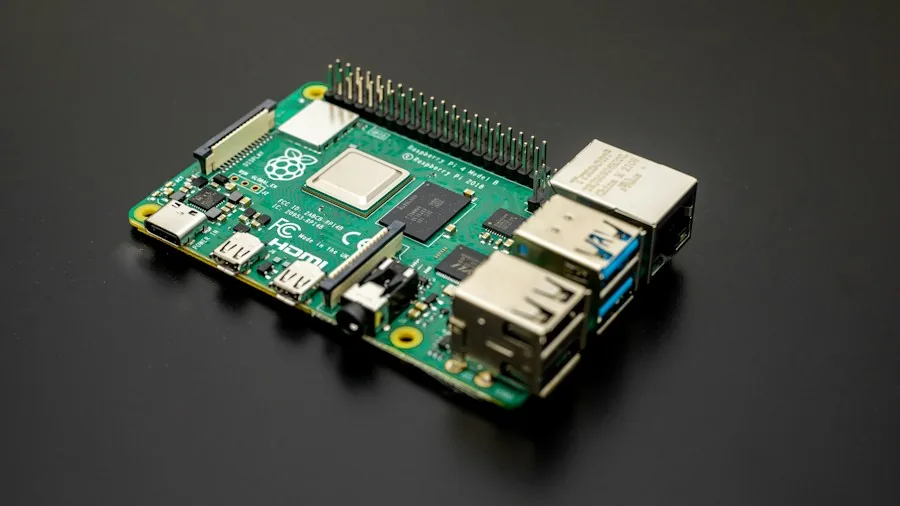
If you prefer a less invasive modification, CWiid offers an excellent alternative. This collection of open-source Linux tools allows your standard, unmodified Wii Remote to communicate with a Raspberry Pi over Bluetooth. No disassembly or custom hardware swapping is necessary, which makes this approach accessible even for users without electronics experience.
The process involves installing the CWiid software on your Pi and writing Python scripts to handle the Wii Remote inputs. You can then forward those signals to Home Assistant through multiple pathways: direct REST API calls, MQTT publishing, or by using the wminput tool to treat your Wii Remote as a mouse. Many users combine this with an HDMI connection from the Pi to their television, opening Home Assistant in a web browser and controlling the dashboard directly. The visual interface works seamlessly when paired with Wii Remote pointer controls, making smart home management intuitive and accessible from your couch.
3. Turn It into a Windows Input Device with Touchmote
For Windows users, Touchmote provides a straightforward software solution that requires no additional hardware or Raspberry Pi. This application enables your Wii Remote to function as a mouse or touchscreen input device, translating the remote’s motion into cursor movement on your screen.
The software detects infrared light from your Wii Sensor Bar (or any infrared emitter), calculating your pointer location with surprising accuracy. Dual sensor bar configurations provide even better precision for large displays. Since Touchmote handles all the input translation at the operating system level, you simply open Home Assistant in any web browser and use the Wii Remote to navigate and interact with your smart home dashboard. This method sidesteps the need for coding, custom scripts, or firmware modifications entirely.
4. Leverage the Motion Sensors for Gesture Control
Beyond button presses, both the OpenMote and CWiid approaches tap into the Wii Remote’s accelerometers and gyroscopes for motion-based automation. Imagine dimming your lights with a flick of the wrist, triggering evening routines with a shake, or toggling scenes with specific gestures. The flexibility of Home Assistant’s automation engine means you can map virtually any motion pattern to any smart home action.
5. Build a Unified Control Hub for Multiple Rooms
Whether you choose the ESP32 route or the Raspberry Pi solution, your Wii Remote becomes a centralized controller capable of managing devices across your entire home. Program different buttons to control lighting in specific rooms, adjust thermostat settings, or activate preset automation scenes. This single device approach reduces the number of remotes and apps cluttering your living space.
6. Combine with IR Capabilities for Legacy Device Control
Many homes still contain infrared-controlled devices that predate smart home integration. Your Wii Remote’s infrared emitter can learn codes from existing remotes, creating a hybrid controller that handles both modern smart devices and older equipment through a single interface. Program one button to adjust your smart thermostat while another controls your conventional projector.
7. Maintain Backward Compatibility for Gaming
Even after conversion, your Wii Remote retains its original capabilities. The OpenMote specifically supports pairing as a standard Bluetooth LE gamepad with PCs, Android phones, and Steam Deck systems. You’re not sacrificing functionality; you’re expanding it. Switch between smart home control mode and gaming mode depending on your immediate needs.
Your aging Wii Remote can enjoy a second life as a capable smart home interface. Choose the installation method that best matches your technical comfort level and existing infrastructure, whether that’s the elegant OpenMote solution, the accessible Raspberry Pi approach, or the straightforward Windows software option. Each pathway transforms a forgotten device into something genuinely useful for modern home automation.
About the author
Ava is REMOVU's laptop writer, balancing speed, battery life, and build quality against price across the whole range. She helps readers find the sweet spot as each new chip shifts what a dollar buys.