iPad Keyboard Globe Symbol Explained: What Buyers Should Know
That globe symbol on your iPad keyboard isn't random. Here's what it does and how to use it.
 By Josephine Mason
Updated November 9, 2026

If you’ve recently purchased an iPad or Mac and noticed a peculiar key with a globe symbol on the keyboard, you might be wondering what it does. That globe icon represents the Function key, commonly abbreviated as Fn, and it’s a powerful tool that many iPad users overlook. Understanding this key can significantly enhance your productivity and unlock features you didn’t know existed on your device.
What Is the Globe Symbol Key?
Apple takes a distinctive approach to labeling modifier keys compared to other manufacturers. While traditional keyboards display the Function key simply as Fn, Apple replaces this text with a globe symbol on its iPad and Mac keyboards. Despite the visual difference, the purpose remains identical: it serves as a shortcut modifier that activates additional keyboard commands and features beyond what you see on the surface.
The Fn key sits in the bottom-left corner of most Apple keyboards, positioned near the Control, Option, and Alt keys. When pressed alone or combined with other keys, it unlocks a secondary layer of functionality that transforms your typing experience. This is particularly valuable for iPad keyboards designed for productivity workflows, where quick access to system features can save valuable time.
Function Key Capabilities and Shortcuts
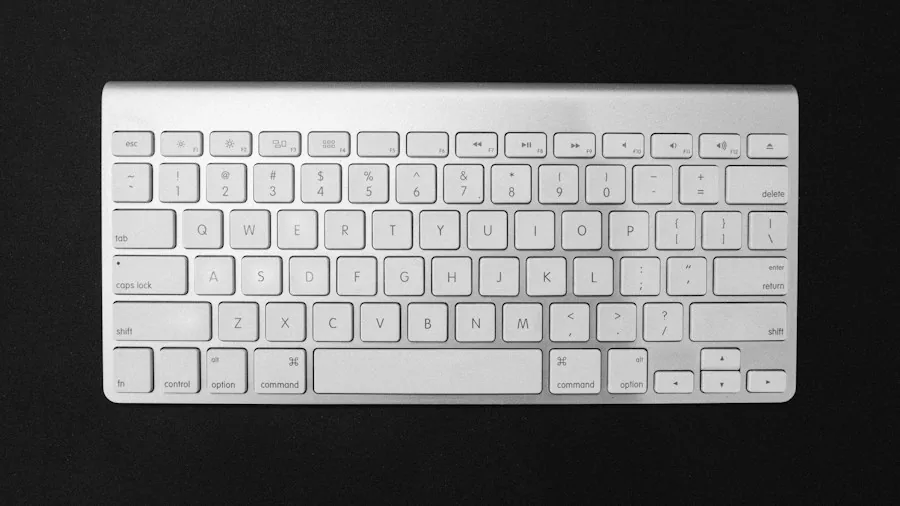
The globe key becomes truly useful when combined with the top row of keys on your keyboard. These keys typically display symbols for common actions: screen brightness adjustment, Mission Control access, Spotlight search, media playback controls, and volume management. When you press the Fn key in combination with these symbols, you gain instant access to these functions without navigating through menus.
Beyond the top row, the globe key opens up an entire vocabulary of shortcuts. Pressing Fn combined with the A key will show or hide your Dock, providing immediate access to your most-used applications. Fn-C brings up your Control Center, where you can manage connectivity settings, battery information, and other system controls. Voice dictation enthusiasts will appreciate Fn-D, which starts or stops voice input without touching the trackpad or screen. Fn-N toggles your Notification Center, allowing you to review alerts and messages at a glance.
Customizing Your Keyboard Behavior
Not every shortcut operates identically across all applications and operating systems. Depending on your macOS version and individual keyboard settings, certain commands may function differently or require adjustment. Some applications prioritize their own keyboard shortcuts over system-level functions, which means a particular Fn combination might behave unexpectedly in specific programs.
The good news is that most macOS versions give you complete control over how your top-row keys function. If you find yourself frequently needing the traditional F1, F2, F3 keys for specific applications, you can modify your settings to make these work as standard function keys instead. This customization option ensures that your iPad setup adapts to your workflow rather than forcing you to adapt to the keyboard.
What This Means for Shoppers

For consumers considering an iPad purchase or upgrading their keyboard accessories, understanding the Fn key’s capabilities should factor into your decision. Buyers who frequently use keyboard shortcuts for professional work, creative applications, or productivity tasks will appreciate how thoroughly Apple’s Function key integrates with system features. If you’re evaluating different keyboard options for various budgets and work styles, recognizing which models include easy access to the globe key becomes important.
The globe key represents Apple’s philosophy of providing powerful features with elegant simplicity. Rather than forcing users to memorize complex key combinations or navigate deep menu systems, this single modifier unlocks frequently-needed functions. Whether you’re managing notifications, adjusting display settings, or launching applications quickly, the Fn key streamlines these common tasks into single keypresses.
Maximizing Your Keyboard Investment
To get the most from your iPad keyboard, spend time discovering which Fn shortcuts align with your daily work. Keep a reference list of your most-used combinations nearby until they become automatic. Experiment with different shortcuts in various applications to understand how they interact with your specific workflow. Many users discover that learning even five or six key combinations dramatically improves their typing speed and system navigation efficiency.
The globe symbol key demonstrates how thoughtful design can make technology more accessible and efficient. By taking a few minutes to familiarize yourself with these shortcuts, you transform what appears to be a simple modifier key into a gateway to faster, smoother device operation. Whether you’re a casual user or a power user, the Function key deserves a place in your daily iPad or Mac usage routine.
About the author
Josephine covers mechanical keyboards for REMOVU, comparing switch feel, layout, and build quality for typing and gaming. She helps readers navigate a deeply personal choice with clear, practical advice.