The 8 Best Chromebooks for Students
Finding a Chromebook that keeps up with a full school day matters more than chasing specs. We researched top picks from Lenovo, Acer, ASUS, and HP to match every student budget and workflow.
 By Eleanor Garcia
Updated July 26, 2026
By Eleanor Garcia
Updated July 26, 2026

Chromebooks have quietly become one of the smartest choices a student can make.
They boot in seconds, run for a full school day on a single charge, receive automatic Chrome OS security updates, and cost significantly less than most Windows laptops or MacBooks.
Whether you are a middle schooler tackling Google Classroom assignments or a college student juggling research papers and video calls, there is a Chromebook built around your workflow.
The challenge is cutting through the noise: display quality, processor tier, storage type, and form factor all vary widely across price points, and a poor choice can leave you frustrated by sluggish performance or a screen that is hard to read in a bright lecture hall.
REMOVU researched every model on this list by analyzing published specifications, synthesizing expert review consensus from across the tech press, and weighing verified buyer feedback.
No single flashy spec drove our picks; we looked at the complete package each Chromebook delivers for real student use. Brands like Lenovo, Acer, ASUS, and HP all made our shortlist, spanning convertible 2-in-1 laptops and classic clamshell designs.
Read on for our top picks ranked below.
| Award | Product | REMOVU Score About REMOVU ScoreThe REMOVU Score is our own rating from 0 to 10, based on performance, design and build, ease of use, and value. It reflects independent research and is never influenced by manufacturers, retailers, or affiliate commissions. Learn more › | Price | |
|---|---|---|---|---|
| Best Premium |
 Lenovo Chromebook Plus i 15 inch WUXGA
|
8.1/10 | Buy | |
| Best Overall |
 Acer Chromebook Plus 515 15.6" Touch
|
8.8/10 | Buy | |
| Best Budget |
 HP Chromebook 14 inch, Intel N100, 8GB RAM
|
7.9/10 | Buy | |
| Best Value |
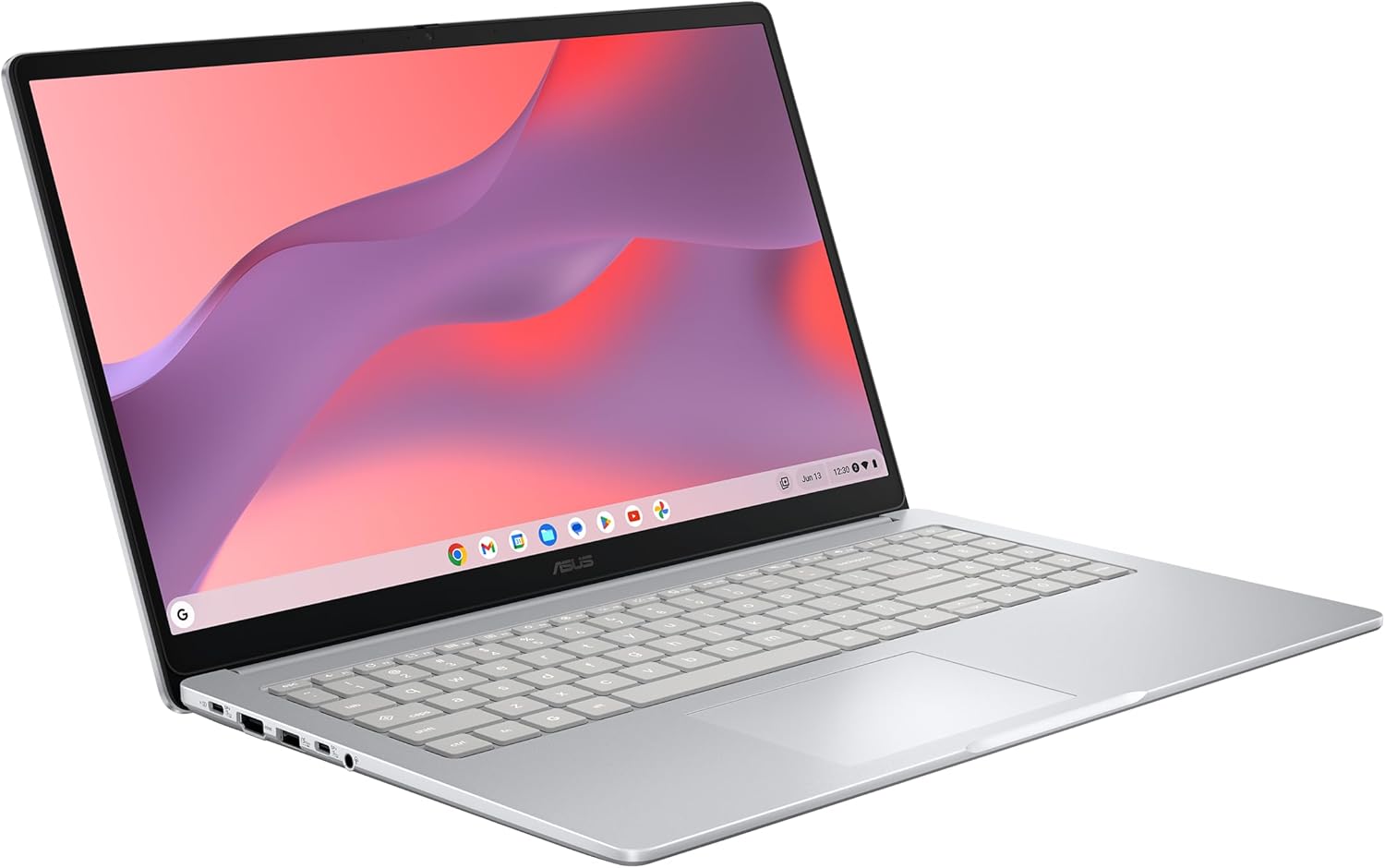 ASUS Chromebook CX15 15.6-inch FHD
|
8.4/10 | Buy | |
 ASUS Chromebook Flip CX1 14" 2-in-1 Convertible
|
7.2/10 | Buy | ||
 Lenovo IdeaPad Flex 3i Chromebook 12.2
|
7.0/10 | Buy | ||
 Acer Chromebook 15.6 FHD Intel N4500
|
6.2/10 | Buy | ||
 HP 14 Chromebook N4120 with 14-Hour Battery
|
7.3/10 | Buy |
Lenovo Chromebook Plus i 15 inch WUXGA
A lightweight 15-inch Chromebook built for productivity and cloud-based work, powered by Intel Core processors and integrated Google Gemini AI features. The tall 16:10 display and solid build quality make it practical for professionals who need portability without sacrificing screen real estate. Best suited for users already invested in Google's ecosystem and cloud-first workflows.
Pros
- Large 15.3-inch WUXGA display with 16:10 aspect ratio reduces scrolling and improves multitasking visibility
- Lightweight at 3.44 lbs with military-grade durability, balancing portability with ruggedness
- Google Gemini AI integration for handwriting-to-text conversion, content simplification, and native assistant features
- Physical webcam shutter for privacy control plus fingerprint reader for quick, secure login
- Comprehensive connectivity with dual USB-C, dual USB-A, HDMI, and Wi-Fi 6E for streaming and video calls
Cons
- Limited to Chrome OS ecosystem, which restricts software compatibility for users needing traditional desktop applications
- Intel Core N355 processor is entry-level, potentially limiting performance for heavy video editing or intensive creative work
- No dedicated graphics; relies on integrated Intel graphics, which may struggle with demanding cloud gaming or 3D applications
Acer Chromebook Plus 515 15.6" Touch
A productivity-focused Chromebook with a spacious 15.6-inch touchscreen and Intel Core i3 processor that handles everyday work, content creation, and streaming without breaking a sweat. The inclusion of Google AI Pro for a year and military-grade durability make it a solid choice for students and remote workers seeking reliability on a budget.
Pros
- Large 15.6-inch Full HD IPS touchscreen with narrow bezels provides immersive viewing for work and entertainment
- Intel Core i3-1305U processor with 8GB LPDDR5X and 256GB SSD delivers smooth multitasking and file handling
- 12 months of Google AI Pro, 2TB cloud storage, and access to advanced apps like Adobe Photoshop and LumaFusion included
- Wi-Fi 6E and Bluetooth 5.1 ensure fast, reliable connectivity across multiple bands
- Up to 10 hours of battery life supports extended work sessions away from power
- MIL-STD 810H military-grade durability certification reduces worry about drops and daily wear
Cons
- HD webcam (720p) is basic for professional video calls compared to 1080p standards on comparable laptops
- Chrome OS limits offline functionality and traditional software compatibility, requiring internet for full productivity
- 8GB RAM and 256GB storage, while adequate, are modest compared to Windows alternatives at similar price points
HP Chromebook 14 inch, Intel N100, 8GB RAM
A budget-friendly 14-inch Chromebook built on Chrome OS with an Intel N100 processor, 8GB RAM, and 128GB storage. The HD micro-edge display pairs with Intel UHD graphics to handle streaming and light tasks, while the sustainable design using recycled materials appeals to eco-conscious buyers. Best suited for students, remote workers, and everyday browsing on a tight budget.
Pros
- Fast charging: reaches 50% battery in 45 minutes via USB Type-C
- Solid build quality with ocean-bound and recycled plastic materials, EPEAT Gold certified
- Enhanced keyboard with dedicated mic mute, screenshot, and media control keys
- Chrome OS provides automatic updates and strong security without virus concerns
- Intel UHD Graphics capable of streaming 4K content and light gaming
Cons
- 128GB storage may feel limiting for users storing large files locally; Chrome OS relies heavily on cloud storage
- HD resolution (1366x768) is standard but not sharp compared to 1080p+ displays on competitors at similar price points
- Limited to Chrome OS ecosystem, which restricts traditional Windows or macOS software compatibility
ASUS Chromebook CX15 15.6-inch FHD
A portable 15.6-inch Chromebook designed for productivity on the go, combining a spacious display with solid battery endurance. The 128GB storage and 8GB RAM handle everyday multitasking smoothly, while military-grade durability and built-in security make it a practical choice for students and remote workers seeking a lightweight, low-maintenance laptop.
Pros
- Large 15.6-inch FHD anti-glare display with slim bezels for comfortable viewing and multitasking
- Up to 10 hours of battery life supports full workdays and travel without frequent charging
- Fast boot under 10 seconds and automatic updates keep the system responsive
- Military Grade MIL-STD 810H durability in a lightweight 3.53 lbs chassis
- 128GB storage with 8GB LPDDR5 RAM provides adequate space and speed for typical Chromebook use
- Built-in Titan C2 security chip and ChromeOS protection eliminate virus concerns
Cons
- Intel Processor N50 is entry-level, limiting performance for demanding applications or heavy multitasking
- No dedicated graphics, making it unsuitable for gaming or video editing
- Limited to ChromeOS ecosystem, restricting access to traditional Windows or macOS software
ASUS Chromebook Flip CX1 14" 2-in-1 Convertible
A lightweight 2-in-1 Chromebook designed for students and mobile workers who need flexibility without bulk. The 360-degree hinge, 11-hour battery, and four work modes make it adaptable for different tasks, while ChromeOS keeps things simple and secure. Best suited for those committed to Google's ecosystem.
Pros
- 360-degree convertible design with four practical work modes for varied productivity styles
- Impressive 11-hour battery life for all-day use without frequent charging
- Lightweight at 3.59 lbs with MIL-STD 810H durability for portability and reliability
- 14-inch FHD touchscreen with NanoEdge bezels for immersive viewing and interaction
- Solid connectivity including Wi-Fi 6, dual USB-C, and microSD card reader
Cons
- Intel Celeron N4500 processor handles multitasking adequately but lacks power for demanding applications
- 128GB eMMC storage is modest for users who store large files locally, though ChromeOS relies on cloud storage
- ChromeOS ecosystem limits offline functionality and Microsoft Office compatibility compared to Windows or macOS
Lenovo IdeaPad Flex 3i Chromebook 12.2
A lightweight 2-in-1 Chromebook with a 360-degree hinge, Intel N100 processor, and 12+ hour battery life designed for students and everyday users. Strong value for remote learning, web browsing, and light productivity tasks on a budget.
Pros
- Versatile 360-degree hinge transforms between laptop, tent, flip, and tablet modes for different tasks
- Exceptional battery life delivers 12+ hours on a single charge, ideal for full school days
- Lightweight and thin design at 2.76 lbs makes it easy to carry in a backpack
- Bright 12.2-inch touchscreen with TUV Low Blue Light certification reduces eye fatigue
- Affordable entry price for a capable 2-in-1 with modern specs and Chrome OS simplicity
Cons
- 4GB RAM may feel limiting for heavy multitasking or running many browser tabs simultaneously
- Intel N100 processor is entry-level and not suitable for video editing, gaming, or demanding applications
- Glossy touchscreen display can show fingerprints and reflections in bright environments
Acer Chromebook 15.6 FHD Intel N4500
A straightforward 15.6-inch Chromebook built for students and everyday users who need a reliable, portable machine for online classes and productivity. The full-size keyboard with numeric keypad stands out for a device in this category, while ChromeOS keeps things lightweight and secure. Battery life stretches to 10 hours, making it practical for school days without constant charging.
Pros
- Full-size keyboard with dedicated numeric keypad, uncommon on 15.6-inch Chromebooks
- Spacious 15.6-inch FHD display ideal for multitasking and document work
- Up to 10-hour battery life supports full school days
- ChromeOS provides fast boot times and seamless Google Workspace integration
- Lightweight at 3.53 lbs with compact 0.7-inch profile for portability
Cons
- Intel Celeron N4500 processor is entry-level, limiting performance for demanding tasks beyond web browsing and light productivity
- 4GB RAM may feel tight when juggling multiple browser tabs or applications simultaneously
- 64GB storage is modest and relies on cloud reliance, though typical for ChromeOS devices
HP 14 Chromebook N4120 with 14-Hour Battery
This 14-inch Chromebook combines an Intel Celeron N4120 processor with Chrome OS to deliver straightforward computing for students and everyday users. The 14-hour battery life and fast charging make it practical for all-day use, while the 4GB RAM and 64GB storage handle basic multitasking and web browsing without strain.
Pros
- Exceptional battery life up to 14 hours, with fast charging reaching 50% in 45 minutes
- Lightweight at 3.35 pounds and slim 0.72-inch profile for easy portability
- Four-core Intel Celeron N4120 processor with up to 2.6GHz boost handles multitasking reliably
- Solid port selection including USB-A, USB-C, and HDMI for connectivity
- Chrome OS provides fast, secure, and simple operation with integrated Google and Android apps
Cons
- 4GB RAM and 64GB storage are baseline specs that limit heavy multitasking and local file storage
- HD resolution (1366x768) on a 14-inch screen is standard, not sharp compared to higher-resolution displays
- Intel UHD Graphics 600 is integrated graphics only, unsuitable for gaming or video editing
Chromebooks for Students Buying Guide
Picking the right Chromebook comes down to matching its strengths to your daily routine. The sections below walk through every factor that separates a great student Chromebook from a frustrating one, so you can prioritize what actually matters for your coursework and budget.
Processor and Day-to-Day Performance

Chrome OS is lightweight by design, but the processor underneath still determines how smoothly you can flip between a dozen open tabs, stream a lecture, and keep a Google Doc open simultaneously.
Entry-level Intel Celeron and Intel N-series chips handle basic tasks well, especially for younger students whose workloads lean toward Google Workspace apps and simple web browsing.
If you routinely run Google Meet alongside several active browser tabs, an Intel Core i3 or Intel 3-series processor gives noticeably faster response times and cooler sustained performance.
Do not overlook the difference between older quad-core Celeron N4120 designs and newer Intel Processor N100 or N4500 chips. The newer architectures deliver better efficiency, which translates directly to longer battery life and less fan noise in quiet libraries.
For heavy multitaskers or students running Linux apps alongside Chrome OS, stepping up to an Intel Core i3 or higher is worth the investment.
RAM and Storage: What You Actually Need

RAM is the spec students most often underestimate. A Chromebook with 4 GB of RAM can handle everyday schoolwork, but it will stall when you push past eight or ten simultaneous tabs, use progressive web apps, or enable Android app multitasking.
Aim for at least 8 GB if your budget allows, especially for high school and college use. Models on our list with 8 GB RAM deliver a noticeably smoother experience for the price.
Storage is less critical on a Chromebook than on a Windows laptop because most schoolwork lives in Google Drive, but local storage still matters for offline files, Android apps, and Linux packages. eMMC storage is common at budget price points and works fine for typical student use.
UFS storage, found on some newer HP models, offers faster read speeds and is a meaningful upgrade.
SSD storage, which appears in higher-end Chromebook Plus models, is the fastest option and the right call if you download large project files or use Linux development environments.
If a model ships with only 64 GB, check that it has a MicroSD slot for easy expansion.
Display Quality and Size
You will spend hours every day staring at this screen, so display quality deserves real attention.
A full HD 1920×1080 IPS panel is the minimum worth buying for a student laptop; it renders text sharply enough for long reading sessions and holds color well from off-angles when a classmate leans over to look at your work.
HD panels (1366×768) are acceptable on very small or very budget-focused machines, but text looks noticeably softer, which adds eye strain during long study sessions.
Screen size is a personal tradeoff. A 14-inch display is the sweet spot for most students: light enough to carry between classes, large enough for split-screen productivity.
Fifteen-inch models give more screen real estate for research and spreadsheets, and some include a numeric keypad that is handy for accounting or statistics coursework.
If you want the flexibility to take handwritten notes digitally, look for a 360-degree convertible with a touchscreen. An anti-glare coating is a practical bonus for bright lecture halls and outdoor studying.
Battery Life and Portability

A student Chromebook should survive a full school day without requiring a charger. Chrome OS is efficient, but battery life still varies significantly by model.
Look for manufacturers claiming at least 10 to 12 hours of real-world use, and cross-reference those claims with verified buyer feedback that reports consistent all-day performance.
Models that fall short in real-world use, even if they advertise strong numbers, show up quickly in user reviews.
Weight matters just as much as battery capacity. Carrying a 4-plus-pound laptop across campus adds up fast. Most 14-inch Chromebooks land in the 3.0 to 3.5 pound range, which is comfortable for daily commutes.
Compact 12-inch convertibles trim even more weight, making them a practical choice for younger students or those who travel frequently.
Pair portability with a USB-C charging port and you can top up from any modern charger or power bank in a pinch.
Connectivity and Ports

Chromebooks vary widely in port selection, and gaps become frustrating fast.
At minimum, look for one USB-C port for charging and data transfer, one USB-A port for legacy peripherals like flash drives, a headphone jack, and a webcam capable of at least 720p for video calls.
A 1080p FHD webcam is a meaningful upgrade for college students who frequently attend online office hours or remote group projects.
HDMI output is a useful bonus if you present to a class or need to connect to a monitor at home. Wi-Fi 6 or Wi-Fi 6E support keeps you competitive on crowded campus networks where dozens of devices compete for bandwidth.
Bluetooth 5.0 or newer ensures stable connections to wireless earbuds or a Bluetooth mouse. If you use a smartwatch, NFC is occasionally included on newer convertible models. Check the port layout before buying; USB-C-only models can limit you without a hub.
Chrome OS Features and Google AI Integration

Chrome OS has matured significantly. It runs Android apps from the Google Play Store, supports Linux app environments for coding students, and integrates directly with Google Workspace tools that most schools already use.
Chromebook Plus models add Google Gemini AI features, including AI-powered writing assistance and enhanced video call backgrounds, which can be genuinely useful for students producing written work or participating in virtual classes.
Automatic OS updates are one of Chrome OS’s most underappreciated features for students. Unlike Windows, you never need to manage driver updates or wait through long install cycles; updates happen in the background and apply in seconds.
Check the Auto Update Expiration (AUE) date for any Chromebook you consider; Google guarantees Chrome OS updates for a set period after a device launches, and a model near the end of its support window is a poor long-term investment.
Most recent models carry support through 2030 or later.
Why You Should Trust Us
REMOVU is an independent review publication. We do not accept payment from brands to influence our rankings, and we have no financial relationship with manufacturers that affects which products appear in our lists or where they rank.
Every Chromebook on this page was assessed using our consistent REMOVU Score methodology: a 0 to 10 rating built from published specifications, expert review consensus drawn from across the technology press, and verified buyer feedback from confirmed purchasers.
We do not conduct our own product trials; our evaluations are grounded in research, published data, expert review consensus, and verified buyer feedback.
Our scoring weighs real-world student priorities: sustained performance for multitasking, display quality for long study sessions, battery reliability for all-day use, and value relative to the competition at each price tier.
REMOVU may earn a commission if you purchase through a link on this page. That affiliate relationship has no influence over our scores, rankings, or editorial recommendations. Xếp hạng reflects merit, not margin.
If a product scores lower than a competitor, that score stands regardless of commission structure.
Final Thoughts
The Chromebook market has never been stronger for students.
Whether you need a powerful 15-inch machine for college coursework, a lightweight convertible for note-taking in class, or a dependable budget pick that handles everything a student needs without breaking the bank, there is a strong option on this list.
Here is how our top picks break down by use case, each earning its place through a rigorous REMOVU Score evaluation.
- Best Overall: Lenovo Chromebook Plus i 15″ earns the top spot with the highest REMOVU Score in our roundup, combining a sharp WUXGA IPS display, an Intel 3 N355 processor, ample RAM and SSD storage, and Google Gemini AI integration into a polished package that grows with a student through high school and college alike.
- Best Chromebook for Multitaskers: Acer Chromebook Plus 515 pairs a full HD IPS touchscreen with an Intel Core i3-1305U processor and LPDDR5X RAM, delivering a step-up performance experience that handles demanding browser workloads and video calls with room to spare.
- Best Mid-Range Pick: HP Chromebook 14 with Intel Processor N100 hits a compelling balance between modern processor architecture, 8 GB of RAM, and faster UFS storage at a mid-range price, making it an excellent all-arounder for secondary and post-secondary students.
- Best Budget Chromebook: HP 14″ HD Chromebook with Intel N4120 is the most accessible entry on our list and still delivers a quad-core processor, a 14-hour battery claim, HDMI output, and a full port complement that covers everyday student needs without a premium price tag.
- Best 2-in-1 for Students: ASUS Chromebook Flip CX1 Convertible offers a 360-degree touchscreen in a thin, convertible chassis, letting students switch between laptop mode for typing and tent or tablet mode for digital note-taking, at a score that reflects its well-rounded feature set for the category.
If you are still weighing form factors, our coverage of versatile 2-in-1 laptops and lightweight travel-friendly laptops can help you narrow down the right design for your commute and classroom setup. You can also browse our full laptops category for more options across every budget.
Frequently Asked Questions
Are Chromebooks good enough for college students?
Yes, for the vast majority of college workflows. Chromebooks handle Google Workspace, Microsoft 365 web apps, research, video conferencing, and media consumption extremely well.
Students in software engineering or graphic design programs may need a Windows laptop or MacBook for specialized software, but most humanities, business, education, and science students find a well-specified Chromebook fully capable.
Chromebook Plus models with Google Gemini AI and Linux app support extend that capability further.
How much RAM do I need in a student Chromebook?
8 GB of RAM is the recommended starting point for high school and college students. It keeps Chrome OS responsive when you have multiple apps, browser tabs, and a video call open simultaneously.
4 GB is workable for lighter use, such as younger students primarily using Google Classroom and basic web browsing, but it shows its limits quickly under heavier multitasking.
No student Chromebook currently benefits from more than 8 GB unless you are running intensive Linux development environments.
What is the difference between a Chromebook and a Chromebook Plus?
Google’s Chromebook Plus designation marks devices that meet a minimum hardware threshold: at least 8 GB of RAM, 128 GB of storage, a full HD display, and an FHD webcam.
Beyond hardware, Chromebook Plus models gain access to exclusive Google AI features powered by Gemini, including Magic Eraser for photos, AI writing assistance in Google Docs, and enhanced video call backgrounds.
For students who want a more capable, future-ready device, the Chromebook Plus tier is worth the step up.
Is a 2-in-1 Chromebook worth it for students?
A 2-in-1 convertible Chromebook adds flexibility that many students genuinely use.
The 360-degree hinge allows you to flip the display back into tablet mode for reading or annotating PDFs with a stylus, into tent mode for watching lectures on a desk, or into standard laptop mode for typing.
The tradeoff is that convertibles are often slightly heavier and occasionally thicker than comparable clamshell models.
If you take handwritten notes digitally or frequently switch between consumption and creation modes, a 2-in-1 is a worthwhile upgrade over a standard clamshell design.
How long will a Chromebook last before losing software support?
Google guarantees Chrome OS updates for each device for a defined period from its launch date, called the Auto Update Expiration date.
Most Chromebooks released in recent years carry support through 2030 or beyond, giving students five or more years of automatic security updates and new features.
Always verify the AUE date on Google’s official support page before purchasing, especially if you are buying a refurbished or older model.
A device past its AUE date will stop receiving security patches, which is a meaningful risk on school or campus networks.
Can I use Microsoft Office on a Chromebook?
Yes. Microsoft 365 runs in the Chrome browser and covers Word, Excel, PowerPoint, and Outlook with a Microsoft account. Android versions of the Office apps are also available through the Google Play Store on supported Chromebooks.
Most schools provide Microsoft 365 accounts to students at no cost. For students whose school requires locally installed Office software, a Chromebook running the web or Android versions of Office handles the vast majority of coursework without issues.
Only advanced macros, legacy file formats, or highly specialized Excel add-ins may present occasional compatibility gaps.
About the author
Eleanor covers smartphones for REMOVU, balancing cameras, battery life, and software support against price. She helps readers find the best value as the field shifts with every release.