The 9 Best USB Microphones
USB microphones have never been more capable, but picking the right one still means matching capsule type, polar pattern, and onboard features to your actual room and workflow. Here are the top picks.
 By Russell Howell
Updated July 26, 2026
By Russell Howell
Updated July 26, 2026
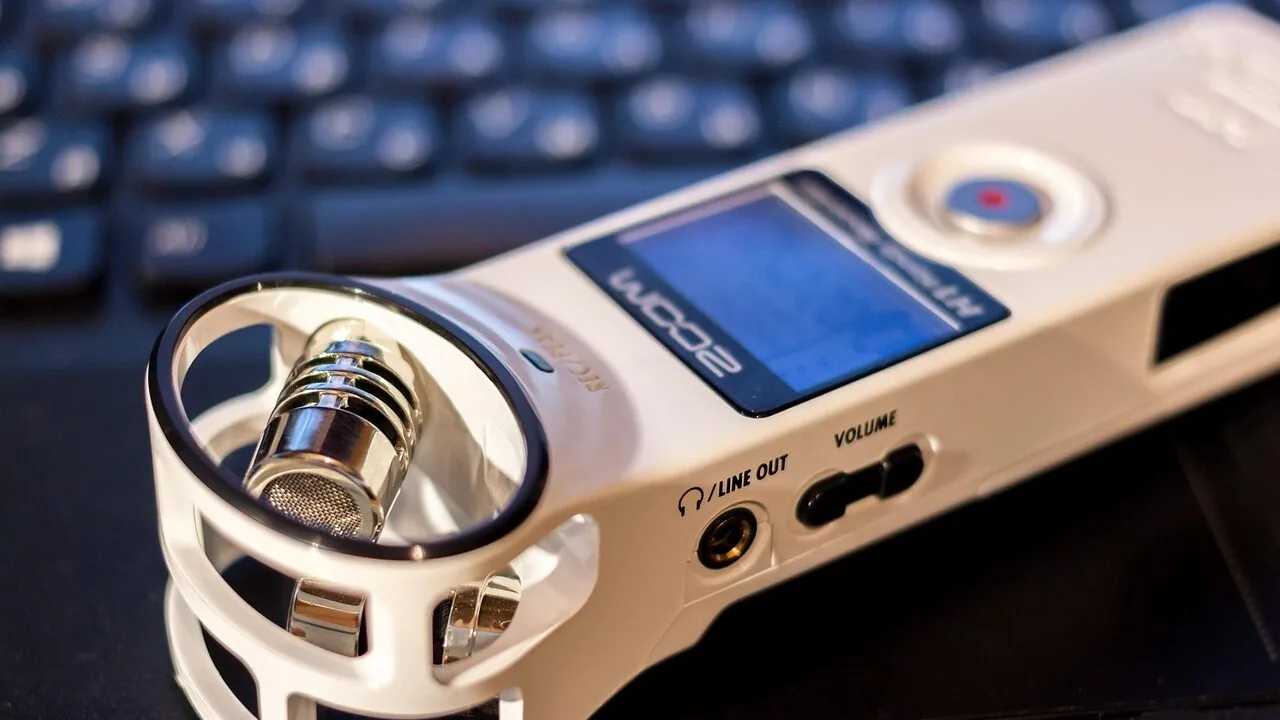
A good USB microphone can transform the way you communicate, create, and connect, whether you are recording a podcast from your home office, streaming games live, joining back-to-back video calls, or laying down vocal tracks for a project.
The plug-and-play simplicity of USB mics means there is no audio interface required, no complicated driver setup, and no barrier between you and professional-sounding audio.
That accessibility has made them one of the fastest-growing categories in personal audio, with options now spanning from budget-friendly desktop pickups to broadcast-grade hybrid USB-C and XLR designs used by working professionals.
Picking the right mic from dozens of competing models is harder than it looks. Polar patterns, capsule types, sample rates, onboard DSP, and connection standards all interact in ways that matter enormously depending on your use case.
At REMOVU, we cut through the noise by synthesizing manufacturer specifications, expert review consensus, and verified buyer feedback into a single, consistent REMOVU Score so you can compare options at a glance.
Whether you need a workhorse condenser for podcasting, a noise-rejecting dynamic mic for a loud room, or the leanest possible travel companion for calls on the go, the picks below represent the strongest performers across price points and use cases.
| Award | Product | REMOVU Score About REMOVU ScoreThe REMOVU Score is our own rating from 0 to 10, based on performance, design and build, ease of use, and value. It reflects independent research and is never influenced by manufacturers, retailers, or affiliate commissions. Learn more › | Price | |
|---|---|---|---|---|
| Best Premium |
 Shure MV7+ USB-C/XLR Dynamic Microphone
|
9.0/10 | Buy | |
 Elgato Wave:3 MK.2 USB Condenser Microphone
|
8.3/10 | Buy | ||
| Best Overall |
 Logitech Blue Yeti USB Condenser Mic
|
9.0/10 | Buy | |
| Best Budget |
 FIFINE K688 Dynamic Microphone, XLR/USB
|
7.3/10 | Buy | |
| Best Value |
 FIFINE AmpliGame AM8 USB/XLR Dynamic Mic
|
7.1/10 | Buy | |
 Razer Seiren V3 Mini USB Microphone
|
6.8/10 | Buy | ||
 Neewer UM01 USB Condenser Mic with AI Noise Cancellation
|
6.9/10 | Buy | ||
 HyperX SoloCast 2 USB Condenser Mic
|
7.1/10 | Buy | ||
 Logitech Blue Yeti USB Microphone with 4 Pickup Patterns
|
8.5/10 | Buy |
Shure MV7+ USB-C/XLR Dynamic Microphone
A dual-output dynamic mic built for creators who need flexibility between simple USB plug-and-play setups and professional studio rigs. The MV7+ combines voice isolation technology with real-time auto-leveling and a customizable LED touch panel, making it particularly strong for podcasters and streamers working in less-than-ideal acoustic spaces. The integrated reverb effects and denoising add polish without requiring external processing.
Pros
- Hybrid USB-C and XLR outputs let you scale from laptop recording to full audio interface integration
- Auto Level Mode adapts gain automatically, reducing the need for constant manual adjustments during recording
- Voice Isolation Technology keeps vocals clear and focused even in noisy or untreated rooms
- OBS-certified with built-in reverb modes (Plate, Hall, Studio) for professional-sounding voiceovers and vocal tracks
- LED touch panel with 16.8 million color options and real-time level monitoring enhances workflow visibility
Cons
- Frequency response tops out at 16 kHz versus 20 kHz on higher-end Shure models, limiting some high-frequency detail
- App integration (MOTIV Mix) adds features but requires an extra step for mobile users seeking full control
- Premium pricing positions it above entry-level USB mics, though below Shure's flagship XLR-only options
Elgato Wave:3 MK.2 USB Condenser Microphone
A compact USB condenser mic built for streamers and podcasters who want studio-quality audio without the complexity. The Wave:3 MK.2 handles distortion intelligently through Clipguard 2.0, applies professional effects like compression and EQ directly on the hardware, and integrates with Wave Link software for seamless audio routing across apps.
Pros
- Clipguard 2.0 anti-distortion system makes clipping virtually impossible, even at high volumes
- Onboard DSP effects (EQ, compressor, voice enhancer) process audio at the source for instant, broadcast-ready sound
- Auto Gain calibration removes guesswork from level setting
- Cardioid condenser capsule delivers focused, professional vocals with integrated pop filter
- Real-time monitoring via headphone jack and multifunction dial for quick adjustments
Cons
- Requires Windows 11 or macOS 14.2 and newer, limiting compatibility with older systems
- USB-C only connection may require an adapter for some users
- No external shock mount or stand included in the box
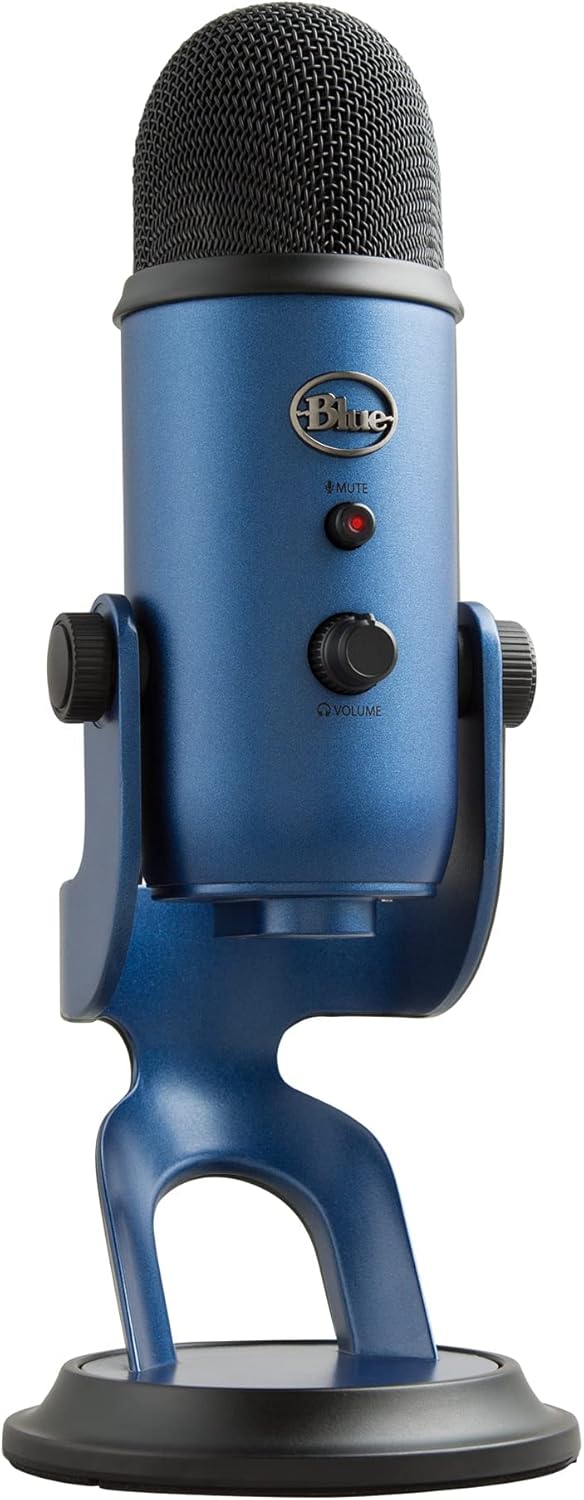
Logitech Blue Yeti USB Condenser Mic
A versatile USB microphone built for creators across streaming, podcasting, and recording. The custom three-capsule array and four pickup patterns deliver broadcast-quality sound without requiring separate equipment, while Blue VO!CE software adds professional vocal effects and enhancement tools.
Pros
- Four flexible pickup patterns (cardioid, omni, bidirectional, stereo) reduce need for multiple microphones
- Blue VO!CE software provides broadcast-grade effects and HD audio processing
- Plug-and-play setup on Mac and PC with no drivers required
- Onboard controls for gain, mute, pattern selection, and headphone monitoring
- Highly rated across 56,000+ verified reviews (4.6 stars)
Cons
- Requires USB connection to computer, limiting portability compared to wireless alternatives
- Blue VO!CE features depend on software compatibility and may require separate learning curve
- Desktop stand included but may not suit all mounting preferences or desk setups
FIFINE K688 Dynamic Microphone, XLR/USB
A dual-connector dynamic mic built for podcasters and streamers who need flexibility between studio gear and direct computer recording. The cardioid pattern handles background noise well, while tap-to-mute and real-time monitoring via headphone jack add practical control for voice work. Best suited for content creators already comfortable with audio interfaces or those wanting to upgrade from basic USB mics.
Pros
- Dual XLR and USB connectivity lets you integrate with mixers or record directly to PC without extra gear
- Metal construction with 120dB SPL handles loud sources without distortion, ideal for energetic vocals or gaming
- Tap-to-mute and gain knob provide in-depth control without software tweaking (USB mode)
- Real-time headphone monitoring with volume adjustment helps catch audio issues during recording
- Includes windscreen and shock mount to reduce plosives and desk vibration
Cons
- All control features (mute, gain, monitoring) only work via USB connection; XLR mode requires simultaneous USB link to access them
- Requires close mic technique (2-6 inches) and proper gain adjustment to sound clean, not beginner-friendly
- No stand, boom arm, or XLR cable included; compatible arms sold separately
FIFINE AmpliGame AM8 USB/XLR Dynamic Mic
A dual-connectivity gaming and streaming microphone that bridges beginner-friendly USB plug-and-play with professional XLR expandability. The AM8 delivers cardioid dynamic sound suited for gaming, podcasting, and vocal recording, with controllable RGB lighting and physical mute button when using USB. Best for streamers and podcasters who want flexibility without breaking setup complexity.
Pros
- Dual USB and XLR connectivity lets you start simple or scale to professional audio interfaces later
- Cardioid dynamic design rejects off-axis noise and avoids over-amplifying voice, good for gaming and streaming environments
- Headphones jack with monitoring volume control provides real-time audio feedback during recording
- RGB lighting with memory function and three modes (static, breathing, alternating) customizes your setup aesthetic
- Includes both 3/8 inch and 5/8 inch metal threads, compatible with most standard mic stands without adapters
Cons
- RGB lighting, mute button, gain knob, and headphones monitoring only function via USB connection, not XLR, limiting control when using professional audio interfaces
- XLR cable not included, requiring separate purchase to use the upgrade-ability feature
- Requires close mic technique (2 to 6 inches from source) for optimal sound quality, which may feel restrictive in some setups
Razer Seiren V3 Mini USB Microphone
This ultra-compact USB mic delivers studio-quality voice capture in a size that fits any streaming or gaming setup. The supercardioid condenser capsule isolates your voice effectively, while the tap-to-mute sensor with LED indicator puts instant control at your fingertips. Plug-and-play operation means you're recording within seconds, though deeper customization requires the optional Razer Synapse software.
Pros
- Supercardioid pickup pattern minimizes background noise like keyboard clicks and room ambiance
- Tap-to-mute sensor with visual LED indicator for quick mute control during streams and calls
- Truly plug-and-play, no drivers or software required to start using
- Built-in shock absorber reduces vibration noise from desk bumps and mic movements
- Advanced audio customization available through Razer Synapse, including 96 kHz/24-bit sampling
Cons
- No headphone monitoring port for direct mic audio feedback during streaming
- Requires Razer Synapse download for full feature access like sample rate adjustment and stream mixing
- Tiltable stand has limited range compared to dedicated boom arm setups, though compatible with external arms
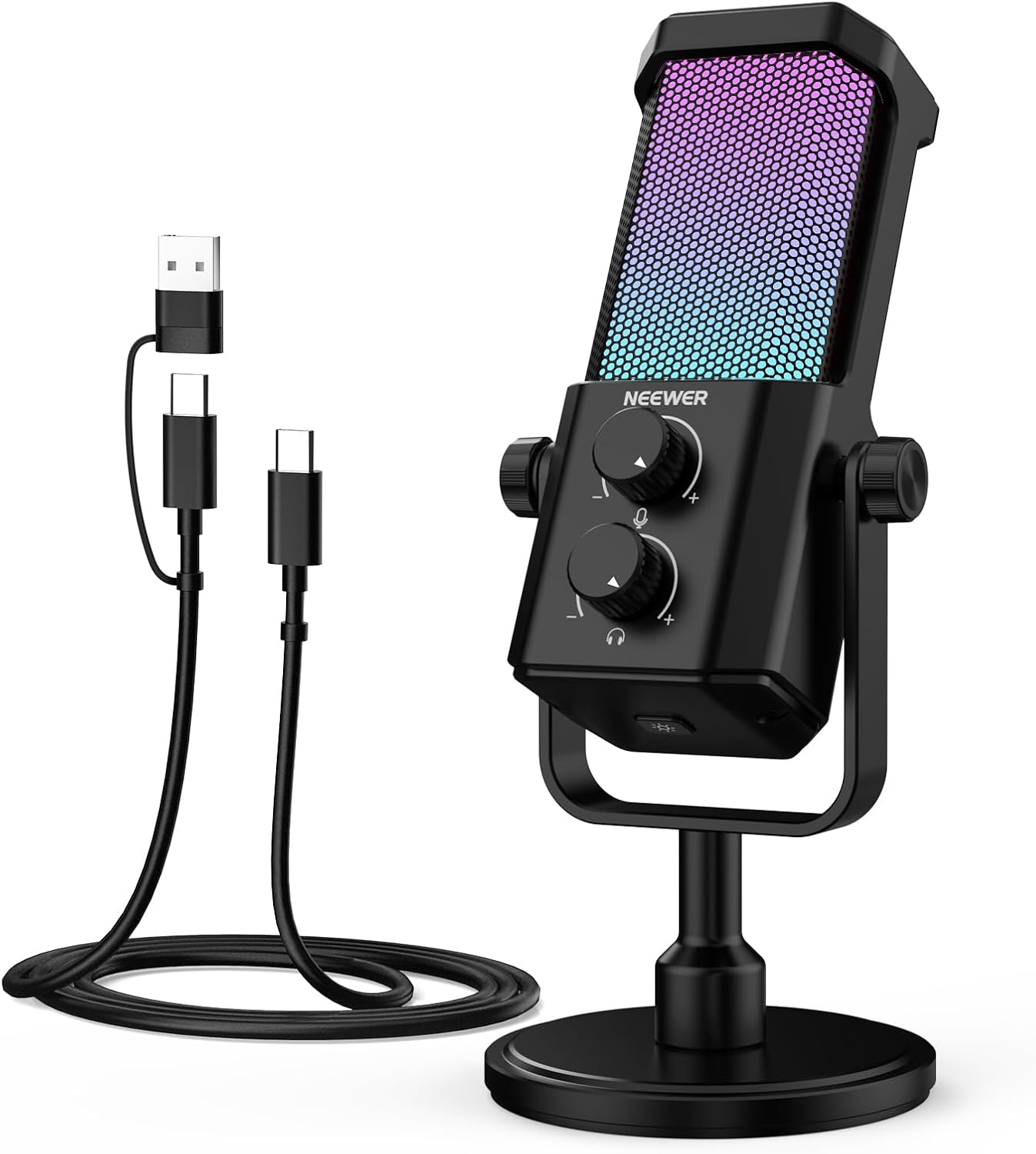
Neewer UM01 USB Condenser Mic with AI Noise Cancellation
A plug-and-play USB condenser microphone built for streamers, podcasters, and remote workers who need reliable noise reduction without software hassle. The UM01 delivers cardioid recording with AI-powered ambient noise suppression, real-time monitoring, and customizable RGB lighting controlled via desktop app. Best suited for content creators on Windows, Mac, and PS4/5 setups seeking an all-in-one solution at an accessible price point.
Pros
- AI noise cancellation effectively reduces keyboard clatter, fans, and background chatter while preserving vocal clarity
- True plug-and-play via USB-C/USB-A cable with no driver installation required across Mac, Windows, PC, PS4/5, and Android devices
- Real-time zero-latency monitoring through 3.5mm jack with independent gain and headphone volume dials for precise control
- Neewer MIC app offers granular EQ, gain, headphone volume, and RGB customization from desktop
- All-metal construction with cardioid polar pattern and solid frequency response (20Hz-20KHz) suitable for vocals and general recording
Cons
- Not compatible with Xbox, limiting gaming platform flexibility
- Requires OTG function activation on some Android phones, adding setup friction for mobile users
- No built-in pop filter or shock mount included, necessitating separate purchases for professional studio setups
- Volume distortion can occur in apps like Zoom unless auto-volume is manually disabled in application settings
HyperX SoloCast 2 USB Condenser Mic
A compact, all-in-one USB condenser microphone built for gamers and streamers who want plug-and-play simplicity without sacrificing audio quality. The SoloCast 2 bundles a shock mount, pop filter, and tiltable stand into one self-contained unit, with 24-bit/96kHz recording and customizable audio filters via HyperX NGENUITY software. Best for creators seeking a no-fuss setup that delivers clear vocals in a tight space.
Pros
- Built-in shock mount and foam pop filter eliminate need for extra accessories
- Tap-to-mute with visual LED indicator for quick control during recording
- Cardioid polar pattern effectively isolates front-facing vocals while rejecting side and rear noise
- Customizable audio filters (high-pass, low-pass, voice enhancement) save directly to the microphone for portable consistency
- Compact footprint with weighted tiltable stand and mic arm thread compatibility (3/8" and 5/8")
Cons
- No headphone jack for direct monitoring, unlike higher-end HyperX models in the comparison
- Single condenser capsule limits flexibility compared to multi-capsule designs for varied recording scenarios
- USB-C to USB-A connection only; no native USB-A port included
Logitech Blue Yeti USB Microphone with 4 Pickup Patterns
A broadcast-quality USB condenser mic built for creators across streaming, podcasting, and gaming. The standout feature is its four flexible pickup patterns, letting you handle everything from solo vocals to multi-person setups without swapping gear. Blue VO!CE effects and onboard controls round out a polished, plug-and-play experience on Mac and PC.
Pros
- Four pickup patterns (cardioid, omni, bidirectional, stereo) eliminate the need for multiple microphones
- Three-capsule array delivers clear, broadcast-quality sound across content types
- Blue VO!CE software provides professional vocal effects, modulation, and HD audio samples
- Onboard controls for gain, mute, pattern selection, and headphone volume let you manage audio without software
- No-latency monitoring and instant setup with included desktop stand or boom arm compatibility
Cons
- Requires Logitech G HUB download for full Blue VO!CE functionality, adding setup complexity
- Omnidirectional and stereo modes can pick up unwanted background noise in untreated spaces
- USB-only connection limits flexibility compared to XLR alternatives for advanced studio work
USB Microphones Buying Guide
Choosing a USB microphone is not just about picking whichever model has the most reviews or the most impressive spec sheet. The right mic depends on your room, your use case, your recording software, and your tolerance for tinkering.
The sections below break down the six criteria that matter most, so you can match a microphone to your real-world situation rather than chasing a number on a box.
Capsule Type: Dynamic vs. Condenser
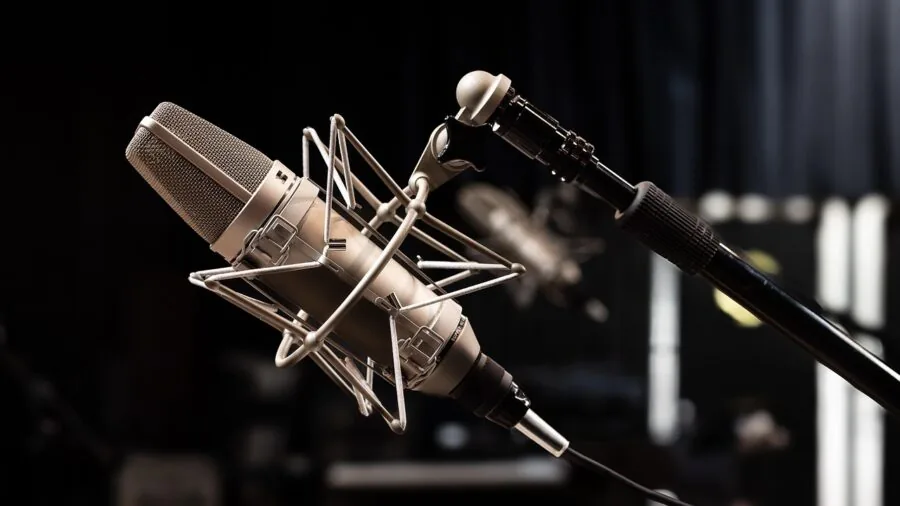
The single most important decision you will make is whether to go with a dynamic or a condenser capsule.
Condenser microphones are more sensitive and capture a wider frequency range, which makes them ideal for controlled environments like treated home studios, quiet offices, or dedicated recording spaces.
They pick up detail beautifully, but that sensitivity cuts both ways: condenser mics will also capture keyboard clicks, air conditioning hum, pets, and street noise.
If your space is acoustically clean, a condenser mic will reward you with airy, detailed audio that stands out in podcasts and vocal recordings.
Dynamic microphones work on electromagnetic induction and are naturally more resistant to background noise.
They require you to speak close to the capsule, which keeps your voice front and center while rejecting much of what is happening behind and around you.
For streamers in gaming setups, content creators in untreated rooms, or anyone who cannot control their acoustic environment, a dynamic USB mic is often the smarter long-term choice even if it sacrifices a little top-end shimmer.
If you are pairing your new mic with a good set of monitoring headphones, browsing our audio and headphones category can help you build a complete setup.
Polar Pattern and Room Rejection
A microphone’s polar pattern describes the three-dimensional space from which it accepts sound.
Cardioid is the most common pattern for solo use because it focuses pickup in front of the mic and rejects sound arriving from the rear, a useful property in any environment with ambient noise.
Supercardioid tightens that rejection window even further, which is why compact mics like the Razer Seiren V3 Mini opt for it: a narrower pattern means more isolation even from a small capsule.
Multi-pattern microphones add omnidirectional, bidirectional, and stereo modes that open creative possibilities for interview-style recordings, instrument capture, or ASMR.
If you only ever record solo vocals or voice-overs, a fixed cardioid or supercardioid mic will serve you well without the extra complexity.
If you anticipate switching between solo and two-person recordings, a mic with selectable patterns like the Blue Yeti series gives you flexibility that a single-pattern capsule simply cannot match.
Connection Standard and Compatibility
Most USB microphones ship with a USB-A connector, which works with virtually every desktop PC and older laptop.
An increasing number of newer models use USB-C, which is the direction the industry is moving and which allows for a reversible, more durable cable connection.
Some hybrid models like the Shure MV7+ and FIFINE K688 offer both USB and XLR outputs, letting you start plug-and-play and scale later to a dedicated audio interface when your setup demands it.
That dual-output architecture adds meaningful longevity to your investment.
Compatibility is rarely an issue on Windows PCs or Macs, where USB audio class compliance means most mics work without installing any driver.
Chrome OS and PlayStation 5 compatibility is often mentioned in marketing materials for gaming-focused mics, so check the product listing if those platforms matter to you.
If you already own a gaming headset for PC and are looking to upgrade your vocal chain separately, a USB mic gives you that flexibility without replacing your whole audio stack.
Onboard Controls and Zero-Latency Monitoring
The convenience of USB mics extends beyond plug-and-play to what you can control directly on the hardware without opening a software mixer.
A physical mute button with a clear LED indicator is the most universally valued feature across verified buyer feedback, particularly for remote workers who need to toggle silence instantly during calls.
Gain control on the microphone body lets you adjust sensitivity for different voice volumes or room sizes without hunting through your recording software settings.
Zero-latency headphone monitoring means you can plug headphones directly into the microphone and hear your own voice in real time without the delay that digital audio processing introduces.
That feature matters most for singers, podcasters doing edited interviews, and streamers who need to hear both their voice and game audio simultaneously.
If monitoring is important to your workflow, check that the model you are considering includes a headphone jack with its own volume dial, a detail that separates dedicated content-creation mics from stripped-down communication accessories.
Onboard DSP and Software Ecosystem
Some of the most competitive mics in this category now ship with meaningful onboard digital signal processing.
The Elgato Wave:3 MK.2, for example, includes a hardware compressor, EQ, and a proprietary Clipguard 2.0 circuit that captures a second, lower-gain signal to prevent clipping during loud moments.
The Shure MV7+ brings an Auto Level Mode that adjusts gain automatically as you move around, plus a digital pop filter built into the capsule housing. These hardware DSP features work without any companion app, which keeps your setup simple.
Software ecosystems add another layer. Elgato’s Wave Link software, Shure’s MOTIV app, and FIFINE’s Ampligame app each offer equalizer curves, noise-gate settings, and sometimes virtual mixing.
If you already use OBS Studio for streaming, verify that the mic you are considering is OBS-certified or works cleanly as a standard audio source.
RGB lighting, while cosmetically driven, has become a practical mute indicator on mics like the FIFINE AM8 where the ring color changes to signal active or muted states.
Build Quality, Stand Design, and Desk Footprint
A microphone that wobbles, tips over, or transmits every desk vibration into your recordings is a frustration that no amount of capsule quality can compensate for.
Weight and base design matter: heavier mics with wide tripod or integrated desk stands tend to stay put, while lighter mics with small folding feet can tip if cables are not routed carefully.
Some models include an internal shock mount that decouples the capsule from vibration mechanically, an important feature for anyone who types while recording or who works on a surface prone to rumble.
Desk footprint is a practical concern that reviewers often overlook.
A large side-address condenser like the Blue Yeti demands real estate on your desk; a compact top-address mic like the Razer Seiren V3 Mini or the HyperX SoloCast 2 fits into tighter setups and travels more easily.
If you eventually want to move to a boom arm for better mic positioning, verify that the base has a standard 5/8-inch thread adapter, as some budget models use proprietary mounts that limit your accessory options later.
Why You Should Trust Us
REMOVU is an independent review publication. We do not manufacture, sell, or have commercial relationships with the brands whose products appear in our roundups.
Every microphone in this guide was evaluated against a consistent set of criteria: capsule and transducer technology, polar pattern behavior, connection options and compatibility, onboard controls and DSP, build quality, and value relative to competing models at the same price tier.
Each product receives a REMOVU Score on a scale of 0 to 10.
That score is derived from a structured synthesis of published technical specifications, expert review consensus drawn from credible audio-focused publications and engineering analyses, and verified buyer feedback from confirmed purchasers across major retail platforms.
We do not conduct our own product trials; our evaluations are grounded in research, published data, expert review consensus, and verified buyer feedback.
This methodology lets us apply consistent, comparable judgment across dozens of products simultaneously without introducing the variability of a single reviewer’s subjective preferences.
REMOVU may earn a commission when you purchase a product through a link on this page. That affiliate relationship has no influence on which products are included, how they are ranked, or what REMOVU Score they receive.
Scores and rankings are determined before any commercial relationship is considered. Our goal is to give you enough information to make a confident purchase decision without having to read a dozen different sources yourself.
Final Thoughts
The USB microphone market is genuinely competitive right now, with strong options from Shure, Elgato, Logitech, FIFINE, Razer, HyperX, and Neewer covering a wide spectrum of needs and budgets.
After synthesizing specifications, expert review consensus, and verified buyer feedback, here are the standout performers from this guide:
- Best Overall: Shure MV7+ earns the top REMOVU Score in this roundup thanks to its broadcast-grade dynamic capsule, USB-C and XLR dual output, Auto Level Mode, and onboard digital pop filter. It is the most complete professional-facing USB mic in the group and the clear first choice for podcasters and broadcasters who want longevity in their investment.
- Best Premium Condenser for Creators: Elgato Wave:3 MK.2 combines hardware Clipguard 2.0 protection, onboard compressor and EQ, and an Auto Gain calibration system into a polished streaming-first package. It earns one of the highest scores in the roundup and is the right pick for full-time content creators who want studio-grade safeguards without a separate interface.
- Best Mid-Range Versatile Pick: Blue Yeti (Midnight Blue) remains a benchmark for multi-pattern USB condenser performance at a mid-range price. Its four selectable pickup patterns, onboard gain and mute controls, and plug-and-play simplicity justify its place as one of the most recommended mics in the podcasting and voice-over communities.
- Best Dynamic USB Mic on a Budget: FIFINE AmpliTank K688 brings XLR and USB hybrid connectivity, a headphone jack with monitoring volume control, and a sturdy all-metal body at a budget-friendly price point. For streamers and home studio creators in noisy rooms, its dynamic capsule and noise-rejecting characteristics make it the most practical spend in the lower price tier.
- Best Compact Pick for Calls and Gaming: Razer Seiren V3 Mini is the most space-efficient option in the roundup, offering a tap-to-mute sensor, a built-in shock absorber, and a supercardioid pattern in an ultra-compact body. It suits gamers and remote workers who prioritize a minimal desk footprint without sacrificing reliable voice pickup.
If you are still deciding on your broader audio setup, pairing a quality USB mic with well-chosen noise-cancelling headphones or a capable pair of wired over-ear headphones for monitoring can elevate your entire recording chain.
For gamers who want an integrated voice and audio solution, our roundup of gaming headsets under fifty dollars is also worth a look before committing to a standalone mic setup.
Frequently Asked Questions
Do I need an audio interface if I buy a USB microphone?
No. A USB microphone has its own built-in analog-to-digital converter, which means it connects directly to your computer and is recognized as a standard audio device without any additional hardware.
This is the core advantage of USB mics over traditional XLR microphones, which require a separate audio interface to digitize the signal.
If you later want more control over gain staging, EQ, and routing, some hybrid models like the Shure MV7+ and FIFINE K688 let you switch to XLR output and add an interface without replacing the microphone itself.
Is a condenser or dynamic USB microphone better for streaming and gaming?
It depends on your room. In a treated, quiet space, a condenser USB mic captures more detail and presence.
In a typical gaming setup with mechanical keyboards, fans, open-back headphones bleeding sound, and ambient noise, a dynamic microphone’s tighter pickup pattern and natural noise rejection make it the more practical choice.
Most professional streamers who spend time in untreated rooms favor dynamic capsules for precisely this reason.
If noise control is a priority for your workspace, exploring noise-cancelling headphones for work alongside a dynamic mic can give you a quieter monitoring and recording environment overall.
What sample rate and bit depth should I look for in a USB microphone?
For voice recording, podcasting, and streaming, 24-bit audio at 48 kHz is more than sufficient and represents the current standard for most quality USB mics.
Some models like the HyperX SoloCast 2 support up to 24-bit at 96 kHz, which provides additional headroom for post-processing but makes little audible difference for speech in a typical listening environment.
Focus more on capsule quality, polar pattern behavior, and onboard noise characteristics than on chasing the highest sample rate number.
Can I use a USB microphone with a smartphone or tablet?
Many USB microphones can work with Android devices and iPads that support USB audio through an appropriate adapter or cable.
USB-C mics have an advantage here because they can connect directly to modern Android phones and iPads without an intermediary hub. iPhones with Lightning connectors typically require a powered USB hub or a dedicated mobile audio interface, and compatibility is less consistent.
If mobile recording is central to your workflow, verify USB audio class compatibility for your specific device before purchasing, and check that the mic does not require more bus power than your mobile device can supply.
How important is a pop filter, and do USB mics need one?
Pop filters reduce the pressure wave caused by plosive consonants like P and B, which can overwhelm a capsule and create a low-frequency thump in recordings.
Some USB mics address this with internal foam windscreens or, in the case of the Shure MV7+, a built-in digital pop filter.
Others leave the capsule relatively exposed and benefit from an external foam cover or a separate nylon mesh screen.
If you plan to speak close to your microphone at high gain settings, a pop filter of some kind is worth having.
Proper mic technique, positioning the capsule slightly off-axis from your mouth rather than directly in front, also reduces plosive impact without any additional hardware.
What is the difference between side-address and top-address USB microphones?
Side-address microphones, like the Blue Yeti and Elgato Wave:3 MK.2, capture sound through the side of the capsule.
You speak into the face of the mic while it stands upright, which positions the microphone at desk height and keeps it out of your webcam frame naturally.
Top-address microphones, like the HyperX SoloCast 2 and Razer Seiren V3 Mini, capture sound from the top, similar to a live vocal mic. Top-address designs tend to be more compact and familiar for users coming from handheld or boom-arm setups.
Neither design is inherently superior; the right choice comes down to your desk layout and how you prefer to position yourself while recording.
If you are building a broader recording or listening setup, our overview of audio and headphones gear covers compatible equipment across every category.
About the author
Russell writes about noise-cancelling headphones for REMOVU, comparing ANC strength, comfort, and sound for flights, offices, and commutes. He tracks which models justify their price.