The 12 Best Smart Displays for Google Home
From compact countertop panels to wall-sized family hubs, the right smart display transforms how you interact with Google Home every day. Here are the top picks for every household.
 By Kelly Castro
Updated July 26, 2026
By Kelly Castro
Updated July 26, 2026
Smart displays have quietly become one of the most useful upgrades you can make to a connected home.
Whether you want a hands-free way to check your calendar, control smart lights, make video calls, or stream a recipe while cooking, a screen-equipped smart speaker does things a voice-only device simply cannot.
For households already invested in Google’s ecosystem, pairing the right display with Google Home unlocks routines, Nest camera feeds, and seamless Chromecast casting that genuinely changes how you interact with your living space.
The market has also expanded well beyond Google’s own hardware, with Amazon, Shelly, and independent calendar brands offering compelling alternatives for different needs and budgets.
This guide cuts through the noise by focusing specifically on smart displays that work well with Google Home and the broader smart home ecosystem.
REMOVU’s editorial team compiled this list through comprehensive research: analyzing published specifications, synthesizing expert review consensus, and weighing verified buyer feedback across hundreds of real-world ownership reports.
Every model below has been assessed against consistent criteria and assigned a REMOVU Score on our 0-to-10 scale. Read on for our ranked top picks, and then dig into the buying guide to find the right fit for your home.

Google Nest Hub Max 10-Inch Smart Display
A 10-inch smart display built around Google Assistant, offering video calling, smart home control, and media streaming in one device. The 1280x800 resolution screen handles everyday tasks well, though it sits in a competitive market where several alternatives offer similar capabilities.
Pros
- 10-inch display provides comfortable viewing for video calls and content
- Integrated Google Assistant handles smart home control, information lookup, and voice commands
- Built-in camera enables video calling through Google Duo and home monitoring
- 4GB memory supports smooth app performance for typical smart display use
- 4.3-star rating from 219 verified buyers indicates solid real-world satisfaction
Cons
- 1280x800 resolution is adequate but not high-definition, limiting visual detail for photos and video
- Limited third-party app ecosystem compared to tablets, restricting customization options
- Requires Google account and ecosystem integration, which may not suit users invested in other platforms

Amazon Echo Show 21 with Premium Adjustable Stand
A large 21-inch Full HD smart display built for kitchens, combining Alexa voice control, Fire TV streaming, and home automation in one device. The adjustable stand offers flexible viewing angles, making it practical for countertop use while cooking or managing household information.
Pros
- Large, crisp display makes reading recipes, checking schedules, and streaming content easy from across the kitchen
- Premium adjustable stand provides sturdy placement with flexible positioning options
- Strong integration with Alexa smart home control and Ring security cameras
- Excellent audio with dual woofers and tweeters for music and streaming content
- Verified buyers praise its reliability as a kitchen hub for reminders, lists, and entertainment
Cons
- Occasional screen freezing reported during streaming on apps like Hulu
- Large size may not fit all kitchen counter spaces; portability is limited
- Alexa Plus functionality noted by some users as needing improvement in early reviews

Amazon Echo Show 15 Full HD Smart Display
A 15.6-inch Full HD smart display built around Fire TV streaming and home organization, with customizable widgets for calendars, weather, and smart home control. Best suited for kitchens or living spaces where you want a centralized hub for family schedules, entertainment, and voice-controlled smart devices.
Pros
- Fire TV built-in eliminates need for separate streaming device, with easy setup for multiple subscription apps
- Large bright display works well for recipes, streaming video, photo slideshows, and security camera feeds
- Audio quality is solid with dual woofers and tweeters, though external soundbars can enhance further
- Calendar and family widget integration simplifies household organization and announcements
- Straightforward wall mounting with included brackets and comprehensive setup instructions
Cons
- Screen resolution capped at 1080p, not 4K, which some users noted when comparing to larger TVs
- Widget selection in the store is limited, with functionality depending on third-party developer support
- Some users experienced connectivity issues during initial setup requiring factory reset to resolve
- Premium price point justified mainly if you utilize multiple features beyond just Fire TV streaming

Amazon Echo Show 15 (2024) with Premium Stand
A 15.6-inch smart display built for kitchen organization and entertainment, featuring Fire TV, customizable widgets, and a 360-degree adjustable stand. Strong audio-visual performance and easy setup make it appealing for families, though ads on the home screen and separate stand cost are notable friction points.
Pros
- Noticeably larger screen compared to Echo Show 8, significantly improves usability for recipes, entertainment, and family organization
- Included premium aluminum stand with flexible positioning and smooth 360-degree swivel eliminates need to buy separately
- Sound quality stands out for the category, with distinct bass and treble that makes music playback enjoyable
- Fast, frustration-free setup with Alexa app compatibility across Fire OS, Android, and iOS
- Solid build quality and sharp visual display praised across verified reviews
Cons
- Persistent ads appear frequently on the home screen, and disabling them requires multiple setting changes; no ad-free tier option available
- Built-in speakers, while good, may still underwhelm for larger kitchens or those expecting premium audio for the product class
- Wi-Fi 5GHz antenna shows spotty reliability in some environments; users report needing to drop to 2.4GHz for stable connection

Google Nest Hub 2nd Gen 7-Inch Smart Display
A compact smart display that serves as a voice-controlled hub for entertainment and smart home control. Works well for family communication, streaming, and bedside sleep tracking, though software limitations frustrate some users seeking deeper customization.
Pros
- Easy setup and reliable performance, with users reporting durability beyond 3 years
- Seamless integration with compatible smart home devices like Roombas and smart lights
- Sleep Sensing provides non-intrusive health tracking without a camera
- Dual functionality for entertainment (Netflix, YouTube, music) and smart home control
- Compact footprint with decent audio quality from its full-range speaker
Cons
- Limited app ecosystem compared to phones or tablets; no Play Store access restricts functionality
- Software limitations around speaker grouping and audio streaming inconsistency reported by users
- Lacks full Google Home app functionality; some radio streaming options are erratic and geographically inconsistent

Amazon Echo Show 8 (2024) 8.7-inch Smart Display
Amazon's latest smart display pairs an enlarged 8.7-inch HD touchscreen with spatial audio and a built-in smart home hub, making it a capable all-in-one device for streaming, video calls, and home control. Best suited for those already invested in Alexa and Amazon services.
Pros
- Larger screen real estate improves visibility for recipes, calendars, and camera feeds
- Spatial audio delivers noticeably improved sound compared to previous generation
- Integrated smart home hub reduces clutter and setup complexity
- Privacy-focused design with hardware controls for microphone and camera
- Natural video calling with centered auto-framing and noise reduction
Cons
- Requires Alexa+ subscription for advanced features like personalized recipe discovery and photo curation
- No specifications provided for storage, processing details, or exact dimensions for comparison
- Limited independent review data available to assess real-world performance and reliability

Amazon Echo Show 15 with Frame Bundle
A 15.6-inch Full HD smart display designed as a family organization hub for kitchens, combining Fire TV entertainment, voice-controlled smart home management, and customizable widget display. Best suited for households wanting a central digital command center with photo frame capability.
Pros
- Large, vibrant display ideal for kitchen placement and family visibility
- Integrated Fire TV eliminates need for separate streaming device
- Flexible organization features support busy household scheduling
- Smart home integration simplifies multi-device control
- Bundle includes matching decorative frame for finished look
Cons
- Requires Fire TV app subscriptions for most streaming content
- Limited smart home compatibility depends on device ecosystem support
- No specifications provided for audio output quality or processing power
Amazon Echo Show 8 (2024) 8.7-inch Smart Display
Amazon's latest smart display pairs an enlarged 8.7-inch HD touchscreen with spatial audio and a built-in smart home hub, making it a capable all-in-one device for streaming, video calls, and home control. Best suited for those already invested in Alexa and Amazon services.
Pros
- Larger screen real estate improves visibility for recipes, calendars, and camera feeds
- Spatial audio delivers noticeably improved sound compared to previous generation
- Integrated smart home hub reduces clutter and setup complexity
- Privacy-focused design with hardware controls for microphone and camera
- Natural video calling with centered auto-framing and noise reduction
Cons
- Requires Alexa+ subscription for advanced features like personalized recipe discovery and photo curation
- No specifications provided for storage, processing details, or exact dimensions for comparison
- Limited independent review data available to assess real-world performance and reliability

Shelly Wall Display XL 10.1-Inch Smart Panel
A 10.1-inch wall-mounted touchscreen that centralizes control for Shelly devices and compatible smart home systems, with built-in relay switching and energy monitoring. Best for homes already invested in open-ecosystem smart devices or those wanting app-free control at a central location.
Pros
- Consolidates smart home control into one physical interface, eliminating the need to juggle multiple apps
- Built-in energy monitoring helps track consumption and create efficiency automations
- Seamless integration with Home Assistant and other open-source platforms
- Supports local control without internet dependency for core functions
- Three-year warranty and professional Shelly support included
Cons
- Requires neutral wire for installation, limiting placement options in some homes
- Limited sample of verified buyer reviews (37 total) means long-term reliability data is sparse
- Dependent on existing Shelly device ecosystem for full functionality; less useful as standalone control panel for other brands

Skylight Calendar 15.4-Inch Smart Wall Planner
A touchscreen family organizer that syncs with Google, iCloud, and Outlook to display shared schedules, chores, and meal plans in one central hub. Best for households seeking a visual coordination tool, though setup can be complex if using Apple calendars.
Pros
- Syncs seamlessly with multiple calendar systems (Google, iCloud, Outlook, Cozi, Yahoo) and updates directly from the device or mobile app
- Built-in chore chart with reward stars and meal planning features help establish routines and reduce daily decision fatigue
- Bright, easy-to-read HD display works as wall mount or countertop placement, fitting naturally into kitchen or home office spaces
- Magic Import feature (Premium Plus Plan) quickly converts emailed PDFs like school calendars into calendar events
- Intuitive touchscreen interface accessible to both adults and children, with family members able to add tasks and events independently
Cons
- Setup can be frustrating and time-consuming, particularly for Apple iCloud users, requiring multiple attempts and potentially 10-15 minute sync delays
- Premium features like Magic Import and photo screensaver require subscription to Plus Plan, adding ongoing costs beyond initial purchase
- Limited customization options and app terminology can be unclear, creating a steeper learning curve than expected for a modern smart home device
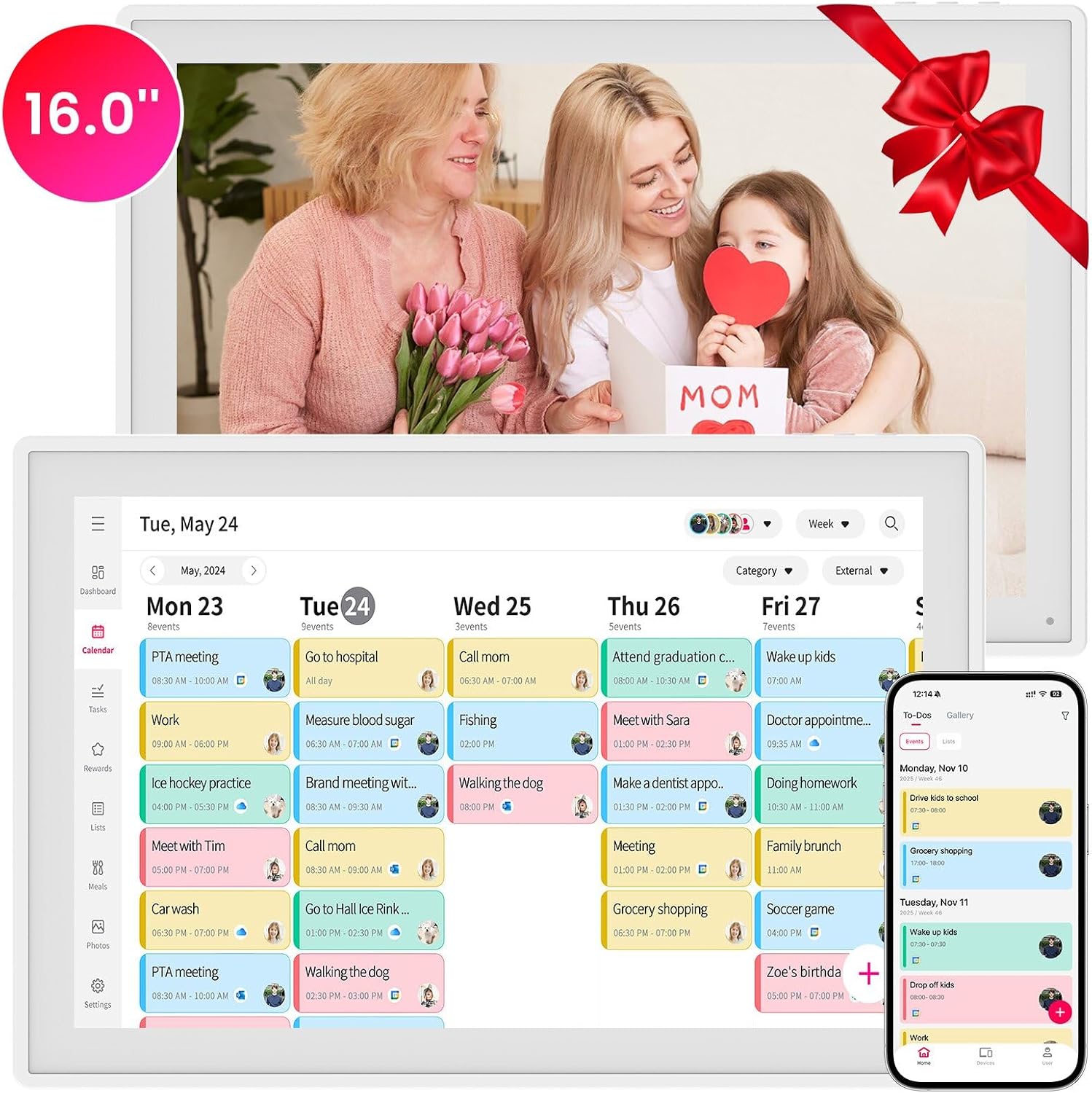
Anyuse 16-Inch Smart Digital Calendar with Google Sync
A 16-inch touchscreen family organizer that syncs with Google Calendar, iCloud, Outlook, and other platforms, doubling as a meal planner and photo frame. Best suited for households looking to centralize scheduling, chores, and family coordination in one device.
Pros
- Seamless syncing across multiple calendar platforms with automatic real-time updates
- Chore management with visual star rewards encourages kids' responsibility without complex setup
- Large, adjustable display suits both seniors and children; sleep mode conserves power
- All-in-one hub combines calendar, meal planning, photo storage, and to-do lists in one interface
Cons
- No verified buyer reviews available yet, limiting real-world usage insights
- Relatively high price point for a family organizer with limited market comparison data
- Setup requires internet connection and app pairing; unclear learning curve for less tech-savvy users

YPI 10.1-Inch Smart WiFi Calendar with Family Sync
A wall-mounted or desk-based smart calendar with a 10.1-inch touchscreen that syncs across Google Calendar, Apple iCloud, and Outlook in under a minute. Best suited for families coordinating schedules and chores across multiple members, though it requires constant power and WiFi connectivity.
Pros
- Quick setup with automatic calendar sync to major platforms
- Supports up to 20 family members with color-coded individual schedules
- Real-time multi-device synchronization across smartphones and computers
- 178-degree wide viewing angle IPS display with auto-brightness
- Silent vibration alerts with customizable repeat cycles and holiday tagging
Cons
- No verified buyer reviews available to validate real-world performance and reliability
- Requires continuous power connection and stable WiFi for full functionality
- Limited information on app ecosystem and third-party calendar platform compatibility beyond the three major services listed
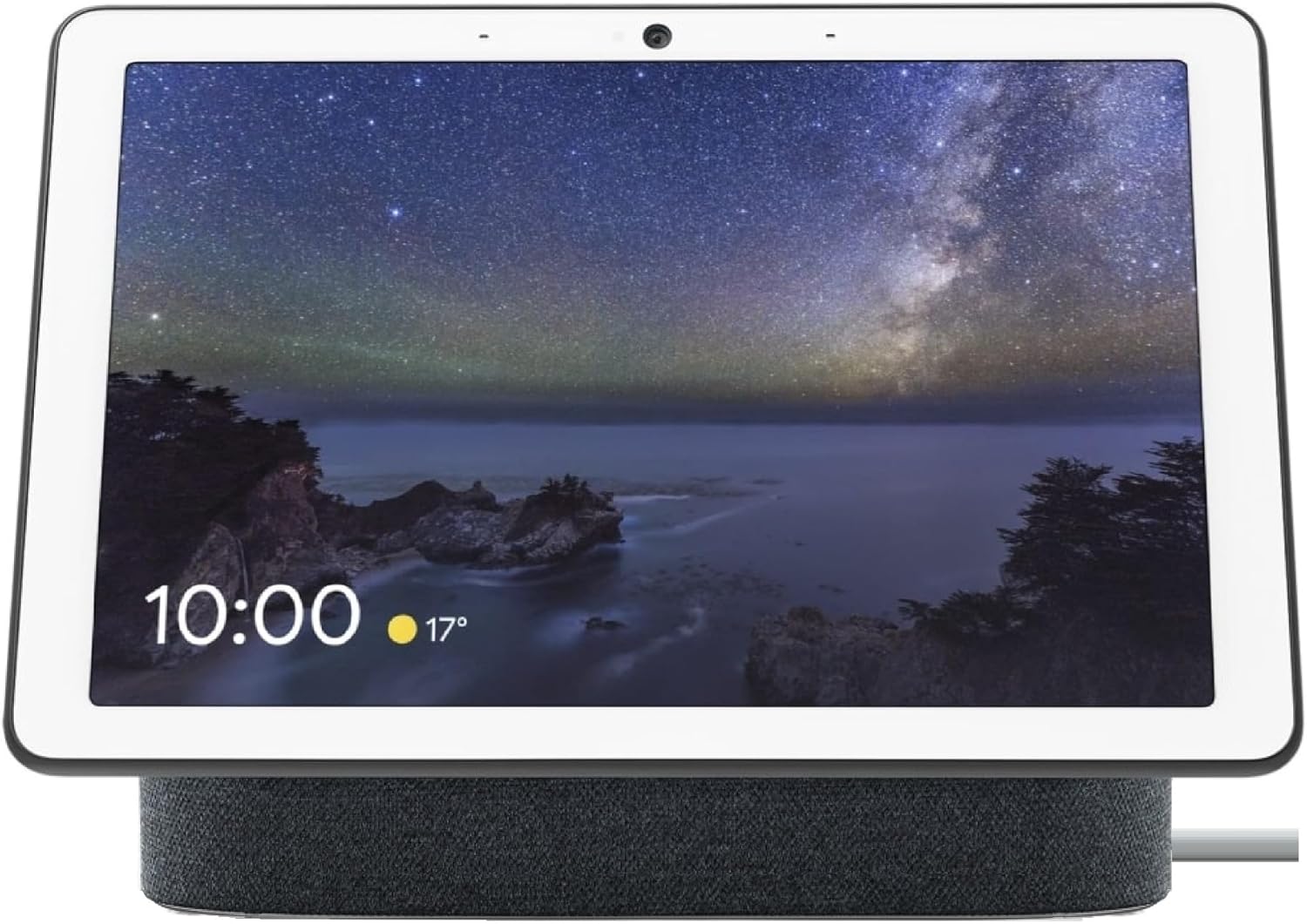
Google Nest Hub Max 10-inch Smart Display (Japan Model)
A 10-inch smart display with touchscreen and speaker designed for multi-room use, but this Japan model carries significant setup and language stability issues that frustrate US buyers. Works best if you're comfortable with potential English-to-Japanese language switching and have technical troubleshooting skills.
Pros
- 10-inch bright touchscreen display fits multiple room settings (nightstand, shelf, wall mount)
- Includes universal power adapter for global outlet compatibility
- Bold, punchy audio quality noted by satisfied users
- Compatible with Google smart home ecosystem
Cons
- Setup materials entirely in Japanese, causing installation difficulty for English-speaking users without online help
- Language interface unpredictably switches between English and Japanese despite selecting English, per multiple verified reviews
- Connectivity issues reported after initial setup period, with devices unable to reconnect to network
- 3.3-star rating from 29 reviews reflects high failure rate among US purchasers
Smart Displays for Google Home Buying Guide
Choosing a smart display involves more trade-offs than it first appears. Screen size and resolution affect daily usability, but ecosystem compatibility, audio quality, and privacy controls matter just as much. Use the criteria below to match a device to the way your household actually lives.
Ecosystem Compatibility and Google Home Integration

If your home runs on Google Home, your display needs to do more than show a clock.
Deep integration means the device can pull up Nest camera feeds natively, act as a Chromecast target, trigger routines from the display itself, and respond to ambient queries without a wake-word tap.
Google’s own Nest Hub lineup achieves this most completely, since the hardware and software share the same engineering team.
Amazon’s Echo Show line supports Google Home through third-party skill bridges and Matter, but native camera viewing and routine management are less fluid by comparison.
Third-party panels like the Shelly Wall Display XL take a different approach, acting as a dedicated control surface for smart thermostats, smart locks, and other devices through HomeKit, Google Home, and Home Assistant simultaneously.
This kind of multi-platform support is powerful for advanced setups but requires more configuration than a plug-and-play Nest Hub. Decide whether you want simplicity or flexibility before settling on a platform.
For families already using Nest cameras or a Google-based security camera system, the ability to cast a live feed directly to the display without opening an app is a daily quality-of-life win that is hard to overstate once you have experienced it.
Display Size and Resolution

Screen size has a surprisingly large impact on how you actually use a smart display.
A 7-inch panel like the one on the Nest Hub 2nd Gen is fine for a bedside table or small kitchen shelf, where glanceable information such as weather, timers, and music controls is the primary use case.
Move up to 10 inches and you gain comfortable video calling, cookbook-style recipe cards, and family photo slideshows that look genuinely good from across the room.
Panels in the 15-to-21-inch range, like the Echo Show 15 and Echo Show 21, blur the line between smart display and wall-mounted family hub.
Resolution matters most at larger sizes. A full HD panel on a 15-inch display will render text and images cleanly; a lower-resolution panel at the same size starts to look soft when displaying calendars or small-print recipe steps.
If calendar management and family organization are central to your use case, the pixel density of purpose-built digital calendar displays such as the Skylight Calendar or the Anyuse 16-inch planner is worth examining in reviews specifically.
These devices trade voice assistant depth for a polished scheduling interface.
Audio Quality
A smart display is often the primary music-playing device in a kitchen or living room, so audio quality is not an afterthought.
The Nest Hub Max stands apart from the smaller Nest Hub 2nd Gen by including a full speaker array capable of filling a medium-sized room with rich, directional sound.
Amazon’s Echo Show 8 introduced spatial audio processing in its latest revision, which creates a noticeably wider soundstage than its predecessor for a display of that size.
If audio is a priority and you are already exploring dedicated speaker options, pairing a smart display with a capable Bluetooth speaker via its aux or Bluetooth output is a practical route.
That said, most households find the built-in speakers on a 10-inch-or-larger display perfectly adequate for background music and podcast listening.
Where the smaller and calendar-focused devices fall short is driving the same output levels, so keep that in mind if your kitchen is open-plan or you entertain frequently.
Camera and Video Calling

Not every smart display ships with a camera, and that gap matters for households that use video calling regularly.
The Nest Hub Max includes a wide-angle camera with face-match technology that can auto-show your personal calendar and commute information when you walk into the room.
Smaller models like the Nest Hub 2nd Gen deliberately omit a camera for households that prioritize privacy in the bedroom. Amazon’s Echo Show line ships cameras across most sizes, with Alexa handling Google Duo or Zoom calls through skill integration.
For parents monitoring a newborn, a smart display with a built-in camera can double as a secondary baby monitor viewer, casting the Nest cam feed from the nursery directly to the kitchen display.
Consider whether the camera position, field of view, and auto-framing capability match how your household video calls, since a camera mounted at the top of a wall-hung 15-inch panel will angle down at a seated adult differently than one at eye level on a countertop stand.
Smart Home Control Depth

A smart display should be a control surface as much as a passive information screen.
The best models let you pull up a full device dashboard, adjust grouped lighting scenes, arm and disarm door locks, and check video doorbell feeds with a single swipe.
Google Home displays handle this through the Home app dashboard, while Amazon’s devices use Alexa routines and widgets.
For users invested in Home Assistant or HomeKit, the Shelly Wall Display XL’s built-in relay and multi-platform compatibility makes it the most capable hardware controller in this roundup, even though it sacrifices assistant convenience for raw integration depth.
Consider how many device types you want to control from a single panel. A household with a robot vacuum, smart thermostat, outdoor cameras, and a doorbell will get the most out of a large display with a well-organized widget grid.
Simpler homes may find a 7-inch Nest Hub more than sufficient.
Privacy Features and Ambient Sensing
Privacy is a legitimate concern with always-on, camera-equipped devices. Google’s Nest Hub 2nd Gen uses radar-based Sleep Sensing rather than a camera to track movement, which many users prefer for a bedroom device.
All Nest Hubs and Echo Shows include hardware microphone mute buttons that physically disconnect the mic array. Google also offers on-device speech processing for many Assistant queries, reducing how much audio is sent to the cloud.
Ambient light sensors are common across most models and allow the display to dim automatically in a dark room rather than blasting a bright screen at 2 AM. Higher-end panels also include ambient color temperature adjustment.
Review the specific privacy settings in the companion app before placing any camera-equipped device in a bedroom or bathroom-adjacent area, and check whether the device stores video clips locally or uploads them to a subscription-dependent cloud service.
Why You Should Trust Us
REMOVU is an independent editorial publication focused exclusively on helping consumers make confident purchase decisions. We have no preferred manufacturers and accept no payment from brands to influence rankings or recommendations.
Every smart display in this guide was evaluated against a consistent set of criteria covering ecosystem integration, display quality, audio performance, camera capability, smart home control depth, and privacy features.
Each model received a REMOVU Score on our 0-to-10 scale, reflecting its overall performance profile relative to others in the category.
We do not conduct our own product trials; our evaluations are grounded in research, published data, expert review consensus, and verified buyer feedback.
Our editorial team cross-references manufacturer specifications with aggregated owner reports, identifying patterns in reliability, software stability, and real-world usability that single-source reviews can miss.
We do not rely on any single publication or platform, instead synthesizing a broad evidence base before assigning a score or recommendation.
REMOVU may earn a commission if you purchase through a link on this page. That affiliate relationship has no influence on which products appear, how they are ranked, or what scores they receive.
Our recommendations exist solely to serve readers, not to maximize commission rates. If a lower-cost model outperforms a pricier one on our criteria, it ranks higher, full stop.
Final Thoughts
The smart display category is more diverse than it looks at first glance.
Google-native devices, Amazon’s Alexa-powered Echo Show lineup, purpose-built family calendar panels, and advanced home control surfaces all compete for the same counter or wall space, each with a different philosophy about what a smart display should do.
Our research points to a few clear standouts across the key use cases. For a broader look at screen-equipped smart home devices beyond the Google Home ecosystem, see our guide to smart displays for every home and workspace.
- Best Overall: YPI 10.1-inch Digital Calendar Smart Display earns the highest REMOVU Score in this roundup by delivering a well-rounded combination of IPS touch display quality, family scheduling features, and instant photo sharing at an accessible price point that no competing model at this level matches.
- Best for Google Home Power Users: Google Nest Hub Max 10-inch Smart Display remains the most deeply integrated Google Home display available, with face-match personalization, wide-angle video calling, and rich speaker output working together in a cohesive package that earns it the highest REMOVU Score among voice-assistant displays.
- Best Large-Screen Smart Hub: Echo Show 21 with Premium Adjustable Stand offers the most commanding presence of any display in this guide, combining a substantial screen with a premium stand that suits open kitchens, home offices, or family command centers where visibility from across a room matters.
- Best Budget Google Display: Google Nest Hub 7-inch (2nd Gen) gives you genuine Google Home integration, radar-based sleep sensing, and a compact footprint at an entry-level price, making it the smartest starting point for anyone new to the Google smart home ecosystem.
- Best for Advanced Home Control: Shelly Wall Display XL stands apart as the only panel in this roundup with a built-in relay and simultaneous support for Google Home, Alexa, HomeKit, and Home Assistant, making it the go-to choice for technically confident users who want a true multi-platform control surface.
Whatever your setup, the right smart display simplifies daily life rather than complicating it.
Match the device to your primary ecosystem, your household’s screen-size needs, and whether calendar management or voice-assistant depth matters most to you, and any of the picks above will serve you well for years.
Frequently Asked Questions
Do all smart displays in this guide work with Google Home?
Most do, but with varying degrees of integration. Google’s Nest Hub lineup offers the deepest native Google Home support, including direct Nest camera casting and full routine management.
Amazon Echo Show devices connect through Matter and Alexa skill bridges, which covers core control but lacks some native Google features. The Shelly Wall Display XL supports Google Home alongside Alexa, HomeKit, and Home Assistant.
Purpose-built digital calendars like the Skylight and the Anyuse planner sync with Google Calendar but are not voice-assistant hubs in the traditional sense.
What size smart display should I choose for a kitchen?
For most kitchens, a 10-inch display hits the sweet spot between readability and counter footprint. You can comfortably follow recipe steps, see calendar notifications, and make video calls without the panel dominating the space.
If your kitchen is large or open-plan, a 15-inch or larger display mounted on the wall, such as the Echo Show 15, is worth considering because it remains legible from across a room.
A 7-inch model is better suited to a small apartment kitchen or a secondary room like a home office.
If family scheduling is your main priority, a dedicated digital calendar display offers a more focused interface than a general-purpose assistant device, and pairing it with a tablet keyboard on a nearby surface can extend your productivity setup further.
Can I use a smart display as a security monitor for my home?
Yes, and it is one of the most practical use cases for a larger display.
Nest Hub Max and Echo Show devices can display live feeds from compatible security cameras and video doorbells on demand or automatically when motion is detected.
Google Home displays show Nest camera feeds natively; Amazon Echo Shows support Ring, Arlo, Blink, and other Alexa-compatible cameras.
For comprehensive monitoring, position the display in a high-traffic area like a kitchen or hallway so the feed is visible without actively seeking it out.
Is a smart display the same as a smart home hub?
Not exactly, though the two functions increasingly overlap. A smart home hub is the communication backbone that connects and coordinates devices across protocols like Zigbee, Z-Wave, and Matter.
A smart display is primarily an interface device with a screen and a voice assistant.
Most smart displays, including every model in this guide, can control smart home devices through their companion apps and voice commands, but only a few, like the Shelly Wall Display XL with its built-in relay, cross into genuine hub territory.
If you are building out a broader ecosystem, explore our coverage of smart thermostats and robot vacuums for devices that integrate well with the displays reviewed here.
Do smart displays require a subscription to work properly?
Core functionality, including voice assistant responses, smart home control, music from free tiers, and calendar display, does not require a paid subscription on any device in this guide. However, some features are subscription-gated.
Google’s Sleep Sensing advanced analysis on the Nest Hub 2nd Gen requires a Fitbit Premium subscription. Alexa+ features on newer Echo Show models require an Amazon Prime or standalone Alexa+ subscription for full capability.
The Skylight Calendar requires a Skylight Plus subscription to unlock premium features beyond basic calendar syncing. Read the fine print before purchasing if subscription costs factor into your budget planning.
How do smart displays for Google Home compare to a tablet on a stand?
A dedicated smart display wins on always-on convenience, ambient display modes, and deep voice assistant integration. It is designed to run continuously, dim intelligently in low light, and respond to a wake word without you picking it up.
A tablet on a stand offers a more flexible screen with a full app ecosystem, better gaming and productivity apps, and a display you can take off the stand when needed.
If you already own a tablet, a stand and a home automation app can approximate some smart display functions, but you lose the seamless Google Home integration and the polished ambient experience.
For a comparison of portable screen options, our guide to portable monitors for laptops covers a different but complementary category of display hardware.
About the author
Kelly is REMOVU's gaming desktop writer, comparing GPU power, cooling, and value across prebuilt towers. He helps players get high frame rates without the headache of building from scratch.